Groundwire: VoIP SIP Softphone
- 74.00
- 3.4
- Installs
- 50.00K
- Price
- $9.49

Screenshots
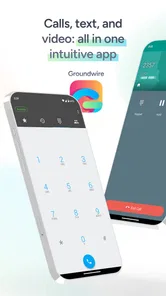
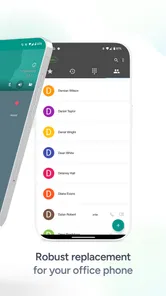
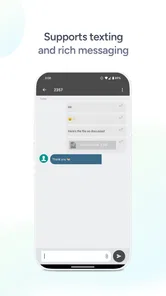
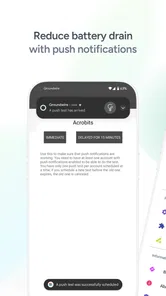
Analysis by Reviewed
I find Groundwire most useful when I already have a SIP-based calling service and want to use it from my phone, rather than replace all my calls with another messaging account. That distinction matters: this is a communication app built around VoIP, so the experience depends on having a service and account to connect. If you’re looking for a free, ready-to-use way to call friends who install the same app, a mainstream messaging app is probably the easier fit.
Where setup tends to get stuck
The first hurdle is usually not navigating the dialer but entering the account details correctly. Before setup, I’d keep the provider’s SIP credentials and server information handy, and check whether the provider has any specific configuration instructions. A mistyped username or server address can look like an app problem even when the issue is simply an account mismatch. I’d also confirm that the VoIP account itself is active before troubleshooting the phone.
Groundwire is made by Acrobits, s.r.o., and sits in the more specialized end of communication apps. It has a 3.5 average from around 646 ratings, while its 50K+ installs suggest a smaller audience than general-purpose calling and chat apps. That isn’t a reason to dismiss it: it tells me this is aimed at people who have a reason to use SIP, not everyone who wants to make an occasional internet call.
Checks that make the first call easier
When a call won’t connect, I’d work through the basics in order: recheck the account details, verify the internet connection, and try again after confirming the provider is available. If calls work on one network but not another, that is a useful clue to share with the VoIP provider rather than repeatedly changing settings at random. Keep notes on what you changed; it makes it easier to undo a setting if the problem gets worse.
For a practical test, call a contact when you have time to troubleshoot, not right before an appointment. Try both placing and receiving a call, then check whether your contacts appear as expected. A short test can reveal an account or caller-identification issue before you depend on the app for an important conversation.
Separating work calls from everyday calls
A useful reason to keep a SIP softphone on a personal device is that it can give a work or project number a place to ring without making it the number you use for everything. Picture finishing errands while waiting for a delivery call from a client: if that call comes through the SIP service, you can answer on the same phone you already have with you. The benefit is convenience, but the trade-off is that your reachability now depends on the account, connection and app working together.
I’d decide in advance how I want to handle that separation. If I use the same contacts for personal and work calls, checking names before answering can prevent a business conversation from catching me off guard. I’d also make sure callers know which number to use; a softphone does not automatically replace the phone number associated with a mobile carrier or messaging account.
More From Our News Desk

 Gmail
Gmail in a Busy Inbox: Who Benefits Most?
From first account to crowded workday, Gmail earns its place through dependable search and flexible sorting—but its best fit depends on how much inbox maintenance you can tolerate.

 Prime Video
Switching to Prime Video: What Changes in Your Viewing Routine
Prime Video can make a compelling second home for streaming, but switching means learning a different catalog, rental layer, and route from browsing to playback.

 Universal TV Remote Control
 Works Best as a Reliable Backup
A phone remote earns its place through quick setup and reliable habits. Here is how to get more from Universal TV Remote Control—and where its limits show.

 Weather - By Xiaomi
Weather by Xiaomi Review: Clear at a Glance, Less Clear Up Close
Xiaomi’s weather app makes everyday forecasts quick to scan, but its calm surface can leave useful details and recovery paths harder to find than they should be.

 X
X Under Pressure: Can It Recover When Posting Goes Wrong?
A resilience-focused review of X, examining setup, mistaken posts, interruptions, weak connections, and the gaps that matter when recovery needs to be dependable.

 Clash of Clans
 Is Won Between the Battles
Its raids are quick; its community is a long-term project of coordination, teaching, rivalry, and shared responsibility—with all the friction that entails.
Latest News



Choosing it over a messaging app or carrier dialer
The comparison is less about which app has the most familiar buttons and more about what kind of service you need. A carrier dialer is the straightforward option when you want calls through your mobile plan. A messaging app is usually easier for calling people who already use that service. Groundwire makes more sense when the number and calling arrangements you need are tied to a SIP provider, and you want to access that service from a mobile dialer.
That specialization is also the main reason I wouldn’t recommend it to everyone. If you don’t already have a SIP account, you’ll need to sort out the service as well as the app, which adds a step that ordinary phone calls and app-to-app chats avoid. If you do have a provider and need its calling setup on your phone, that extra configuration may be a reasonable trade for using the number and service you already rely on.
The Power of VoIP at Your Fingertips
For starters, Groundwire shines in providing seamless VoIP services that mimic the traditional phone call experience. Installing the app was a breeze, and setting it up was equally straightforward. I was able to connect my existing VoIP service in no time, thanks to its intuitive interface that guides you through each step.
Once set up, the app offers a plethora of features that make it stand out from other VoIP apps. Imagine being able to handle multiple calls at once, make conference calls, and even record conversations directly from your phone. This app is not just about making calls; it’s about making them better, more professional, and incredibly convenient.
Features That Impress
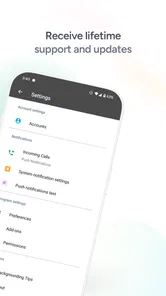
One of the features I found particularly useful is the push notification system, ensuring you never miss a call even when the app isn’t active. Another impressive feature is its ability to integrate with existing address books, which means no more fumbling around to find contacts.
And let’s not forget about the call quality. I was genuinely surprised by how clear and crisp the calls were, even when my internet connection was less than stellar. This is likely due to the app’s ability to optimize audio codecs, ensuring the best possible quality under varying conditions.
Making the calling workflow dependable
For a small business owner, freelancer, or anyone who handles calls through a SIP provider, keeping a separate VoIP calling setup can be handy. For example, if I’m away from my desk and a client calls the number associated with that service, having the account on my phone gives me another place to answer. It can also help keep work calls distinct from personal conversations, provided the provider gives you the number and service you need.
Groundwire’s multiple-call handling and conference calling are most valuable when they solve a real workflow problem, not simply because they are available. I’d learn the call controls during a low-pressure test: know how to manage a second call and how to start a conference before trying it in the middle of a busy conversation. Recording can be useful for reference, but I’d treat it carefully and make sure it is appropriate and permitted in the situation before using it.
When the app may not be the cause
VoIP depends on more than the app: your network and SIP provider both affect whether calls connect and how they sound. If audio becomes choppy, compare the experience on a steadier connection before concluding that the dialer is at fault. If incoming calls fail while outgoing calls work, or the reverse, report that exact pattern to your provider; it is more actionable than saying only that calling is broken.
Push notifications are helpful, but I wouldn’t treat them as a guarantee that every call will reach me under every phone or network condition. If missing an important call would be costly, test incoming calls in the circumstances where you plan to rely on the app, and keep an alternative contact method available. That small precaution is more useful than assuming any internet phone app behaves exactly like a carrier line.
Features That Impress
One of the features I found particularly useful is the push notification system, ensuring you never miss a call even when the app isn’t active. Another impressive feature is its ability to integrate with existing address books, which means no more fumbling around to find contacts.
And let’s not forget about the call quality. I was genuinely surprised by how clear and crisp the calls were, even when my internet connection was less than stellar. This is likely due to the app’s ability to optimize audio codecs, ensuring the best possible quality under varying conditions.
Simplicity Meets Professionalism
What I appreciate most about Groundwire is its balance between simplicity and functionality. While it packs all these advanced features, the app remains user-friendly. Whether you're tech-savvy or a newbie, you’ll find navigating through it a piece of cake. The interface is clean, with every function easily accessible, making it perfect for both personal and professional use.
Moreover, the app supports a wide range of VoIP providers, which means flexibility in choosing the service that best fits your needs. It’s like having a personal assistant that handles all your call-related tasks with finesse.
Who should pay for this kind of softphone?
The price is $9.49, with in-app purchases ranging from $0.99 to $24.99 per item, so I’d decide based on whether SIP calling is part of my regular routine. It is a more reasonable choice for someone already using a compatible VoIP service than for a casual caller who only needs occasional voice chats. In that latter case, a free messaging app or the phone’s standard dialer is simpler and avoids paying for a tool whose main purpose may go unused.
It is rated for Everyone, and the current version is 25.2.47; it first appeared on Apr 24, 2012, and requires OS 7.0 or later. Those details make it easier to judge basic compatibility, but I’d still check that my particular phone and provider work well together before making it my only calling route. Groundwire is best for people willing to manage a dedicated VoIP account; if you don’t want to handle provider credentials or troubleshoot network-dependent calls, a conventional phone plan or familiar chat app is a better match.
My practical verdict
Groundwire is a capable option when you want your existing SIP service in a mobile dialer, with tools that can suit both everyday calls and more involved conversations. The trade-off is that a polished interface cannot remove the dependency on account setup, provider reliability, and internet quality. I’d recommend it to someone who already knows why they need SIP and will use its call-management tools. For everyone else, the simplest choice is likely the calling app or phone service they already understand.
In conclusion, Groundwire: VoIP SIP Softphone is more than just a VoIP app; it’s a revolution in how we communicate digitally. Its robust features, ease of use, and excellent call quality make it a must-have for anyone looking to upgrade their communication game. Whether you’re a business professional needing reliable service or someone who just wants to stay connected with loved ones across the globe, this app has got you covered. So why not give it a try and experience the future of calling today?
Groundwire: VoIP SIP Softphone Frequently Asked Questions
Is Groundwire suitable for someone who has never used a SIP softphone before?
Groundwire is a communication app for making VoIP calls through SIP, so it is most useful when you already have, or are ready to set up, a SIP account. You will need to enter the account details from your SIP provider before you can place calls through that service. If you are looking for a conventional phone service that works without a SIP provider, this app may not fit your needs.
What is Groundwire: VoIP SIP Softphone and what are its main features?
Groundwire is a VoIP SIP softphone app designed for both Android and iOS platforms, enabling users to make voice calls over the internet using SIP (Session Initiation Protocol). Its main features include high-quality audio calls, video calling, messaging, call transfers, and integration with various SIP providers. The app supports multiple SIP accounts, push notifications, and advanced call handling features like call waiting, call forwarding, and voicemail.
How does Groundwire ensure call quality and reliability?
Groundwire ensures high call quality and reliability through its advanced audio codecs and network optimization features. It utilizes codecs like G.711, G.722, and Opus to provide crystal-clear audio quality. The app also features jitter buffering and echo cancellation to enhance call clarity. Additionally, its robust network handling capabilities minimize disruptions, ensuring reliable connectivity even on less stable networks.
Is Groundwire compatible with my existing SIP provider?
Yes, Groundwire is designed to be compatible with most SIP providers worldwide. Users can easily configure their SIP accounts within the app by entering the necessary credentials provided by their SIP service provider. This flexibility allows users to seamlessly integrate Groundwire with their existing VoIP setup, making it a versatile choice for both personal and professional use.
Does Groundwire support video calling and messaging features?
Groundwire supports both video calling and messaging features, making it a comprehensive communication tool. Users can initiate high-quality video calls directly from the app, and the messaging feature allows for text-based communication alongside voice and video calls. This multi-modal communication capability ensures that users have all the tools they need for effective and versatile interaction.
Pros
- High-quality voice calls
- Supports multiple accounts
- Easy to configure settings
- Secure encryption protocols
- Compatible with various devices
Cons
- Requires stable internet
- Complex UI for beginners
- Limited free features
- Occasional call drops
- Consumes battery quickly