

Graffiti Name Logo Maker
- 772.00
- 4.8
- Installs
- 1.00M
- Price
- Free
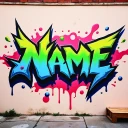
Screenshots
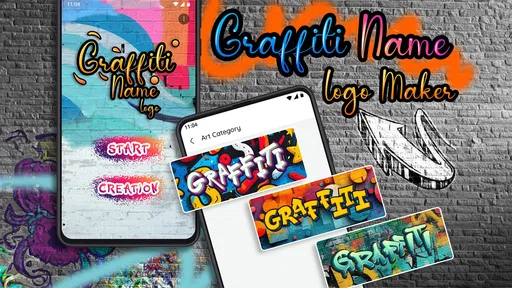
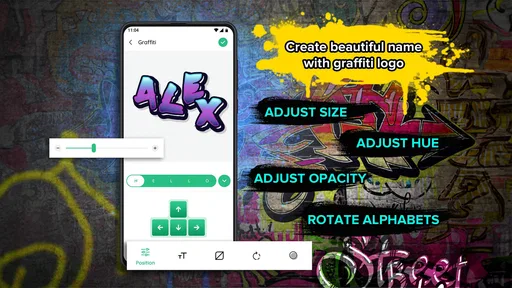
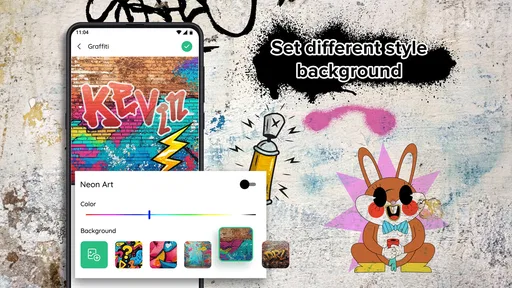
Analysis by Reviewed
I like that Graffiti Name Logo Maker starts with a simple, personal idea: turning a name or short phrase into graffiti-style lettering. That focus makes it approachable when I want a quick visual identity rather than a full graphic-design project. It is a free photography app from GeniusTools Labs, rated for Everyone, and its appeal is easy to understand: the text itself becomes the artwork, with color, lettering and background choices doing the expressive work.
A name becomes the main design element
The useful effect of this narrow focus is that I can begin with something familiar instead of building a composition from scratch. A nickname, a gaming handle or a short label can all serve as the starting point. The app has a 4.8 average from around 22,000 ratings, but the practical draw for me is simpler: it gives casual creators a way to explore a graffiti look without needing to know illustration software.
That makes it best for playful, personal graphics rather than polished brand work. If I needed a complete logo system with carefully controlled typography, precise spacing and consistent versions for different uses, I would reach for a more flexible design tool. Here, the fun is in trying a style and seeing how a few visual choices change the personality of the same text.
Making the lettering work for you
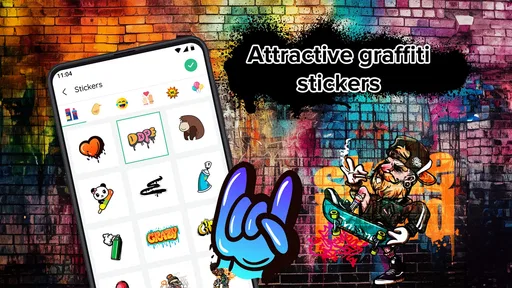
Have you ever found yourself doodling your name in quirky styles on a piece of paper during a boring meeting or class? Well, say hello to the Graffiti Name Logo Maker, an app that brings your doodling dreams to life with just a few taps on your smartphone. This app is a delight for those who love to experiment with fonts and colors, transforming ordinary names into vibrant graffiti art.
Easy Peasy Design Process
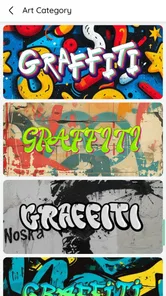
What I absolutely love about this app is its user-friendly interface. You start by entering your name or any text you fancy. Then, the magic begins! With a vast array of font styles and color options at your fingertips, you can customize your design to your heart’s content. Whether you prefer bold, edgy designs or something more subtle, there’s something for everyone.
When I am making a design for a profile image, I would keep the wording short and check that it stays readable at a small size. Busy lettering and strong colors can look exciting full-screen yet become hard to distinguish when cropped into a small circle. For a group chat or a casual gift, I would test the same name against a few different color and background combinations before settling on one; that quick comparison is more useful than adding decoration just because it is available.
A practical way to explore the lettering is to decide what the text needs to do before choosing a look. A short handle meant to be recognized at a glance can tolerate a louder style than a longer phrase that someone must read. I would start with the exact wording, then compare a few font treatments without changing the text each time. Keeping one variable steady makes it easier to tell whether the lettering or the color is actually improving the design.
More From Our News Desk

 Gmail
GmailGmail in a Busy Inbox: Who Benefits Most?
From first account to crowded workday, Gmail earns its place through dependable search and flexible sorting—but its best fit depends on how much inbox maintenance you can tolerate.

 Prime Video
Switching to Prime Video: What Changes in Your Viewing Routine
Prime Video can make a compelling second home for streaming, but switching means learning a different catalog, rental layer, and route from browsing to playback.

 Universal TV Remote Control
Universal TV Remote Control Works Best as a Reliable Backup
A phone remote earns its place through quick setup and reliable habits. Here is how to get more from Universal TV Remote Control—and where its limits show.

 Weather - By Xiaomi
Weather by Xiaomi Review: Clear at a Glance, Less Clear Up Close
Xiaomi’s weather app makes everyday forecasts quick to scan, but its calm surface can leave useful details and recovery paths harder to find than they should be.

 X
XX Under Pressure: Can It Recover When Posting Goes Wrong?
A resilience-focused review of X, examining setup, mistaken posts, interruptions, weak connections, and the gaps that matter when recovery needs to be dependable.

 Clash of Clans
Clash of Clans Is Won Between the Battles
Its raids are quick; its community is a long-term project of coordination, teaching, rivalry, and shared responsibility—with all the friction that entails.
Latest News



There is also a useful distinction between making something expressive and making it legible. Graffiti-inspired letterforms can overlap or feel deliberately irregular, which is part of their character, but that can make unfamiliar names difficult to decipher. If the image is for a friend who already knows the nickname, a more abstract treatment may be fine. If it is meant to help people identify a gaming profile or group, I would favor a clearer style and avoid letting effects compete with the letters.
Another cool feature is the background customization. You can choose from various textures and colors to make your graffiti logo pop. Plus, the ability to add shadows and 3D effects gives your creation that extra zing. It’s like having your own little art studio in your pocket!
Where this quick workflow fits
A realistic use for me would be making a playful name graphic before a weekend gaming session: enter a handle, try a more energetic color treatment, then save an option that feels distinct enough for a profile or message. It also suits a quick birthday graphic for a friend who likes street-art lettering. I would treat the result as a personal image, though, not assume it is automatically ready for professional printing; check how it looks at the intended size before using it on anything physical.
For that gaming example, I would make the design with its final crop in mind rather than judging it only on the full editing screen. A square profile image has different needs from a wide banner or a picture dropped into a chat. I would leave breathing room around the name, because cropping tightly can cut off decorative edges or make a bold letterform feel cramped. This small check can save a promising design from looking awkward once it is used somewhere else.
The same approach works for a casual gift. I might create a friend’s nickname for a birthday message, then choose the version that feels most like their personality rather than the one with the most effects. If they prefer understated things, a restrained color choice can make graffiti lettering feel personal without turning the image into visual noise. For a more playful recipient, stronger contrast may fit better. The point is to use the customization to make the name feel specific to the person.
Compared with a general photo editor, this app puts the name-led graffiti idea front and center, so I can get to a themed result without assembling every effect myself. A full design suite is a better choice when I need exact layout control, multiple logo variations or a consistent visual identity. The trade-off is that a focused tool can feel limiting if I arrive with a very specific composition in mind. For experimentation and one-off designs, that simplicity is a strength; for precision work, it is a reason to choose something else.
It also occupies a different middle ground from drawing the letters by hand. Sketching gives me the greatest freedom over each stroke, but it takes more time and practice, especially if I want to repeat the same design cleanly. A general editor offers room to combine text with other elements, although I may need to build the graffiti treatment myself. This app is the convenient option when the name is the main subject and I want a themed result without turning a quick idea into a larger project.
That convenience does not mean every result will feel original or perfectly tailored. A ready-made lettering approach is naturally less personal than drawing each character or commissioning a custom mark. I would think of it as a way to make an expressive personal graphic, not as a substitute for an illustrator when the design has to be distinctive, reproducible and carefully art-directed. The right choice depends on whether speed and playful variation matter more than full control.
Sharing the Masterpiece
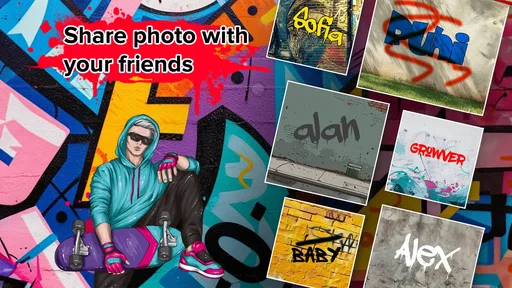
After creating an eye-catching graffiti logo, the next step is sharing it with the world. The app makes this super simple. With just a few taps, you can save your design or share it directly on social media platforms. It’s a fantastic way to show off your creative prowess and maybe even get a few likes and comments from friends.
For someone making a graphic to share immediately, the straightforward route from text design to a saved or shared image is the main convenience. I would still preview the finished version in the place where it will appear. A bright design can stand out in a message but may feel too busy in a profile circle; a detailed background that looks appealing on a large screen can also make the name less distinct in a small preview. Matching the format to the destination matters as much as choosing the style.
For those who love to personalize their devices, the designs can be used as wallpapers or even printed on merchandise like t-shirts and mugs. Imagine sipping your morning coffee from a mug adorned with your own graffiti art!
I would be a little more cautious with physical uses than with social sharing. A phone image can look crisp at its display size while the intended print may call for a different shape, scale or level of detail. Before using a design on an item, I would check the image at the size and crop I have in mind and make sure the name remains readable against the background. If the project needs exact print preparation or a file built for a specific production process, a dedicated design workflow is the safer option.
One helpful habit is to save more than one candidate before deciding. I might keep a high-energy version for a post and a quieter one for a small icon, rather than trying to force one treatment to work everywhere. This is especially useful when effects and textures are part of the appeal: they can add depth at a larger size but compete with the lettering when the image shrinks. Comparing actual-use previews is a better test than choosing only by which design looks most dramatic on the editing screen.
The app can suit a small creative task during an ordinary day, too. Suppose I want to make a quick image for a group chat before meeting friends: I can use a shared nickname, try lettering that feels lively, and send a saved design instead of searching for a stock image or explaining the joke in text. That is a modest use, but it captures the app’s strength. It gives a name or short phrase a visual personality with little setup, and the result can feel more personal than a generic picture.
Worth a try, with the right expectations
The app is free to start, with in-app purchases ranging from $0.99 to $99.99 per item, so I would check the purchase screen before committing to anything beyond basic experimentation. It has reached over one million installs, and version 7.0.2 runs on Android 5.0 or later. I would recommend it to people who want a quick, personal graffiti-style name graphic and enjoy testing visual variations. If you mainly need precise professional branding, or prefer drawing every letter yourself, a dedicated design app or your own sketching workflow will suit you better.
The purchase range is broad enough that I would make my first session about exploring the basic workflow, not about assuming every option is included at no cost. I would try a short name, see what styles feel usable, and only then decide whether I want to spend on anything. That is a sensible way to judge a creative app: first find out whether its central treatment suits your taste, then consider whether extra spending would solve a real need rather than simply add another choice.
Who is most likely to enjoy it? I would put casual creators, people who like personalized profile images, and anyone making a one-off graphic for a friend near the top of the list. It is also a reasonable starting point for someone curious about graffiti-style lettering but not ready to learn a full illustration or design program. The app’s focus keeps the task approachable: the text is already chosen, and the creative question becomes how to present it.
Who should probably skip it? I would look elsewhere if I needed a logo that must work across packaging, signage and different digital layouts, or if I needed exact control of spacing and typography. I would also choose another tool if the goal were to draw custom letterforms from scratch or combine text with a detailed, layered composition. The focused workflow is helpful only when its built-in approach is close to what I want; it is not a replacement for a more flexible editor in a demanding project.
For a first attempt, I would use a short word with a clear purpose, such as a nickname or handle, and test contrast before adding shadows or a textured backdrop. Then I would check the result in the smallest place it needs to appear. If the lettering still reads there, I would keep that version; if it loses clarity, I would simplify the treatment or choose a more open style. This is a simple, repeatable workflow that helps avoid mistaking visual complexity for a better design.
The age rating of Everyone makes the app approachable for a broad audience, and its photography category reflects the image-making task it serves. Still, I would guide younger users toward treating the result as personal creative play rather than assuming a graphic is ready for commercial use. For a family activity, making a nickname image together can be a fun prompt for discussing color and readability. For a business identity, the same easy process may be too limited to meet professional requirements.
My overall recommendation is conditional but positive: try it when the goal is a quick, expressive name graphic, and keep expectations modest when precision matters. The best results are likely to come from choosing wording that is short enough to read, matching the visual energy to its destination, and resisting the temptation to add every effect. Those choices make the app’s focused nature work in your favor instead of exposing its limits.
In a nutshell, the Graffiti Name Logo Maker is a fun and engaging app that allows users to express themselves creatively. It’s perfect for anyone looking to add a splash of personality to their digital presence or simply have fun experimenting with art. So why not give it a whirl? You might just discover a hidden talent for graffiti art that you never knew you had. Happy designing!
Graffiti Name Logo Maker Frequently Asked Questions
Can I create a graffiti design for a particular name or project?
The app is presented as a way to create a graffiti-style name, making it relevant if you want a personalized design rather than a general photo-editing tool. You can consider whether that focused purpose fits your idea, such as making a name design for a personal project or social profile. The published description also frames the result as a cool graffiti-style name.
How much storage space does Graffiti Name Logo Maker need?
Before downloading, it is sensible to check the available storage on your Android device, especially if you keep many photos and creative projects on it. Graffiti Name Logo Maker is a Photography app for making graffiti-style name designs, so you may also want room to save the artwork you create. The app’s current version is 7.0.2, but installation size can vary by device.
Who developed Graffiti Name Logo Maker, and when was it released?
Graffiti Name Logo Maker is developed by GeniusTools Labs and was released on March 24, 2021. Knowing the developer and release date can help you identify the app when browsing similar name-design tools. It is a Photography app focused on creating graffiti-style names, so its purpose is relatively specific. The current version is 7.0.2, which is useful to keep in mind when checking compatibility.
What devices can run Graffiti Name Logo Maker?
Graffiti Name Logo Maker is an Android app that requires Android 5.0 or later. Before downloading, check your device’s operating system version to make sure it meets that requirement. The app is listed in the Photography category and is intended for creating graffiti-style name designs, so it may suit users who want a focused creative tool on a compatible phone or tablet.
What is Graffiti Name Logo Maker?
Graffiti Name Logo Maker is a creative application that allows users to design personalized graffiti-style logos. Whether you're looking to create a unique logo for your brand, social media, or personal projects, this app provides a range of tools and features to craft eye-catching designs with ease. It is developed by GeniusTools Labs, and its store summary describes it as a way to create a cool graffiti-style name.
Pros
- Easy to use interface for beginners.
- Variety of fonts and styles available.
- Quickly generate unique graffiti art.
- No graphic design skills needed.
- Offline functionality available.
Cons
- Limited color palette options.
- Occasional app crashes reported.
- Ads can interrupt creative process.
- Not optimized for tablets.
- Limited free features available.











