GO Raid Party - Worldwide Raid
- 1.40K
- 4.8
- Installs
- 500.00K
- Price
- Free

Screenshots
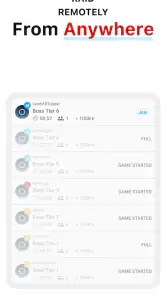
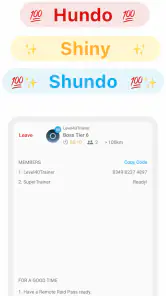
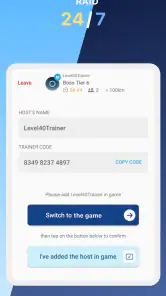
Analysis by Reviewed
I installed GO Raid Party to see whether it could make arranging a Pokémon GO raid feel less chaotic. My starting point was familiar: I wanted to join a remote raid, but I did not want to spend several minutes searching through scattered messages, guessing whether a group was still active, or arriving too late. This free tools app from Tiny Whale Pte. Ltd. is built around that exact problem. It is not a replacement for Pokémon GO itself; it is a companion for finding and organizing raid participation.
That distinction matters. The app’s store summary promises that a first raid can be completed in under ten minutes, but the real value is not simply speed. It is the handoff between a player who has a raid available and other players who want to join. In my experience, that makes the app most useful when demand is high, timing matters, and a normal friends list is not enough to assemble a group quickly.
From wanting a raid to joining one
The starting condition: a raid without a reliable group
The usual alternative is to ask friends directly, wait for replies, and coordinate invitations one person at a time. That works well for a regular local group, but it becomes awkward when everyone plays at different times or lives in different places. Public chat channels can solve the reach problem, yet they often create another one: messages move quickly, and it is easy to lose track of which raid is still accepting players.
GO Raid Party approaches the situation as a focused raid-matching tool. I found the interface easier to understand when I treated it as a short workflow rather than as a general social network. The goal is simple: identify a raid opportunity, join the appropriate party, follow the invitation process, and return to the game at the right moment.
The app is rated for Everyone, which fits its straightforward presentation. It does not feel designed only for experienced raiders, although new users still need to understand the basic Pokémon GO raid process. If you already know how remote invitations work, the learning curve is much lighter. If you are completely new to raids, the app can help with the group-finding part but will not replace learning the game’s own raid mechanics.
Step one: choosing the right opportunity
The first useful habit is to decide what you actually need before browsing. Are you hosting a raid that needs more players, or are you looking for an open party to join? Those are different situations, and moving through the app with that distinction in mind prevents wasted taps. I also recommend checking the raid details carefully before committing, especially if you are using limited remote passes or planning around a short break.
This is one of the less obvious trade-offs: a large pool of players improves the chance of finding a group, but it can also make timing more competitive. An attractive raid may fill quickly, while a less popular one may require more patience. I would not treat every visible opportunity as equally convenient. The best choice is the one whose timing matches your availability and whose party appears active enough to complete the handoff.
For an everyday example, imagine having ten minutes before leaving for work. Opening the app and looking for a suitable party is more practical than starting a long conversation with several friends. However, I would avoid browsing casually until the last second. If the raid requires several transitions between the companion app and Pokémon GO, a small delay can matter.
Step two: joining and preparing
Once I found a promising party, the next stage was preparation. The important thing is to remain attentive after joining rather than assuming that the process is finished. A raid group is a live event, so the useful question is not merely “Did I enter the party?” but “Am I ready for the invitation and the game launch?”
That is where the app’s focused design helps. It keeps the raid objective in view instead of surrounding it with unrelated content. I could concentrate on the sequence: select the opportunity, join the group, watch for the next handoff, and open Pokémon GO when needed. The app is strongest when used as a coordination layer, not as a place to linger.
A practical tip is to prepare the Pokémon GO side before joining whenever possible. Make sure the game is available, your account is ready, and you know where the raid invitation will appear. This is not a special feature of the companion app, but it is an important workflow improvement. Many failed attempts are caused by switching too slowly or discovering that the player is not ready after the group has formed.
Step three: the handoff between players
The central handoff is between the person offering the raid and the people waiting to participate. The host needs to move quickly enough to invite the group, while participants need to respond without treating the app as a passive waiting room. This shared timing is the part that ordinary friend-based coordination often handles poorly.
I found it helpful to think of the party as a queue with a deadline. Joining does not guarantee a smooth outcome if the host is delayed, the group changes, or someone misses the invitation. The app can organize the meeting point, but it cannot remove every human variable. That is why I would keep notifications visible and avoid starting the process while multitasking heavily.
There is another handoff that is easy to overlook: moving from the companion app into Pokémon GO. Every switch introduces a chance to miss context. I recommend reading the party information first, then switching only when you are ready to act. Returning repeatedly to check small details is slower and can make the experience feel more complicated than it needs to be.
Step four: completing the raid
The actual battle takes place in Pokémon GO, so GO Raid Party’s contribution ends where the game begins. That separation is sensible. The companion app does not try to imitate the battle screen or compete with the main game. Its job is to get the right players into the same opportunity with less manual coordination.
For a first attempt, I would choose a situation where you have enough time to recover from a missed invitation or an unsuccessful match. The advertised quick start is realistic as a best-case workflow, but real-world speed depends on the party, the host, your connection, and how quickly you move between apps. Treating the time claim as a guarantee would create unnecessary frustration.
When the handoff works, the result is satisfying because the app removes the most tedious part of remote raiding: finding people at the same moment. I did not need to build a permanent social group before trying to participate. That makes it especially appealing to players who are active but do not have a dependable local community.
What happens after the result?
After a successful raid, the app’s role feels deliberately limited. You can use the same general workflow again when another raid becomes relevant, but I would not expect it to become the center of your Pokémon GO routine. It is a utility for a specific recurring problem, and that is a strength rather than a weakness.
The clearest benefit appears in repeated short sessions. Someone who plays during commuting breaks, lunch, or irregular evening hours may not have enough overlap with friends to arrange raids naturally. A public matching workflow gives that player more chances to participate without requiring a large personal network.
It is also useful for players who host raids occasionally and need extra participants. Instead of sending individual invitations and hoping enough people answer, the host can use a broader pool. The trade-off is that public coordination requires more attention than raiding with people you already know. Familiar friends usually communicate more smoothly, while a public group offers reach at the cost of predictability.
Where the flow breaks
The biggest limitation is that the app cannot control the reliability of other participants. A player may join and then disappear, a host may be slow, or a party may not develop as expected. That is not a defect unique to this app, but it affects how much confidence you should place in a time-sensitive raid. If missing the raid would waste a scarce resource, a trusted friend group remains the safer option.
The second friction point is app switching. The workflow depends on moving between GO Raid Party and Pokémon GO, and that can feel abrupt on a smaller screen or older device. The minimum operating system is Android 7.1, so compatibility is reasonably broad, but supported software alone does not guarantee a smooth experience on every handset. I would keep other demanding apps closed if your phone tends to reload applications in the background.
Another limitation is that public matching may not suit players who prefer complete control. If you want to choose every teammate, coordinate a precise strategy, or communicate with people you already trust, direct invitations are often better. GO Raid Party is designed for access and speed, not for replacing a close-knit raid community.
The free entry point is welcome, especially for someone who wants to test the workflow before committing. There are in-app purchases priced at $14.99 per item, so I would examine the purchase screen carefully and decide whether the free experience already covers your needs. I would not pay simply because the app is convenient once or twice; the value depends on how often you actually use public raid coordination.
How it compares with the usual alternatives
Compared with asking friends, this app is faster when your friends are unavailable but less personal when they are. Compared with informal group chats, it is more focused because raid participation is the central task, though a chat may provide richer conversation and more context. Compared with trying to organize everything inside Pokémon GO, it can widen your access to players beyond your existing contacts.
That comparison also clarifies who should skip it. If you already have an active local group, the extra step may not improve your routine. If you rarely raid, the setup may feel unnecessary. And if your connection or device struggles with frequent app switching, a simpler friend-based arrangement could be less stressful.
On the other hand, I would recommend trying it if you repeatedly see raids you cannot join because nobody in your contact list is online. The app addresses that exact gap. It is particularly well matched to solo players, irregular players, and people who want to turn a short available window into a realistic raid attempt.
Everyday advice for a smoother first session
- Prepare before joining: have Pokémon GO ready and know what action you need to take after the invitation arrives.
- Choose timing over popularity: the busiest-looking raid is not always the best choice if you have only a few minutes.
- Stay available during the handoff: joining the party is only one stage; watch for the transition into the game.
- Use trusted friends for high-stakes attempts: public matching is convenient, but it cannot guarantee that every participant will respond.
- Test the free workflow first: decide whether your actual raid frequency justifies any optional purchase.
My verdict after following the full workflow
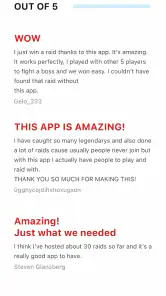
GO Raid Party succeeds because it focuses on a narrow but common Pokémon GO problem: turning an available raid into a group quickly. Tiny Whale Pte. Ltd. has kept the idea accessible, and the app’s 4.8 average from around 28 thousand ratings suggests that many users find this focused purpose valuable. It has also passed half a million installs, which fits the impression of an established companion tool rather than an obscure experiment.
The current version is 1.8.37, and the app has been available since September 15, 2020. Those details matter less than the workflow itself, but they reinforce that this is a mature utility with a specific job. It is free to start, suitable for Everyone, and available to users on Android 7.1 or later, while optional purchases cost $14.99 per item.
My honest recommendation is conditional: try it if your main obstacle is finding raid partners at the right moment. Do not expect it to fix poor timing, unreliable participants, or a weak connection, and do not use it as a substitute for a trusted group when the raid is especially important. Used with realistic expectations, it can turn a frustrating search into a manageable sequence from discovery to invitation to battle.
For me, the best way to use it is as a quick launchpad. Open it with a clear goal, choose a suitable party, stay alert through the handoff, and move into Pokémon GO without unnecessary delays. That approach keeps the useful part—the access to a wider pool of raiders—while limiting the friction that comes from treating a coordination tool like a full social platform.
Pros
- Helps coordinate local and global raids with other Pokémon GO players.
- Worldwide listings make it easier to find raids across different time zones.
- Useful for planning teams before joining a difficult raid battle.
- Simple interface makes browsing available raid parties quick and convenient.
- Can help solo players connect with active communities and find teammates.
Cons
- Raid availability depends heavily on active users in your area.
- Some features may require in-app purchases or premium access.
- Notifications can become frequent when many raids are listed.
- Remote raid participation may still depend on Pokémon GO restrictions.
- User-submitted listings may occasionally be outdated or inaccurate.

- Category
- Tools
- Version
- 1.8.37











