Giti VPN
- 667.00
- 4.5
- Installs
- 1.00M
- Price
- Free

Screenshots



Analysis by Reviewed
I treat a VPN as a tool for particular moments, not a magic shield for everything I do online. That makes Giti VPN most useful when I want a simple way to add a VPN connection to an everyday routine without spending time learning networking jargon. It is a free tools app from SASAAPPS, and its straightforward approach is appealing if your priority is getting connected with minimal fuss.
A practical starting routine
My baseline workflow with a VPN is deliberately simple: open the app, connect before using a network I trust less, and disconnect when I no longer need the VPN. That habit is more useful than leaving an unfamiliar app running without thinking about when it is active. For a quick coffee-shop stop, for example, I would connect before opening an account or checking a private message, then avoid treating the connection as permission to ignore normal security habits.
The app is designed to be approachable rather than a technical control panel. That suits someone who wants a quick connection and does not want to choose among lots of networking options. I would still take a moment to confirm that the connection is active before relying on it. A VPN only helps with traffic routed through it while connected; it does not make a weak password safer, prevent every kind of tracking, or guarantee that a site itself is trustworthy.
Giti VPN is available at no charge, has an Everyone age rating, and requires Android 6.0 or later. Its current version is 99.0. Those details make it accessible to many Android users, but the right choice still depends on what you expect from a VPN. If you need detailed controls, a carefully documented privacy policy, or a particular server location, check those needs before making it part of a sensitive workflow.
Secure and Speedy Connection
It's no secret that internet security is a big deal these days. With Giti VPN, you get a secure connection that protects your data from prying eyes. Whether you're using public Wi-Fi or your home network, this app ensures your information stays yours. Plus, it doesn’t just stop at security—it delivers a speedy connection too. Gone are the days of slow VPNs that make you want to pull your hair out!
What to check before relying on it
I would be careful with any absolute promise about privacy or speed. A VPN changes the route your internet traffic takes, but the experience can vary with the network, the destination, and the VPN server. If a page loads slowly after connecting, I would first compare it with my normal connection and try again on a different network before deciding the app itself is the problem.
There is also a useful distinction between privacy on a shared connection and anonymity online. A VPN can help protect traffic from people observing the local network, but it does not erase account activity or stop a service from identifying you after you sign in. I would keep using unique passwords, two-factor authentication where available, and sensible caution around links even when the VPN is on.
More From Our News Desk

Weather by Xiaomi Review: Clear at a Glance, Less Clear Up Close

X Under Pressure: Can It Recover When Posting Goes Wrong?

Clash of Clans Is Won Between the Battles

Android Auto Makes the Case for Quieter Car Software

MobiOffice: Transforming Mobile Productivity with Seamless Integration

EA SPORTS FC™ Mobile Soccer: Redefining Mobile Sports Gaming
User-Friendly Interface
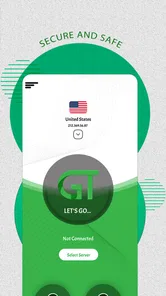
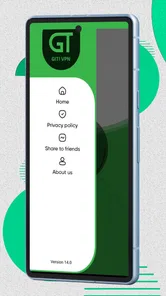
I know what you're thinking: "Do I need to be a tech wizard to use this?" Absolutely not! The app is super easy to navigate. From installation to connection, everything is a breeze. You can literally get started with just a few taps. Trust me, even if tech isn’t your thing, you’ll find this app as simple as pie.
That simplicity is a genuine advantage for a first-time VPN user, but it also means I would not assume there are advanced settings hiding behind the clean interface. Before using it for an important task, I would learn the basic connect and disconnect flow and check how the app behaves when the phone changes networks. That small rehearsal is less stressful than figuring it out while rushing to join a call or reach a work service.
Repeatable habits beat constant fiddling
For a smoother day-to-day routine, I would decide in advance which situations call for a VPN instead of toggling it on and off at random. A quick stop on public Wi-Fi is an obvious case; a trusted home connection may not need the same routine. Keeping the decision simple makes it easier to notice when the VPN is actually active and avoids the common mistake of assuming an app is connected just because it was opened earlier.
Another practical habit is to test the services you use most while connected, before you depend on them. Banking apps, video calls, and work sign-ins can react differently to VPN traffic. If one behaves unexpectedly, disconnect briefly to compare, then reconnect when appropriate. That check helps distinguish a temporary service issue from a connection problem without turning every hiccup into a long troubleshooting session.
Access to Global Content
One of the coolest features of Giti VPN is the access it provides to global content. Ever wanted to watch a show that’s only available in another country? Or access a website that’s blocked in your region? With this app, those digital borders become a thing of the past. You can switch between servers in different countries and enjoy unrestricted access to the internet.
For location-dependent services, I would keep expectations measured. A VPN may change the apparent network location, but streaming platforms and other services can use their own rules to decide what is available. A country switch can also make a familiar account request extra verification or show different language and currency settings. I would use this kind of access for legitimate browsing and check the service’s terms rather than assume every regional restriction will disappear.
Where it fits among VPN choices
Compared with a browser’s private-browsing mode, a VPN is aimed at network traffic rather than simply keeping local browsing history out of the browser’s usual record. Compared with a VPN built into a workplace or school setup, a general-purpose app is not automatically a route to internal files or managed resources. And compared with services that foreground extensive configuration, a simple app is easier to approach but may not suit someone who wants granular control over protocols, routing, or server selection.
That trade-off is the central decision here. If you want a straightforward way to try a VPN for ordinary browsing, the clean design is a sensible draw. If your work depends on a specific endpoint, you need detailed connection controls, or you are choosing a provider primarily for a thoroughly documented privacy model, I would compare alternatives on those exact requirements instead of choosing on simplicity alone.
Everyday use without surprises
Imagine arriving at a library with a few minutes before a video appointment. I would open the app before joining, connect, and then check whether the meeting service still works smoothly. If audio starts breaking up, I would not keep toggling settings blindly: I would compare the connection without the VPN, decide whether the call or the extra network protection matters more in that moment, and reconnect afterward if useful. That is a practical trade-off, not a failure of the app.
For someone who moves between home Wi-Fi, mobile data, and public hotspots, it is worth paying attention to those transitions. A connection that was active on one network should not be treated as proof that it remains active after switching. I would make checking the app’s connection state part of the same routine as checking the Wi-Fi icon, especially before sending information I would rather not expose on a shared network.
Limits that matter to experienced users
A VPN is one layer in a broader privacy routine, and I would not use it as a substitute for keeping the phone updated or reviewing app access. It also cannot make a compromised device safe or prevent a website from collecting information you provide directly. For sensitive work, I would follow the organization’s own VPN and device rules; a personal VPN is not a replacement for an approved corporate connection.
Speed is another practical limit. Encryption and an indirect route can affect responsiveness, and a distant or busy server may feel slower than a direct connection. Since a VPN’s usefulness depends on the task, I would not leave it on automatically for every activity if a particular service becomes unreliable. The better choice is to connect when the benefit matters and accept a direct route when performance or compatibility is more important.
There is also a trust decision behind every VPN: the app becomes part of the path your traffic takes. I would be comfortable trying a simple tool for routine browsing, but I would read the provider’s privacy information before sending especially sensitive material through it. That is not a knock unique to this app; it is a basic standard I apply to any VPN, particularly one I plan to use regularly.
Support, reputation, and who should choose it
The app has an average rating of 4.5 from around 23,000 ratings, with roughly 667 written reviews, and it has passed one million installs. I see that as a sign that many people have tried it, not as proof that every connection will suit every network or that it meets a particular professional requirement. Ratings can help with a first impression, but my own decision would still depend on whether the app works reliably for the places and services I use.
It is a reasonable fit for Android users who want a free, uncomplicated VPN to try for everyday browsing and occasional use on shared networks. I would be less likely to recommend it to someone who needs a guaranteed server location, detailed technical configuration, or a documented setup for business access. Those users are better served by choosing a provider or managed service that explicitly meets those needs, even if it takes more effort to configure.
Support and sensible troubleshooting
Let's face it, nothing is perfect and sometimes things can go wrong. This is where Giti VPN’s 24/7 customer support comes in handy. Whether you have a question or need help troubleshooting, their support team is always ready to assist. It’s like having a tech-savvy friend on speed dial!
Before asking for help, I would note the simple details that make a connection issue easier to describe: whether it happens on Wi-Fi or mobile data, whether it affects one service or everything, and whether reconnecting changes the result. I would avoid sending passwords or private account details in a support request. A clear description of the problem is usually more useful than a vague report that the VPN is not working.
Giti VPN is a straightforward option for someone who values a low-friction start more than a large set of controls. I would use it with realistic expectations: connect deliberately, check the status when networks change, and remember that a VPN is only one part of staying safer online. If that balance matches what you need, it is worth trying; if your priority is specialized controls or a specific privacy guarantee, I would look for a service that clearly documents those features before switching.
Customer support and the final trade-off
Let's face it, nothing is perfect and sometimes things can go wrong. This is where Giti VPN’s 24/7 customer support comes in handy. Whether you have a question or need help troubleshooting, their support team is always ready to assist. It’s like having a tech-savvy friend on speed dial!
In conclusion, Giti VPN is more than just a VPN app; it's your gateway to a safer and more open internet experience. Whether you're concerned about online privacy, want to bypass geo-restrictions, or simply need a reliable virtual private network, this app has got you covered. So why not give it a whirl and see for yourself? Your online privacy will thank you!
Giti VPN Frequently Asked Questions
Does Giti VPN work on older Android phones?
Giti VPN supports Android 6.0 and later, so it can be an option for devices running that version or a newer one. Before downloading, check your phone’s Android version in its settings and make sure you have enough available storage for installation. The app is rated for Everyone, and its simple design is intended to make getting started approachable.
Is Giti VPN free to download, and what should I check before installing it?
Giti VPN is free to download, and its listed age rating is Everyone. Before installing, confirm that your device meets the Android version requirement and that you are comfortable using a VPN app for your browsing needs. It is also sensible to review the app’s permissions during installation and consider whether its features suit the way you plan to use a VPN.
Is Giti VPN suitable for beginners, and what is the app like to use?
Giti VPN is a Tools app with a simple, clean design, which makes its basic purpose easy to understand for someone new to VPNs. Its store summary describes it as fast and secure, so it is aimed at people who want a straightforward VPN option rather than a complicated interface. The app is rated for Everyone, making it broadly accessible.
What is Giti VPN and how does it work?
Giti VPN is a virtual private network application designed to provide users with secure and private internet browsing. It works by encrypting your internet connection, masking your IP address, and routing your data through remote servers. This process helps protect your online identity and data from hackers and third-party trackers, ensuring a safer browsing experience.
Is Giti VPN free to use, and are there any limitations?
Giti VPN is free to download and use. The free version provides basic VPN functionalities with limited server options and speed. For users who require more features, like access to additional servers, faster connection speeds, and priority customer support, the premium version is available through a subscription.
Pros
- Fast connection speeds for streaming.
- User-friendly interface for easy navigation.
- Multiple server locations worldwide.
- Strong encryption for enhanced security.
- No-log policy ensures privacy.
Cons
- Limited free version features.
- Occasional connection drops.
- No customer support chat option.
- Ads in the free version.
- Not available in all countries.