GEM VPN
- 357.00
- 4.7
- Installs
- 500.00K
- Price
- Free

Screenshots

Analysis by Reviewed
I judge a VPN less by a promise of unlimited access than by whether it fits the way I actually use my phone: quick protection on public Wi-Fi, a manageable connection routine, and enough clarity to know when it is worth switching on. GEM VPN is an Android tools app from Golden VPN proxy apps, and its simple, tap-to-connect approach makes it appealing if you do not want to spend time learning VPN settings. My main advice is to treat it as a convenient everyday tool, not as a substitute for checking whether a VPN meets a particular privacy or work requirement.
Decide what you need from a VPN
Before installing any VPN, I would separate three goals that are often bundled together: protecting traffic on an unfamiliar network, changing the apparent region of a connection, and maintaining reliable access to a work or personal service. Those needs are not interchangeable. A straightforward app can be handy for casual browsing, while someone handling sensitive business information may need a provider and setup that their organization has specifically approved.
That distinction matters with GEM VPN. The app is free, has an Everyone age rating, and is currently at version 3.0.2, with Android 6.0 as its minimum operating system. Its 4.7 average from around 18,000 ratings and more than 500,000 installs suggest that many Android users have tried it, but popularity alone cannot tell you whether a VPN is suitable for your personal threat model. I would still avoid sending highly sensitive information through any VPN unless I had checked its privacy terms and felt comfortable with them.
First Impressions
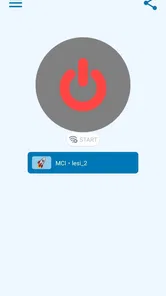
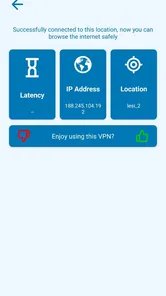
When I first stumbled upon GEM VPN, I was intrigued by its promise of providing a secure, fast, and unlimited VPN service. The installation was smooth sailing, no hiccups or complicated setup processes. As soon as I launched the app, I was greeted with a clean and intuitive interface. For someone who isn’t exactly tech-savvy, this was a pleasant surprise. The app is user-friendly and doesn’t overwhelm you with too many options right off the bat. Just a simple tap and you’re connected. Easy peasy!
Where its simple approach helps
The practical appeal is not just that a connection is easy to start; it is that the low-friction design suits brief, situational use. Imagine arriving at a café, checking a travel booking, and then opening your email on the venue’s Wi-Fi. A VPN that takes only a small amount of attention is easier to remember in that moment than one that requires you to choose settings before every session. I would make connecting part of the routine, then disconnect when I no longer need it if I want to avoid routing ordinary traffic through a VPN unnecessarily.
For region-based access, server choice can matter as much as the connection button. If a site behaves differently after connecting, I would try another available location rather than repeatedly refreshing the same page. Some services block VPN traffic or tie access to an account’s region, so a VPN cannot guarantee that every catalogue or website will open. That is a useful expectation to set before relying on it for a specific show, booking, or online service.
Features That Stand Out
Okay, so let’s talk features. GEM VPN offers a wide variety of server locations, which is a big plus if you’re looking to access content from different regions. The connection speed is pretty impressive. I could stream my favorite shows without any buffering issues, which is a major win in my book. Additionally, it boasts strong encryption protocols, ensuring that your data remains private and secure. In a world where data breaches are becoming increasingly common, knowing that GEM VPN has your back is quite reassuring.
More From Our News Desk

Weather by Xiaomi Review: Clear at a Glance, Less Clear Up Close

X Under Pressure: Can It Recover When Posting Goes Wrong?

Clash of Clans Is Won Between the Battles

Android Auto Makes the Case for Quieter Car Software

MobiOffice: Transforming Mobile Productivity with Seamless Integration

EA SPORTS FC™ Mobile Soccer: Redefining Mobile Sports Gaming
One thing I particularly love about this app is the unlimited bandwidth. Gone are the days of worrying about hitting data caps and slowing down. Whether you’re streaming, downloading, or just browsing, GEM VPN has got you covered. Another noteworthy feature is the app’s ability to bypass firewalls, making it a fantastic option for those who are in countries with strict internet regulations.
Trade-offs to keep in mind
Even a smooth connection is not the same as a guaranteed connection. VPN performance can vary with the network, the chosen server, and the service you are trying to reach. If a video suddenly pauses or a page takes longer to load, I would first compare the experience with the VPN off and then try a different location. That quick check helps distinguish a weak Wi-Fi signal or a site-specific restriction from a VPN slowdown, instead of assuming the app itself is broken.
There is also a trade-off between convenience and control. GEM VPN’s uncluttered design is friendly to newcomers, but a person who wants to fine-tune a connection for particular apps, protocols, or a specialized work setup may prefer a more configurable VPN. I would not choose a simple general-purpose app as the sole answer to a company’s security rules, nor would I assume that a VPN makes every online activity anonymous. It changes how traffic is routed; it does not replace careful account security or safe browsing habits.
Performance and Usability
Now, onto the nitty-gritty: performance. I’ve been using GEM VPN for a couple of weeks now, and I must say, it’s been a smooth experience. The app consistently provides a stable connection, and I haven’t encountered any drops or lags, which can be quite frustrating. The app runs quietly in the background, so you can go about your day without any interruptions.
Usability-wise, GEM VPN is a hit. The app’s design is straightforward, and it doesn’t bombard you with unnecessary features. It’s perfect for those who just want a simple, effective VPN service without all the fluff. Whether you’re a seasoned VPN user or a newbie, you’ll find GEM VPN easy to navigate.
Everyday habits that make it more useful
I would treat the connection button as a deliberate choice rather than assuming that the VPN should stay on in every situation. Before joining public Wi-Fi, connect first, then open the apps you need. If a service responds as though you are somewhere else, disconnect briefly to see whether the location change is the cause. This small sequence is more useful than repeatedly signing out or resetting an app without checking the VPN state.
It is also worth testing the tasks you rely on before you need them in a hurry. For example, try opening your usual travel or messaging service on a familiar network, then repeat the check on a different connection. If something stops working, note whether changing the server location or disconnecting resolves it. That gives you a practical fallback plan for a busy day instead of discovering a compatibility issue while trying to make a time-sensitive booking.
When another kind of VPN is a better fit
Compared with the usual alternatives, GEM VPN’s strongest case is for someone who wants a quick, general-purpose connection without getting pulled into a settings-heavy workflow. A paid subscription VPN may be a better fit for a person who wants a particular bundle of support, account controls, or clearly documented privacy commitments and is willing to compare those details before paying. A workplace VPN is different again: it is designed to connect to an organization’s systems, so a consumer app is not a replacement for the setup provided by an employer or school.
If your main need is simply to reach a familiar home network while away, a router-based or organization-managed option may suit that job better than a general VPN app. And if you only need protection for a single service, check whether that service already provides the security you need before routing all phone traffic through a VPN. These distinctions keep the choice practical: pick the kind of tool that matches the destination, rather than expecting one app to solve every networking problem.
For someone comparing free VPN apps, the sensible question is not just whether an app connects, but whether its privacy terms, day-to-day reliability, and level of control fit the person using it. I would compare those points directly rather than assuming that a no-cost option or a paid one is automatically better. GEM VPN is most compelling when simplicity is the priority; if the decision depends on documented practices or support for a specialized setup, I would put those requirements first and choose accordingly.
Making the switch without hassle
Trying GEM VPN does not have to mean changing every part of your online routine. I would test it first on a low-stakes task, such as ordinary browsing on a trusted network, then compare the same task on public Wi-Fi. Note whether a site asks you to sign in again or behaves differently when your apparent location changes. If a banking, streaming, or shopping app becomes inconvenient, disconnect for that task rather than repeatedly fighting the service.
One useful habit is to decide in advance when you want the VPN active: for example, when joining unfamiliar Wi-Fi or when you have a specific regional-access need. That avoids the common frustration of forgetting it is on when a location-sensitive service reacts unexpectedly. If you later move to another VPN, review which apps and routines depend on the existing connection, then test them individually. The main cost of switching is usually rebuilding a habit and checking compatibility, not learning an elaborate interface.
Questions worth settling before relying on it
Will it work with every site or streaming service I use? I would not count on that. Services can restrict VPN connections, and changing the apparent location may cause a login or account check. Try the particular service you care about while you still have time to use another route if needed.
Is it a good choice for work or highly private activity? Only if it meets the relevant requirements. A simple consumer VPN should not stand in for an employer’s approved connection, and it does not make unsafe links, weak passwords, or careless sharing safe. For sensitive tasks, I would look for privacy information and organizational approval that match the actual risk.
Does the free price make it the right choice for everyone? Not necessarily. It removes the need to pay to try the app, but cost is only one part of the decision. Someone who needs extensive controls or detailed assurances may reasonably prefer a different provider, even if that means paying, while a casual user may value a quick, uncomplicated tool more.
Final Thoughts
So, is GEM VPN worth it? In my opinion, absolutely. With its robust features, excellent performance, and user-friendly interface, it’s a solid choice for anyone in need of a reliable VPN service. Whether you’re looking to protect your online privacy, bypass geo-restrictions, or simply enjoy unlimited browsing, GEM VPN has something for everyone.
In a nutshell, GEM VPN is a gem of a find. It’s a powerhouse of a VPN that delivers on its promises, and I can confidently say that it’s become a staple in my digital toolkit. So, if you’re on the hunt for a VPN that ticks all the right boxes, give GEM VPN a try. You won’t be disappointed.
Who I would recommend it to
I would suggest giving it a try if you use Android, want a low-effort way to connect through a VPN, and are comfortable judging it against your own everyday needs. It is especially approachable for someone new to VPNs who values a simple start over a long list of controls. I would steer away if you need a VPN formally approved for work, need extensive connection customization, or are choosing a provider primarily on detailed privacy documentation; in those cases, compare alternatives on those specific points before moving your important traffic.
My bottom line is to use it with a clear purpose rather than treating a VPN as an automatic shield for everything. Test the connection where you plan to use it, keep expectations realistic about region-locked services, and choose a more specialized option when your job or privacy needs call for one. For casual Android use, the uncomplicated experience is its most convincing reason to install it.
GEM VPN Frequently Asked Questions
Is GEM VPN safe to download?
GEM VPN is an Android VPN app from Golden VPN proxy apps, and its store summary describes it as secure and limitless. Before installing any app that handles your internet connection, review the permissions requested and make sure they make sense for how you plan to use it. Downloading from a trusted app store and keeping the app updated are sensible steps for using it more cautiously.
Who develops GEM VPN, and what is its age rating?
GEM VPN is developed by Golden VPN proxy apps and has an Everyone content rating, so it is rated for a general audience. That rating is about the app’s intended audience; it does not replace checking whether a VPN’s functions suit your own needs. If you are choosing an app for a child or another family member, take a moment to review its permissions and intended use together.
Is GEM VPN free to download and use?
GEM VPN is a free app in the Tools category, so you can try it without paying to download it. Its store summary describes it as a secure and limitless VPN app for Android. As with any VPN, it is worth checking the app’s permissions and deciding whether its features suit your needs before connecting it to your internet traffic.
What Android version do I need to install GEM VPN?
GEM VPN requires Android 6.0 or later. Before downloading, check your device’s Android version in its settings to make sure it meets that requirement. The app is intended for Android, so the Android version matters when assessing compatibility; avoid assuming that a similarly named app on another platform is the same product.
What is GEM VPN and how does it work?
GEM VPN is a virtual private network service designed to protect your online privacy and security. It works by encrypting your internet connection, making it difficult for hackers, ISPs, and other entities to track your online activities. By connecting to one of GEM VPN's secure servers, users can browse the internet anonymously, access restricted content, and enjoy a safer online experience across different devices.
Pros
- Fast connection speeds
- User-friendly interface
- No-log policy
- Wide server selection
- Affordable pricing
Cons
- Limited free version
- Occasional connection drops
- No dedicated IP option
- Inconsistent customer support
- Ads in free version








