Online chat, calls - Gem Space
- 306.00
- 3.9
- Installs
- 10.00M
- Price
- Free

Screenshots


Analysis by Reviewed
I look at Gem Space as a communication app for people who want messaging and calls gathered in one place, without a complicated setup. That convenience is its main appeal, but it isn’t automatically the best choice for everyone: your contacts need to be willing to use it, and people who already have a reliable chat app may not gain enough to justify switching. My overall view is positive, with a practical caveat: it works best when a real group of friends or relatives adopts it together.
Who will get the most from it
I’d consider it for keeping in touch with family members who prefer calls to long text threads, or for a small group that wants to share updates and media in the same conversation. It is also worth a look if you often move between a quick message and a face-to-face call; having both communication styles in one app can make that handoff feel natural. For work, though, I would be cautious about treating it as a full collaboration tool. It is focused on personal communication, so teams that need formal project workflows may be better served by a dedicated work platform.
A useful way to try it
Rather than moving every contact at once, I’d start with one person who is likely to answer and test the parts you’ll actually use: send a short message, share a photo, then make a call. That small trial helps you judge whether the interface and call experience suit your routine before you ask a whole family or friend group to change habits. If you’re setting it up for relatives, agree on one group conversation for everyday updates; it gives everyone a clear place to look and avoids scattering the same plan across separate chats.
A realistic example is coordinating a weekend visit while one person is travelling. Someone can send the updated arrival plan as text, another can respond with a photo or quick note, and anyone who needs to clarify details can call. That is a modest convenience, not a reason to abandon every other messenger, but it can make a familiar group’s communication less fragmented. The trade-off is that a group only benefits if its members check the app, so keeping a backup route for urgent plans is sensible.
Compared with familiar messaging apps, Gem Space’s appeal is not simply that it can send messages or place calls; those basics are common. The meaningful question is whether your contacts will use its combination of chat and calling consistently. If your friends already coordinate comfortably in another service, inviting them to maintain a second inbox may create more friction than value. If you are choosing fresh for a close-knit group, however, it can be reasonable to compare the call experience and ease of use directly with the alternatives your group already knows.
Connecting Made Effortless
First things first, the app is all about making online chats and calls as seamless as possible. From the moment I downloaded it, the user interface struck me as incredibly intuitive. You know how some apps just make you feel like you need a manual to get started? Not Gem Space. It’s like the app was reading my mind or something! I was chatting away with my friends in no time.
Features That Shine
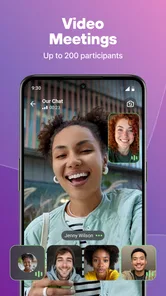
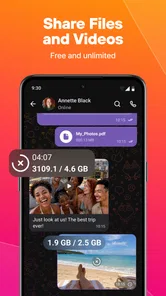
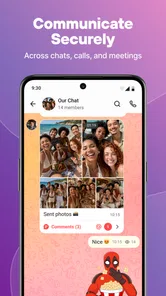
What truly sets Gem Space apart are its features. The app offers high-quality voice and video calls that left me genuinely impressed. I mean, it was almost like my friend was sitting right next to me, and that’s saying a lot given how many apps out there have subpar call quality. On top of that, there’s the chat feature which supports text, emojis, and even media sharing. Trust me, sharing those hilarious memes has never been easier!
More From Our News Desk

 Lark Player:Music Player & MP3
Switching to Lark Player: A Better Fit for Music Stored on Your Phone?
Lark Player makes sense if your music already lives on your phone. Here is what changes, what does not transfer by assumption, and how to test the switch without regret.

 Tile Master® - Matching Game
Tile Master Finds Its Place in the Gaps of a Noisy Phone
OS changes rarely transform a tile puzzle, but they reshape the small rituals around it. Tile Master’s appeal lies in how well its brief, tactile rounds fit the modern phone.

 Google Docs
 Shows What Mobile Writing Still Gets Wrong
Google Docs still makes a strong case for the shared document, but its real significance is how it exposes the gap between cloud convenience and genuinely capable mobile work.

 YouTube Studio
 Is Becoming a Creator’s Daily Control Room
As publishing turns into a daily, data-led habit, YouTube Studio is becoming the control room creators reach for between uploads—not another tool for making videos.

 Tiles Hop Music & Ball Game
Tiles Hop Review: When the Beat Is Clear, Every Miss Counts
Tiles Hop turns a simple bouncing-ball premise into a sharp test of timing. Its best design is immediate and readable; its weakest moments come when recovery feels less clear than the beat.

 Piano - Music Keyboard & Tiles
: Inviting Rhythm, Unproven Recovery
A tile-tapping piano game lives or dies by timing. This resilience-focused review separates what its format promises from what players still need to verify.
Latest News



Customization and Privacy
Now, let’s talk about customization. The app allows you to personalize chat themes and notifications, which is perfect if you're like me and love adding a personal touch to everything. Plus, privacy is top-notch. The app assures end-to-end encryption, meaning your conversations remain just between you and the person you’re chatting with. In today’s age, that peace of mind is invaluable.
Staying Connected, Anytime, Anywhere
One of the standout features of Gem Space is its ability to keep you connected even when the internet connection is less than stellar. I tested this out while on a road trip, and you know what? It performed admirably. There were no dropped calls or messages lost in the abyss. It’s like having a reliable friend who’s got your back, no matter where you are.
Where it fits among communication apps
For me, the practical choice depends less on a feature checklist than on the habits of the people I want to reach. A conventional text or calling app may be the easier option when my contacts already use it every day. Gem Space makes more sense when I want one place for personal chats, shared media, and voice or video conversations, and the people closest to me are happy to meet there. I would not switch a whole group just because an app offers another way to call; I’d first see whether the people I care about find it comfortable enough to keep using.
Small decisions that improve the experience
One useful habit is to tune notifications for individual chats rather than letting every conversation interrupt the day in the same way. Since themes and notification settings can be personalized, I’d use those options to make important family conversations easy to recognize while keeping less urgent chats quieter. It is a simple adjustment, but it helps a messaging app feel less demanding. For media sharing, I’d also add a short note when a photo needs context; that keeps the conversation understandable later instead of relying on everyone to remember what an image meant.
Call quality is always shaped by the connection at both ends, so I wouldn’t treat one smooth call as a guarantee that every call will be flawless. If a conversation matters, I’d make sure the other person has a stable connection and switch to text if the video becomes distracting. That flexibility is one reason combining calls and chat can be handy: you can keep the conversation moving without insisting that video work perfectly. People who need a dependable tool for time-sensitive coordination should still agree on a backup method with their group.
Who may want something else
I would skip it if adding another messenger would split conversations across too many apps, or if the people I contact most are unwilling to install and check it. It may also be the wrong fit for anyone whose priority is a business suite with structured team tasks rather than personal messages and calls. Before making it the default, I’d ask a few regular contacts to try a short conversation and call. Their comfort matters as much as the app’s interface, because communication tools are only useful when both sides show up.
For context, Gem Space is a free communication app from Marketspace Solutions OU. It has a 3.9 average from around 69,000 ratings and more than 10 million installs, which suggests a sizable audience while leaving room for mixed experiences. It is rated for teens, and the current version is 8.1.38213, with Android 7.0 as the minimum operating system. Those details make it straightforward to check whether it fits your device and household before inviting others.
A sensible group setup
For a household or friend circle, I’d make the first shared space serve one clear purpose instead of trying to move every conversation into it immediately. A group for trip planning, regular family check-ins, or sharing pictures gives people a reason to open the app and makes its value easy to judge. If the group finds itself using it naturally, then it can take on more everyday conversations. If not, you have learned that without having to reorganize everyone’s contacts or abandon the service they already prefer.
It also helps to agree on what belongs in the group chat and what deserves a direct message or call. A practical plan can go to everyone, while a personal follow-up stays between the people involved. That small bit of etiquette makes a shared conversation easier to scan, especially when members have different routines and notification preferences. It is not a special technical feature; it is a way to get more value from the app’s mix of messaging and calls without creating a noisy stream.
Questions worth settling before switching
Would I use it as my only messenger? Only if the people I speak with most are active there and the calls suit us; otherwise, I’d keep the existing app for contacts who are not moving. Is it suitable for a family group? It can be, provided members are comfortable installing another communication app and someone is willing to help less confident users get started. Does it replace a work platform? I would not count on it for task tracking or formal team processes; its strongest case is everyday personal communication.
And what if a call becomes unreliable? I’d switch to text or use the group’s agreed backup channel, rather than assuming a video call will always be the best format. That is a sensible habit with any internet calling app, and it matters most when coordinating travel or time-sensitive plans. Treating chat and calls as useful options, not guarantees, makes it easier to decide when Gem Space is convenient and when another channel is safer.
What its audience figures suggest
The app has reached more than 10 million installs, and its 3.9 average from around 69,000 ratings points to a substantial user base with a range of experiences. I see that as a reason to try it, not as proof that it will fit every household. Communication apps are unusually dependent on who else uses them: a tool can be well suited to one close group and feel redundant to someone whose contacts are settled elsewhere. I’d let a small trial with real contacts matter more than broad popularity when making the decision.
Gem Space is free, comes from Marketspace Solutions OU, and is rated for teens. Its current Android version is 8.1.38213, and it supports devices running Android 7.0 or later. Those details are useful when deciding whether family members can join, especially if people in the group use older phones. I’d check compatibility before asking everyone to install it, then keep the invitation low-pressure so nobody feels forced to maintain another inbox.
In conclusion, Gem Space isn’t just another app; it’s a gateway to maintaining meaningful connections with those who matter most. Whether you’re catching up with old friends or coordinating with family across the globe, this app has got you covered. It’s easy to use, packed with features, and, most importantly, keeps your conversations private and secure. So, if you’re on the hunt for a dependable communication app, give Gem Space a try. You might just find it’s the gem you’ve been looking for!
Online chat, calls - Gem Space Frequently Asked Questions
Can I use Gem Space without creating an account?
Before downloading Gem Space, consider how you prefer to set up and use a communication app. It is designed for chatting and calls with contacts, so getting value from it depends on being able to connect with the people you want to reach. Review the app’s setup prompts after installation and decide whether its account and contact options suit your privacy preferences.
Can I send photos, videos, or other media in Gem Space chats?
Gem Space is presented as a private messenger and chatting app, with multimedia messaging included among its chat features. That makes it worth considering if you want conversations to include more than text. Media sent online uses an internet connection, so your Wi-Fi or mobile data connection can affect how convenient it is to share and receive files.
What do I need to get started with Gem Space?
Gem Space is a communication app for chatting and video calls. To get started, install it on a compatible device and use an internet connection to access its communication features. It is intended for users aged Teen and above, so it may not be suitable for younger children. Think about your usual messaging and calling needs when deciding whether it is right for you.
What is Gem Space and how does it work?
Gem Space is an online communication app that allows users to engage in chat and voice calls with their contacts. The app focuses on providing a seamless communication experience with high-quality audio and easy-to-use chat features. Users can create groups, send multimedia messages, and enjoy a secure platform for their conversations.
Is Gem Space free to use or are there any hidden costs?
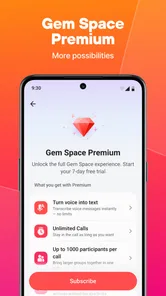
Gem Space is free to download and use. It offers chat and calling features for communicating with contacts, while the app's store page is the place to check for any purchase options that may be available. Keep in mind that using calls or sending media over the internet can consume mobile data, so your carrier's data plan may affect your overall costs.
Pros
- User-friendly interface
- High-quality video calls
- End-to-end encryption
- Cross-platform support
- Customizable themes
Cons
- Requires stable internet
- Consumes battery quickly
- Limited free features
- Occasional connection issues
- Ads in free version