FreeTone Calls & Texting
- 26.84K
- 4.3
- Installs
- 10.00M
- Price
- Free

Screenshots

Analysis by Reviewed
I like having a calling option that doesn’t depend on spare carrier credit, especially for quick conversations and messages. FreeTone Calls & Texting is a social app from TextMe, Inc. built around that practical idea: it gives users a phone number and supports calls and SMS and MMS between the US and Canada. It is free to install, though in-app purchases range from $0.99 to $79.99 per item, so I’d treat “free” as a useful starting point rather than assume every extra use will cost nothing.
Making a second line part of your routine
The easiest way to get value from FreeTone is to make it a deliberate second line, not an automatic replacement for your regular phone service. I’d use its number for conversations where a separate contact point is useful, then keep the app available for calls and messages over an internet connection. That distinction matters: the app is not a way to make ordinary cellular service unnecessary in every situation, and a weak connection can affect a call even when the other person’s phone is working perfectly.
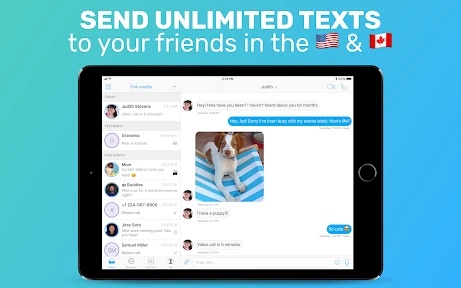
For example, if I’m arranging a weekend pickup with relatives in Canada, I can use the app’s number to keep the conversation and any follow-up photo in one place. A group message can also help everyone see a change of plan, rather than having one person relay it through separate texts. If the other person needs to reach me later, sharing the app’s number makes the arrangement more useful than using it only for outgoing calls.
I’d be especially comfortable using this setup for plans that can tolerate a quick retry: coordinating a visit, confirming a change of meeting place, or sending a photo that clarifies which entrance to use. For an urgent call where I cannot afford a delay, I’d keep my normal calling option in mind. That is not a flaw unique to this app; it is the sensible trade-off of routing a conversation through an internet-based service.
Settings and checks worth doing early
I’d check the app’s available settings after setup and make sure its notifications suit the way I plan to use that number. A missed-call alert is only helpful if it gets noticed, and a message app that stays quiet at the wrong time can make a second line feel unreliable. I’d also test a short call and a text with someone I know before relying on it for a time-sensitive conversation. That quick check gives me a practical sense of how the connection behaves on my current Wi-Fi or mobile data.
It helps to decide in advance which contacts should use the FreeTone number. I wouldn’t hand it out casually and then expect it to replace every contact detail in my address book; I’d reserve it for a particular circle or purpose. That makes it easier to notice calls and messages intended for this line, and it avoids confusion if I’m switching between the app and my regular number.
One useful habit is to tell people what the number is for when I share it. “Use this for our travel plans” is clearer than simply sending another number with no context. It also gives me a straightforward way to judge whether keeping the line active is worthwhile: if the people and purpose I chose actually use it, it is serving its role; if conversations keep drifting back to my regular number, the extra line may be unnecessary.
More From Our News Desk

Weather by Xiaomi Review: Clear at a Glance, Less Clear Up Close

X Under Pressure: Can It Recover When Posting Goes Wrong?

Clash of Clans Is Won Between the Battles

Android Auto Makes the Case for Quieter Car Software

MobiOffice: Transforming Mobile Productivity with Seamless Integration

EA SPORTS FC™ Mobile Soccer: Redefining Mobile Sports Gaming
Getting Started with FreeTone
First things first, downloading and setting up FreeTone Calls & Texting is a breeze. Available for both Android and iOS, this app promises free calls and texts without needing a SIM card. After downloading, you’ll be prompted to create an account, which is pretty straightforward. You just need an email address or a Facebook account. Once you’re in, you’re greeted with a clean and intuitive interface that doesn’t overwhelm you with too many options.
That straightforward start is useful, but I’d still take a moment to decide how I want to use the number before sharing it widely. A second number works best when it has a clear job, whether that is keeping a particular set of conversations separate or giving a contact in the US or Canada another way to reach me. Treating setup as the beginning of a small routine, rather than just a quick install, helps prevent missed calls and crossed conversations later.
What the number changes
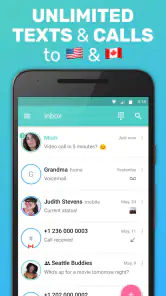
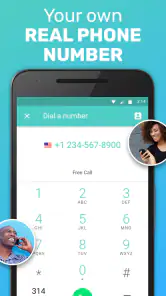
One of the standout features of FreeTone is that it offers you a real phone number. That’s right, a legitimate number that you can share with friends and family. This means you can make and receive unlimited calls and texts to anyone in the US and Canada for free. Yes, you heard that right—unlimited free calls and texts!
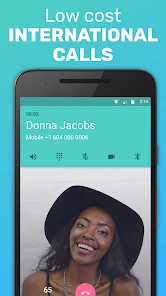
But wait, there’s more! For those of you who need to make international calls, FreeTone has got you covered. Though not entirely free, the rates are competitive and significantly cheaper than your regular carrier. Plus, the app often offers promotions and ways to earn credits, so you might just end up making those international calls for free too.
I would keep those two kinds of use separate in my own planning. The US-and-Canada routine is the clearest fit for the app, while an international call deserves a check of the terms and any costs shown before I dial. If I’m calling abroad only occasionally, I’d compare the displayed cost with the alternatives I already use instead of assuming that a low-cost option is automatically the best one for every destination or call length.
Messages, media, and everyday coordination
Using FreeTone is a smooth experience. The call quality is surprisingly clear, and the texts get delivered almost instantly. I particularly enjoyed the group messaging feature, which is great for coordinating plans with friends or family. The app also supports multimedia messaging, so you can send photos, videos, and even voice notes.
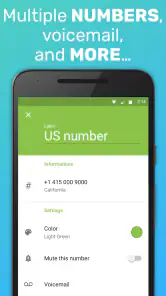
Another neat feature is the voicemail service. If you miss a call, the app will notify you and you can listen to the voicemail right within the app. It’s these little touches that make FreeTone stand out from the crowd.
For a practical workflow, I’d use a group message to settle a plan, then switch to a direct conversation if one person needs to share a detail that does not belong in the whole group. A photo can answer a question faster than a long description, while a voice note can be handy when typing is inconvenient. The point is not to use every format for its own sake; it is to keep the conversation on the line where the other people can reliably reach me.
How it compares with familiar options
Compared with a standard carrier dialer, FreeTone’s main appeal is the additional number and the ability to handle supported calls and messages through the app. Compared with familiar messaging apps, it is more useful when someone needs a phone number rather than only a shared chat account. That makes it a sensible choice for people who want a distinct line for family, travel planning, or occasional conversations across the US and Canada. It is less suitable if you need dependable calling in places with poor data or Wi-Fi, or if everyone you contact already prefers a different messaging service.
This difference matters when choosing what to give a new contact. If they are comfortable exchanging app-based messages in a service they already use, a familiar chat app may be simpler and avoid asking them to adopt another routine. If a phone number is the practical requirement, this app has a clearer role. For a person who needs one dependable number for work, family, and urgent calls, a carrier line remains the more straightforward default; FreeTone makes more sense as a purposeful companion than as a universal substitute.
That makes it a particularly good match for someone who wants to keep a limited circle reachable without mixing every conversation into their main number. It is less compelling for people whose contacts already communicate through one established messaging service, or who rarely need a separate line. I’d choose it for a defined use, not just because adding another app feels like an easy way to solve every communication problem.
Limits that affect when I’d rely on it
While FreeTone is an impressive app, it’s not without its quirks. Occasionally, I did notice a slight lag in connection during calls, especially when the Wi-Fi signal wasn’t strong. However, this was a rare occurrence and didn’t detract much from the overall experience. Also, the app is supported by ads, which can sometimes be a bit intrusive. But hey, for a free service, it’s a small price to pay.
FreeTone has a 4.3 average from around 130,000 ratings, and it has passed 10 million installs. Those figures suggest that it has found a substantial audience, but popularity alone won’t make it right for everyone. It is rated for Everyone, was released on October 23, 2014, and the current version is 3.50.2, with Android 7.0 as the minimum requirement. I’d still judge it by whether its internet-based calling and separate number fit my own routine.
The most important limitation is practical rather than complicated: the app’s usefulness depends on having a connection good enough for the conversation at hand. Before a call I care about, I’d check that I have a dependable Wi-Fi or mobile-data connection, and I would not make this my only route for an urgent situation. A brief test call is a better way to make that judgement than assuming performance will be identical on every network or in every place.
I’d also treat the number as an app-based contact point, not as a guarantee that every person will use it in the same way they use a carrier number. Friends and relatives may need to save the new contact, and I would make the purpose of the number clear so they know which line to try. That modest bit of explanation can prevent the awkward moment when someone sends a message to the number I no longer check as often.
Costs, habits, and sensible shortcuts
I’d also keep expectations measured around international calling. It is a separate use from the free US-and-Canada calling and messaging, and may involve charges or credits. Before placing a longer call, I’d check the current terms shown in the app rather than assume the same arrangement applies to every destination. The same cautious approach makes sense for optional purchases: the app costs nothing to install, but extras can be paid, so I’d review a purchase prompt before confirming anything.
For repeat use, I’d make the number easy to recognize in my own contacts and keep a small mental rule about who should call it. That is a simple shortcut, but it reduces the chance of replying from the wrong line or overlooking a message among notifications from other apps. I’d also avoid buying credits or extras just because a prompt appears; first I’d identify the specific call or feature I need, then decide whether the displayed cost makes sense for that use.
If a call is important but not an emergency, I’d send a short message first when that suits the situation, then arrange a time when both sides have a better connection. For a group plan, I’d keep the key details in the group thread instead of assuming everyone saw a separate update. These are ordinary habits, not hidden tools, but they make an internet calling app more predictable and reduce misunderstandings about which number or conversation to check.
One common decision is whether to make this the number for a public-facing purpose, such as sharing it with a new group, or reserve it for people I already know. I’d lean toward a limited circle until I understand how often I check the app and how well its notifications fit my day. That keeps the line manageable and makes it easier to stop using it if it turns out not to suit my routine.
A practical verdict for regular use
My most useful tip is to build a repeatable habit: keep the app’s number for a defined group, check notifications, and make a brief test call whenever you start using it on a new connection. If a call matters, don’t wait until the last minute to discover that the Wi-Fi is struggling; switch to a stronger connection or use your regular phone service as a backup. This is a small bit of planning, but it turns a convenient extra line into a more predictable tool.
FreeTone is a good fit if you want a separate number and mostly contact people in the US or Canada, and you’re comfortable relying on internet access for calls. If your priority is uninterrupted service wherever you are, or a single number that works independently of an app, your carrier’s service is the safer choice. The app’s free entry point makes it easy to try, while its connection dependence, advertising, and paid extras are worth weighing before you make it part of your everyday routine.
In the end, I’d recommend trying it when the need is specific: perhaps I want a separate line for a regular family group, or I need a number for coordinating plans across the US and Canada. I would skip it if I expect it to replace a carrier connection in every setting, or if the people I contact will not use the number. The distinction is simple but useful: FreeTone can make a second line convenient, while it cannot remove the need to think about connectivity, costs, and how the people on the other end prefer to communicate.
Overall, FreeTone is a fantastic app for anyone looking to save on phone bills or needing a secondary number. Whether you’re trying to keep connected with loved ones or just want an alternative to your traditional phone service, FreeTone Calls & Texting is worth checking out. Just ensure you have a stable internet connection, and you’re good to go!
FreeTone Calls & Texting Frequently Asked Questions
Can I use FreeTone Calls & Texting to send photos or other media?
FreeTone Calls & Texting supports MMS as well as SMS texting, so it can be used for multimedia messages in addition to standard text conversations. Its free calling and texting service is aimed at numbers in the United States and Canada. As with calls and messages, you’ll need an internet connection to use the app’s communication features.
Can I use FreeTone Calls & Texting to get a separate phone number?
Yes. FreeTone Calls & Texting provides a free phone number for app-based communication, giving you a separate number to use for calls and texts. Its core free calling and texting service covers numbers in the United States and Canada. The app is developed by TextMe, Inc., and is listed in the social category, so it may suit people looking for an additional way to communicate.
Can I keep using FreeTone Calls & Texting if I change phones?
FreeTone Calls & Texting is designed around an account and the phone number assigned through the app, so access on a new device depends on signing in with the same account. Before switching phones, make sure you can access your account details. This is especially useful if you rely on the app’s number for calls or texts and want to continue using it on another device.
Does FreeTone Calls & Texting work without a SIM card or carrier plan?
FreeTone Calls & Texting uses an internet connection for its calling and texting features, rather than requiring a traditional carrier plan for those app-based communications. You still need access to Wi-Fi or mobile data to use it. The app provides a phone number for communicating with numbers in the United States and Canada, making it an option to consider if you want a separate number.
What should I know about the app’s cost before downloading it?
FreeTone Calls & Texting is free to download and offers free calling and texting to numbers in the United States and Canada. The app also includes in-app purchases, with items ranging from $0.99 to $79.99. Keep in mind that some features or services may involve purchases, so check the options shown in the app before buying anything.
Pros
- Unlimited free calls to US and Canada
- High-quality voice calls
- User-friendly interface
- Supports Wi-Fi calling
- Includes free SMS texting
Cons
- Limited international call options
- Contains in-app ads
- Requires internet connection
- Occasional app crashes
- Limited features without premium
- Category
- Social
- Version
- 3.50.2













