FreePrints
- 100.07K
- 4.8
- Installs
- 10.00M
- Price
- Free

Screenshots
Analysis by Reviewed
I like having printed photos around, but choosing which files to print can be the hard part when they’re spread across a phone and social accounts. FreePrints is built for turning those digital snapshots into physical copies without making the ordering process feel like a project. The main appeal is a recurring allowance of free standard prints; the practical catch is that shipping and any upgrades still matter when you decide what to order.
A simple routine for choosing prints
My best approach is to treat an order as a small edit of my camera roll rather than a backup of everything. I first pick a specific occasion or group of people, then select only the photos I’d actually want to hold or share. That keeps the order focused and makes it easier to notice duplicates, blurry shots, and near-identical poses before they become prints.
For example, after a family gathering, I might choose a few group photos, one candid, and a picture of the food or decorations. That mix makes a more complete little collection than ordering every image from the afternoon. It also helps me avoid spending on prints that will likely stay in an envelope.
Check the crop before placing an order
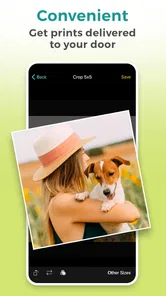
One useful habit is to look closely at how each image fits the selected print size. A phone photo can have a different shape from a standard print, so an edge that looks unimportant on screen may be trimmed. I’d check faces, hands, and anything near the borders instead of assuming the whole screen image will appear on paper.
I also separate photos by their intended use. A small print for a desk or album can tolerate a casual composition, while a picture meant for a frame deserves a more careful look at framing and image quality. If a photo is dark or already soft on the phone, a larger or upgraded print won’t necessarily make it look better; I’d choose a clearer image instead.
Where the free-print model fits
FreePrints is a photography app from PlanetArt, and its value depends on whether you want occasional physical photos rather than an entirely digital collection. The app is free to download, has an Everyone age rating, and its current version is 4.30.0. It has a 4.8 average from around 336,000 ratings and more than 10 million installs, which suggests it has found a broad audience among people who want a straightforward way to order prints.
The free-print allowance is not the same as a completely cost-free order: shipping applies, and choices beyond the included prints can add expense. I’d check the final order total before confirming, especially if I’ve selected a larger batch or changed print options. That makes the offer most useful when I already have a sensible group of images to print, not when I’m browsing without a plan.
More From Our News Desk
 Instagram
’s Power Comes From Its Place in Your Phone
A close look at how Instagram turns Meta’s reach, recommendation systems and everyday camera habits into durable platform power—and what that costs users.

 Gmail
Gmail in a Busy Inbox: Who Benefits Most?
From first account to crowded workday, Gmail earns its place through dependable search and flexible sorting—but its best fit depends on how much inbox maintenance you can tolerate.

 Prime Video
Switching to Prime Video: What Changes in Your Viewing Routine
Prime Video can make a compelling second home for streaming, but switching means learning a different catalog, rental layer, and route from browsing to playback.

 Universal TV Remote Control
 Works Best as a Reliable Backup
A phone remote earns its place through quick setup and reliable habits. Here is how to get more from Universal TV Remote Control—and where its limits show.

 Weather - By Xiaomi
Weather by Xiaomi Review: Clear at a Glance, Less Clear Up Close
Xiaomi’s weather app makes everyday forecasts quick to scan, but its calm surface can leave useful details and recovery paths harder to find than they should be.

 X
X Under Pressure: Can It Recover When Posting Goes Wrong?
A resilience-focused review of X, examining setup, mistaken posts, interruptions, weak connections, and the gaps that matter when recovery needs to be dependable.
Latest News



Getting Started with FreePrints
First off, downloading and setting up FreePrints is a breeze. Available on both Android and iOS, the app welcomes you with a user-friendly interface that’s as inviting as a cozy blanket on a chilly day. You simply sign up, and voilà, you’re ready to start selecting those precious memories for printing.
How It Works
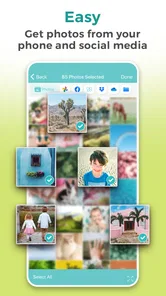
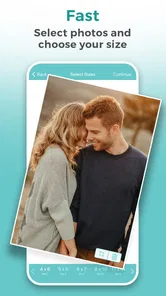
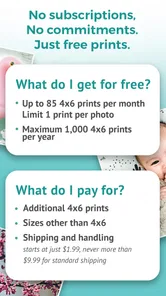
FreePrints lets you select photos directly from your phone’s gallery, Facebook, Instagram, or even Google Photos. This integration is a real lifesaver for those of us who have our digital memories scattered across different platforms. Once you've picked your photos, you can choose the size and style, and then hit order. The app offers a selection of prints each month for free, with just a small charge for shipping.
It’s worth noting that while the printing is free, shipping costs can vary depending on your location and the number of prints. But honestly, when you think about the convenience, it’s still a pretty sweet deal. Plus, the app frequently offers discounts and promotions, so you might snag an even better bargain.
Print Quality and Options
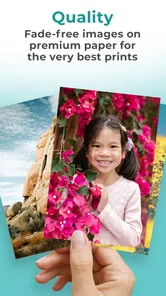
Now, let’s talk about what really matters - the quality of the prints. The photos I received looked vibrant and sharp, with colors that popped like a firework display. The paper quality is decent for a free service, and they even offer upgrades for those who want something a bit fancier. So, whether you’re printing photos to frame or to stick on your fridge, FreePrints has got you covered.
Additionally, the app offers various sizes and finishes, ensuring you can tailor your prints to fit your needs. Want a classic 4x6 or something more Instagram-worthy like a square print? The choice is yours!
What I Loved and What Could Improve
What really won me over was the sheer convenience and simplicity. The process is as straightforward as ordering a pizza. Plus, the option to print directly from social media is a game-changer for the digitally inclined. No more downloading and re-uploading photos - hallelujah!
However, I did notice that during peak times, like the holiday season, the delivery can take a bit longer than expected. But hey, patience is a virtue, right?
Overall, FreePrints offers a fantastic service for anyone looking to bring their digital photos to life. It’s easy to use, offers great print quality, and the cost is hard to beat. Whether you're looking to fill a photo album or just want a few prints to send to grandma, this app is definitely worth a shot.
When I’d choose another option
If I wanted a large batch of prints immediately, or needed a particular finish and precise delivery timing, I’d compare local print shops or other photo-printing services before ordering. Those alternatives can be more suitable when I need to inspect paper choices in person or coordinate pickup. FreePrints makes more sense for a modest, planned order that can arrive by delivery, rather than an urgent gift or a carefully matched professional print.
It also isn’t a replacement for organizing or backing up my photos. I still need to keep the originals in the places I normally store them; selecting pictures for an order is a print workflow, not a complete photo-library solution. That distinction matters if the real goal is finding old pictures or protecting files from loss.
Small habits that make repeat orders easier
I’d keep a short shortlist of images for the next order instead of making every decision in one long session. When a good photo comes in, I can mark it using the organization tools already available on my phone, then review that set later. This doesn’t rely on a special FreePrints feature, and it cuts down on scrolling through unrelated screenshots and everyday camera-roll clutter.
Before submitting, I’d review the selected photos and order summary together: confirm the crop, check the number of prints, and make sure the delivery details and total are what I expect. This final pass is especially helpful when ordering from more than one connected photo source, since the images may have different resolutions or aspect ratios. It’s a simple way to catch an accidental duplicate or a crop that cuts into the subject.
Who will get the most from it
I’d recommend FreePrints to people who enjoy having a few real snapshots for an album, a fridge, or family members who prefer paper photos to a shared screen. It’s also a good fit for someone who wants to print selectively over time rather than pay for a large set all at once. The app’s free-to-start approach makes trying a small order feel approachable, as long as shipping and optional choices are included in the decision.
On the other hand, anyone who rarely looks at printed pictures may be better off keeping photos digital. And if the priority is a same-day pickup, a particular paper specification, or a highly controlled print job, I’d look elsewhere. The key question is whether convenience and occasional standard prints matter more to you than immediate access or specialized control.
My verdict after weighing the trade-offs
FreePrints has been around since May 23, 2013, and its central idea remains easy to understand: select phone or connected-account photos and order physical prints without turning the task into a complicated editing session. I find it most useful when I approach it deliberately, check crops, and keep the order to images I’ll genuinely use. The free prints can make that habit economical, but shipping and upgrades mean I wouldn’t judge the cost by the print price alone.
For a casual family album or a handful of pictures to send to someone, I’d give it a try. For urgent, premium, or highly customized printing, I’d compare alternatives first. That balance is why I see FreePrints as a handy companion to my photo library—not a reason to print everything, but an easy route from a few favorite images to something I can hold.
FreePrints Frequently Asked Questions
What devices and operating systems can run FreePrints?
FreePrints is a photography app for mobile devices, and it requires Android or iOS 10 or later. Before downloading, check your device’s operating-system version and make sure there is enough space for the app and the photos you plan to work with. The app is designed for selecting images and arranging physical prints from your phone.
Is FreePrints available for both Android and iOS?
FreePrints is a photography app for mobile devices, designed to let you select photos and arrange physical prints from your phone. Before downloading, check that your device meets the app’s operating-system requirements. Once installed, the main experience centers on choosing images, reviewing your print order, and placing it through the app.
Who makes FreePrints, and is it suitable for all ages?
FreePrints is developed by PlanetArt and is rated for everyone, so its photo-printing purpose is suitable for a broad audience. It can be useful for anyone who wants to turn images stored on a phone or connected services into physical prints. As with any photo app, consider which pictures and accounts you choose to access when setting it up.
What is FreePrints and how does it work?
FreePrints is a mobile application that allows users to print photos directly from their smartphone. Users can select photos from their phone or social media accounts and order them as physical prints. The app offers free 4x6 prints up to an annual limit, with shipping and handling potentially adding to the order cost. It's a convenient way to bring digital memories to life.
Is FreePrints really free to use?
Yes, FreePrints offers up to 1,000 free 4x6 photo prints a year, with no subscription or commitment. Shipping and handling may still cost extra, and additional sizes or quantities can be ordered for a fee. Review the final order total in the app before placing an order so you know what you will pay.
Pros
- Free prints every month
- User-friendly interface
- High-quality photo prints
- Fast delivery service
- Wide range of photo products
Cons
- Limited free prints per month
- Shipping fees apply
- Requires account to use
- App can lag occasionally
- Limited editing features