FreePrints Photo Tiles
- 5.48K
- 4.8
- Installs
- 1.00M
- Price
- Free

Screenshots
Analysis by Reviewed
I see FreePrints Photo Tiles as a handy bridge between the photos that pile up on a phone and the pictures people actually enjoy at home. The idea is appealing, but the real value is practical: choosing images and arranging them as wall pieces without needing to plan a conventional frame display. I’d consider it for a small personal gallery or a photo gift, while keeping in mind that ordering prints is different from simply editing pictures on a screen.
When the tile format makes sense
Before choosing images, I’d decide where the tiles might go and how many pictures that space can comfortably hold. A narrow hallway, a spot beside a desk, and a large living-room wall call for very different arrangements. Thinking about the destination first keeps the project focused and makes it easier to judge whether separate tiles will suit the room better than one framed print.
The format also changes how I’d select photographs. Images with a clear focal point tend to be easier to place in a small display than busy scenes with several competing details. A simple run of related pictures can feel intentional even when each image is different; a random mix can look cluttered. I’d shortlist more photos than I expect to order, then compare them as a group rather than making each choice in isolation.
Who gets the most from a tile workflow
This photography app makes the most sense if you already have a few favorite images and want to turn them into something visible. A parent could pick a handful of everyday family moments, while a traveler might group photos from one trip into a compact display. I’d choose images with clear subjects and good lighting, then review each crop before ordering; a photo that looks fine as a full phone image can lose an important face or detail when fitted to a tile.
It is less compelling if your main goal is to edit photos, build albums, or make a large-format statement piece. A general photo editor is better for adjusting images, and a traditional print or framed enlargement gives more control over scale. Here, the appeal is the finished wall display and the low-friction path from camera roll to physical decor.
FreePrints Photo Tiles is a unique app that brings a delightful twist to your home decor. With just a few taps, you can transform your cherished digital photos into stunning wall art. Offering an easy and affordable way to personalize your space, this app is definitely worth a closer look. Let's dive into the nitty-gritty details of what makes this app tick and how it stands out from the rest.
What Makes FreePrints Photo Tiles Shine?
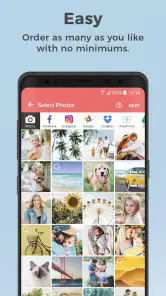
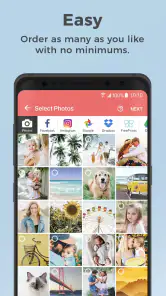
First off, let's talk about the sheer simplicity of FreePrints Photo Tiles. The app takes the complexity out of turning your photos into wall art. Once you download the app, you can start selecting your favorite photos straight from your phone's gallery, Facebook, or Instagram. In no time, you'll have a set of beautiful photo tiles ready to adorn your walls. The whole process is so intuitive that even a tech newbie can navigate it with ease.
More From Our News Desk

Clash of Clans Is Won Between the Battles

Android Auto Makes the Case for Quieter Car Software

MobiOffice: Transforming Mobile Productivity with Seamless Integration

EA SPORTS FC™ Mobile Soccer: Redefining Mobile Sports Gaming

How Microsoft OneDrive Became a Mobile Productivity Giant

How Google Translate Breaks Language Barriers Effortlessly
Choosing pictures with the finished wall in mind
One useful way to avoid a disappointing order is to make a temporary mock-up before committing. I’d place candidate photos in a simple grid on my phone, or lay them out as small previews on a table, and look for repeated colors, visual balance, and a sensible reading order. This is not about making every image match; it is about checking that the display feels like a collection rather than a handful of unrelated snapshots.
I’d also keep an original copy of any image I plan to crop or adjust elsewhere. That gives me room to try a tighter composition without losing the version I might want for another print later. If a picture only works after heavy editing, I would finish that work before ordering rather than expecting a tile-ordering app to act like a full photo editor. That distinction is important: convenience is strongest when the images are already close to how I want them to look.
Customization at Your Fingertips
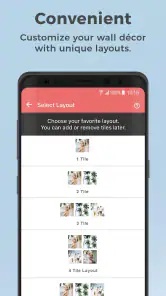
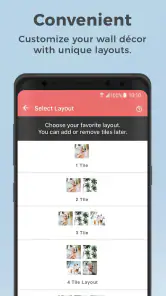
One of the standout features of the app is its customization options. You can choose from different sizes and layouts to create a display that truly reflects your style. Plus, the tiles are lightweight and come with an adhesive backing, making them easy to mount and rearrange without leaving any marks on the walls. This flexibility is perfect for those of us who love to switch things up now and then.
Even with a flexible arrangement, I would not treat the wall as an afterthought. A quick paper template can help test the intended spacing and overall footprint before anything is mounted. It is a small extra step, but it can reveal that a layout is too wide for the spot or that a doorway interrupts the visual flow. I’d be especially cautious about placement on a surface where I am unsure how adhesive will behave, and would follow the product’s mounting guidance rather than assume every wall is identical.
Quality That Speaks for Itself
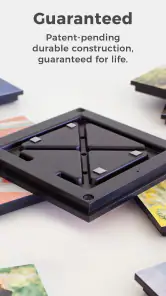
Now, let's talk about quality. The photo tiles are printed on a durable, high-quality material that ensures your images look sharp and vibrant. The colors pop, and the details are crisp, making your photos look like they belong in a gallery. It's impressive how FreePrints Photo Tiles manages to maintain such a high standard of quality while keeping prices affordable.
My practical advice is to judge a photograph at the size and distance where it will actually be seen. A picture that looks detailed when enlarged on a phone can read differently as a wall piece, particularly if its subject is small or the original is soft. I’d favor well-lit pictures with strong shapes and recognizable faces, and avoid making a treasured but low-quality image carry the whole display. A tile arrangement can be personal without every photo needing to be technically perfect.
Comparing tiles with familiar print options
Compared with standard photo prints, tiles are more immediately suited to display: they turn a selection of pictures into wall decor rather than leaving you to find frames and plan a gallery yourself. The trade-off is that a framed print can offer a more traditional finish and a single image can command more attention. If I want to showcase one special portrait, I’d lean toward a frame; if I want a group of smaller memories that can be rearranged, tiles make more sense.
Large-format print services are a better fit when scale and fine control matter most, while a digital album is easier to share and costs nothing to hang. The tile approach sits between those choices: it makes phone photos physical and visible, but requires a real wall, a little planning, and an order. I see that as a useful niche rather than a universal replacement for prints, frames, or photo apps.
A Cost-Effective Solution
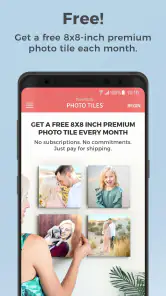
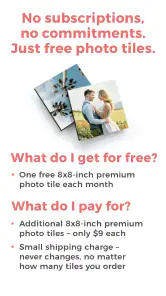
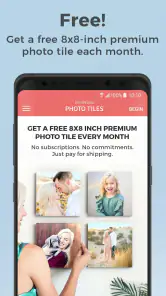
Speaking of affordability, this app offers a cost-effective way to decorate your home. You get a free tile every month, and you only pay for shipping. If you want more tiles, they come at a reasonable price, which is a steal considering the quality and convenience. It's a fantastic option for anyone looking to add a personal touch to their living space without breaking the bank.
I’d still compare the final checkout total with the amount of wall art I actually want. The monthly offer can make a single tile an appealing trial, but shipping and additional pieces affect the overall value. If I only want one large image, putting the order toward a conventional print may better match my goal. If I expect to build a small display gradually, the monthly option is easier to appreciate because it gives the project a natural, unhurried pace.
For anyone wondering whether they need to order regularly, I would treat each month as an opportunity, not a schedule. The no-subscription, no-commitment framing means the offer does not need to dictate how often I decorate. I’d use it when I have a photo worth displaying, skip a month when I do not, and check the order details before confirming so the shipping cost and any extras are clear.
What to consider before ordering
My most useful tip is to settle on a small visual theme before browsing: one room, one trip, or one set of family milestones. That makes it easier to choose images that look cohesive together rather than ordering a mixed batch you later struggle to arrange. I’d also check whether a photo is already tightly cropped, since a tile format can make an edge-hugging subject feel cramped.
The free monthly tile is a reason to try the service, not a reason to assume the whole order has no cost. Shipping is part of the purchase, and additional tiles are paid for, so I’d review the final order total before confirming. There is no need to treat the monthly offer as a subscription commitment; the store summary describes it as free each month with no subscription or commitment. That makes it easier to use occasionally, though it still pays to order only images you are confident you want on the wall.
For a realistic use, imagine sorting photos after a family gathering while waiting for a quiet evening. I’d pick a few images that work as a sequence, check faces and framing, then decide where the group will hang before choosing a layout. Planning the wall first helps avoid ordering tiles that do not fit the space or feel balanced together. If you rent or often redecorate, the adhesive-backed format may be especially attractive, but I’d still think about the surface and placement before sticking anything up.
Another good workflow is to keep a small “maybe” selection separate from the pictures I am ready to order. I’d look at that shortlist again after a day or two, because a favorite phone snapshot is not always the one I want to see every day. This pause is especially helpful for gifts: a recipient may value a few familiar moments more than a highly polished set, but the display should still feel chosen for their home rather than assembled from whatever was easiest to find.
Practical limits and the right expectations
The main friction is that selecting images is only one part of the job. The order has to make sense as a group, fit a real space, and justify its total cost. I would not start by browsing endlessly through a camera roll; I’d first decide on a theme and destination, then select from a manageable set. That saves time and reduces the chance of ordering pieces that look good individually but do not belong together.
There is also a personal-style question. A modular display can feel relaxed and changeable, but it will not suit everyone’s idea of finished decor. Someone who prefers a minimal room with one strong focal image may find a cluster of tiles visually busy. Someone who wants matching frames and a carefully formal gallery may prefer to control every border and spacing detail themselves. In those cases, the app’s convenience does not outweigh the appeal of a more traditional approach.
Who should choose another option
The app is a focused ordering tool, not a replacement for a full photo workflow. If you want to retouch, color-correct, or carefully prepare a large print, I’d edit elsewhere first and choose a service that offers the specific print format you need. Likewise, people who prefer one large framed photograph may find separate tiles less suited to their taste. Those trade-offs do not undermine the concept; they simply define the audience it serves best.
There is also a difference between a convenient ordering experience and instant access to decor: these are physical products, so the result depends on placing an order and receiving it, rather than appearing immediately in an app. I’d treat the app as a way to make a considered purchase, not as a quick fix for an empty wall. Its strongest use is turning a few meaningful phone photos into a display you can adjust as your collection changes.
My verdict
My recommendation is strongest for someone who likes rotating small photo displays and wants a straightforward route from phone pictures to wall decor. PlanetArt’s photography app is free to use, is rated for Everyone, and has a 4.8 average from around 62,000 ratings, with more than a million installs. It was released in 2018, and version 7.58.0 requires Android 10 or later. Those details make it a well-established option, but the decision should still come down to whether tiles suit your room and whether the full order cost works for you.
For me, the monthly free tile lowers the barrier to trying the idea, while the need to pay for shipping and any extras keeps the offer grounded in a real purchase. I’d recommend it to people who value personal photos as decor and enjoy arranging a display over time. If you need editing tools, a large framed print, or complete control over a print project, I’d look elsewhere; if you want a simple, personal wall arrangement, this is an appealing place to start.
FreePrints Photo Tiles Frequently Asked Questions
Do I need to create an account to use FreePrints Photo Tiles?
Before getting started, consider whether you are comfortable setting up an account as part of a photo-ordering experience. FreePrints Photo Tiles is built around selecting personal pictures, preparing them as tiles, and placing an order, so you should expect to provide the information needed to complete that process. The app is free to download, but ordering and account steps are separate from installing it.
Can I use photos stored on my phone with FreePrints Photo Tiles?
Yes, the app’s basic purpose is to help you choose photos from your phone and turn them into wall tiles. That makes access to your photo library an important part of the experience: you will need to find the images you want, review your selections, and prepare them for an order. Think about which pictures you want to print before you begin, especially if your library contains personal photos.
What does the FreePrints Photo Tiles app cost to download?
FreePrints Photo Tiles is free to download and is a photography app from PlanetArt. Its central offer is a free premium photo tile every month, with no subscriptions and no commitments. The app is intended for turning personal photos into wall art, so you can explore its ordering process without signing up for a recurring plan.
Is FreePrints Photo Tiles available for both Android and iOS?
FreePrints Photo Tiles is made for mobile devices and is offered for Android and iOS. Before downloading, check that your device meets the app’s operating-system requirement, since compatible software is needed to install and run it. Once installed, the app provides a way to select photos on your phone and prepare an order for photo tiles.
What are FreePrints Photo Tiles?
FreePrints Photo Tiles is a mobile application that allows users to easily turn their digital photos into ready-to-hang wall art. The app provides a simple process to select photos from your phone, customize them, and have them delivered to your doorstep in the form of lightweight and damage-free wall tiles.
Pros
- Easy to set up and start using.
- Affordable pricing for custom photo tiles.
- High-quality prints that look professional.
- Lightweight tiles that won't damage walls.
- Wide range of customization options.
Cons
- Limited to square tile shapes.
- Shipping may take longer than expected.
- App interface can be slightly confusing.
- No option for larger tile sizes.
- Occasional issues with photo cropping.

- Category
- Photography
- Version
- 7.58.0