FreePrints Photobooks
- 15.85K
- 4.8
- Installs
- 1.00M
- Price
- Free

Screenshots
Analysis by Reviewed
Have you ever found yourself scrolling through your phone's photo gallery, swiping through countless memories, and thinking, "I really should get these printed"? Well, let me introduce you to FreePrints Photobooks, the app that's about to make turning those digital memories into tangible keepsakes as easy as pie.
What is FreePrints Photobooks All About?
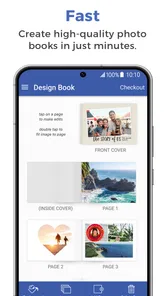
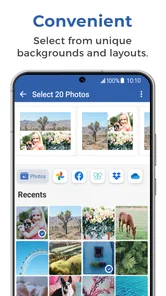
So, here's the deal: FreePrints Photobooks is this super handy app that lets you create photo books right from your smartphone. That's right, no need to transfer files to your computer or deal with complicated software. You just select your photos, choose a layout, and voila – your photo book is ready to order!
Making a Book That Feels Personal
The most useful way to approach a first book is to decide on its story before opening the editor. A month of family snapshots, a weekend trip, or a year of a child’s milestones each makes a more coherent book than a random sweep through the camera roll. I would pick a manageable set of favorites first, then arrange them in rough chronological order. That simple bit of sorting makes choosing layouts easier and reduces the temptation to cram every near-duplicate into the same pages.
For a gift, I’d also think about the recipient while selecting images: include a few familiar faces and small everyday moments, not only the most polished holiday shots. A book meant for someone who lives far away can feel more intimate when it shows ordinary details they missed. The trade-off is that editing takes attention; if I wanted a highly designed album with precise typography and elaborate page-by-page control, I’d compare dedicated desktop photo-book tools before committing to a phone-first workflow.
Getting Started with Ease
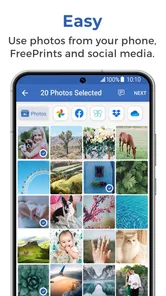
When I first downloaded the app, I was pleasantly surprised at how user-friendly it is. The interface is intuitive, making it a breeze to navigate. You start by selecting photos from your phone, Facebook, Instagram, or other sources, and trust me, it's as easy as choosing your favorite pizza toppings. The app offers a variety of layouts and styles, so you can get as creative as you want or keep it simple if that's more your vibe.
One practical tip is to review crops and page order rather than accepting an automatic-looking sequence without a second glance. A face close to the edge can be awkwardly cut by a layout, while a burst of almost identical photos can make a page feel repetitive. I’d preview the whole book once from beginning to end, checking that the opening image sets the tone and that important moments aren’t split in a way that weakens the story. If you’re short on time, a smaller, carefully chosen selection often makes a more satisfying book than a rushed, crowded one.
It’s also worth treating the phone gallery as the source collection, not as a finished edit. Before building, I’d remove screenshots, accidental shots, and duplicates from the group I plan to use. This is a modest extra step, but it helps avoid the common frustration of finding an image that looked fine as a thumbnail but adds little when printed. I would keep the original photos on the phone until the order is complete, so I can return to them if I change my mind while arranging pages.
More From Our News Desk
 Instagram
’s Power Comes From Its Place in Your Phone
A close look at how Instagram turns Meta’s reach, recommendation systems and everyday camera habits into durable platform power—and what that costs users.

 Gmail
Gmail in a Busy Inbox: Who Benefits Most?
From first account to crowded workday, Gmail earns its place through dependable search and flexible sorting—but its best fit depends on how much inbox maintenance you can tolerate.

 Prime Video
Switching to Prime Video: What Changes in Your Viewing Routine
Prime Video can make a compelling second home for streaming, but switching means learning a different catalog, rental layer, and route from browsing to playback.

 Universal TV Remote Control
 Works Best as a Reliable Backup
A phone remote earns its place through quick setup and reliable habits. Here is how to get more from Universal TV Remote Control—and where its limits show.

 Weather - By Xiaomi
Weather by Xiaomi Review: Clear at a Glance, Less Clear Up Close
Xiaomi’s weather app makes everyday forecasts quick to scan, but its calm surface can leave useful details and recovery paths harder to find than they should be.

 X
X Under Pressure: Can It Recover When Posting Goes Wrong?
A resilience-focused review of X, examining setup, mistaken posts, interruptions, weak connections, and the gaps that matter when recovery needs to be dependable.
Latest News



The Perfect Gift or Personal Keepsake
Whether you're creating a photo book for yourself or as a gift, this app has got you covered. Personally, I made a photobook for my mom's birthday, and it was a hit! The quality of the prints is impressive, and the photos are crisp and vibrant. Plus, the books are sturdy and have a professional finish that makes them look like they came straight from a high-end printing service.
A realistic use case is a Sunday evening after a family visit: I might pick a handful of pictures while the details are still fresh, then build a small story around the meal, the people, and the funny moments that would otherwise disappear into the camera roll. That works especially well for someone who enjoys sharing a physical album but doesn’t want to learn desktop publishing. On the other hand, if you need a book for a fixed event date, leave room for selecting images and reviewing the order; a quick phone workflow still requires a thoughtful final check.
Compared with keeping everything in cloud albums or sending a link to friends, a printed book is easier to browse together and doesn’t depend on someone opening an app. Compared with making prints one by one, a book gives the photos a sequence and a sense of occasion. I see that as the app’s strongest use: it turns a batch of pictures into something people can pass around, rather than another digital collection that may be forgotten.
Budget-Friendly with No Hidden Costs
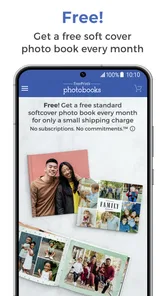
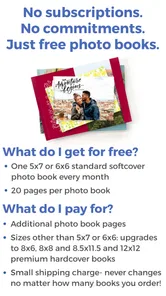
Now, let's talk money because I know you're wondering about the cost. One of the best features of FreePrints Photobooks is the pricing. You get one free photo book per month, and you only pay for shipping. Yes, you heard that right – just the shipping! This is perfect for someone like me who wants to print photos regularly without breaking the bank.
Even when a book itself is free, I’d treat the order as a purchase decision rather than assuming the whole process costs nothing: check the final order details and shipping charge before confirming, and consider whether the selected options suit your budget. That makes the offer easier to judge against local photo printing or other book services, where you may pay differently for the book, delivery, or extra choices. For me, the convenience is most appealing when I already have a clear set of photos and want a straightforward keepsake, not when I’m still experimenting with a large collection.
Who It Suits, and What to Keep in Mind
PlanetArt’s photography app is free to download, has an Everyone age rating, and has been available since March 28, 2016. Its current version is 3.7.3, and its average rating is 4.8 from around 49,000 ratings; more than a million installs suggest it has reached plenty of people looking for a simple way to print memories. Those figures tell me it is an established option, not that every order or design will suit every user.
I’d recommend it to people who mostly take photos on a phone, want a guided route from selecting pictures to ordering a book, and value convenience over fine-grained design control. It may be a poor fit if you prefer arranging every element on a large screen, want to make a one-off print rather than a bound collection, or don’t want to spend time checking image selection and page flow. The app is best when the goal is a personal, shareable album—not a substitute for a professional design workflow.
How the App Has Evolved, and What I’d Watch
Its release date and current version give useful context: this is not a brand-new experiment, and version 3.7.3 is the version to look for when checking compatibility. The long span since its 2016 release suggests the product has had time to develop, but a version number alone doesn’t tell me which features changed or how a particular update affects an existing project. I wouldn’t assume a redesign or a new editing tool without seeing it in the app itself.
For existing users, the sensible approach is to check that the app still opens and that a saved project appears as expected after an update, then review the finished pages before ordering. If you’re deciding whether to install it, focus on the workflow you need today rather than expecting a specific future feature: the key question is whether phone-based selection and layout choices are enough for your book. I’d watch for clear changes to editing, source selection, and order review, since those are the parts that most affect whether making a book feels convenient or fiddly.
Final Thoughts
In a world where everything is becoming digital, there's something undeniably special about holding a physical photo book in your hands. FreePrints Photobooks makes it incredibly simple to bring your cherished memories to life without any hassle. Whether you're looking to create a personal keepsake or need a thoughtful gift, this app is a fantastic choice. Give it a try, and you'll find yourself looking forward to creating your next book!
FreePrints Photobooks Frequently Asked Questions
Can I preview my photobook before placing an order?
It is sensible to review the finished design in the app before ordering, checking that the photos and their arrangement look the way you want. Creating a book involves selecting and organizing personal pictures, so a careful final look can help catch choices you would like to adjust. Review the order details shown in the app as well.
Can I save a photobook project and finish it later?
A photobook can take time to put together, especially when you are choosing pictures and arranging pages. The app’s creation flow is designed around making a personalized book, so you can work through the design before moving on to the order. If you plan to return later, follow the prompts in the app and check that your project is available when you reopen it.
Do I need an account to create a FreePrints Photobook?
Creating a photobook starts with choosing photos and arranging them in the app, so it helps to have the pictures you want to use accessible on your device or through a connected source. Before ordering, review the details shown in the app and follow its prompts to set up or sign in as needed. This keeps the design and order process straightforward.
What devices can run FreePrints Photobooks?
FreePrints Photobooks is a photography app for Android and iOS, and it requires an operating system version of 10 or later. Checking your device’s software version before downloading is a simple way to avoid compatibility problems. The app is free to install, so you can explore its photobook creation features once it is available on your device.
What is FreePrints Photobooks and how does it work?
FreePrints Photobooks is an app that allows users to create and order custom photo books directly from their smartphone. Users can select photos from their device, social media, or cloud storage, and arrange them into a personalized photobook. Each month, you can order one free 5x7 standard softcover photobook, paying only for shipping and handling. Additional books or upgrades may incur extra costs.
Pros
- High-quality photo prints.
- User-friendly interface.
- Affordable pricing.
- Variety of customization options.
- Fast delivery service.
Cons
- Limited editing tools.
- Occasional app crashes.
- Shipping fees apply.
- No digital download option.
- Limited to specific countries.