FreePrints Gifts
- 5.10K
- 4.8
- Installs
- 1.00M
- Price
- Free

Screenshots
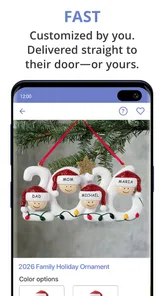
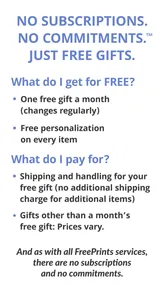
Analysis by Reviewed
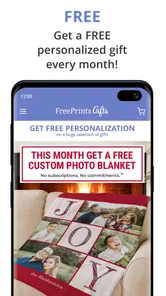
I like the idea of a photo app that helps me do more than keep memories buried in a camera roll. FreePrints Gifts is built around turning personal photos into made-to-order gifts, so the main appeal is choosing a picture and giving it a physical purpose. It’s a Photography app from PlanetArt, and its monthly custom-gift focus makes most sense if you enjoy making small, personal presents rather than simply ordering standard prints.
One photo, more than a print
The useful capability here is the move from image selection to a personalized object. A photo can become part of a gift for a birthday, holiday, or ordinary thank-you, which feels more considered than sending the same image in a message. I’d treat the app as a lightweight project tool: pick a moment with a clear subject, decide who the item is for, then choose a format that suits that person and the occasion.
That workflow also changes how I’d browse my gallery. Instead of scrolling randomly, I’d make a short album first—perhaps a few pictures from a family gathering or a pet’s best expressions. A small, deliberate selection makes it easier to compare crops and layouts, and it lowers the chance of rushing into an order with a photo that looks good on a phone but awkward on a product.
Making a photo gift feel personal
The app is free, has an Everyone age rating, and has reached over a million installs. Its average rating is 4.8 from around 39,000 ratings, with about 4,700 written reviews. Those figures suggest plenty of people use it, but I’d still judge a gift by the final preview and by whether the chosen image fits the item—not by popularity alone.
How I’d use it in a real week
Imagine I notice that a friend’s birthday is coming up while sorting photos after a weekend trip. I could pick one image that means something to both of us, try a crop that keeps the important faces or details in view, and check the preview before ordering. That last pause matters: a phone screen can hide how close a face is to an edge, while a product layout may frame it differently. I’d avoid leaving the decision until the day before the occasion, since a made-to-order gift needs time to be produced and delivered.
For recurring occasions, I’d also keep a shortlist of candidate photos instead of relying on memory when a birthday arrives. That makes the app more useful as a practical gifting habit, not just a last-minute novelty. It is especially appealing when the recipient already has plenty of ordinary gifts but would appreciate a familiar image made into something they can keep or use.
Where it differs from ordinary photo printing
A standard print service is the simpler choice when I only want loose photos or a straightforward set for an album. FreePrints Gifts is more compelling when the point is the object and its personal connection. Compared with making a collage or photo project in a general editing app, it brings the gift decision closer to the photo selection, though a dedicated design tool may give more control to someone who wants to fine-tune every detail.
More From Our News Desk
 Instagram
’s Power Comes From Its Place in Your Phone
A close look at how Instagram turns Meta’s reach, recommendation systems and everyday camera habits into durable platform power—and what that costs users.

 Gmail
Gmail in a Busy Inbox: Who Benefits Most?
From first account to crowded workday, Gmail earns its place through dependable search and flexible sorting—but its best fit depends on how much inbox maintenance you can tolerate.

 Prime Video
Switching to Prime Video: What Changes in Your Viewing Routine
Prime Video can make a compelling second home for streaming, but switching means learning a different catalog, rental layer, and route from browsing to playback.

 Universal TV Remote Control
 Works Best as a Reliable Backup
A phone remote earns its place through quick setup and reliable habits. Here is how to get more from Universal TV Remote Control—and where its limits show.

 Weather - By Xiaomi
Weather by Xiaomi Review: Clear at a Glance, Less Clear Up Close
Xiaomi’s weather app makes everyday forecasts quick to scan, but its calm surface can leave useful details and recovery paths harder to find than they should be.

 X
X Under Pressure: Can It Recover When Posting Goes Wrong?
A resilience-focused review of X, examining setup, mistaken posts, interruptions, weak connections, and the gaps that matter when recovery needs to be dependable.
Latest News



One practical tip is to choose the image for the item, not just for its emotional value. A wide group shot may suit one layout but lose important details in a tighter crop; a single clear portrait can be more reliable for a smaller personalized object. I’d also check text spelling and placement carefully in the preview. Those small checks can prevent a thoughtful idea from turning into a gift that feels rushed.
Who will get the most from it
I’d recommend trying it if you regularly give personal gifts, enjoy revisiting your photos, or want an easy route from a memory to a physical keepsake. The app is free to download, but the products themselves cost money, so I’d browse the available options and any checkout details before committing. It may not suit someone who wants only basic prints, needs a gift immediately, or prefers complete control over a design in a full editing program.
The current version is 72.12.0 and supports Android 10 or later. For me, the strongest reason to use it is not a promise that every photo will make a perfect gift; it’s the convenient bridge between a meaningful image and a personalized present. If I take a little care choosing the photo and checking the preview, that’s a useful and enjoyable way to make a digital memory feel more lasting.
Planning around the recipient and the image
I get better results when I start with the person rather than browsing products first. Think about whether they would actually use a personalized object, where it might live, and whether the photo would feel welcome in that setting. A picture that makes me laugh may be perfect for a close friend but less suitable for a relative who prefers understated gifts. That simple check helps keep personalization thoughtful instead of turning it into decoration for decoration’s sake.
It also helps to think about image quality before building a design. A sharply focused photo with good light is usually a safer starting point than a dark image or one enlarged from a small crop. I’d avoid choosing a picture where the important detail sits right at the edge, because different product shapes can leave less room than a phone preview suggests. If I’m uncertain, I’d compare a second candidate rather than trying to rescue a weak source image with edits.
A useful routine for occasions that sneak up
For a family birthday, I’d make a small collection of possible photos soon after the gathering, while I still remember the context and who appears in each one. Later, I can choose a picture that suits the recipient without digging through years of camera-roll clutter. This is a practical advantage of treating the app as part of a gifting routine: the meaningful moment and the gift idea are connected before time pressure takes over.
I’d still leave room for checking the order details and delivery timing before relying on any made-to-order item for a fixed date. A personalized gift is not the best backup when I have forgotten an occasion and need something today. In that situation, a local shop or a digital greeting is more dependable. The app works better when I can plan, review the design calmly, and allow the order to arrive without making the whole gift depend on a last-minute decision.
What to check before placing an order
The preview is not just a finishing touch; it is where I’d catch avoidable mistakes. I’d inspect faces, borders, text, and any part of the image that could be cropped by the product’s shape. For a group photo, I’d make sure nobody important is pushed out of the composition. If the design includes a message, I’d read it once for spelling and again for tone. A personal object can make a small typo unusually visible, so a deliberate final look is worth the extra moment.
I’d also compare the available product choices with the purpose of the gift rather than assuming the most eye-catching option is automatically best. A keepsake meant to be displayed has a different role from something the recipient might use every day. If the photo is the main point, I’d avoid a format that makes it feel cramped; if the message matters more, I’d favor a layout with enough space to keep it legible. The app’s value is in making this decision approachable, not in removing the need to make it.
How it sits among photo-app alternatives
Compared with a conventional printing app, this one is aimed at turning a selected memory into a gift rather than simply reproducing images on paper. That distinction matters: someone building an album or ordering a stack of prints may find a basic print workflow more direct. On the other hand, a general image editor can offer finer creative control but may leave the user to work out the gift format and ordering steps separately. I see FreePrints Gifts as a middle ground for people who want a personal result without starting a design project from scratch.
There is a trade-off in that convenience. A guided gift-oriented process is helpful when I want to make a straightforward choice, but it is not a replacement for a full design suite if I care about precise typography, complex compositions, or complete control over every detail. I’d use a specialist editor for a carefully art-directed project, and this app when the goal is a warm, recognizable photo gift with less setup.
Cost, timing, and practical expectations
Free to download does not mean every finished gift is free, so I would treat the app as a way to explore and prepare an order rather than assume there is no purchase involved. Before committing, I’d review the selected item and the checkout total, including any applicable delivery details shown there. That is the sensible way to judge whether a particular gift fits my budget; the right choice depends on the product and the occasion, not on the download price alone.
I’d also manage expectations about what a phone preview can tell me. It helps me check composition and wording, but it cannot make a weak image stronger or guarantee that every detail will look exactly as it does on a bright screen. Choosing a clear original photo and a suitable layout gives me a better starting point than relying on last-minute edits. For an important present, I’d keep the design simple enough that the photo remains the focus.
Who may prefer another approach
I would skip this app if I mainly want inexpensive, no-frills prints, need a present immediately, or enjoy building every part of a design from a blank canvas. It is also less useful if I rarely take or keep personal photos, since the central appeal depends on having an image that means something to the recipient. In those cases, a regular print service, a ready-made present, or a more flexible design tool may suit the job better.
For someone who likes personal gestures but does not want to spend an evening learning design software, the balance is more attractive. A parent could turn a favorite family moment into a keepsake; a pet owner could choose a clear portrait for a fellow animal lover; or friends could mark a trip with an image that carries a shared story. The strongest use is not making every occasion more elaborate. It is choosing one meaningful photo when a physical reminder will matter more than another generic item.
Unboxing the Features
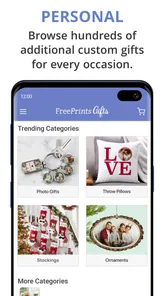
Okay, let's dive right in. The first thing that caught my attention was the sheer variety of options. From photo books to canvas prints, and personalized mugs to cushions, FreePrints Gifts offers a plethora of choices to satiate your creative cravings. The interface, my friends, is a breeze. It's like swiping through a well-organized photo album, intuitive and snappy.
Getting Started
Starting off is as simple as pie. You just download the app, sign up, and you're good to go. I loved how seamless the integration with my phone's gallery was. It literally took seconds to select the photos I wanted to print. The app even throws in a few editing tools to tweak your photos right there. Talk about convenience!
Personalization Galore
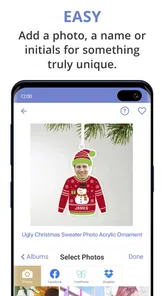
This is where the app truly shines. I mean, who wouldn't love a pillow with their dog's face on it or a mug with a picture from that unforgettable road trip? The personalization options are endless. You can add text, choose different layouts, and even play with colors. Plus, the preview feature is super handy to see how your masterpiece will look before hitting that order button.
Quality and Delivery
Now, the most crucial part—quality. I was a bit skeptical at first, but when my order arrived, it was like Christmas morning! The prints were vibrant, the materials used felt premium, and the attention to detail was impressive. And let's talk delivery. The app promises quick shipping, and boy, do they deliver! My order arrived well-packaged and faster than I anticipated.
The Verdict
All in all, FreePrints Gifts is a delightful app that brings your cherished moments to life. It's perfect for gifting or just treating yourself to a bit of nostalgia. While the app is free to download, you do pay for the products, but trust me, it's worth every penny. So, if you're looking to add a personal touch to your memories, give FreePrints Gifts a try. You won't regret it!
FreePrints Gifts Frequently Asked Questions
Can I use FreePrints Gifts without creating an account?
Before downloading, it is worth considering whether you are comfortable setting up and using an account for a shopping app. FreePrints Gifts is designed to take you from choosing personal photos through customizing a gift and placing an order, so you should be ready to provide the details needed to manage that process. Review the app’s prompts and privacy options before adding photos or ordering.
What kinds of occasions can I make gifts for with FreePrints Gifts?
The app is intended for personalized photo gifts for birthdays, holidays, and other occasions. That makes it useful when you want to give someone an item connected to a shared memory rather than a generic present. Browse the available gift choices and customization options in the app to see which ones suit your occasion and the photo you have in mind.
Who develops FreePrints Gifts, and what kind of app is it?
FreePrints Gifts is a photography app developed by PlanetArt. It is designed for turning personal photos into custom gifts, making it a practical choice if you want to use pictures from your phone for something more tangible than a digital album. The app is free to download, and its content rating is Everyone.
What is FreePrints Gifts and how does it work?
FreePrints Gifts is an app that allows users to create personalized gifts using their photos. Whether it's a mug, cushion, or other items, the app provides an easy and intuitive interface to choose your photos, customize the design, and order directly from your smartphone. It's a convenient way to turn your memories into tangible gifts.
Do I need to pay for using FreePrints Gifts?
While the app itself is free to download, users will need to pay for the products they order. The pricing varies based on the item and customization options selected. However, FreePrints Gifts often has promotions and discounts, making it an affordable option for personalized gifts.
Pros
- User-friendly interface for easy navigation.
- Wide variety of gift options available.
- High-quality printing for all gifts.
- Affordable pricing with frequent discounts.
- Quick delivery times for gifts.
Cons
- Limited customization options for gifts.
- Occasional app crashes reported by users.
- Shipping fees can be expensive.
- Customer service response can be slow.
- Requires account creation to place orders.