Fox Cleaner: Manager & Space
- 312.00
- 3.9
- Installs
- 10.00M
- Price
- Free

Screenshots


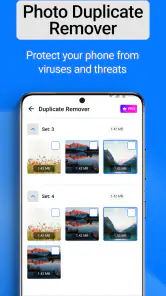

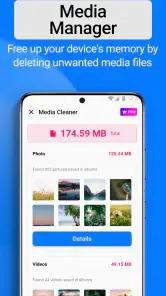


Analysis by Reviewed
Fox Cleaner: Manager & Space is an app designed to optimize your smartphone's performance by managing storage space and boosting overall speed. As someone who likes keeping a phone tidy, I think it makes the most sense for people who want a straightforward place to review cleanup and maintenance options, rather than a complicated dashboard full of settings.
What I would check before installing
Before relying on any cleaner, I ask myself what problem I am trying to solve: running short on storage, struggling to find files, or simply wanting a quick maintenance routine. Those are different jobs, and a cleanup tool is most useful when it helps with the one that is actually bothering you. Fox Cleaner is a free tools app from MefistoDev, rated for Everyone, and its appeal is its focus on common phone upkeep rather than specialist file work.
A useful habit is to look through suggested cleanup items before confirming anything. A file that looks disposable to an automated scan may still matter to you, especially if it is a download or a duplicate you kept deliberately. I would treat a cleaner as a way to find candidates for removal, not as a reason to delete everything it flags without checking.
Getting Started with Fox Cleaner
First things first, downloading and setting up Fox Cleaner is a breeze. It’s available on both Android and iOS, so no worries about compatibility here. Once installed, the app greets you with a slick interface that's both user-friendly and intuitive. I was up and running in no time, navigating through its features with ease.
Features that Stand Out
One of the standout features of Fox Cleaner is its ability to clear out junk files. I mean, who knew my phone was hoarding so much unnecessary data? With just a tap, I managed to free up a significant amount of space. It felt like giving my phone a fresh start, and the best part was that it didn’t affect any of my important files or apps.
Another feature that caught my attention was the app's performance booster. It promises to speed up your device by closing background apps that you’re not actively using. I noticed a marked improvement in my phone’s speed, especially when switching between apps.
Where it fits—and where it doesn’t
That quick-clean approach is handy when I have a specific reason to clear room, such as before downloading a large file or recording more video. I would still check what is selected before tapping through: freeing space is useful, but keeping a download I need later matters more than an impressive-looking cleanup result. For everyday file organization, a built-in file manager may be a better fit if you want to sort folders manually and decide exactly where each item belongs.
More From Our News Desk

Weather by Xiaomi Review: Clear at a Glance, Less Clear Up Close

X Under Pressure: Can It Recover When Posting Goes Wrong?

Clash of Clans Is Won Between the Battles

Android Auto Makes the Case for Quieter Car Software

MobiOffice: Transforming Mobile Productivity with Seamless Integration

EA SPORTS FC™ Mobile Soccer: Redefining Mobile Sports Gaming
The same distinction applies to speed. A cleaner can make it easier to close apps you are not using, but it cannot make older hardware behave like a newer phone. If a device remains slow after basic cleanup, I would look at storage pressure, troublesome apps, or the phone’s own settings before expecting a booster to solve everything. I also avoid repeatedly closing apps just for the sake of it; a quick intervention is more sensible than turning cleanup into a constant chore.
Why You Might Love It
What I really appreciate about Fox Cleaner is its simplicity. You don’t need to be a tech wizard to use it effectively. It’s perfect for anyone who wants to maintain their device without getting into the nitty-gritty of technical details. Plus, the app provides reminders and tips on how to keep your phone running smoothly, which is a nice touch.
Another thing worth mentioning is its battery-saving capabilities. By managing and optimizing battery-draining apps, Fox Cleaner helps in extending your phone’s battery life, which is always a win in my book.
A practical routine and the trade-off
In a realistic day-to-day routine, I would open the app when storage starts to feel tight, review the cleanup suggestions, and remove only items I recognize as safe to lose. Then I would use its app-management tools when I have a reason to reduce background activity, rather than running them on a schedule without thinking. That small pause is the main trade-off: automation saves effort, but a little personal review helps prevent accidental regret.
If your phone’s own storage screen already makes it easy to identify large files and unused apps, that built-in option may be enough and avoids adding another maintenance app. On the other hand, someone who wants cleanup, file management, and app security tools grouped in one place may prefer Fox Cleaner’s broader toolkit. The app has an average rating of around 3.9 from about 13,000 ratings, and it has passed over 10 million installs; that suggests a substantial audience, though it is still worth judging the workflow against your own needs.
Choosing the right cleanup style
I find it useful to separate three jobs that often get lumped together: reclaiming space, organizing files, and controlling apps. Fox Cleaner is most appealing when I want a guided pass across those kinds of maintenance tasks without opening several different screens. It is less compelling when the task is narrow and I already know exactly what to do. If I only need to remove one old download, the phone’s own file browser is usually the quicker route; if I want to review several housekeeping areas in one sitting, a combined utility has a clearer purpose.
That distinction also helps set expectations about what “cleaning” means. A scan can surface material that may be safe to remove, but it cannot know which personal files carry sentimental or practical value. I would use the results as a shortlist, especially around photos, downloads, and documents, rather than treating the scan as a verdict. A sensible first session is therefore more like an inspection than a one-tap purge: notice what the app identifies, remove familiar clutter, and leave uncertain items alone until you can check them elsewhere.
Small habits that make cleanup safer
One practical tip is to clean at a moment when I have time to review the choices, not while rushing out the door or trying to capture something important. Before a trip, for example, I might check available room before saving maps, tickets, or media for offline use. The useful order is to identify what is taking up space, decide what can genuinely go, and only then confirm removal. That avoids the common mistake of clearing a file just because it looks unfamiliar and then discovering I needed it later.
I would also avoid treating a performance tool as a daily ritual. If a phone is behaving normally, there is little reason to close apps repeatedly just to see a cleaner screen. I would instead open the app after a noticeable change—storage warnings, a phone that feels unusually burdened, or a planned download—and see whether its tools address that specific issue. That makes the app a practical option rather than another source of maintenance busywork.
Who is likely to get the most from it
Fox Cleaner is a better match for people who prefer guidance over manual folder-by-folder management. It may suit someone who shares a phone with family members and wants a simple routine for checking clutter, or a user who is comfortable reviewing suggestions but does not want to learn a specialist file utility. The Everyone content rating makes its intended audience broad, though I would still supervise cleanup on a shared device if another person’s downloads or saved files are involved.
I would be more cautious if you rely on precise control over every folder, regularly move files between locations, or need a detailed explanation of what each item does before removing it. In those cases, a dedicated file manager or the device’s built-in storage controls may feel more transparent. And if your only concern is a single app draining battery or slowing things down, investigating that app directly in the phone’s settings is a more focused first step than expecting a general cleaner to diagnose every cause.
What to expect from a combined toolkit
The convenience of having several maintenance tools together is real, but it comes with a trade-off: each tool may be less specialized than a standalone option. I would choose a combined app for a quick overview and straightforward actions, not because I expect it to replace every built-in control or a specialist utility. Its usefulness depends on whether the grouped workflow saves me effort; if I only use one part of it, a simpler native option may be easier to keep in my routine.
There is also a difference between managing apps and understanding why a phone feels slow. Closing apps you are not using can help with a short-term cleanup, but it does not identify every underlying cause. A full device, an app behaving badly, and aging hardware call for different responses. I would use the booster as a convenient action, then pay attention to whether the same problem returns. If it does, checking storage and the individual apps involved is more useful than repeating the same close-and-clean cycle.
How I would judge whether to keep it
After trying a cleanup tool, I would judge it by whether it makes a recurring task easier, not by how dramatic a scan result looks. Does it help me spot clutter I would otherwise miss? Can I review the proposed changes without feeling rushed? Do I actually use its app-management or security tools? Those are better questions than whether a phone feels instantly transformed after one pass. A useful utility should earn a place in the routine through convenience and confidence.
The app is free, which makes it easy to try as an option, but installing any utility still adds another app to manage. I would keep it only if its combined approach is more comfortable than the tools already on my phone. If I find myself opening it once, clearing a few items, and never needing its other functions, removing it later is a perfectly reasonable choice. The best setup is the one that solves the actual problem without making ordinary phone use feel more complicated.
Final Thoughts
All in all, Fox Cleaner: Manager & Space is a solid app for those looking to optimize their smartphone performance. It combines a clean design with tools that declutter and speed up your device. While it may not have all the bells and whistles of some other apps, its straightforward approach is its strength. If you’re in the market for a reliable phone manager, this app is worth checking out. Its current version is 1.29, and it suits people who want an approachable set of maintenance tools more than those seeking detailed manual control.
So, there you have it! If your phone’s been feeling sluggish lately, this might just be the solution you’ve been searching for. Happy cleaning! My recommendation is to try it when you have a clear storage or maintenance task in mind, then keep it only if its routine feels more convenient than your phone’s built-in tools. If you prefer managing every file yourself, or your device is already running comfortably, you may not need an extra cleaner at all.
Fox Cleaner: Manager & Space Frequently Asked Questions
Is Fox Cleaner: Manager & Space free to download, and what age group is it for?
Fox Cleaner: Manager & Space is free to download and is listed for Everyone, so it is intended for a broad audience. Its tools focus on cleaning a device, managing files, and securing apps. As with any utility, review the permissions and options shown on your device before using individual features, particularly if you are unsure how a setting may affect your files or apps.
What features does Fox Cleaner: Manager & Space offer?
Fox Cleaner: Manager & Space is designed to optimize your device's performance by clearing cache, managing files, and freeing up space. It offers features like junk file cleaning, memory boosting, and app management to help users maintain a smooth and efficient device operation. Additionally, it can monitor system health to prevent overheating and improve battery life.
How does Fox Cleaner ensure the privacy and security of my data?
Fox Cleaner prioritizes user privacy and data security by using advanced encryption methods to protect your information. It ensures that none of your personal data is accessed or shared without your consent. Regular updates and security patches are also provided to safeguard against vulnerabilities and threats.
Is Fox Cleaner compatible with all Android devices?
Fox Cleaner: Manager & Space is compatible with most Android devices running on Android 5.0 and above. It is optimized to work on a wide range of smartphones and tablets, ensuring that users can enjoy its full range of features regardless of their device's make or model. However, it’s always recommended to check the app's compatibility with your device on the app store before downloading.
Does Fox Cleaner have any in-app purchases or ads?
Yes, Fox Cleaner: Manager & Space offers in-app purchases that allow users to unlock premium features for enhanced functionality. While the app is free to download and use, it does contain advertisements. Purchasing the premium version can remove ads and provide a more seamless user experience.
Pros
- Efficient storage management
- User-friendly interface
- Fast cleaning process
- Supports multiple file formats
- Regular updates
Cons
- Contains ads
- Limited features in free version
- May delete important files
- Requires device permissions
- Occasional crashes
- Category
- Tools
- Version
- 1.29








