

FlyTrack - Flight Tracker
- 3.00
- 4.7
- Installs
- 100.00K
- Price
- Free

Screenshots



Analysis by Reviewed
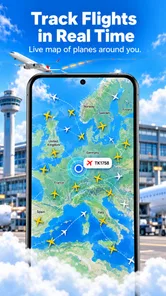
When I want a quick view of a flight without opening a full airline website, I prefer a focused tracker that gets me to the important information quickly. FlyTrack - Flight Tracker takes that approach. It is a free travel and local app from Mor Tosbaa Mobile, built around live flight tracking, airport status checks, and route details across the world. After spending time with it, I see it as a practical companion for travelers, airport pickups, and anyone who likes to keep an eye on a journey without juggling several travel tools.
The first thing I noticed is that FlyTrack is easier to understand than many travel apps that try to combine bookings, hotels, loyalty programs, maps, and destination guides in one place. Its purpose is narrower, and that is a strength when I only need flight information. The experience feels most useful when I already know the flight or airport I want to check and need a clear status view rather than a complete trip-management system.
How FlyTrack fits into real travel days
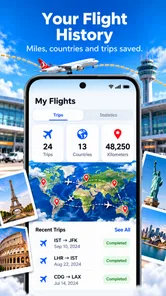
In everyday use, I would reach for FlyTrack in three situations. Before leaving for the airport, I can check whether the flight is still operating as expected. While waiting for someone to arrive, I can use the flight and airport information to avoid guessing from a scheduled arrival time. During a connection or a long travel day, the route view gives me a convenient way to understand where a flight is going and how the journey is progressing.
A realistic example is picking up a friend after an evening flight. Instead of asking the traveler to send repeated messages while taxiing, I can check the flight myself and keep an eye on the airport status. If the timing changes, I have a better chance of leaving home at the right moment. That does not remove the need to confirm details with the airline, but it can reduce unnecessary waiting at the terminal.
I also found the global route perspective useful for planning conversations about travel. A route is more informative than a departure and arrival label alone, especially when I am comparing possible connections or explaining a journey to someone who is not traveling. This is one of the less obvious benefits of a tracker: it can help organize my understanding of a trip even before I make decisions about transport, accommodation, or airport transfers.
The app is aimed at a broad audience, and its Everyone content rating makes it suitable for general household use. I would recommend it to frequent flyers, occasional travelers, families monitoring a relative’s journey, and people who regularly collect passengers from airports. It is also a reasonable choice for users who do not want a large travel platform taking over their planning process.
That focus also defines who should look elsewhere. If I need to buy tickets, manage a reservation, store boarding passes, compare fares, or build a complete itinerary, FlyTrack is not a substitute for an airline app or a full travel organizer. Its value comes from tracking and checking, not from replacing every part of the travel process.
More From Our News Desk

 Weather - By Xiaomi
Weather by Xiaomi Review: Clear at a Glance, Less Clear Up Close
Xiaomi’s weather app makes everyday forecasts quick to scan, but its calm surface can leave useful details and recovery paths harder to find than they should be.

 X
XX Under Pressure: Can It Recover When Posting Goes Wrong?
A resilience-focused review of X, examining setup, mistaken posts, interruptions, weak connections, and the gaps that matter when recovery needs to be dependable.

 Clash of Clans
Clash of Clans Is Won Between the Battles
Its raids are quick; its community is a long-term project of coordination, teaching, rivalry, and shared responsibility—with all the friction that entails.

 Android Auto
Android Auto Makes the Case for Quieter Car Software
The car interface is no longer judged by how much it can do, but by how quietly it helps. Android Auto shows what drivers now expect—and what still gets in the way.

 MobiOffice: Word, Sheets, PDF
MobiOffice: Transforming Mobile Productivity with Seamless Integration
MobiOffice: Word, Sheets, PDF is redefining mobile productivity with a surprising blend of functionality and innovation.

 EA SPORTS FC Soccer Mobile 26
EA SPORTS FC™ Mobile Soccer: Redefining Mobile Sports Gaming
Dive into EA SPORTS FC™ Mobile Soccer, where immersive gameplay and strategic depth transform mobile sports gaming.
Latest News



A focused interface rather than a complete travel hub
One advantage of a dedicated flight tool is that I can keep my attention on operational information. When a trip is already booked, I do not need inspirational destination content or a long list of hotel suggestions. I need to know what is happening with the flight and whether the airport situation changes the next step of my day.
That simplicity can make the app more comfortable for relatives who are not experienced travelers. Someone waiting at home does not necessarily want to learn a complex booking platform. A straightforward tracker can be easier to use when the only task is checking a route or following a flight.
At the same time, a focused design means I need to bring some information from elsewhere. I would still keep the airline confirmation available, especially for terminal instructions, baggage rules, check-in requirements, and official disruption notices. The best workflow is to use FlyTrack as a monitoring layer, not as the sole authority for every decision connected to a flight.
What the current release tells me about the product
The current version is 1.2.0, and the app was released on Jul 1, 2026. Those details place FlyTrack in an early stage of its product life rather than suggesting a long-established travel platform with years of visible evolution. I see that as both interesting and important: the app already has a clear purpose, but its long-term direction will depend on how consistently Mor Tosbaa Mobile improves the experience.
The current release supports the central promise well enough for someone who wants live flight information, airport status, and route visibility in one travel-oriented app. I would not judge it by the standards of a mature airline ecosystem. Instead, I would ask whether it saves time during the specific moments when flight uncertainty matters. For that job, the focused feature set makes sense.
The app has attracted an average rating of 4.6 from around 208 ratings, and it has passed 100K installs. Those figures suggest that FlyTrack has found an audience, although I would still treat it as a growing product rather than assume it has the depth or polish of the biggest names in travel. The small review count also makes me pay more attention to my own workflow: a strong rating is encouraging, but it should not replace checking whether the app matches my particular travel habits.
Compatibility is another practical point. FlyTrack runs on Android 7.0 and later, which gives it a wide reach across older and newer Android devices. That matters if I am installing it on a spare phone used for airport pickups or recommending it to a family member who does not regularly upgrade hardware. I would still expect the smoothness of the experience to depend on the individual phone and network connection.
Useful habits that make tracking less stressful
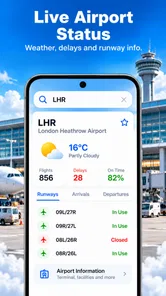
My first tip is to check the airport context before focusing only on the aircraft. A flight can appear to be progressing normally while the traveler still faces a practical issue at the airport. Looking at airport status alongside the route gives a broader picture and helps me avoid treating one flight indicator as the entire story.
My second tip is to use the route view as a planning aid before departure, not only as a map to watch afterward. If I am coordinating a pickup, I can think about the likely sequence of landing, walking through the terminal, collecting luggage, and reaching the meeting point. The tracker cannot perform those steps for me, but the route and status information can help me make a less rushed plan.
My third tip is to keep the airline’s official communication in parallel. If I receive a gate change, cancellation notice, or check-in instruction from the carrier, I would act on that official message first and use FlyTrack to maintain situational awareness. This two-source approach is especially sensible when a trip is time-sensitive, because a tracker is helpful for visibility but does not replace the airline’s direct instructions.
A fourth useful habit is to avoid checking constantly when I am waiting for someone. I can look at the status before leaving, again while traveling to the airport, and once more near the expected arrival window. That is more useful than repeatedly refreshing without a clear decision attached to each check. The app works best when its information supports an action, such as delaying departure or confirming that it is time to head inside.
How it compares with airline apps and broader alternatives
Compared with an airline’s own app, FlyTrack is more neutral. I can use it when I am watching several carriers or checking a flight that belongs to someone else. An airline app remains better for booking-specific tasks, account details, boarding documents, and messages sent directly to the passenger. I would choose FlyTrack for broad visibility and the airline app for official trip management.
Compared with a large travel organizer, FlyTrack is less ambitious but potentially less distracting. A travel organizer may be the better option if I need one place for trains, hotels, reservations, expenses, and calendar details. FlyTrack makes more sense when flights are the main concern and I want a lighter tool that does not require me to build an entire itinerary.
Compared with simply searching the web for a flight, the app offers a more dedicated routine. A web search can be perfectly adequate for a single quick check, especially if I do not want another app installed. FlyTrack becomes more convenient when I check flights repeatedly, monitor airport conditions, or want route information gathered within a travel-specific interface.
The trade-off is that a dedicated app may ask me to develop one more habit. If I only fly once every few years, opening a search engine may be faster than remembering a tracker. For regular travelers and people who often collect passengers, the repeated convenience is more persuasive.
Where the experience still needs care
The main limitation is not that FlyTrack lacks a long list of travel extras; it is that flight information is only valuable when I interpret it correctly. A live status can help me understand the situation, but it should not encourage overconfidence about exact pickup timing. Airports involve boarding, taxiing, baggage collection, customs, and traffic, so I still need a buffer around any displayed arrival information.
I also would not use FlyTrack alone for a critical connection. If missing the next flight would create a serious problem, I would confirm the itinerary with the airline and check the airport’s own guidance. The app is useful for awareness, but high-stakes travel deserves redundancy.
The free download is appealing, but in-app purchases range from $8.99 to $59.99 per item. That makes it important for me to look carefully at any purchase screen before confirming anything. A free starting point does not automatically mean every part of the experience is included at no cost, so I would decide whether optional additions are genuinely useful for my habits rather than buying simply because I am traveling.
That pricing range may suit a user who wants extra value from a regular tracking tool, but it could feel excessive to someone who checks one flight occasionally. My own approach would be to use the free experience first, understand how well it fits my routine, and only then consider whether a paid item solves a problem I actually have.
What existing users can expect from the product’s direction
For someone already using FlyTrack, the current release suggests a product centered on refining its core rather than changing into an unrelated travel platform. I would watch for improvements that make live information easier to interpret, airport status more actionable, and route views more useful during real journeys. Those areas matter more to me than adding unrelated booking features.
For a new user, the best way to evaluate it is to test it against a real upcoming journey. Check a familiar airport, look up a route you understand, and see whether the presentation helps you make a decision faster. That small trial is more revealing than simply reading a feature list because the app’s value depends on clarity at the moment I need it.
I would also pay attention to how the app handles the difference between scheduled information and changing travel conditions. A mature tracker should help users understand what has changed and what action is sensible, rather than merely presenting more labels. That is the product evolution I would most want to see as FlyTrack develops.
My recommendation after using it
FlyTrack - Flight Tracker is a sensible free choice for Android users who want a dedicated way to follow flights, inspect airport status, and understand routes without entering a full travel-management ecosystem. Its strongest quality is its clear purpose. I can imagine keeping it installed for airport pickups, family travel, and journeys where a quick status check is more useful than opening several separate services.
I would recommend it most strongly to people who monitor flights regularly or need a neutral tool that is not tied to one airline. I would be more cautious for occasional travelers, users who need booking and boarding-pass functions, and anyone expecting the app to replace official airline communication. Those users may get better results from an airline app or a broader travel organizer.
Overall, I see FlyTrack as a promising, focused travel utility rather than a complete travel command center. Its current version has a practical foundation, broad device compatibility, and a clear everyday role. Use it to improve awareness, not to eliminate sensible travel checks. With that expectation, it can make flight days calmer and coordination easier, while leaving reservations and official instructions where they belong.
FlyTrack - Flight Tracker Frequently Asked Questions
Is FlyTrack - Flight Tracker suitable for first-time users?
FlyTrack is a travel and local app focused on flight tracking, airport status, and route details around the world. Its purpose is straightforward: look up a flight and use the available information to follow its journey. The app is rated for Everyone, making it suitable for a broad audience, including travelers and people coordinating airport pickups.
What is FlyTrack - Flight Tracker used for?
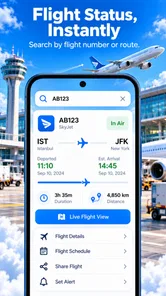
FlyTrack - Flight Tracker is designed to help travelers monitor flight information in one place. After entering a flight number or route, users can typically check departure and arrival times, airport details, delays, terminal or gate updates when available, and broader flight status information. It can be useful before leaving for the airport, while waiting for a connection, or when tracking a friend or family member’s journey.
Does FlyTrack provide real-time flight status and delay notifications?
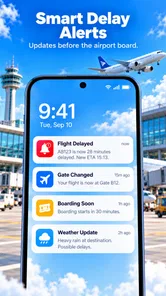
The app is intended to provide updated flight-status information, including schedule changes, delays, cancellations, and arrival updates, depending on the data supplied by its aviation information providers. Accuracy and speed can vary because airlines and airports may publish changes at different times. Users should still confirm important information through the airline or airport, especially before traveling or making time-sensitive arrangements.
Can I track someone else’s flight with FlyTrack?
Yes, a flight-tracking app such as FlyTrack can generally be used to follow another person’s journey as long as you know the relevant flight number, airline, route, or travel date. This is convenient for airport pickups, business travel coordination, and monitoring family members’ arrivals. Tracking availability may depend on whether the flight is listed in the app’s data service.
Does FlyTrack require an internet connection or location permission?
An internet connection is normally required to search for flights and receive current status updates because the app must retrieve information from online servers. Location permission may be optional rather than essential, depending on the version and features you use. If enabled, location access can help identify nearby airports or personalize results, but you should review permissions and disable access if those features are not needed.
Pros
- Tracks flights in real time with regularly updated status information.
- Supports airport searches
- making it useful for planning departures and arrivals.
- Shows terminal and gate details when the airline provides them.
- Flight alerts can help you monitor delays
- cancellations
- and schedule changes.
- Clean layout makes essential flight information quick to find.
Cons
- Some tracking details may be delayed or unavailable for certain airlines.
- Several advanced features may require a paid subscription.
- Accuracy depends on data supplied by airlines and airport systems.
- Frequent travelers may find notification settings less customizable than expected.
- The app can use extra battery and data when live tracking is enabled.













