

Collector’s Helper - Coin Lens
- 109.00
- 4.2
- Installs
- 100.00K
- Price
- Free

Screenshots
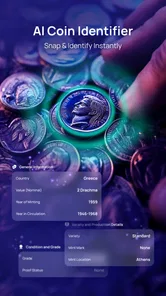
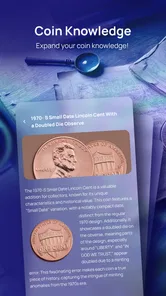

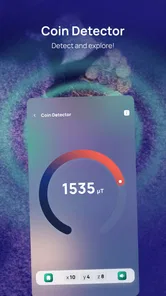
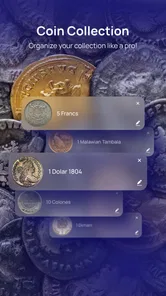



Analysis by Reviewed
Collector’s Helper - Coin Lens is the kind of finance app I would open with a small box of inherited coins on the table, rather than with the expectation of replacing a professional appraisal. Its purpose is straightforward: help identify coins from around the world and give curious owners a starting point for learning about what they have. I found that focus useful because it turns an unfamiliar object into something I can investigate without immediately searching through scattered websites.
The app is free to install, although it includes optional in-app purchases ranging from around five dollars to around thirty dollars per item. That makes the first step easy for casual users, while also giving more committed collectors a reason to look carefully at what is included before spending anything. It is aimed at everyone, and the relatively low entry barrier suits families, beginners, students, and anyone sorting through coins found in a drawer.
What matters most to me here is not the promise of instant certainty. Coin identification can be difficult when lettering is worn, a design is partly hidden, or several countries have issued similar-looking pieces. I see this app as a practical visual assistant and learning companion. It can help me decide what to research next, but I would not use a result alone to make a sale, settle an inheritance, or declare a coin rare.
How Coin Lens fits into real collecting
I use coin collecting as a mix of curiosity and careful record-keeping, so the most useful tools are the ones that help me move from “What is this?” to a sensible next step. In this section, I look at how Coin Lens can fit into that routine without asking it to settle questions that need specialist evidence. A repeatable first pass also makes it easier to spot which coins deserve closer attention.
A useful first pass for an unfamiliar coin
My favorite use case is the first pass through a mixed collection. I can separate coins by apparent country, language, symbol, or period, then use the app to investigate the pieces that still seem unclear. That workflow is much less tiring than trying to read every inscription manually or opening several browser tabs for each object.
The app makes the most sense when I treat identification as a sequence rather than a single tap. I would begin with the clearest side of the coin, check whether the result matches the visible script and imagery, then compare the other side before accepting the suggestion. This simple habit is important because a photograph can contain enough visual information for a plausible match without being clear enough for a definitive one.
For a parent or teacher, the educational value is easy to see. A child can start with a coin’s picture and then ask why a particular person, building, animal, or national emblem appears on it. For a traveler, the app can turn leftover foreign currency into a small history lesson. For a new collector, it offers a gentler starting point than specialist catalogues filled with abbreviations and reference codes.
More From Our News Desk

 Weather - By Xiaomi
Weather by Xiaomi Review: Clear at a Glance, Less Clear Up Close
Xiaomi’s weather app makes everyday forecasts quick to scan, but its calm surface can leave useful details and recovery paths harder to find than they should be.

 X
XX Under Pressure: Can It Recover When Posting Goes Wrong?
A resilience-focused review of X, examining setup, mistaken posts, interruptions, weak connections, and the gaps that matter when recovery needs to be dependable.

 Clash of Clans
Clash of Clans Is Won Between the Battles
Its raids are quick; its community is a long-term project of coordination, teaching, rivalry, and shared responsibility—with all the friction that entails.

 Android Auto
Android Auto Makes the Case for Quieter Car Software
The car interface is no longer judged by how much it can do, but by how quietly it helps. Android Auto shows what drivers now expect—and what still gets in the way.

 MobiOffice: Word, Sheets, PDF
MobiOffice: Transforming Mobile Productivity with Seamless Integration
MobiOffice: Word, Sheets, PDF is redefining mobile productivity with a surprising blend of functionality and innovation.

 EA SPORTS FC Soccer Mobile 26
EA SPORTS FC™ Mobile Soccer: Redefining Mobile Sports Gaming
Dive into EA SPORTS FC™ Mobile Soccer, where immersive gameplay and strategic depth transform mobile sports gaming.
Latest News



I also think it works well for organizing attention. Instead of wondering whether every old-looking coin deserves expert treatment, I can use the app to flag pieces that have unusual designs, unfamiliar scripts, or details worth researching further. That does not establish value, but it helps me spend time where it is most likely to be worthwhile.
Where it is stronger than ordinary searching
The usual alternative is a web search based on whatever words I can decipher. That approach is fine when a coin has a readable country name or a distinctive date, but it becomes frustrating when the lettering is tiny or the language is unfamiliar. A visual coin tool reduces the need to describe the object perfectly before research can begin.
It is also more convenient than browsing a general image search. Search results often mix genuine examples with unrelated coins, modern replicas, marketplace listings, and photographs taken from awkward angles. A dedicated coin app keeps my attention on identification and learning instead of making me filter a broad stream of results.
Specialist catalogues remain better for advanced work. Experienced collectors may need mint marks, varieties, edge lettering, die differences, grading terminology, and carefully documented references. Coin Lens is more approachable than those tools, but that accessibility also tells me where its role ends. It is a front door to the subject, not a complete replacement for numismatic references or a qualified expert.
Three habits that make the results more useful
First, I would photograph or inspect coins one at a time rather than presenting a crowded pile. Separating the objects reduces visual confusion and makes it easier to compare the suggested identity with the actual coin. A plain, uncluttered background is also more practical than a reflective surface or patterned cloth.
Second, I would rotate the coin and inspect both sides before drawing a conclusion. The date, denomination, mint mark, or national emblem may appear on the side that was not initially visible. This is a small step, but it prevents a common mistake: accepting a visually similar result before checking the information that distinguishes one issue from another.
Third, I would keep a short note beside each physical coin. I would record the app’s suggestion, the visible date, the apparent country, and any uncertainty. That creates a useful trail for later comparison and stops me from confusing several similar coins after a long sorting session. It also makes a future conversation with a collector or appraiser more productive.
Trust begins with realistic expectations
The developer is Mor Tosbaa Mobile, and the app has built an average rating of 4.2 from around one thousand ratings, with more than one hundred written reviews. It has also passed the threshold of over one hundred thousand installs. Those figures suggest that the product has attracted a meaningful audience, but popularity is not the same thing as proof that every identification is correct.
I would judge trust here through the choices visible while using the app, not through assumptions about what happens behind the scenes. Before granting any device access, I would read the permission prompt carefully and consider whether the requested access matches the action I am trying to perform. If I only want to inspect a coin image, I prefer the narrowest option offered by the operating system rather than broad access to unrelated personal content.
I would also pay attention to whether the app lets me choose an existing image, capture a new one, or continue without sharing more than necessary. Those choices matter because a coin photograph can accidentally include a table, an address label, family papers, or other objects in the background. Cropping the image first is a simple privacy habit that costs little and gives me more control.
Data-sensitive moments deserve care
The most sensitive moment is not the coin itself; it is the image and everything around it. A collection may have sentimental or financial importance, and a photograph may reveal more than intended. I would avoid including receipts, storage labels, personal documents, or a full room when a close crop of the coin is enough.
I would be especially careful when handling inherited collections. A picture of a coin beside an envelope bearing a name or address can disclose personal information without the user noticing. My preferred workflow is to place the coin on a neutral surface, remove identifying material, and review the image before continuing. This is useful whether the app processes images locally or sends them elsewhere, because good privacy practice starts before the image leaves the phone.
I would not upload photographs of a valuable collection casually or use the app as a public inventory unless I had deliberately decided that the convenience was worth the exposure. The safest approach is to test the basic experience with an ordinary coin first, inspect the visible choices, and only then decide whether the app belongs in a more personal collecting routine.
Account controls are another point I would check during setup. If the app presents sign-in, subscription, or purchase screens, I would pause and read each option rather than tapping through quickly. A free installation does not mean every useful function is free, and the optional purchase range makes it sensible to confirm what a payment unlocks before approving it.
Keeping control over purchases and access
The current version is 1.6, and it supports devices running Android 7.0 or later. That broad compatibility makes it accessible to people using older phones, but I would still keep the operating system and app store account protected with the normal security settings. On a shared family device, purchase confirmation is particularly important so that a child exploring coins cannot approve an unwanted transaction.
I would treat the free tier as a trial of the workflow, not as a promise that every advanced action will remain available without payment. Before buying anything, I would identify whether the feature solves a real problem in my collection. If I only have a handful of souvenir coins, paying may not be worthwhile. If I regularly sort mixed foreign currency and the paid option saves repeated research, the cost may be easier to justify.
I also prefer to keep my own notes outside the app. A simple spreadsheet, notebook, or folder of cropped images gives me a backup that I control. It means my research does not depend entirely on continued access to one application, and it helps me compare the app’s suggestions with later information from books, museums, collector communities, or professional services.
Who will appreciate it, and who should skip it?
I would recommend Coin Lens to beginners who want a friendly way to identify unfamiliar coins, families looking for an educational activity, travelers with leftover currency, and casual collectors beginning to sort a box of mixed pieces. It is also useful for someone who knows enough to verify a result but wants to speed up the initial search.
I would be more cautious about recommending it to a collector who already works with specialist catalogues or needs exact variety identification. If the difference between two coins depends on a tiny mint mark, edge detail, die crack, or condition grade, a general visual suggestion is unlikely to be the final tool I would trust. In that situation, a specialist reference or human expert is the better choice.
I would also skip it as a valuation shortcut. Identification and value are separate questions. Even when the country and denomination are correct, condition, authenticity, rarity, demand, and exact issue can change the outcome. Anyone planning to sell an expensive-looking coin should use the app only to prepare questions, then seek independent confirmation before making a financial decision.
A realistic afternoon with the app
Imagine finding a jar of coins after moving house. I would first spread them out, remove anything that is obviously a token or damaged beyond recognition, and group the rest by apparent design. Then I would examine the clearest examples individually, checking the suggested country against the script, symbols, date, and denomination.
For coins that produce uncertain or conflicting results, I would not repeatedly accept the first answer. I would improve the image, turn the coin over, and compare distinctive details. I would mark those pieces for later research instead of allowing uncertainty to become false confidence. After the first pass, I might have a manageable shortlist for a collector’s forum, a reference book, or an appraisal appointment.
This workflow shows the app’s practical value: it reduces the amount of unstructured searching. It does not magically transform a jar into a priced collection, but it can turn a confusing pile into labeled groups and sensible next steps. That is a modest benefit, yet it is exactly the kind of benefit I would use repeatedly.
My cautious verdict
Collector’s Helper - Coin Lens is a sensible starting point for visual coin identification and general learning. I like that it gives beginners a direct way into a subject that can otherwise feel intimidating, and I can see genuine value in using it to sort, compare, and decide what deserves deeper research.
My recommendation comes with clear boundaries. I would verify important results, crop photographs carefully, review permission and purchase choices, and avoid treating the app as a valuation service. The free entry point is appealing, while the optional purchases mean I would test the everyday workflow before spending money.
For me, the strongest reason to try it is not the idea of instant answers. It is the chance to make the first stage of coin research quicker and more approachable while keeping final judgment in my own hands. Use it as a careful identification assistant, not as the sole authority behind a financial decision. With that mindset, it is a worthwhile tool for curious newcomers and casual collectors, while serious numismatists should continue to rely on specialist references and expert verification.
Collector’s Helper - Coin Lens Frequently Asked Questions
Does Collector’s Helper - Coin Lens work on my Android device?
Collector’s Helper - Coin Lens is available for Android devices running Android 7.0 or later. Before downloading, check your device’s operating system version and make sure there is enough space for the app. It is a free app, with optional in-app purchases ranging from $4.99 to $29.99 per item, so review any purchase details before confirming.
What is Collector’s Helper - Coin Lens used for?
Collector’s Helper - Coin Lens is designed to help users identify and organize coins using their smartphone camera. You can photograph a coin, review visual details, and compare the result with available reference information. It can be useful for beginners, collectors, and people sorting inherited or recently discovered coins, although it should be treated as a helpful guide rather than a guaranteed professional appraisal.
How accurate is the coin identification feature?
The app can provide useful suggestions when the coin is photographed clearly and enough identifying details are visible, such as the date, country, denomination, and design. However, image-based recognition is not perfect. Poor lighting, reflections, worn surfaces, unusual varieties, counterfeit pieces, or coins photographed at an angle may lead to incorrect results. Always verify important findings with a reputable catalog, dealer, or numismatic expert.
What should I do to get the best results when scanning a coin?
Place the coin on a plain, contrasting surface and use bright, even lighting without strong reflections or shadows. Keep the camera lens clean, hold the phone steadily, and capture both sides of the coin whenever possible. Avoid blurry images and extreme angles. If the coin is damaged or heavily worn, take several photographs and compare the app’s suggestions instead of relying on a single scan.
Can Collector’s Helper - Coin Lens tell me how much a coin is worth?
The app may help you research a coin’s identity and discover information that can influence its potential value, but an estimated result should not be considered a formal valuation. A coin’s price depends on authenticity, rarity, mint mark, condition, demand, and sometimes errors or provenance. For valuable coins, confirm the details through current market listings, auction records, or an experienced coin dealer.
Pros
- Identifies many coin designs quickly using the phone camera.
- Useful for organizing a collection without carrying reference books.
- Helps reveal basic coin details that may be easy to overlook.
- Simple interface makes it approachable for beginners.
- Convenient for checking coins while shopping or visiting markets.
Cons
- Recognition accuracy can drop with worn
- dirty
- or poorly lit coins.
- Rare varieties may require manual verification from specialist sources.
- Some features may depend on an internet connection.
- Camera results are not a substitute for a professional valuation.
- The app may not support every country
- mint
- or commemorative issue.













