Fly Browser-Search & Private
- 1.40K
- 4.6
- Installs
- 10.00M
- Price
- Free

Screenshots


Analysis by Reviewed
When I want a quick search or a separate place to open a page, I don’t always need the full set of tools in my main browser. I find Fly Browser-Search & Private most useful as a simple alternative for everyday searches, quick reading, and opening pages without carrying a long trail of activity into later browsing. It is a free tools app from MUCKRAKER MEDIA, and its current version is 2.1.0. The practical question is whether its straightforward approach suits your habits, not whether it replaces every feature in a full-sized browser.
Where it fits into a daily routine
For example, if I’m checking a recipe while shopping, comparing a few product pages, or looking up a one-off question on a shared device, a private browsing session can help keep that activity separate from ordinary history. I’d still avoid treating private mode as anonymity: it can limit traces kept in the browser, but it does not make a person invisible to websites or networks. That distinction matters whenever privacy is the main reason for switching.
A useful way to decide whether this separation helps is to think about the task before opening the browser. A quick search for a store’s opening hours, a page you need to show someone else, or a one-time comparison is easy to keep distinct from your longer-term browsing. For work involving confidential accounts or personal records, though, I would not assume that private browsing alone is enough protection. I’d follow the security practices required for that work and choose tools that meet them.
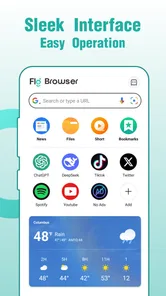
Its light, uncluttered feel is also appealing if you want a browser that doesn’t ask you to learn a complicated set of controls before you can search. On the other hand, people who depend on extensive customization, tightly integrated account syncing, or specialist productivity tools should compare it with their current browser before moving over. A simpler interface is a benefit only when it includes the controls you actually rely on.
Choosing it over familiar browsers
Compared with a mainstream browser that bundles bookmarks, account sync, extensions, and other connected services, Fly Browser comes across as a more focused option for quick, private-minded browsing. That can make it a handy secondary browser: keep your usual app for work, saved logins, and long-running research, and use Fly for searches you want to keep apart. The trade-off is managing two apps and remembering which one holds a page or saved item.
That two-browser arrangement is not automatically convenient. If you frequently move between devices, rely on a carefully organized bookmark collection, or expect a page opened on your phone to appear on a laptop, one integrated browser may save more time. I’d treat Fly as a companion when separation is genuinely useful, rather than adding another app just because it has a privacy-minded identity.
If you try that split, make it deliberate. Use Fly for a specific kind of session rather than moving all your browsing at once, then check whether its navigation and page handling work for the sites you visit most. That small trial is more useful than judging a browser from one fast search, especially if your regular routine includes forms, media, or repeated visits to the same pages.
More From Our News Desk

 Lark Player:Music Player & MP3
Switching to Lark Player: A Better Fit for Music Stored on Your Phone?
Lark Player makes sense if your music already lives on your phone. Here is what changes, what does not transfer by assumption, and how to test the switch without regret.

 Tile Master® - Matching Game
Tile Master Finds Its Place in the Gaps of a Noisy Phone
OS changes rarely transform a tile puzzle, but they reshape the small rituals around it. Tile Master’s appeal lies in how well its brief, tactile rounds fit the modern phone.

 Google Docs
 Shows What Mobile Writing Still Gets Wrong
Google Docs still makes a strong case for the shared document, but its real significance is how it exposes the gap between cloud convenience and genuinely capable mobile work.

 YouTube Studio
 Is Becoming a Creator’s Daily Control Room
As publishing turns into a daily, data-led habit, YouTube Studio is becoming the control room creators reach for between uploads—not another tool for making videos.

 Tiles Hop Music & Ball Game
Tiles Hop Review: When the Beat Is Clear, Every Miss Counts
Tiles Hop turns a simple bouncing-ball premise into a sharp test of timing. Its best design is immediate and readable; its weakest moments come when recovery feels less clear than the beat.

 Piano - Music Keyboard & Tiles
: Inviting Rhythm, Unproven Recovery
A tile-tapping piano game lives or dies by timing. This resilience-focused review separates what its format promises from what players still need to verify.
Latest News



For a practical trial, choose a few tasks that resemble your real day: search for an item, open several pages to compare it, return to the page you were reading, and try a form you use often. Pay attention not just to whether each page opens, but to how easily you recover your place after switching tabs or leaving the app. Those small moments reveal whether a focused browser fits your habits better than a familiar all-in-one option.
Everyday browsing and its trade-offs
First off, I love how Fly Browser-Search & Private offers a really smooth browsing experience. It’s designed to be lightweight, which means it doesn’t bog down your phone with unnecessary clutter. This is especially handy if you’re like me and tend to have multiple tabs open at once. The transitions between pages are seamless and it feels like the browser is just gliding through the web.
Privacy at its Core
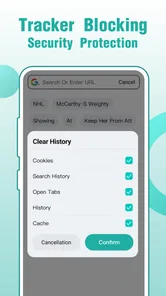
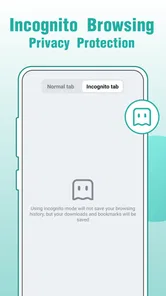
One of the biggest selling points for me is the privacy features. In a world where our data is constantly at risk, having a browser that prioritizes privacy is a huge plus. Fly Browser ensures that your searches and browsing history remain private, thanks to its built-in private mode. So, you can browse without the worry of leaving a digital trail.
I would use that mode as a way to keep a browsing session separate, not as a promise that nobody else can observe activity. For instance, a private session can be useful when I’m checking something briefly on a device I share, but it does not make a website forget what I did or conceal network activity. That distinction is worth keeping in mind before relying on any browser’s privacy label for sensitive tasks.
User-Friendly Interface
The interface is another aspect where Fly Browser shines. It’s clean, intuitive, and doesn’t overwhelm you with too many options. Everything is right where you’d expect it to be, making navigation a breeze. Whether you're tech-savvy or a casual user, you’ll find it accommodating.
That kind of simplicity can be particularly helpful when you only need to search, read, and move on. A less busy screen can make a quick task feel direct, but it may also mean fewer ways to tailor the browser to a highly specific routine. My tip is to test the controls you use most—especially switching between pages and returning to a result—before deciding that the clean layout is enough for your everyday use.
Speedy Browsing
I can’t stress enough how fast this browser is. Pages load in the blink of an eye, and even media-heavy websites don’t stand a chance at slowing it down. It’s perfect for those moments when you need information quickly and don’t want to wait around for ages.
In real use, perceived speed depends on the connection, the website, and the phone as well as the browser. I’d judge it across the pages I actually visit rather than expect every site to feel equally quick. If a page is slow or awkward in one browser, trying it in Fly can be a useful comparison; if your usual browser already handles those pages well, speed alone may not be a compelling reason to switch.
Who is likely to get the most from it
I can see Fly suiting someone who wants a simple browser for casual searches, short reading sessions, or browsing they prefer to keep separate from their usual history. It may also be a sensible choice for a person who finds feature-heavy browsers distracting and would rather open a page without first navigating a maze of settings. The main benefit is having a focused option ready for a particular task, not necessarily replacing every browser on the phone.
It is less convincing for people whose browsing depends on synchronized bookmarks, extensions, extensive customization, or a consistent setup across several devices. If your normal routine includes research spread across many sessions, switching browsers can create extra housekeeping: you may need to remember where a page was opened and where a useful result was saved. In that situation, staying with a well-configured main browser may be the more practical choice.
What the current version means for users
The app was released on June 5, 2024, and version 2.1.0 is the current build. Those details give existing users a clear version to check when deciding whether they are up to date, but they don’t by themselves tell me what changed between releases. I’d judge an update by trying the pages and routines I depend on, rather than assuming a version number guarantees a particular improvement.
For someone already using Fly, the useful question is whether the version on their phone is current and whether the browser still handles their everyday sites as expected. I would revisit a couple of familiar tasks after an update—such as returning to a search result or opening a page I use regularly—rather than infer specific changes from the build number. A current version is a practical reference point, but the experience on your own device is what matters.
Fly has a 4.6 average from around 182,000 ratings, with more than 10 million installs. That’s a strong sign that many people have tried it, though popularity cannot tell you whether its privacy approach matches your own needs. The app is rated for Everyone, runs on Android 8.0 or later, and is free to install; optional in-app purchases range from $0.99 to $9.99 per item. I’d check the purchase prompt carefully and make sure a paid option is relevant before confirming it.
The free starting point makes it easier to test the browser against your own routine before committing to it as a regular tool. If an optional purchase appears, I’d read the prompt rather than assume it is necessary for ordinary browsing. That is a sensible habit with any free app that offers in-app purchases, particularly if you are setting it up for someone else or sharing a device.
What to weigh before switching
The main limitation is that a clean, focused browser may not cover every preference built into a more established alternative. If you need a specific workflow, test it directly: open a page you use often, move between several tabs, and see whether returning to your place feels natural. For private searches, also decide what “private” needs to mean to you; people handling sensitive work may need more than a private mode and should choose tools based on their actual threat model.
One non-obvious trade-off is that a separate browser can make privacy-minded habits easier to remember while making saved information harder to manage. If you use Fly for a one-off search, consider whether you will need to find that page later and choose where to keep the useful result. Keeping the browser’s role narrow—rather than spreading routine browsing across two apps at random—can prevent a small convenience from turning into a confusing collection of tabs and saved pages.
MUCKRAKER MEDIA is the developer, and the app’s current build gives users a point of reference when checking whether they are running the latest version available to them. What I would watch over time is whether the browser continues to work smoothly with the pages and routines that matter to me. That is more meaningful than expecting a version number alone to promise a particular feature or privacy outcome.
For a household choosing a browser for casual use, the Everyone age rating and straightforward purpose may make Fly easy to consider, but I would still explain what private browsing does and does not do. A younger or less technical user can mistake a private mode for complete secrecy; a clear conversation about shared devices, websites, and networks is more useful than relying on the name of a feature to explain its limits.
Fly Browser is worth trying if you want a straightforward browser for quick searches and separate browsing sessions, especially as a companion to an app you already use. I wouldn’t switch blindly if your current browser’s synced bookmarks, extensions, or account features are essential. MUCKRAKER MEDIA has built an accessible option with a clear everyday appeal, but the best fit depends on whether its simplicity matches your habits. I’d start with a few ordinary tasks, then keep it only if it earns a place in your routine.
If you’re tired of your current browser’s sluggish performance or its lack of privacy features, give Fly Browser a whirl. It combines speed, privacy, and a user-friendly interface into one neat package. Trust me, once you try it, you might not want to go back to what you were using before!
Fly Browser-Search & Private Frequently Asked Questions
Will Fly Browser-Search & Private replace my current browser for everyday use?
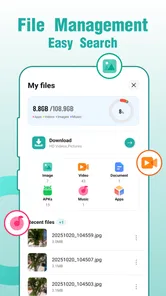
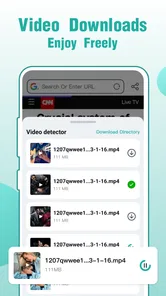
Fly Browser-Search & Private is a mobile web browser for people who want a private and fast Internet experience. Its search and browsing tools may suit everyday visits to websites, while its privacy-oriented features give it a different emphasis from a browser focused mainly on extensions or customization. You can try it alongside your current browser and decide which better fits your routine.
Is Fly Browser-Search & Private suitable for children and families?
The app has an Everyone content rating, which makes it appropriate for a broad audience from a store-rating perspective. That rating does not replace parental judgment about browsing habits or the websites someone visits. Families can review the app’s privacy and browsing options together, then decide whether it fits their needs before making it a regular browser on a device.
Is Fly Browser-Search & Private free to download, and are there optional purchases?
Fly Browser-Search & Private is free to download, so you can try its browsing features without paying upfront. The app also offers in-app purchases, which are listed at prices ranging from $0.99 to $9.99 per item. Check the purchase details in the app before buying, and consider whether any optional features suit the way you plan to browse.
What is Fly Browser-Search & Private, and what makes it unique?
Fly Browser-Search & Private is a mobile web browser designed to enhance user privacy and provide a seamless browsing experience. Its unique features include an integrated private search engine, advanced ad-blocking capabilities, and a minimalistic interface for faster page loading. Unlike other browsers, Fly Browser prioritizes user privacy by not storing browsing history and data, making it ideal for users concerned about online privacy.
How does Fly Browser-Search & Private ensure user privacy and security?
Fly Browser-Search & Private ensures user privacy by offering a private browsing mode that doesn’t track or store your browsing history or data. Additionally, it blocks third-party cookies and trackers, helping to prevent data leaks and enhance security. The browser also features a built-in VPN option, providing an extra layer of security and anonymity when surfing the web.
Pros
- Fast and efficient browsing experience.
- Built-in ad blocker enhances page load speed.
- User-friendly interface that's easy to navigate.
- Privacy-focused with no tracking of user data.
- Supports multiple tabs for multitasking.
Cons
- Limited customization options for appearance.
- Occasional crashes on older devices.
- Some features locked behind a paywall.
- Doesn't support all browser extensions.
- Limited language support beyond English.