Fishbrain - Fishing App
- 15.62K
- 4.5
- Installs
- 5.00M
- Price
- Free

Screenshots
Analysis by Reviewed
I usually start a fishing day with a few practical questions: where is worth trying, what should I bring, and how will I remember what worked? Fishbrain is built around those decisions, joining fishing maps and catch records with an angler community. It’s a sports app from Fishbrain, and its 4.5 average from around 64,000 ratings suggests it has found a sizable audience among people who fish regularly as well as those who go now and then.
Before leaving home, narrow the choices
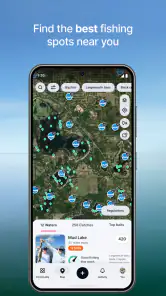
For me, the app is most useful when I have a real outing in mind rather than a few minutes to kill scrolling through fishing posts. I can begin by thinking about the kind of water and trip I want, then use fishing-focused map information to identify possible places. The practical goal is not to find a magic pin; it is to arrive with a sensible first choice and an alternative if the first plan does not work out.
That makes Fishbrain a better fit for someone willing to do a little preparation than for a person who expects an app to choose every detail. I would check likely spots before the day, look at the fishing information around them, and make a short list instead of trying to study the entire map. This is especially helpful when I’m visiting an unfamiliar area: I can use the app to generate questions about where to try, then check access and local rules separately before setting off.
Start with a plan, not a pin
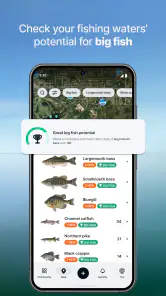
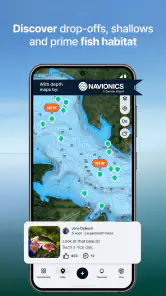
Before heading out, I’d use the map and local fishing information to narrow down a few possible areas rather than treating any one marker as a guaranteed spot. That distinction matters: a map can help me plan, but conditions, access, local rules, and the day’s bite still decide whether a trip works. Fishbrain’s focus on spots, angler rules, bite information, and ice fishing makes it more specialized than a general-purpose map, but it is still a planning aid, not a promise of a catch.
A useful habit is to check more than one nearby option and keep a backup in mind. If the first location is busy, hard to reach, or simply quiet, having another candidate makes the trip less dependent on a single pin. I’d also check the relevant rules before fishing; discovering a regulation after arriving is a frustrating way to lose time. For a newcomer, this turns browsing into a simple routine: shortlist, verify, then go.
Making Fishbrain Part of a Fishing Day
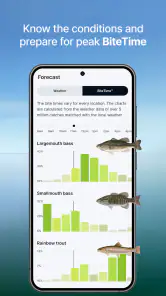
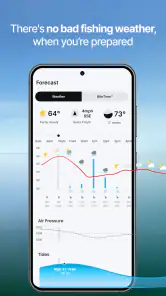
Right off the bat, Fishbrain impressed me with its array of features. When you first open the app, you're greeted by a vibrant community of anglers sharing their catches and tips. It's like having a global fishing forum in your pocket. Location-based fishing forecasts are one of my favorite features, helping you gauge the best times and spots to fish based on real-time data. It's almost like having a fishing guide whispering in your ear.
Turn a trip into a useful record
The strongest workflow is not just finding a place and leaving: it’s connecting the plan with what happened there. After a session, a catch entry with a location, photo, and notes can help me compare future visits. I’d record practical context I can remember reliably, such as the approach that worked or whether I changed tactics, rather than trying to write a full diary while packing up. Over time, those notes can make the map more personal and useful than a collection of unexplained pins.
More From Our News Desk

Weather by Xiaomi Review: Clear at a Glance, Less Clear Up Close

X Under Pressure: Can It Recover When Posting Goes Wrong?

Clash of Clans Is Won Between the Battles

Android Auto Makes the Case for Quieter Car Software

MobiOffice: Transforming Mobile Productivity with Seamless Integration

EA SPORTS FC™ Mobile Soccer: Redefining Mobile Sports Gaming
There is a trade-off in recording precise locations. It can make my own history easier to use, but a fishing spot may be sensitive information, and sharing it openly could bring unwanted attention. I’d think carefully about what I post publicly and what I keep for my own reference. That small pause is especially worthwhile when a catch photo reveals a recognizable shoreline or a place I would rather keep quiet.
Hooked on Social Connectivity
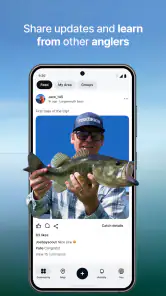
One of the standout aspects of Fishbrain is its social connectivity. You can follow other anglers, comment on their posts, and even message them. It's not just about comparing fish sizes; it's about building a community. I found myself learning new techniques and discovering new fishing spots just by interacting with fellow users. The app fosters a sense of camaraderie that makes the fishing experience richer and more rewarding.
That social layer is most useful when I treat posts as clues, not instructions. Someone else’s catch can suggest a species, method, or area to investigate, but their success may depend on conditions that have changed since they posted. I’d look for patterns across local posts instead of copying one angler’s setup. If I prefer quiet trips and do not want to interact or share catches, the community features may feel like extra noise; a simple map and a private notebook could suit me better.
Mapping Your Fishing Journey
Another feature that really got me was the detailed catch maps. These maps allow you to log your catches with precise GPS locations, photos, and notes. It's a fantastic way to keep track of what works and what doesn't, season after season. Plus, the app's database of over 1.7 million catch locations is a treasure trove for those looking to explore new fishing grounds.
Compared with a general map app, Fishbrain is more directly shaped around fishing context and catch history. Compared with keeping notes in a paper log, it can connect a record to a place and a photo, though paper remains a perfectly good choice for anglers who want fewer screens at the water. I would not rely on any community map as the only source for access or regulations: local signage and authoritative rules deserve the final say.
Reeling in the Knowledge
For those who are keen on learning, Fishbrain offers a wealth of educational content. From articles to video tutorials, there's plenty to keep you informed and entertained. Whether you're trying to perfect your fly fishing technique or understand the habits of a particular fish species, the app has you covered.
For a beginner, the useful handoff is from learning something in the app to testing it on a real outing, then recording what actually happened. I would choose one technique or question at a time rather than trying to absorb every tip at once. Experienced anglers may get more value from local observations and their own catch history than from introductory material, so the learning section is a bonus rather than the main reason everyone should install it.
Who will get the most from it?
I’d recommend Fishbrain most to anglers who enjoy planning, keeping track of catches, and learning from other people’s local experience. It can also suit someone who fishes in different places and wants one fishing-focused tool for exploring spots and building a personal record. The app is free to download, has more than five million installs, and is rated for teens; optional in-app purchases range from $1.99 to $199.99 per item. I’d check the purchase details in the app before paying, since the free starting point does not mean every feature or option is included at no cost.
It may be a poor fit for someone who wants a completely offline, no-account-style notebook, dislikes social feeds, or expects a forecast to replace personal judgment. An angler who only needs directions may be better served by a conventional map, while someone focused on regulations should verify them through the relevant local authority. The practical question is whether the combination of maps, records, and community is worth having together.
Small choices that make the workflow better
For a realistic weekend example, I might check a few nearby possibilities the evening before, note a backup, and then use the trip itself to see whether the suggested area is worth staying at. If I catch something, I can save the location and a brief note before the details blur; if I do not, I can still remember which spot I tried and avoid treating an uneventful visit as proof that the whole area is poor. That distinction makes a fishing log useful even when the day brings no photo-worthy result.
A small but worthwhile workflow improvement is to decide what I want to learn before I open the map. If I’m comparing two locations, I can make a quick note about what I’m comparing, such as access, the kind of fishing information available, or how the outing unfolds. Afterward, recording the outcome in the same terms makes the next decision less dependent on memory. It also keeps the app from becoming a long, unstructured feed of places and catches that I later cannot interpret.
Fishbrain is a long-running app, released in 2013, and version 11.46.0.(23352) is the current version. I would still judge it by how well it fits my own routine: map first, careful check of rules, useful notes after the outing, and selective participation in the community. Its main friction is that every added layer asks for attention, and crowdsourced information can be uneven or out of date. It works best when I use it to guide questions and remember outcomes, not to make decisions for me.
When the handoff does not work
The weak point in the workflow is the gap between seeing a promising signal and knowing what it means on the ground. A catch post is tied to another person’s experience, while a map marker cannot tell me whether I’ll find the same conditions when I arrive. I would avoid turning a forecast or a cluster of catches into certainty, especially if the trip involves a long drive or a tight schedule. Keeping a backup is not just good planning; it is a way to avoid letting an imperfect digital clue dictate the whole day.
There is also a balance between getting value from community information and protecting the character of a trip. If I spend every quiet moment checking posts, the app can pull attention away from the water. I’d use it at home for preparation and briefly after a session to save useful notes, rather than treating it as something I need to monitor continuously. An angler who wants a fully screen-free outing may prefer a paper log and a conventional map, while a person who enjoys comparing local experiences is more likely to appreciate Fishbrain’s combined approach.
In conclusion, Fishbrain isn't just an app; it's a comprehensive toolkit for anglers of all levels. With its blend of social interaction, practical features, and educational resources, it's no wonder it's become a go-to resource for the fishing community. So, whether you're looking to make new fishing buddies, find the best spots, or simply keep a detailed fishing log, Fishbrain might just be the catch of the day for you.
Fishbrain - Fishing App Frequently Asked Questions
Do I need fishing experience to get started with Fishbrain?
No prior fishing experience is needed to explore Fishbrain. It is aimed at both new and experienced anglers, with fishing maps, information about fishing spots, and a community where users can exchange tips and insights. Beginners can use those resources to learn, while more seasoned anglers may find the planning tools and fishing-focused information useful for organizing their outings.
Can Fishbrain help me find fishing spots and understand local angler rules?
Fishbrain focuses on fishing maps and helping users find fishing spots, and it also includes information about angler rules and bites. Those features can help you plan where to go and what to consider before setting out. The app’s summary also highlights ice fishing, so it may be worth exploring if that is the kind of fishing you enjoy.
Is Fishbrain free to download, and what might require payment?
Fishbrain is free to download, so you can try the app without paying upfront. It also offers in-app purchases, with prices ranging from $1.99 to $199.99 per item, so some options may involve extra costs. If you prefer not to make purchases, check the app’s purchase prompts carefully and review your device’s settings for managing in-app spending.
What devices and age group is Fishbrain suitable for?
Fishbrain is a fishing app for Android and iOS, with a minimum operating system requirement of version 10. It is rated Teen, which is useful to consider when deciding whether it is appropriate for younger anglers. The app is developed by Fishbrain and is focused on fishing-related maps, information, and community features, so its appeal is primarily to people interested in the sport.
What is Fishbrain and how can it enhance my fishing experience?
Fishbrain is a comprehensive fishing app designed to elevate your fishing experience by providing tools for planning, tracking, and sharing your fishing activities. It offers features such as detailed fishing maps, weather forecasts, and a vibrant community of anglers to exchange tips and insights. Whether you're a novice or an expert angler, Fishbrain enhances your fishing adventures by offering tailored advice and real-time data to improve your catch rate.
Pros
- Comprehensive fishing maps available.
- Real-time weather forecasts included.
- Connects anglers worldwide.
- Extensive species database.
- Personalized fishing reports.
Cons
- Requires subscription for full features.
- Limited offline functionality.
- Battery intensive with GPS use.
- Occasional app crashes.
- Some features need internet connection.
- Category
- Sports
- Version
- 11.46.0.(23352)





