Eyecon Caller ID & Spam Block
- 4.75K
- 4.4
- Installs
- 100.00M
- Price
- Free

Screenshots




Analysis by Reviewed
I judge a caller ID app by a few practical questions: does it help me make a quick decision when the phone rings, does it fit into the way I already manage contacts, and is the extra information worth letting another app take a central role in calling? Eyecon Caller ID & Spam Block is aimed at people who want more than a plain incoming number: it combines caller identification with a visual contact experience and tools for handling unwanted calls.
Eyecon is a free communication app from Eyecon Phone Dialer & Contacts, with optional in-app purchases. It is rated for Everyone and runs on Android 6.0 and later. The current version is 4.2025.11.26.1256. Its 4.4 average from around 1.1 million ratings and more than 4,700 written reviews suggests that a large audience finds the basic idea useful; it has passed 100 million installs. Those figures indicate reach, not a guarantee that every caller will be identified correctly.
What I would consider before installing
The main decision is whether you want caller context to appear as part of your calling routine, or whether you would rather keep the default phone app and contacts list as simple as possible. Eyecon is most appealing if unknown calls are a regular nuisance and you like visual cues. If you only receive occasional unfamiliar calls, the phone’s built-in caller information and a quick decision to let the call go to voicemail may already be enough.
I would also think about how much you value a contact’s picture and associated profile details. A name or photo can make a number feel less anonymous, but it is still a clue rather than proof of identity. I treat an unexpected caller’s displayed details as a prompt to judge the call carefully, not as permission to share personal or financial information.
How I’d judge whether the extra context helps
Before making Eyecon part of my routine, I’d ask what actually slows me down when the phone rings. If the problem is simply forgetting which saved contact is calling, a photo-led view could be useful. If I mostly need to decide whether a number is safe to answer, the more important question is whether the identification feels reliable enough in my own circumstances. No caller label should replace ordinary caution, especially when a caller asks for a password, payment, or sensitive details.
I’d also consider who else uses the phone. A visual contact setup may help someone who recognizes faces more easily than names, or who shares a device with a family member who needs clear caller cues. On the other hand, someone who keeps contacts deliberately sparse may find that extra visual information creates more clutter than convenience. The right choice depends less on the number of features and more on whether they solve a repeated problem.
There is a useful way to test the app without changing every habit at once: begin by noticing how it handles calls you already recognize, then observe whether unfamiliar calls become easier to assess. Keep your existing saved contacts accurate as you go. That gives you a fair comparison with your normal dialer and makes it easier to tell whether the added caller context is genuinely helping, rather than simply looking different.
More From Our News Desk

Weather by Xiaomi Review: Clear at a Glance, Less Clear Up Close

X Under Pressure: Can It Recover When Posting Goes Wrong?

Clash of Clans Is Won Between the Battles

Android Auto Makes the Case for Quieter Car Software

MobiOffice: Transforming Mobile Productivity with Seamless Integration

EA SPORTS FC™ Mobile Soccer: Redefining Mobile Sports Gaming
Where Eyecon earns its place
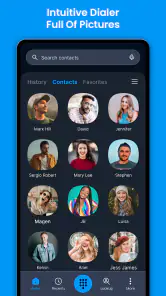
Alright, let’s get into the nitty-gritty. One of the first things I noticed about Eyecon Caller ID & Spam Block is its super intuitive design. The app is not just about functionality; it’s also about looking good while doing its job. When you get a call, Eyecon instantly displays the caller's photo and name, if available, and that’s pretty neat. No more guessing games!
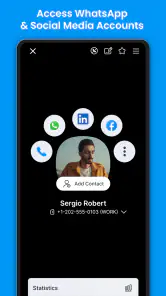
But that’s not all. This app stands out because it links with social media profiles, giving you a fuller picture of who’s on the other end of the line. Imagine seeing the caller's Facebook or LinkedIn information right as they call. It’s like having a personal dossier on your caller, and it feels kinda cool, to be honest.
The spam-blocking trade-off
Now, let’s talk about one of its most praised features: spam blocking. In a world where spam calls are becoming more of a nuisance than ever, Eyecon acts like a shield. It automatically identifies spam calls and blocks them, saving you the headache of dealing with unwanted interruptions. The peace of mind that comes with knowing you won’t be tricked into answering a robocall is priceless.
Moreover, the app updates its spam list frequently, so you’re always protected against the latest spam threats. It’s like having a digital bodyguard for your phone, and who doesn’t want that?
There is a useful distinction here: identifying a suspected nuisance and deciding whether to block it are not the same thing. If you expect calls from couriers, clinics, customers, or a new workplace, an unfamiliar number might matter. I’d avoid treating an unknown label as a final verdict; when a call could be important, checking voicemail or calling back through a number you trust is the safer habit. That cautious approach helps keep spam tools useful without letting them make every decision for you.
Everyday use and contact upkeep
Another thing I love about Eyecon is how easy it is to use. The interface is clean, straightforward, and doesn’t require a tech genius to navigate. Setting it up was a breeze, and the app runs smoothly without any hiccups. It’s like having a trusty sidekick that operates seamlessly in the background.
The app also allows you to customize your contacts with photos straight from your gallery or even from Facebook. It’s these little touches that make the experience more personal and enjoyable.
A practical way to get value from that visual approach is to start with a small group of contacts you call often, rather than trying to perfect your whole address book at once. A clear photo can help distinguish two people with similar names when you are in a hurry, while a saved contact gives you a more dependable reference than a profile match for an unfamiliar number. This is especially handy for someone who handles personal and work calls on one phone, but less compelling if you prefer a minimalist contact list.
One less obvious benefit of building a small, reliable set of familiar contacts is that it gives you a useful baseline. If the caller information for people you know is clear and easy to recognize, you can judge whether the same visual approach helps with less familiar numbers. It also keeps contact upkeep manageable: correct a few important names and photos when you notice a problem, rather than spending an afternoon trying to organize everything in one go.
How it compares with familiar alternatives
Compared with the standard dialer and contacts app, Eyecon puts more emphasis on caller presentation and identifying unfamiliar callers. That richer layer is the point, but it also means another app becomes part of a task many people already handle adequately with their phone’s built-in tools. Dedicated spam-call services may suit someone whose sole priority is screening nuisance calls, while a basic dialer may be better for someone who wants fewer moving parts. I would choose Eyecon when visual caller context matters as much as filtering, not just because it offers another way to place calls.
The trade-off is not simply “more features versus fewer.” A basic dialer keeps the calling experience familiar, and may be all you need if your contacts are already easy to recognize. A tool focused only on screening calls may fit better if you do not care about photos or richer caller presentation. Eyecon’s particular appeal is the combination: I’d consider it when I want caller context and spam handling together, while accepting that one app will now influence more of my calling routine.
If you use more than one phone or frequently switch devices, I’d be especially deliberate about keeping the contact names you rely on in the phone’s address book. That way, the useful part of your calling routine is not dependent on remembering a separate set of visual cues. It is also a sensible safeguard when a profile match looks unfamiliar or ambiguous: compare it with information you already trust instead of assuming the displayed identity settles the question.
There is a small routine cost to switching: you need to become comfortable with how the app fits into incoming calls and contact editing, then decide whether its extra context helps enough to keep using it. Before relying on it, I’d make sure important people and organizations are saved under names you recognize, and I’d check the phone’s call settings after setup so the experience matches how you want calls handled. If you later prefer the default dialer, the key habit is to confirm which app is managing calls and keep your contacts in order; that avoids confusion when an expected call arrives.
Who I’d recommend it to
Eyecon makes the most sense for someone who regularly fields calls from numbers they do not recognize, enjoys photo-led contacts, and wants caller identification and spam handling in one communication app. It is less suited to people who avoid social-profile connections, want the simplest possible dialer, or rarely need help deciding whether to answer. The free starting point makes it easy to try, while purchases range from $0.49 to $39.99 per item, so I’d check the purchase screen carefully and only pay for something that addresses a need I actually have.
I would also skip it if you are already happy with your phone’s built-in caller tools and dislike adding another layer to a familiar task. A new dialer can be a poor fit when consistency matters more than extra context, or when you would rather make a quick decision from the number and use voicemail for anything uncertain. For people who do want to test it, I’d start with the free experience and make a note of what feels easier or more awkward before considering any optional purchase.
For a realistic example, imagine you are expecting a delivery while also receiving a run of sales calls. A caller label or contact photo may help you spot a familiar name quickly, and spam handling may reduce interruptions; if the delivery call still appears unfamiliar, voicemail or a trusted follow-up route gives you a second check. That is the kind of small everyday decision Eyecon can make less fiddly, without replacing your own judgement.
Another useful situation is a day when you are moving between work and personal calls and cannot stop to search your contacts each time. A recognizable contact image may make a saved caller easier to place at a glance, while an unfamiliar number still deserves a moment of thought. In that kind of busy routine, I’d treat Eyecon as a quick sorting aid, not as an instruction to answer or reject automatically.
My recommendation after weighing the switch
My practical test would be whether the app changes the moments that matter: do I recognize important callers faster, and do unwanted calls interrupt me less? If the answer is yes, the extra visual layer has earned its place. If I still find myself opening the regular contacts app to verify names, or if caller labels make me second-guess people I need to hear from, I would return to the simpler setup. There is no need to keep a dialer just because it has more going on.
For anyone trying it, I’d keep the first week simple: pay attention to familiar contacts, be cautious with uncertain identification, and notice whether spam handling is convenient rather than disruptive. That gives you a grounded basis for deciding whether the app suits your calls. The best outcome is not answering every call with confidence; it is having enough context to make a calm choice and a safe fallback when that context is incomplete.
Overall, Eyecon Caller ID & Spam Block is more than just a caller ID app. It’s a comprehensive tool that enhances your communication experience by making it smarter and more personal. Whether you’re tired of spam calls or just want to know more about who’s calling you, this app has got your back. So, next time you’re deciding whether to pick up that unknown number, you’ll have all the info you need right at your fingertips. Give it a try, and you might just wonder how you ever lived without it!
Eyecon Caller ID & Spam Block Frequently Asked Questions
What does Eyecon’s caller ID show when an unknown number calls?
Eyecon’s central purpose is to help identify incoming callers by displaying a name and photo, including for numbers that are not saved in your contacts. Its store summary also highlights call recording. If identifying unknown calls is your main reason for downloading, consider how those features fit the way you handle calls and review the app’s permission prompts before enabling them.
Can I use Eyecon as my everyday phone dialer and contact manager?
Eyecon is a communication app focused on caller identification and call management, and it is intended to work alongside your phone’s calling functions. You can explore whether its interface and tools suit your routine after installation. If you prefer your phone’s existing dialer or contacts app, check the available settings and make sure Eyecon’s role is clear before changing defaults or granting access.
Does Eyecon include call recording, and should I consider that before installing?
Call recording is highlighted in Eyecon’s store summary, alongside caller identification. Whether that feature is useful depends on how you handle calls and the rules that apply where you live. Before using recording tools, consider consent and local requirements, and review any prompts the app presents. You can also check its settings to understand which call-management options you want to use.
What permissions might Eyecon request, and why should I review them?
Eyecon is a communication app that works with caller identification and call management, so reviewing its requested permissions during installation is a sensible step. Check each permission prompt and consider whether it matches a feature you intend to use. You can also review your device’s permission settings after installation and adjust access there, bearing in mind that limiting permissions may affect related functions.
What is Eyecon Caller ID & Spam Block, and how does it work?
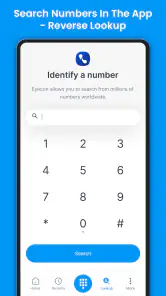
Eyecon Caller ID & Spam Block is an innovative app designed to enhance your calling experience by displaying caller photos and names, even if they're not in your contact list. It uses a vast social network database to identify unknown numbers and blocks spam calls to ensure a smooth and secure communication experience. The app integrates seamlessly with your existing phone functions, providing a more personalized, efficient, and spam-free way to manage incoming calls.
Pros
- Very accurate caller identification.
- Easy to use interface.
- Blocks spam calls effectively.
- Integrates well with contacts.
- Customizable themes and settings.
Cons
- Occasional glitches in call display.
- Ads can be intrusive.
- Some features require payment.
- Limited compatibility with certain devices.
- Can drain battery quickly.
- Category
- Communication
- Version
- 4.2025.11.26.1256











