Exacta Weather Alarm-Radar
- 433.00
- 4.3
- Installs
- 500.00K
- Price
- Free
Screenshots
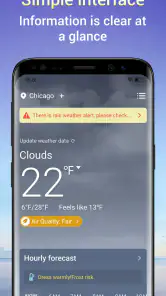
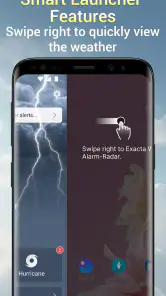
Analysis by Reviewed
I started using Exacta Weather Alarm-Radar because I wanted a weather tool that felt more focused than the crowded all-in-one apps on my phone. It comes from Sync Broad Media & Technology LLC and sits in the tools category, with a clear purpose: help me check conditions and make better decisions around the weather. The app is free, rated for Everyone, and has reached more than half a million installs, so it has already attracted a sizeable audience without making the experience feel like a social platform or a news feed.
My first impression was that this is an app for people who want weather information to be useful rather than decorative. I do not open it expecting a lifestyle dashboard, a long stream of articles, or a collection of unrelated utilities. I open it when I need to know what is happening outside, whether a change is approaching, and whether I should adjust a plan. That focused approach is the main reason I can recommend it, although it also means users who want a highly personalized weather ecosystem may find it less compelling than a larger mainstream alternative.
How Exacta Weather Alarm-Radar feels today
The current release is version 2.0.2, and that detail matters because the app now feels like a product that has moved beyond its earliest stage. I found the experience easier to judge as a practical tool rather than as a rough experiment. The combination of weather information, radar-oriented awareness, and alarm-style attention gives it a more purposeful identity than a basic temperature screen.
In everyday use, I think of it as a quick decision-making aid. Before leaving home, I can use it to decide whether a light jacket is enough. Before starting a drive, I can check whether conditions deserve a delay or a different route. If I am planning outdoor work, the value is not just seeing the current temperature; it is having a reason to look again when conditions may change. The strongest part of the app is its role as a weather checkpoint, not its ability to replace every other information source.
The app is available for devices running Android 8.0 or later, which keeps it accessible to people using older phones as well as newer models. I appreciate that because weather tools are often installed on secondary devices, family phones, or older handsets kept in a car or at home. A tool that only works on recent hardware would be less useful for that kind of practical setup.
Its audience response is encouraging: the app holds an average rating of 4.3 from roughly 2.8 thousand ratings, alongside more than 400 written reviews. I do not treat ratings as proof that every experience will be smooth, but they suggest that the central idea works for many people. The install count also points to real adoption rather than a product that only looks promising on paper.
A useful routine before leaving home
One scenario shows the app at its best. Imagine I am preparing to walk to a station in the morning, then spend several hours away from home. I do not need a detailed meteorological lesson. I need to know whether the weather is stable enough for the walk, whether I should carry protection from rain, and whether the return trip deserves another check later. I can make the first decision quickly, then use the app again before heading back instead of relying on the morning forecast.
That second check is an important habit. Weather apps are often treated as something we consult once, but changing conditions make a single glance unreliable. I found Exacta Weather Alarm-Radar more useful when I treated it as a repeatable routine: check before leaving, check before an outdoor activity, and check again when the timing of the plan changes. That workflow is more valuable than simply keeping the app open in the background.
Where the radar and alarm idea helps
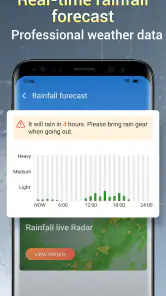
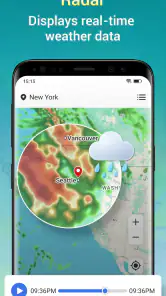
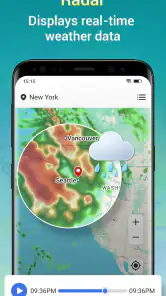
Radar-style information is most helpful when I care about movement and timing rather than a general daily summary. A forecast may tell me that rain is possible, but a radar view can help me think about whether a weather system is approaching my area or moving away. That distinction changes what I do. I might postpone a short errand if conditions appear to be arriving soon, but continue with a longer plan if the pattern is moving elsewhere.
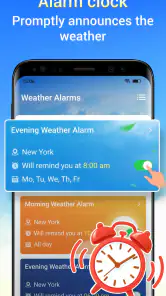
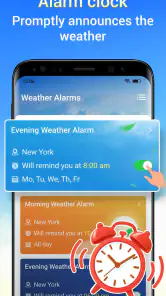
The alarm angle also changes how I use the app. Instead of opening it only out of curiosity, I can treat it as a prompt to pay attention when weather deserves a closer look. I would still avoid depending on any app as the only source for serious safety decisions, but for ordinary planning, reminders and radar awareness can reduce the number of times I get caught by a sudden change.
A practical tip is to check the app at the moment your plan becomes specific. Looking at weather early in the morning is useful, but checking immediately before a run, commute, delivery, or outdoor appointment gives the information more context. This is one of the less obvious strengths of a focused weather tool: it encourages a decision at the right time instead of turning weather into background decoration.
What has changed and what that means for users
The release history gives the current version a useful point of reference. Exacta Weather Alarm-Radar was released on February 6, 2026, and the present version is 2.0.2. I would describe that as a meaningful product stage rather than an invitation to assume a long list of undocumented changes. The safe conclusion is that the app has reached a second major version and is being maintained in a form intended for current use.
For someone installing it today, the main benefit is starting with the current experience instead of judging it by early impressions. For an existing user, version 2.0.2 is a reminder to keep the app updated if the device supports it, particularly when the app is used for timely information. Weather tools depend on current service behavior, so staying on the latest available release is a sensible part of using them responsibly.
I would not claim that a new major version automatically solves every weakness. A version number tells me that the product has evolved, but it does not by itself guarantee perfect forecasts, instant alerts, or identical behavior on every phone. My judgment is based on how the current release presents the app’s purpose: it is more convincing as a dedicated weather utility than as a feature-heavy replacement for every weather service available.
Existing users should also consider whether their personal routine has changed. Someone who originally installed it for occasional temperature checks may now get more value by using the radar and alarm-oriented parts as part of a planned routine. In other words, the app’s evolution is not only about what the developer changes; it is also about whether I use the newer shape of the product more deliberately.
How it compares with familiar weather alternatives
The usual alternative is the weather feature already built into a phone, search engine, or general-purpose weather app. Those options are convenient because they are familiar and often show a quick forecast without requiring a separate habit. If I only want to know the current temperature once a day, Exacta Weather Alarm-Radar may not offer enough extra value to justify changing my routine.
Where this app makes a stronger case is in the combination of quick weather checking, radar awareness, and an alarm-focused purpose. Many basic weather panels are designed for passive viewing. This app feels better suited to someone who wants to make a decision and remember to revisit the conditions. That distinction is small on paper but meaningful in practice.
On the other hand, a larger weather platform may be better for users who want a broad collection of maps, extensive customization, multiple locations, severe-weather coverage, or a highly detailed long-range forecast. I would choose such an alternative if my work depends on specialized weather information or if I need a large archive of forecast details. Exacta Weather Alarm-Radar is easier to understand when I want a focused tool, not a complete meteorological workstation.
Another trade-off is simplicity versus depth. A focused design can make a quick check less tiring, but it may feel limited to people who enjoy exploring layers of information. I prefer not having to navigate through unrelated content, yet I understand why a weather enthusiast might want more controls than this app’s straightforward identity suggests.
Small habits that improve the experience
My first tip is to use the app for timing, not just prediction. If I am deciding whether to leave now or in twenty minutes, the radar-oriented view is more relevant than a broad daily label. Looking at the information in relation to the decision helps me avoid the common mistake of reading a forecast without asking what action it should change.
My second tip is to make a personal threshold for checking again. For example, I might look before leaving home and once more before beginning an outdoor activity. This avoids both extremes: ignoring the weather after one glance and repeatedly refreshing the app without a practical reason. The value comes from connecting each check to a real decision.
My third tip is to keep expectations realistic when conditions are fast-moving or important. The app can support planning, but I would still use official emergency guidance for dangerous weather and avoid treating a consumer weather app as a guarantee. That is not a criticism unique to this product; it is a sensible boundary for any forecast service.
A fourth useful approach is to test it against your own routine for several days rather than judging it after one opening. Weather changes naturally, and the app’s usefulness becomes clearer when I see whether its presentation helps with commuting, exercise, errands, or outdoor work. If my decisions do not improve after using it consistently, a more detailed alternative may be a better fit.
Remaining gaps and who should skip it
The main limitation is that a focused weather app cannot satisfy every kind of weather user. People who want extensive customization, professional-grade detail, or a large collection of specialized views should look beyond it. The app’s appeal depends on wanting a clear, practical path from weather information to a decision. If I enjoy comparing many forecast models or inspecting advanced meteorological data, I would probably find a broader service more suitable.
I would also skip it if I only need an occasional glance and already have a reliable weather panel built into my phone. Installing another app makes sense when it changes how I plan, not simply because it displays information I already see elsewhere. The free price removes a financial barrier, but it does not remove the cost of attention: every additional app adds another icon, another routine, and potentially another source to compare.
Users should think carefully about how much they rely on alerts. An alarm can be helpful when it brings weather back to my attention, but I would not assume that a notification replaces checking the actual conditions. For an important journey or outdoor responsibility, I would open the app and review the situation rather than depending passively on a prompt.
There is also a difference between accurate presentation and perfect prediction. The store summary describes the app as providing accurate weather services, and that is the standard I want from it, but real weather remains variable. I judge the app by whether it gives me useful information in a clear way and helps me make better everyday choices, not by expecting certainty in every forecast.
Questions I would ask before installing
If I were wondering whether the app costs anything, the answer is straightforward: it is free. That makes it easy to try alongside an existing weather app without committing money. I would still compare the experience with the tools already on my phone after a few days, because free does not automatically mean it is the best match for every routine.
If I were asking whether an older phone can run it, the minimum operating system is Android 8.0. That is a useful compatibility point for people who keep older devices in service. I would check the phone’s Android version before installing, especially if the device is several years old.
If I wanted to know whether it is suitable for a child or family device, the content rating is Everyone. That makes the app broadly appropriate from a content perspective, although weather decisions still require sensible adult judgment when conditions are hazardous.
If I were choosing between this and a full weather suite, I would ask how much detail I actually use. For quick checks, timing decisions, and radar-oriented awareness, this app is a reasonable choice. For extensive customization or specialized forecasting, I would choose the broader option. The right decision depends less on the number of features and more on whether the app fits the way I plan my day.
My final view after using the current release
Exacta Weather Alarm-Radar is a focused free weather tool that earns its place when I want more intention than a basic temperature widget but less complexity than a large weather platform. Its current version, 2.0.2, gives the product a more established feel, while the second-generation release suggests continued development without giving me a reason to assume features that are not clearly part of the experience.
I like it most for repeatable everyday decisions: checking before a commute, watching conditions around an outdoor appointment, or deciding whether a short errand should happen now or later. The radar and alarm-oriented identity gives those checks a practical purpose. I also appreciate that it works on Android versions going back to 8.0 and remains free, making experimentation easy.
My recommendation is qualified but positive. If you want a straightforward weather companion that encourages timely checks and helps you think about approaching conditions, I would try it. If you need professional depth, extensive personalization, or a complete replacement for every weather service, I would look at a broader alternative instead. For ordinary planning, its best quality is not showing more information; it is helping me use weather information at the moment it matters.
Pros
- Accurate radar maps make it easy to track approaching rain and storms.
- Weather alarms can provide timely warnings for changing local conditions.
- Clear forecasts help with planning commutes
- trips
- and outdoor activities.
- Location support lets you monitor weather in multiple places.
- Useful widgets provide quick updates without opening the full app.
Cons
- Some advanced radar and alert features may require a paid subscription.
- Frequent notifications can feel excessive during unstable weather.
- Radar imagery may load slowly with weak mobile connections.
- Forecast accuracy can vary significantly by region and terrain.
- The interface may feel crowded for users seeking only basic forecasts.
- Category
- Tools
- Version
- 2.0.2











