Duo Call - Dual Global Calling
- 53.00
- 3.7
- Installs
- 10.00M
- Price
- Free

Screenshots




Analysis by Reviewed
I judge international calling apps by a practical question: will they make a cross-border call easier without leaving me unclear about the cost or what I’m agreeing to? Duo Call - Dual Global Calling is a communication app from Duo Call Studio, aimed at people who want another way to reach contacts abroad. Its promise is appealing, but I’d treat it as a calling option to evaluate for your own routine rather than assume it replaces every phone or messaging service.
What I would check before relying on it
My first step with any app that handles calls is to separate what I can see and control from what I might merely assume. I’d look at the permission requests during setup, read each prompt, and consider whether it makes sense for the action I’m trying to take. If a permission is unclear, I would pause and check the app’s settings or help information instead of granting it automatically. That small bit of care is especially worthwhile when an app is being used for conversations that matter.
I’d also treat account setup as a decision, not just a hurdle to get past. Before entering personal details or choosing a payment option, I’d review the screens presented and make sure I understand what I’m accepting. This is not about assuming something is wrong; it is a practical habit for any communication service. The clearest sign of a good fit for me is that I can understand the choices in front of me and feel comfortable proceeding.
The app is free to install, though in-app purchases range from $0.99 to $19.99 per item. That makes it sensible to distinguish downloading from paying: I would not buy credits or a plan until I had checked the destination, the displayed charge, and how much calling I realistically expect to do. For a one-off conversation, a small test is a more measured start than committing to a larger purchase before knowing whether the service suits my needs.
Choosing the right kind of international call
A useful question before trying Duo Call is whether the person you want to reach can use an internet-calling app, or whether you need to reach a regular phone number. Those are different jobs, and an app’s international focus alone does not answer which one it handles in a particular case. I’d check the destination and call options shown in the app before making plans around it, especially if the recipient is not comfortable installing new software or relies on a basic phone.
That distinction also helps me compare it fairly with familiar alternatives. If both people already use the same messaging app, an internet call there may be the easiest choice: there is no extra service to learn, and the contact is already set up. A dedicated international calling app becomes more interesting when that shared option is unavailable or when a call needs a different route. Traditional carrier calling may still be preferable when I need a number-based call that I know how to use, even if I first want to check what it will cost.
I would not make the comparison based only on a headline about saving money. The actual value depends on the destination, the type of call, how often I call, and the price shown before I connect. A few minutes spent checking those details can prevent the common mismatch of choosing a service that looks suitable in general but does not fit the person or number I need to reach.
More From Our News Desk

Weather by Xiaomi Review: Clear at a Glance, Less Clear Up Close

X Under Pressure: Can It Recover When Posting Goes Wrong?

Clash of Clans Is Won Between the Battles

Android Auto Makes the Case for Quieter Car Software

MobiOffice: Transforming Mobile Productivity with Seamless Integration

EA SPORTS FC™ Mobile Soccer: Redefining Mobile Sports Gaming
Where it fits in a caller’s routine
The app makes the most sense when someone you need to reach is overseas and a regular international call is inconvenient or costly. For example, if I’m coordinating a family visit and need to speak with a relative abroad, I’d first check whether we can both use a familiar internet-calling service. If not, an app focused on international calling may be worth trying, provided I understand how its calling and payment setup works before relying on it for an urgent conversation.
That distinction matters because “international calling” can describe different experiences. Some alternatives connect app users over the internet; others let you call ordinary phone numbers. Before making an important call, I’d confirm which kind of destination Duo Call supports in the calling screen and whether the person on the other end needs the app. I’d also place a brief test call before using it for a long conversation, so I can check sound and connection quality from the network and location I actually use.
Seamless International Communication
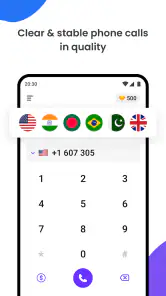
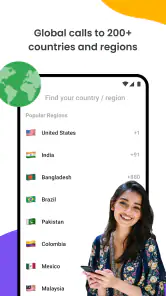
One of the standout features of Duo Call - Dual Global Calling is its ability to connect you with people globally, without the need for a traditional phone plan. Imagine being able to chat with your friends in Paris, colleagues in Tokyo, or family in Sydney, all with just a few taps on your smartphone. It's like having the world at your fingertips!
Setting up the app is as easy as pie. You just download it, sign up, and bam—you’re ready to start calling. The interface is super user-friendly, which means even if you're not tech-savvy, you'll have no problem navigating through the options. Plus, the app offers crystal clear audio quality, which is a huge plus. No more shouting "Can you hear me now?" into the phone!
Affordable and Reliable
Let's talk about the cost because who doesn’t love saving money? Duo Call - Dual Global Calling offers competitive rates for international calls, which is a breath of fresh air compared to the pricey alternatives out there. You can purchase credits within the app, and they also have various plans depending on your calling needs. This flexibility makes it perfect for both occasional callers and those who need to connect more frequently.
Reliability is another key factor. The app uses a robust network to ensure your calls go through without a hitch. Whether you’re calling over Wi-Fi or using mobile data, the connection remains stable. It's a relief knowing that your important business call won't drop midway through.
Checking the call before it matters
For a useful first run, I’d avoid making the app my only route to someone. Try a short call while you have time to troubleshoot, and compare the experience on Wi-Fi with mobile data if both are available. That gives you a better feel for how it behaves in your usual setting than relying on a general promise of clear audio. If the other person is difficult to reach, keep a familiar alternative ready; a calling app is only helpful when both sides can connect at the moment you need them.
It is also sensible to look at the displayed charge or credit balance before a longer call. In-app purchases range from $0.99 to $19.99 per item, so I’d decide on a small, specific use case first rather than buying more than I expect to need. Someone who calls overseas every week may value a repeatable plan, while a person making one occasional call should be especially careful to choose only what suits that purpose.
Additional Features Worth Mentioning
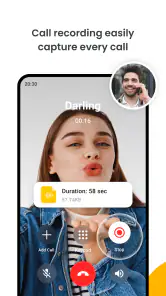
Aside from the basic calling functionality, the app is packed with features that enhance the user experience. For instance, it allows you to record calls, which can be incredibly handy for reference. There's also a handy feature that lets you set up a second line on your smartphone. This is perfect for those of us juggling work and personal life on the same device.
Security-wise, the app employs end-to-end encryption, which means your conversations are kept private. In a world where privacy is paramount, this is a huge selling point.
Privacy deserves a closer look
Call recording and a second line can be useful, but they also make it worth slowing down before sharing sensitive information. I would use recording only when it is appropriate for everyone on the call, and I’d check the app’s visible prompts and settings rather than assume a recording is handled in a particular way. For a confidential work conversation, I’d follow my workplace’s rules and use a channel approved for that purpose.
The same caution applies during setup: review the choices the app presents, especially any permissions or account options, and grant only what makes sense for calling. I wouldn’t infer privacy protections from a feature label alone. If you are deciding whether to use the app for personal or business calls, your comfort with its in-app controls and the information it asks you to provide should be part of that decision.
Making a low-risk first call
A practical way to test the app is to choose a person who is easy to contact and a conversation that can be kept short. Agree on a time, confirm what kind of call you are placing, and make sure you have another way to reach them if the connection does not work. This lets you assess the actual experience without making a family emergency, a deadline, or a sensitive conversation your first trial.
I’d keep the first test focused: can I find the right contact or destination, understand the charge before connecting, and hear the other person clearly enough for an ordinary conversation? If the call works, I would still test again under the conditions I expect to use most. A good result on home Wi-Fi does not automatically tell me how it will behave on mobile data while travelling, so I would avoid treating one successful call as a guarantee for every setting.
For people who make regular calls to the same overseas contact, a small routine can reduce surprises. Check the displayed cost each time before a longer call, note whether the recipient needs the app, and keep track of any balance or purchase decision inside the service. For infrequent callers, the opposite approach makes more sense: avoid buying more than the immediate need calls for, and revisit the app only when another real call comes up.
Who is likely to benefit—and who may prefer another option
I can see this being useful for people who regularly need to reach contacts abroad and want a dedicated calling option alongside their usual messaging apps. It may also suit someone who likes separating work and personal conversations on one phone, assuming the second-line setup fits their needs. By contrast, if all your contacts already use the same free internet-calling service, that familiar option may be simpler and avoid managing another app or its purchases.
It is not my first choice for someone who needs guaranteed access in an emergency, depends on a particular local number, or cannot risk a call failing because of connectivity. I’d keep the ordinary phone service or another known method available for those situations. The app’s broad international focus is attractive, but it does not remove the everyday trade-off between internet access, destination compatibility, and the other person’s availability.
One realistic use case is a traveller who wants to call home after arriving somewhere new. I would set up and test the service before departure, while I still have time to understand the available options, rather than wait until I urgently need it. I’d also keep the usual carrier route available for situations where internet access is poor or where I need a dependable fallback. That preparation matters more than adding another icon to the phone: the app is useful only if its call route and payment choices make sense for the trip.
It is less compelling for someone whose overseas contacts are already easy to reach through a shared messaging app, or for a caller who wants one familiar method and does not want to manage a separate account or in-app purchases. Likewise, if a call must go to a specific number and the app’s available destination options do not match, I would choose a service that clearly supports that route. The right decision is not whether a dedicated app is generally better, but whether it solves a real gap in your own calling routine.
A cautious verdict
Duo Call - Dual Global Calling is free to install, rated for Everyone, and has an average rating of 3.7 from around 20,000 ratings, with over 10 million installs. Version 2.5.7 supports Android 6.0 and later. Those figures suggest a sizeable audience, but they don’t tell me whether it will work best for a particular destination or calling pattern; a short personal test is still the most useful way to decide.
In conclusion, this app is worth considering if international voice calls are a real part of your routine and you are comfortable checking the call options, purchase terms, and privacy choices before depending on it. I would not treat it as an automatic replacement for familiar calling tools, but as an additional route that may be convenient when its setup matches the person you need to reach. Start with a low-stakes call, make sure the experience suits your connection, and then decide whether it earns a place in your regular toolkit.
Duo Call - Dual Global Calling Frequently Asked Questions
Can I use Duo Call - Dual Global Calling to reach people in other countries?
Duo Call - Dual Global Calling is aimed at people who want to make international calls, and its store summary promotes unlimited international calls with no roaming fees. It may be useful for keeping in touch with family, friends, or other contacts abroad. The app is free to download, but review its in-app purchase details before depending on it for frequent calls.
What should I check before installing Duo Call - Dual Global Calling?
Check that your phone runs a compatible operating system and that you are comfortable with any in-app purchases offered. The app is a communication tool for international calling, so consider whether its calling options fit the way you plan to stay in touch. It is rated for Everyone, which gives you a quick indication of its stated age suitability.
Who makes Duo Call - Dual Global Calling, and how is it rated?
Duo Call - Dual Global Calling is developed by Duo Call Studio. It has a 3.7 average rating from around 20,000 ratings, offering a broad snapshot of user feedback rather than a guarantee of how it will work for you. The app has also received 53 written reviews, which can provide additional perspectives on other users’ experiences.
Does Duo Call - Dual Global Calling work on my phone?
Duo Call - Dual Global Calling is a communication app for Android and iOS. Its current version is 2.5.7, and it requires Android 6.0 or later. The app is rated for Everyone, so its stated age category is suitable for a broad audience. Check that your device meets the operating system requirement before downloading.
What does Duo Call - Dual Global Calling offer for international calls?
Duo Call - Dual Global Calling promotes unlimited international calls with no roaming fees. It is designed for people who want to stay in touch across countries, including travelers and people with friends or family abroad. The app is free to download, though some features or calling use may involve in-app purchases, so check the purchase details before relying on it for regular calls.
Pros
- Easy-to-use interface for seamless calls
- Supports international calling at low rates
- High-quality audio ensures clear communication
- Integrates well with contacts for easy access
- Offers call recording feature for convenience
Cons
- Depending on internet connection for calls
- Limited free minutes available monthly
- May experience occasional app crashes
- Requires account registration for use
- In-app ads can be distracting
- Category
- Communication
- Version
- 2.5.7











