Dunkin’
- 86.93K
- 4.6
- Installs
- 10.00M
- Price
- Free

Screenshots
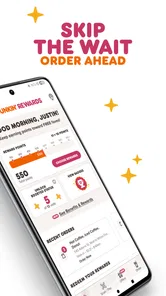
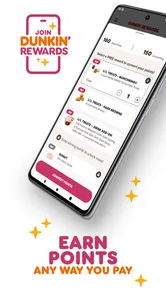
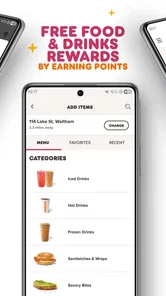
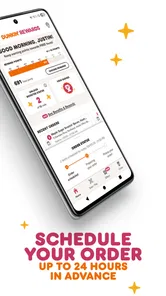
Analysis by Reviewed
I find the Dunkin’ app most useful when a visit is already part of my day: I can decide what I want before reaching the counter and keep an eye on the order details along the way. Its convenience depends on the branch and the timing, though, so I’d use it as a planning tool rather than assume every pickup will be instant. If you’re deciding whether to install it, the key question is simple: do you visit Dunkin’ often enough for ordering ahead and rewards to fit your routine?
Start with the stop, not the drink
My first practical check is the location. Before spending time adjusting a drink, I’d choose the branch that actually works for the journey—near work, on the commute, or close to wherever I’m headed. This small order of operations matters: customizing first can make it easier to overlook that the wrong store is selected. If your plans change, revisit the location before placing the order rather than expecting a prepared order to follow you.
The app’s appeal is strongest for a predictable stop. Imagine leaving home on a weekday and knowing you’ll pass a Dunkin’ on the way in. You can sort out a familiar order while you have a moment, then collect it when you arrive. On a day when the route is uncertain or you might change your mind, I’d wait until I’m closer or order in person. A little preparation helps; rushing through choices just to save a few seconds can create more hassle than it avoids.
Small checks that prevent avoidable snags
When an order looks off, I’d review it in a steady sequence: confirm the selected store, inspect the items, and check every customization before submitting. With a regular drink, it’s tempting to move quickly, but that is exactly when an old preference can slip through unnoticed. I’d give the final screen a deliberate once-over, especially if I’ve changed the size or adjusted ingredients from my usual choice.
Another useful habit is to separate the order from the reward check. I’d first make sure the food and drink are right, then look at any offer or reward I mean to use before paying. That makes it easier to spot whether I overlooked a step or selected the wrong item. The app is most helpful when I treat it as a short checklist, not when I tap through checkout on autopilot.
If the app seems stuck, basic checks are sensible: make sure the phone has a working connection, close and reopen the app, and look for an order confirmation before trying again. That last step is particularly important if a payment action appears to have stalled. Repeating it immediately could lead to confusion or a duplicate order, so I’d confirm what happened first and only then decide what to do next.
A closer look at everyday use
There’s also a trade-off between preparing ahead and keeping choices open. An advance order can make a familiar stop feel more organized, but it is less appealing if you want to browse the menu at the counter, ask a question before choosing, or change your mind at the last moment. I’d use the app for the first kind of visit and keep the counter in mind for the second. Neither approach is automatically better; it depends on how settled your plans are.
More From Our News Desk

Weather by Xiaomi Review: Clear at a Glance, Less Clear Up Close

X Under Pressure: Can It Recover When Posting Goes Wrong?

Clash of Clans Is Won Between the Battles

Android Auto Makes the Case for Quieter Car Software

MobiOffice: Transforming Mobile Productivity with Seamless Integration

EA SPORTS FC™ Mobile Soccer: Redefining Mobile Sports Gaming
Getting Started with the Dunkin’ App
First things first, downloading the app was a breeze. Available on both Android and iOS, you can find it easily on your respective app store. Once installed, the setup process is pretty straightforward. All you need is a quick sign-up or a simple login if you’ve already got an account. Within minutes, I was ready to explore all the caffeinated goodness Dunkin’ had to offer.
Dunkin’ Brands, Inc. publishes this free food-and-drink app, which is rated for Everyone. It has an average rating of 4.6 from around 585,000 ratings, and it has passed 10 million installs. Those figures suggest broad use, but I would still judge it by whether it suits your own route and ordering habits. The current version is 11.18.0.377, and the minimum operating-system requirement is version 11, so checking compatibility before downloading is a sensible first step.
A User-Friendly Experience
One of the first things I noticed about the app is its user-friendly design. The interface is super intuitive, making it easy to navigate through the menu, find your nearest store, and even customize your orders. Everything is laid out in a way that feels natural, and the app is responsive, which means no frustrating lags or crashes.
Where people can get stuck is often not the menu itself but the details around a particular visit. Before building an order, I’d check that the selected location is the one you intend to visit and that it makes sense for your route. Store choice matters more than a polished screen: selecting a convenient branch first helps avoid preparing an order for the wrong stop. If something looks different from what you expected, pause and review the store and order details before submitting rather than rushing through checkout.
Customization and Convenience
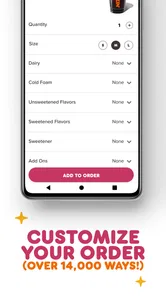
Speaking of customization, the app really lets you personalize your coffee just the way you like it. Whether you’re a fan of extra shots, almond milk, or a sprinkle of cinnamon, it’s all there at your fingertips. And let’s not forget the convenience factor. With the app, you can skip the line and order ahead, which is perfect for those hectic mornings when every second counts.
A useful habit is to build a familiar drink carefully once, then check each choice again whenever you order. A saved routine can be convenient, but it should not replace a quick review: preferences can change, and an old customization may not suit today’s order. For a weekday commute, I’d place the order after confirming the branch along my route, then allow myself enough time to collect it without assuming the app can remove every queue or delay.
Rewards and Offers
Who doesn’t love a good deal? The Dunkin’ app comes with a rewards program that’s sure to keep you coming back for more. Every dollar you spend earns you points, which can be redeemed for free drinks and food. Plus, the app frequently updates with special offers and discounts, so there’s always a chance to save on your favorite treats.
Rewards are most worthwhile for someone who already buys from Dunkin’ regularly; I would not make an extra trip just to chase points. Before paying, take a moment to check what the app currently shows for your order and any offer you plan to use. If an expected reward or offer is not visible, reviewing the account and order details is a better first move than assuming it applied. The app is a useful companion to regular purchases, while a café’s own counter or another ordering option may be simpler for an occasional visitor who does not want another account to manage.
When a Problem May Be Outside the App
If an order does not seem to match your plan, I’d first check the selected location, the items and customizations, and the order status shown in the app. If the screen is not updating, closing and reopening the app and checking that the phone has a working connection are reasonable basic steps. I would avoid repeating a payment action immediately if it is unclear whether an order already went through; first look for confirmation in the app to reduce the chance of making a duplicate order.
Not every snag is an app fault. A location’s availability, a changed commute, or the timing of a busy morning can affect how helpful ordering ahead feels. If the app works but the chosen branch is inconvenient, switching to a better-located option or ordering in person may be the practical answer. For someone who rarely visits Dunkin’, prefers choosing face to face, or does not want to keep track of a rewards account, the ordinary counter experience may be a better fit.
Who will get the most from it
I’d point frequent Dunkin’ customers toward the app if they tend to order the same drink or meal and appreciate preparing it before they arrive. It can also suit someone whose morning has a dependable route and who wants to make planned purchases count toward rewards. The advantage is less about discovering a completely different café experience and more about making a familiar one easier to organize.
By contrast, someone who visits only occasionally may find that ordering at the counter is simpler than setting up and maintaining an account. The same goes for people who enjoy deciding after they see the menu, need to ask staff about a choice, or often switch destinations at short notice. In those situations, the app’s advance-ordering angle is not much of a benefit. A general café-finding or delivery option may be more useful if the real goal is comparing nearby places rather than ordering from Dunkin’ specifically.
How it fits beside other ways to order
Compared with walking up to the counter, the app lets me make choices before I arrive, which can be helpful when I already know what I want. The counter has the opposite strength: it leaves room to pause, ask, and change course in the moment. Compared with broad restaurant or delivery apps, Dunkin’s own app is the more focused choice when I’ve settled on this chain and want its ordering and rewards experience in one place. If I’m still choosing where to go, a broader alternative is more practical.
That distinction also helps set realistic expectations. Ordering ahead can reduce the time spent deciding at the counter, but it does not make the store closer, remove every wait, or guarantee that a busy visit will match a quiet one. I’d think of it as shifting some decisions earlier, not eliminating the work of picking up breakfast. For a fixed commute and a known order, that trade-off feels worthwhile; for a spontaneous stop, it may not.
Final Thoughts
All in all, the Dunkin’ app is a must-have for anyone who loves their coffee fast and customized. It’s packed with features that not only make your life easier but also add a little extra joy to your daily routine. Whether you’re a die-hard Dunkin’ fan or just someone looking to streamline your morning coffee run, this app is worth a download. So go ahead, give it a try, and see how it transforms your coffee experience.
I’d recommend it most to regular customers who know the drinks they like and have a Dunkin’ stop that fits naturally into their day. Its strongest case is practical: prepare a familiar order, check the selected branch, and make rewards part of purchases you already planned. If you value flexibility more than speed, or your plans change too often to order ahead, visiting the counter keeps more decisions open. For me, that makes this a useful routine-builder rather than an essential app for every coffee drinker.
Dunkin’ Frequently Asked Questions
What is Dunkin’ used for, and is it worth downloading?
Dunkin’ is a Food & Drink app from Dunkin’ Brands, Inc. Its main appeal is bringing ordering and rewards features into a mobile experience: you can plan a purchase ahead and make your visit more convenient. If you already use Dunkin’ or want a way to order through your phone, the app may be useful; it is free to download.
Can I use Dunkin’ without creating an account?
The app is designed around ordering and earning rewards, so features tied to an account may require you to sign in or register. Before downloading, consider whether you want to use those personalized features or simply browse what the app offers. Account access can also help keep your orders and rewards connected to you when you return to the app.
Does Dunkin’ let me choose a store before placing an order?
The app’s order-ahead purpose makes choosing where to place an order an important part of the process. Selecting a convenient Dunkin’ location can help you plan when and where to pick up your purchase. Check the selected location and your order details before submitting, especially if you are ordering while traveling or near more than one store.
Is Dunkin’ free to download, and what devices can run it?
Dunkin’ is free to download and is available for Android and iOS. Before installing, check that your device meets the app’s minimum operating-system requirement; the current version requires OS version 11 or later. The app is listed for everyone and is focused on food and drink, so it may suit anyone looking for a mobile way to interact with Dunkin’. The developer is Dunkin’ Brands, Inc.
What is Dunkin' and how does the app enhance my experience with the brand?
The Dunkin' app is a mobile application designed to make your Dunkin' experience more convenient. It allows you to order your favorite donuts, coffee, and other menu items ahead of time, skip the line, and earn rewards. With features like mobile ordering and customizable orders, it enhances your in-store experience and saves you time.
Pros
- Easy mobile ordering and payment
- Loyalty rewards and discounts
- User-friendly interface
- Quick access to menu and offers
- Location-based store finder
Cons
- Limited customization options
- Occasional app crashes
- Requires stable internet connection
- No dark mode option
- Limited regional availability











