Dual Camera Sides
- 112.00
- 3.0
- Installs
- 100.00K
- Price
- Free

Screenshots
Analysis by Reviewed
I tend to judge a two-camera recording app by one practical question: does it help me tell a moment more clearly, or does it just make the frame busier? Dual Camera Sides has an appealing answer when the point is to show both what is happening and the person experiencing it. It is a free camera app from kahlochSto in the Libraries & Demo category, and its main idea is straightforward: record with the front and rear cameras together. That is a genuinely useful creative option, though it works best when I plan the shot rather than expect every moment to benefit from two views.
Why a second viewpoint can be useful
With a regular camera app, I have to choose between showing the scene and turning the phone around to show my reaction. A dual-camera recording can keep those perspectives together. On a walk, for instance, I could frame a street musician with the rear camera while the front view captures my brief commentary. At a family gathering, it could show a shared activity and the person holding the phone, instead of leaving the camera operator out of the memory.
That makes the app more than a novelty for people who enjoy experimenting. It suits casual vloggers, travelers who want their reactions in the same clip as a landmark, and anyone recording a demonstration where their face and the subject both matter. I would not use it for every video, but when those two angles belong in the same story, the concept saves the awkward choice between filming and reacting.
Getting to Know Dual Camera Sides
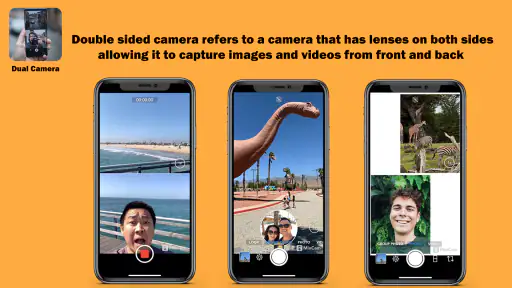
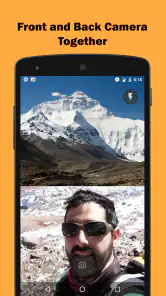
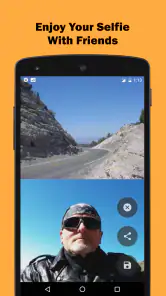
Alright, so here’s the scoop. Dual Camera Sides is all about capturing photos or videos using both your front and back cameras at the same time. Yes, you heard that right! Imagine being able to capture that beautiful sunset and your reaction all in one go. It’s like having the best of both worlds without needing any fancy equipment.
How Does It Work?
So, you might be wondering how this magic happens. Once you fire up the app, you’re greeted with a clean and intuitive interface. It’s super easy to navigate, which is a big win for those of us who aren’t particularly tech-savvy. You simply select the mode you want to use, line up your shots, and hit that record button. The app does all the heavy lifting for you, seamlessly integrating both camera feeds into a single, cohesive image or video.
Choosing the right moment and framing
The dual view changes how I compose a shot. I need to think about two frames at once: what the rear camera should show and whether my face or surroundings in the front view add anything. Before recording, I would check that neither perspective is pointed at a distracting background. A little adjustment can make a clip feel intentional rather than like a standard video with an extra window added by accident.
For a quick everyday example, imagine filming a recipe while explaining a step. One view can stay on the ingredients or the pan, while the other keeps the person speaking present. It is also handy for showing a craft process, a small repair, or a scenic route while narrating what caught your attention. In these cases, the second view provides context; it does not need to be a polished portrait.
More From Our News Desk

Clash of Clans Is Won Between the Battles

Android Auto Makes the Case for Quieter Car Software

MobiOffice: Transforming Mobile Productivity with Seamless Integration

EA SPORTS FC™ Mobile Soccer: Redefining Mobile Sports Gaming

How Microsoft OneDrive Became a Mobile Productivity Giant

How Google Translate Breaks Language Barriers Effortlessly
A useful trade-off is that the two views compete for attention. If the scene itself is already visually busy, adding a face view may make the finished recording harder to follow. I would use the dual layout when the reaction or explanation contributes something, then return to a conventional camera for a clean landscape, a detailed close-up, or a moment where the subject should dominate.
Features That Stand Out
One feature I absolutely adore is the split-screen view. It’s perfect for vlogging or creating engaging content for social media. Plus, the app offers a variety of layouts and effects to choose from, adding a touch of flair to your creations. Another neat feature is the ability to adjust the size of each camera’s view, giving you complete control over your composition.
Speed expectations and demanding sessions
A dual-camera recording asks more of a phone than a simple front-camera clip because the device has to capture two views together. I would approach it as a mode for deliberate short recordings rather than assume it is the best choice for filming continuously. A brief reaction, demonstration, or travel moment is an easier fit than a long recording where I do not need both angles throughout.
Before an important take, I would make a short test clip and watch it back. That gives me a chance to judge whether the framing works on my device, whether my voice and the scene feel balanced, and whether the phone stays comfortable to hold. It is a more reliable workflow than discovering after a long shoot that I preferred one camera view or wanted the smaller panel on the other side.
Movement is another reason to keep expectations sensible. Walking while trying to frame two viewpoints can be awkward, especially if I am also talking. For a moving shot, I would slow down, hold the phone steadily, and make the second view simple. If the goal is smooth footage of a fast-moving subject, a conventional recording with attention focused on one camera is usually the better tool.
The same restraint helps with battery and heat expectations. Recording with both cameras can be a heavier task than using one, so I would avoid treating the app as an all-day background recorder. I would start with a charged phone for a planned session and stop between takes when I have captured what I need. That is sensible practice for demanding camera use generally, not a guarantee of a particular recording duration or performance on every device.
Why You’ll Love It
Now, let’s talk about why you’ll fall head over heels for this app. Beyond its technical capabilities, Dual Camera Sides is just plain fun to use. Whether you’re a seasoned photographer or just someone who loves snapping pics on the go, this app invites you to explore your creative side. It’s perfect for capturing travel memories, family moments, or even just your daily adventures in a fresh and exciting way.
Reliability, retakes, and a sensible workflow
For me, an app like this earns trust through preparation. I would open it before the moment I want to capture, choose a layout, set both views, and record a short test rather than launch it at the last second. That is especially helpful at an event or on a trip, where a missed moment cannot always be recreated. Keeping the phone steady and checking that the important subject remains visible can matter more than adding an effect.
If a take does not come out as intended, I would adjust one thing at a time: camera angle, the relative size of each view, or my position. Changing everything together makes it harder to learn what improved the result. For a spoken clip, I would also choose a quieter place when possible and keep my mouth close enough to the phone for clear speech. The app can combine viewpoints, but it cannot make a distracting setting or unclear narration disappear.
This is also where a dual-view app differs from the usual alternatives. A standard camera app is simpler when I want one clean angle, and a separate selfie clip followed by editing gives me more freedom to arrange the story later. The latter takes extra steps and may not preserve the feeling of reacting in the moment. Dual-camera recording is the middle ground: immediacy and two perspectives in one capture, with less editorial control than building a video from separate shots.
I would not assume that a combined recording automatically suits every social platform or project. If I need precise cuts, carefully balanced audio, or a specific final format, I would make the source material with the intended edit in mind and use a dedicated editor afterward. For a spontaneous clip, the direct two-view result is the attraction; for a highly produced video, it is just one possible starting point.
Device limits and who should choose another tool
Two-camera capture depends on the phone as well as the app. Devices can differ in their camera hardware and in how comfortably they handle simultaneous recording, so I would try a short clip on the handset I plan to use rather than assume every model behaves identically. The app is listed for Android 7.0 and later, but meeting that minimum does not by itself tell me how smoothly a particular device will handle a demanding session.
Storage is worth thinking about, too. Video files can take room, and a recording with two views is a reason to check available space before setting out to film. I would review and keep only the takes I want instead of making a long series of exploratory clips. That small habit avoids a cluttered camera roll and makes it easier to find the useful moments afterward.
Someone who mainly takes still photos, wants extensive editing controls, or needs a dependable single-camera workflow should probably stay with a regular camera app. This one makes most sense when capturing two perspectives together is the actual goal. Likewise, if I am filming something where my attention must stay fully on the surroundings, operating a phone for a dual composition may be more distraction than benefit; I would choose a simpler setup.
The audience profile is clear enough from the app’s scale and reception without treating popularity as proof of quality. It has more than 100,000 installs, an average rating of 3.0 from around 4,800 ratings, and 112 written reviews. I read that as a reason to try it with realistic expectations: the idea has found users, but the middling average suggests it will not be the right fit for everyone. It is free to install, rated for Everyone, and offers in-app purchases ranging from $0.99 to $99.99 per item, so I would check the purchase details in the app before committing to anything.
The app was released on March 1, 2023, and its current version is 8.1.0. Those details help identify the product, but my practical advice remains the same: test it with a real, low-stakes clip first. A quick trial tells me more about whether the dual framing suits my device and the way I film than the version number alone can.
A Few Final Thoughts
In conclusion, Dual Camera Sides offers a unique twist on smartphone photography. It’s easy to use, packed with features, and above all, it makes taking photos and videos a whole lot more exciting. Whether you’re documenting a special event or just playing around with creative ideas, this app is sure to become a staple on your device.
So, if you’re ready to spice up your photography game, give Dual Camera Sides a try. It’s a fresh take on capturing memories and expressing creativity, all from the palm of your hand. Happy shooting!
My performance verdict
I see the strongest case for this app in short, purposeful recordings where the person filming is part of the story. Its appeal is not that it replaces every camera tool, but that it removes the need to choose between a scene and a reaction in the moment. When I want one straightforward view, I would use the usual camera; when I want separate clips and careful editing, I would record them separately. The dual approach earns its place between those options.
Overall, I would recommend trying it if you make casual vlogs, explain things on camera, or like keeping your own response alongside a place or event. I would not promise a particular speed or level of stability across all phones, and I would not make it my only camera workflow without testing it first. Used with a steady hand, a considered layout, and a short test before an important take, it offers a practical creative twist. For me, that is a more useful reason to keep it than novelty alone.
Dual Camera Sides Frequently Asked Questions
Is Dual Camera Sides free to download, and does it offer in-app purchases?
Dual Camera Sides is free to download, so you can try its dual-camera recording concept without paying upfront. It also offers in-app purchases, with items priced from $0.99 to $99.99. If you prefer to avoid extra charges, check purchase settings before using the app and review any purchase prompt carefully.
What kind of content can I create with Dual Camera Sides?
The app is intended for recording video with the front and back cameras together, capturing both sides of a moment in one recording. That approach can suit vlogs, travel clips, and personal memories when you want your reactions and surroundings in the same piece of content. It is categorized among library and demo apps, so its central appeal is trying this camera feature.
What is Dual Camera Sides and how does it work?
Dual Camera Sides is an innovative app designed to leverage both the front and rear cameras of your smartphone simultaneously. This allows users to capture both perspectives, creating a unique, immersive photo or video experience. Ideal for vlogs, travel diaries, or just capturing memories, the app seamlessly blends the images from both cameras into a single output.
Is Dual Camera Sides compatible with all smartphones?
While Dual Camera Sides strives to support a wide range of devices, it is primarily optimized for smartphones with dual camera capabilities, commonly found in newer models. Ensure that your device has both functioning front and rear cameras and is running on a compatible Android or iOS version to make the most of the app's features.
Does using Dual Camera Sides consume a lot of battery?
Running two cameras simultaneously can be demanding on your smartphone's resources, potentially leading to increased battery consumption. However, the app is designed to minimize this impact by optimizing performance and power usage, allowing you to capture your moments without significantly draining your device's battery.
Pros
- Simultaneously captures photos from both front and rear cameras.
- Easy to use interface for quick setup.
- Enhances social media sharing with unique perspectives.
- Compatible with most Android and iOS devices.
- Allows creative storytelling through dual perspectives.
Cons
- Limited editing options within the app.
- Requires permission to access both cameras.
- May drain battery faster when in use.
- Not all devices support dual camera functionality.
- Occasional lag in camera switching.
- Category
- Libraries & Demo
- Version
- 8.1.0











