drawnames | Secret Santa app
- 1.72K
- 4.8
- Installs
- 1.00M
- Price
- Free

Screenshots


Analysis by Reviewed
I find Secret Santa works best when the organizing is clear before anyone draws a name. drawnames is a free tools app from drawnames that brings the draw, wish lists and group details together. Its focus is useful for family gatherings, workplace exchanges and friend groups where coordinating privately by message can quickly get confusing.
Getting a group ready without creating extra work
The biggest benefit for an organizer is having the exchange’s basic moving parts in one place rather than scattered across a chat, a note and a spreadsheet. That matters most when participants live in different homes or need to join at different times. I’d treat the first setup as a short planning task: decide who is in, settle the spending limit, and make sure names are entered consistently before sending invitations.
A practical detail is to confirm the participant list with the group before the draw. Someone may assume a partner or colleague is included when they are not, or a person may decide to join only after the organizer has started. A quick check helps avoid the awkwardness of changing a draw once people have received their private assignment.
Reading and finding your way around
The app’s central task is easy to understand: organize a group, enter participants and manage the exchange. That focused flow should suit people who would rather not juggle a spreadsheet and several separate conversations. I would still take a moment to check names and email addresses before starting a draw; a simple typo can turn a smooth setup into extra messages and correction work.
Wish lists also make the exchange more practical than a bare name generator. They give gift-givers a starting point without requiring the organizer to collect everyone’s preferences manually. A useful approach is to ask participants to add a few ideas across different price levels, then agree on one budget for the group. That keeps the list helpful without making it feel like a precise shopping order.
Using wish lists without turning gifts into orders
Wish lists work best when people treat them as clues about interests, not as a required catalogue. I’d encourage participants to include broad preferences as well as specific ideas: a favorite hobby, a type of snack, or a color can help a giver choose thoughtfully even if a listed item is unavailable. This also makes the exchange more forgiving when the group has different shopping habits or budgets.
For an organizer, the useful trade-off is that lists reduce the need to ask each person privately what they might like, but they do not eliminate communication. If someone has not added anything, a gentle reminder before the draw is better than leaving the giver to guess. It can also help to agree that no one is expected to buy every item on a list; the final choice remains with the giver.
More From Our News Desk

Weather by Xiaomi Review: Clear at a Glance, Less Clear Up Close

X Under Pressure: Can It Recover When Posting Goes Wrong?

Clash of Clans Is Won Between the Battles

Android Auto Makes the Case for Quieter Car Software

MobiOffice: Transforming Mobile Productivity with Seamless Integration

EA SPORTS FC™ Mobile Soccer: Redefining Mobile Sports Gaming
Motor, sensory and group considerations
A private assignment is a thoughtful fit for people who want to participate without announcing their match in a busy group chat. The app is rated for Everyone, and its average rating is 4.8 from around 136,000 ratings. Those figures point to broad appeal, but they don’t tell me whether every person will find the interface comfortable, so I’d invite the group to try the setup before relying on it for an important event.
For a mixed-age or multilingual group, the language support can reduce one kind of friction, while email-based invitations give people a familiar route to their assignment. It is still worth checking that everyone can use the email address they provide and knows to look for the invitation. If someone has difficulty reading a small screen, navigating apps, or managing email, offering a one-to-one walkthrough—or letting them ask a trusted person for help—can make participation easier without revealing their draw.
Making the process easier for different participants
There is no single setup that feels equally simple to everyone. One person may be comfortable installing an app but rarely check email; another may prefer a family member to explain the steps in person. I would ask about those preferences before the exchange begins, rather than assuming that a familiar smartphone makes the process accessible by default.
A discreet support plan can preserve the surprise. For example, an organizer can help someone find the invitation without reading their assignment aloud, or arrange for a trusted helper to assist with the app privately. The important point is to offer help without turning one participant into a public exception. If a person would rather not use a phone or email at all, a paper draw or organizer-managed alternative may be kinder and simpler.
What’s the Buzz About?
If you’re tired of the chaos that comes with organizing a Secret Santa exchange, then drawnames is your best buddy. It takes away the hassle by randomly assigning people to each other, ensuring everything is fair and square. No more awkward duplications or someone getting left out.
Setting Up is a Breeze
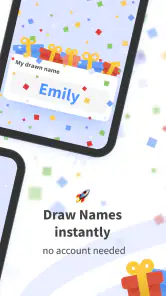
Getting started with the app is super straightforward. You just create a group, add your participants via email, and let the app handle the rest. Participants will receive their assignments privately, so there’s no chance of the cat being let out of the bag prematurely. The app also lets you set a budget, which is a lifesaver for keeping everyone on the same page financially.
A realistic exchange, from invitation to gift day
Imagine a family spread across several towns planning a holiday exchange. The organizer makes a group, checks that everyone who wants to join is on the list, and sets a budget before the draw. Participants receive their assignments privately, then add a few gift ideas when they have time. A relative who is not confident with email can ask for help from someone they trust without posting the match in the family chat.
That workflow is calmer than trying to coordinate every decision during one video call. It also gives people time to think about gifts rather than making a rushed choice while everyone watches. I’d still send a plain-language message outside the app with the agreed budget and any practical deadline the group has chosen; clear expectations are more reliable than assuming everyone will notice the same details.
Features That Stand Out
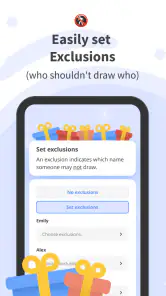
One of the features I absolutely love is the wish list option. Participants can add items they’d love to receive, making it easier for the gift-giver to pick something perfect. Plus, there’s a nifty feature for exclusions, just in case you want to avoid certain pairings (like spouses, because where’s the fun in that?).
Exclusions are especially useful in groups with obvious pairings to avoid, such as people who share a household or close family members who already exchange gifts. I’d decide on those rules before the draw and check them with the group, rather than adding restrictions after people have been assigned. Too many constraints can make any draw harder to organize, so I would use exclusions only for pairings that genuinely matter.
The app also supports multiple languages, which is a fantastic touch for international groups. And if you’re like me and always forget when the exchange is, the app sends out reminders so nobody misses the big reveal.
Situations where a different method may work better
Against the usual alternatives, the app sits between a bowl of paper slips and a fully manual spreadsheet. Paper is personal and needs no digital setup, so it can be the best choice when everyone is in the same room and the group is small. A spreadsheet offers more hands-on control for an organizer who wants to inspect every pairing, but it also means privately distributing assignments and tracking changes yourself.
A group chat is convenient for general planning, yet it is a poor place to reveal individual matches if the organizer wants to keep the surprise intact. Using a dedicated draw tool makes more sense when people are remote, when the organizer wants to avoid handling every assignment manually, or when exclusions and wish lists are useful. If your group does not want to use email or an app, choosing the simpler offline method is not a compromise; it may be the more considerate option.
Everyday logistics and sensible alternatives
Picture a family planning a gift exchange across several households: the organizer can establish the group, set a shared spending limit and use exclusions to avoid familiar pairings, while each person receives their match privately. Before drawing, I’d confirm who is actually joining and give everyone time to check their wish list. That small pause is more useful than rushing to send invitations and later having to redo the plan.
Compared with drawing slips from a bowl, the app is more convenient when participants are far apart and helps avoid accidentally drawing your own name or exposing a match during the process. A spreadsheet or group chat can be better if your group wants complete control over every detail or prefers not to use an app and email. The trade-off is that those manual methods leave the organizer responsible for checking pairings, keeping exclusions straight and sending each match privately.
Remaining barriers and small points to plan around
The app’s workflow depends on participants being able to use the invitation route and engage with the exchange digitally. That may be easy for some and a real hurdle for others, especially if they share an email account, seldom check messages, or find phone navigation tiring. I would ask people what works for them before making the app the only way to take part.
There is also a social limitation: a digital draw can make a group feel organized, but it cannot settle disagreements about the budget, gift expectations or who should be included. Those decisions still need a clear conversation. If a participant is left out of the planning chat or receives an invitation too late, the tool cannot fix that human oversight. A quick roster check and a direct reminder can prevent more problems than rushing through the draw.
Where the fit is less certain
I would choose another approach for a very small exchange that can be settled face to face, or for a group where several people cannot comfortably use email or a mobile app. The organizer should also remember that a wish list is guidance, not a guarantee that every suggestion will suit the budget or be available. Agreeing that participants can offer broad ideas rather than exact demands helps preserve the fun and keeps gift choices flexible.
The app is free, has more than a million installs, and is currently at version 1.72.10; it requires Android 7.0 or later. With a 4.8 average across its ratings, it has clearly found an audience, though popularity alone doesn’t settle whether its workflow suits your group. I’d pick it when private assignments and fewer coordination chores matter more than keeping everything offline.
Who I’d recommend it to
I think this is a good fit for an organizer handling a remote or mixed-location exchange, particularly when participants want private matches, shared gift ideas and a simple way to keep the group’s arrangements together. It should also suit someone who would rather spend a little time checking the setup once than personally managing every match and follow-up message.
I would skip it for a group that values a face-to-face draw, has no appetite for email invitations, or needs a highly customized process that the organizer wants to manage manually. It is also not a substitute for agreeing on expectations. If the group has different ideas about spending or what counts as an appropriate gift, settle that first; a name generator cannot make those decisions for you.
Why You’ll Love It
Honestly, the drawnames app makes organizing a Secret Santa so much fun. It’s easy to use, packed with handy features, and it keeps everything under wraps until the big day. Whether you’re organizing a family exchange or an office party, this app is a game-changer.
In a nutshell, if you want to keep the holiday spirit alive without the stress of manually organizing everything, give drawnames a try. It’s like having a trusty assistant who’s got everything covered, so you can focus on the joy of giving.
My inclusive verdict
For me, the app’s strongest inclusive quality is that it gives a dispersed group a shared way to arrange a private exchange, while wish lists and language support can make participation more comfortable for different people. I would not call any app universally accessible based on those conveniences alone. The best experience comes when the organizer checks how each person prefers to take part and keeps a non-digital route available for anyone who needs it.
Overall, I’d use it when the group is comfortable with digital invitations and values an orderly, private draw. Its practical tools can reduce the organizer’s workload, but a thoughtful setup still matters more than the software: confirm the roster, discuss the budget, give people time to respond and treat gift suggestions as guidance. With those basics in place, it is a useful way to make the exchange easier without taking the personal fun out of choosing a present.
drawnames | Secret Santa app Frequently Asked Questions
Can I organize a gift exchange with people who use different phones?
The drawnames app is available for Android and iOS, so people in a group may be using different kinds of phones. The group organizer can invite participants by email, giving everyone a way to receive an invitation and take part. Before starting the draw, it is helpful to make sure each person can access their invitation and knows how to join.
Can I use drawnames for a gift exchange that is not a holiday Secret Santa?
Yes. Although the app is built around Secret Santa, its group-drawing and wishlist tools can also help organize gift exchanges for office events, parties, or other occasions. You can create a group, arrange the name draw, and let participants share gift ideas, making it useful whenever people want to exchange gifts without organizing the assignments manually.
Does everyone in the group need to install the app?
The app is intended to help a group organize a draw, invite participants, and share wish lists. You can invite people by entering their email addresses, so participants can receive an invitation to join the group. Whether everyone chooses to install the app is a practical consideration for your group; make sure invitees can access the invitation and understand how to take part before the draw.
Is drawnames | Secret Santa free to download?
Yes. The drawnames | Secret Santa app is free to download and use, and its core group-organizing features are available without a purchase. The app is developed by drawnames and is rated for Everyone. If you are choosing an app for a family or workplace exchange, those details can help you decide whether it is suitable for your participants.
What is the drawnames | Secret Santa app used for?
The drawnames | Secret Santa app is designed to simplify the process of organizing Secret Santa gift exchanges. It allows you to easily create groups, draw names, and set up wish lists. This app is ideal for holiday parties, office events, or any occasion where you want to plan a gift exchange without the hassle of manually organizing everything.
Pros
- Easy to set up and manage groups.
- Automatic draw ensures randomness.
- Option for wishlist creation.
- Supports multiple events simultaneously.
- User-friendly interface.
Cons
- Limited customization options.
- Ads can be intrusive at times.
- Requires internet connection.
- No option for manual name draw.
- Limited customer support.
- Category
- Tools
- Version
- 1.72.10








