Docu Reader - PDF Reader
- 57.00
- 3.7
- Installs
- 500.00K
- Price
- Free
Screenshots

Analysis by Reviewed
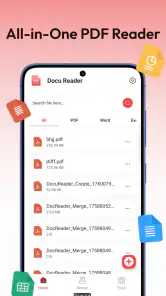
I approached Docu Reader as the kind of utility that has to prove itself through repetition, not through a flashy first launch. Its purpose is straightforward: open PDF files, view documents, turn images into PDFs, and keep document work in one place. That sounds modest, but these are tasks many of us repeat when dealing with receipts, forms, manuals, school notes, scanned pages, or files sent through messaging apps.
What interested me most was whether this free Tools app from Simplibook could become a dependable part of a daily routine rather than another application opened once and forgotten. After using it across those common document situations, my impression is fairly balanced. It is approachable and useful for light, practical work, especially if you want a simple PDF reader without paying. At the same time, its long-term value depends on how demanding your document habits are. People who need advanced editing, deep cloud organization, or professional annotation may outgrow it.
From an easy first week to a more realistic daily routine
The immediate appeal is its focused purpose
The first thing I liked about Docu Reader was that its role is easy to understand. I did not have to think of it as a complete office suite or learn a complicated document system. It belongs in the practical tools category, and that identity comes through in the way I used it: open a PDF, read it, convert a group of images into a single file, and manage the documents I need to find again.
That narrow focus is useful on a phone. A mobile screen is already a compromise for reading, so an app that avoids filling the experience with unrelated functions can feel more comfortable. I found it especially suitable for quickly checking a downloaded document while away from a computer. For a form, instruction sheet, or travel document, I usually want access immediately rather than a full desktop-style workspace.
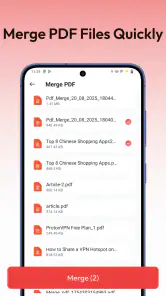
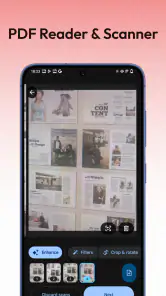
The image-to-PDF function is also more meaningful than it may sound. Many everyday documents begin as pictures: a photographed receipt, a page from a notebook, a whiteboard, or several paper sheets captured with a phone camera. Turning those images into one PDF makes the result easier to send and store than a loose collection of pictures. The practical advantage is not creativity; it is reducing small bits of document clutter.
A useful workflow for ordinary errands
One realistic example is handling paperwork after an appointment. I might photograph a receipt and a supporting page, open Docu Reader, convert the images into one PDF, and keep the finished document with the other files. If I later need to send it, a single attachment is cleaner than asking someone to sort through several images. This is the sort of small workflow where the app earns its place: not because it transforms document management, but because it removes a few annoying steps.
Another good scenario is studying from downloaded material. I can use the reader for a reference PDF, then switch back to the document manager when I need to locate another file. It is also handy for people who receive PDFs through several different channels and want one dedicated place to open them instead of relying on whichever application happens to claim the file first.
Still, I would not confuse a focused viewer with a full document editor. If your normal work involves changing paragraphs, signing contracts, filling complex forms, rearranging pages repeatedly, or marking up every document, you should examine whether your usual alternative already handles those tasks better. Docu Reader makes sense when reading, converting, and organizing are the main jobs.
What the public numbers suggest, and what they do not guarantee
The app is free, carries an Everyone content rating, and has passed 500K+ installs. Its average rating is 3.7 from 606 ratings, with 57 written reviews. I read that combination as a sign of practical interest rather than universal satisfaction. Enough people are trying it for the basic idea to be useful, but the rating also tells me not to expect a flawless replacement for every PDF tool.
That matters during the first week. A free app can be worth keeping even when it has rough edges, provided it handles the particular documents you work with. I would test it with your own files rather than judging it only by the first successful opening. Try a long PDF, a document received from another app, and a small batch of images. The important question is whether the workflow remains comfortable when the file is less convenient than the example you had in mind.
Where it fits beside familiar alternatives
On Android, many people already have access to a browser, a file manager, or a general office application that can open PDFs. Those options may be enough if you only read a document once in a while. Docu Reader becomes more attractive when you want PDF reading and image conversion gathered under one document-oriented tool instead of scattered across separate applications.
Compared with a full office suite, its advantage is simplicity. A large productivity package can be more capable, but it may also feel excessive when all you need is a reader and a way to combine photographed pages. Compared with a dedicated scanning application, Docu Reader appears better suited to handling images you already have than to replacing a complete capture-and-enhancement workflow. That distinction is important: it can simplify the final PDF step without necessarily being the best answer for every stage before it.
The small habits that improve the experience
I found three habits particularly useful. First, I decide before converting images whether they belong in one document. Combining unrelated pictures creates a file that is harder to name, share, and retrieve later. Second, I use a consistent naming habit immediately after creating a PDF, such as including the subject and month in plain language. A reader can open files quickly, but good names still do most of the work when a folder becomes crowded.
Third, I treat image conversion as a filing step rather than a backup strategy. A PDF is convenient for sharing, but I would not delete the original images until I know the document is readable and complete. This is especially important for handwritten notes or photographed pages, where a poor crop or unclear image may only become obvious when someone else tries to read it.
Why the first-week impression can be misleading
The novelty fades quickly with a utility app. During the first few days, almost any successful conversion feels valuable because it solves an immediate problem. The harder test comes later: can I find the document again, do I still understand where the files are, and does the app remain quicker than opening a browser or another reader?
For me, Docu Reader passes the first-week test when I use it as a lightweight PDF station rather than expecting it to be an entire paperless office. Its appeal is strongest for occasional personal paperwork, students handling image-based notes, and anyone who wants a free reader with a conversion function nearby. It is less convincing for teams or professionals whose documents require a controlled, repeatable review process.
Month-to-month value depends on recurring document friction
The lasting value of this app comes from repetition. If I create or read PDFs every few weeks, a dedicated tool can save enough small decisions to remain useful. I know where to open a file, where to turn images into a document, and where to look when I need it later. That predictability is more important than a long list of rarely used features.
However, a PDF utility does not automatically become valuable just because it is installed. If most of your documents are handled inside email, messaging, or a cloud drive, you may continue using those existing tools out of habit. Docu Reader needs a defined role in your routine. Mine would be the point where loose images become a shareable PDF and the place I use for straightforward reading on the phone.
The app’s current version is 1.2.2, and it supports devices running Android 8.0 or later. That makes it relevant to a broad range of Android phones, including some older devices, although compatibility alone does not determine whether it will feel comfortable on your particular screen or with your particular files. I would still judge it by the speed and clarity of the tasks I actually repeat.
Who is likely to keep it installed?
I can see this staying on the phone of a student who photographs class material and periodically combines pages for submission. It also makes sense for a renter saving signed paperwork, a freelancer collecting receipts, or a family member who regularly receives manuals and forms as PDFs. In each case, the app addresses a recurring nuisance: documents arrive in different shapes, but they need to become readable and manageable.
It is less compelling for someone who reads only an occasional PDF and already has a comfortable default viewer. It is also not my first recommendation for a business user who needs shared folders, formal approval flows, detailed annotations, or specialized document security. Those needs call for a more dedicated solution, even if that solution is less simple or not free.
Maintenance is light, but organization remains your responsibility
The main maintenance burden is not complicated setup; it is preventing the document area from becoming a dumping ground. Converting every image without a naming or deletion routine can create a collection of files that is technically managed but practically confusing. I recommend deciding where finished PDFs belong, naming them consistently, and removing failed or duplicate conversions soon after checking them.
This is a subtle trade-off. A dedicated document app can make files feel more organized at first, but no reader can decide which receipt is still important six months later. The app can support the workflow, while the user still has to maintain it. If you already struggle with downloads and photos spread across several locations, Docu Reader will not solve that entire problem by itself.
I would also build in a quick quality check after every image conversion. Open the resulting PDF and move through every page before sharing it. Look for missing edges, unreadable handwriting, an image in the wrong order, or a page that was accidentally included. This habit takes little time and prevents the most embarrassing kind of document error: discovering the problem only after sending the file.
Where fatigue begins after the novelty wears off
The first source of fatigue is repetition without automation. If you convert large batches of images often, the process may feel less efficient than a scanning-focused application designed around capture, cropping, enhancement, and batch handling. Docu Reader is appealing for occasional conversions, but frequent paperwork processing raises a higher standard. The more pages I handle, the more I care about ordering, quality control, and speed.
The second source is switching between tools. Reading a PDF is one task, while editing its content or adding sophisticated marks is another. If I need to move repeatedly between Docu Reader and a separate editor, the simple starting point can become a fragmented workflow. That is not a serious flaw for a reader, but it is a reason not to choose it as the center of a demanding document system.
The third is retrieval. A document manager is only as useful as its ability to help me recognize the right file later. If my own naming is vague, a clean interface will not rescue me. I would rather create fewer, clearly labeled PDFs than convert everything and hope I can sort it out afterward.
Privacy-minded habits are still worthwhile
PDFs often contain information that matters: addresses, invoices, school records, identification details, or medical paperwork. Even when an app is used only as a reader, I treat every converted file as sensitive until I know where it is stored and who can access it. I avoid leaving unnecessary copies in temporary locations and share only the finished document I actually need to send.
This is not a criticism unique to Docu Reader. It is a practical reminder that convenience can encourage duplication. Creating a PDF from images may leave the original pictures in the gallery, the converted file in a document location, and another copy in a messaging thread. A monthly cleanup of redundant files is a sensible habit if you use the app for personal paperwork.
The better choice depends on the job, not the feature count
If I wanted the broadest editing capabilities, I would choose a full office or PDF-editing product. If I wanted advanced scanning, I would look toward a scanner-oriented app. If I only needed occasional reading, the built-in viewer on my phone might be enough. Docu Reader occupies the middle ground: more purposeful than a basic viewer, but simpler than a professional document suite.
That middle ground can be exactly right for a person who wants fewer steps without learning a large application. It can also feel limiting to someone who expects every document task to happen in one place. My advice is to define the recurring problem first. If the problem is “I have PDFs and images that need straightforward handling,” this app deserves a trial. If the problem is “I need a complete workflow for editing, signing, collaborating, and archiving,” I would look elsewhere.
My long-term verdict
After the initial appeal fades, Docu Reader earns lasting space when it becomes a small, dependable checkpoint in a document routine. I would keep it for quick PDF reading and for turning related images into a single file, especially because it is free and easy to understand. The value is practical rather than exciting, and that is perfectly acceptable for a Tools app.
My reservation is that its usefulness can plateau. Once your needs move beyond viewing, conversion, and basic document organization, a more specialized alternative will probably save more time. I also would not install it merely because every phone needs a PDF reader; many phones already provide one. Install it when the image-to-PDF workflow or the desire for a dedicated document space solves a recurring annoyance.
For Android users on version 8.0 or later, the app is accessible enough to consider, and its Everyone rating makes it suitable for general household use. Simplibook has kept the concept focused, which helps new users get started without a long learning period. The 3.7 average tells me to approach it with reasonable expectations rather than assuming it will replace every document tool.
My recommendation is simple: keep Docu Reader if it saves you repeated effort each month, and remove it if it merely duplicates a viewer you already prefer. Its strongest quality is the combination of PDF reading and image conversion in a compact, free utility. Its weakest point is the boundary around that simplicity. For light personal paperwork, that boundary is rarely a problem; for serious document management, it becomes the deciding factor.
Pros
- Opens PDFs quickly
- even when switching between several documents.
- Simple interface makes basic reading comfortable for most users.
- Supports zooming and page navigation with responsive touch controls.
- Useful search function helps locate words or phrases in long files.
- Documents can be accessed conveniently from the device’s local storage.
Cons
- Advanced editing and annotation tools may be limited or unavailable.
- Large PDFs with images can take longer to load on older devices.
- The app may display advertisements during regular use.
- Cloud storage integration may not be as extensive as dedicated PDF suites.
- Some features or file formats may require additional permissions or upgrades.
- Category
- Tools
- Version
- 1.2.2











