Design Craft: Cut Files, Fonts
- 39.00
- 4.2
- Installs
- 50.00K
- Price
- Free
Screenshots
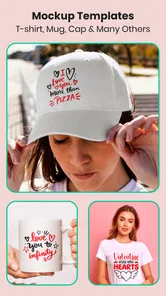
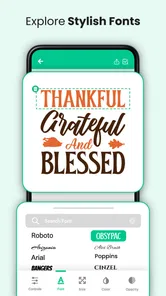
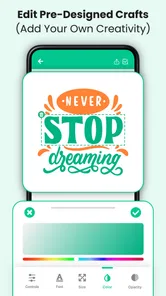
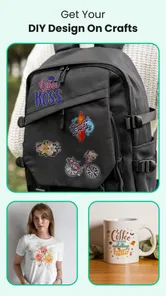
Analysis by Reviewed
I spent time with Design Craft: Cut Files, Fonts as a practical art and design app rather than treating it like a simple gallery of decorative images. It is aimed at people who want to prepare creative material for DIY projects, especially work involving monograms, graphics, lettering, and a cutting machine. My first impression was that it is most useful when you already have a project in mind: a label, a personalized gift, a sign, or a small craft collection that needs a more distinctive visual starting point.
The app is developed by One Music Player and sits in the Art & Design category. It is free to install, with optional in-app purchases shown from $0.99 to $99.99 per item. That distinction matters. You can try the app without paying, but the free entry point should not be confused with unlimited access to every creative resource. I would approach it as a low-risk way to explore the design library first, then decide whether the paid material is worthwhile for the projects you actually make.
Its store presence shows a 4.2 average from around 214 ratings and more than 50K installs, which suggests a modest but established audience rather than a giant mainstream platform. The age rating is Everyone, so it is positioned as a general-purpose creative tool. I tested it with that in mind: not as professional illustration software, but as a convenient source of ready-made design ideas and assets for personal craft work.
How Design Craft fits into a real DIY workflow
I find it helpful to treat the app as the idea-and-selection stage, then pause before committing to a design. I compare a few candidates against the finished object’s size and wording, because a style that suits a monogram may not remain clear on a longer label. That simple check makes the handoff to the machine’s own software more purposeful, where the next heading looks at what that division means in day-to-day crafting.
A useful starting point for personalized projects
The strongest idea behind Design Craft: Cut Files, Fonts is convenience. Instead of beginning with a blank canvas and building every letter or ornament from scratch, I could start by browsing a collection of visual elements and considering how they might fit a project. The focus on monograms, graphics, and fonts makes the app especially relevant to personalization, where the basic concept may be simple but the right lettering style makes the finished object feel intentional.
That makes it different from a general drawing app. A drawing app gives me a broad workspace, but it also expects me to create the visual language myself. Here, the value is in reducing the distance between “I want to make something with a name on it” and “I have a design direction I can work with.” For a beginner, that can be the difference between starting a project and abandoning it because the blank screen feels too demanding.
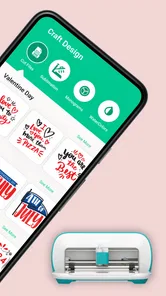
I would use it before opening a cutting-machine companion app. The first stage would be browsing for a suitable monogram or font mood, then deciding whether the design suits the material and size of the project. Only after that would I move to the machine-specific software for final sizing, placement, and cutting preparation. This separation is important: Design Craft is best viewed as a creative source and planning aid, not automatically as a replacement for the software that controls a particular machine.
More From Our News Desk

Weather by Xiaomi Review: Clear at a Glance, Less Clear Up Close

X Under Pressure: Can It Recover When Posting Goes Wrong?

Clash of Clans Is Won Between the Battles

Android Auto Makes the Case for Quieter Car Software

MobiOffice: Transforming Mobile Productivity with Seamless Integration

EA SPORTS FC™ Mobile Soccer: Redefining Mobile Sports Gaming
Where the large design collection helps
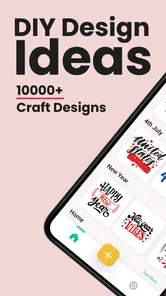
The collection is presented as containing over 5,000 monograms, graphics, and fonts. That breadth is attractive because it gives me more than one obvious style to consider. A single elegant monogram may work for a wedding favor, while a heavier graphic or playful letter treatment may suit a child’s storage box or a casual tote. The practical benefit is variety at the idea stage, not merely a high number on a feature list.
There is also a subtle advantage for people who make similar items repeatedly. If I were preparing several personalized gifts, I would not need to reuse the same visual treatment each time. I could keep the overall workflow familiar while changing the lettering or decorative direction. That helps a small craft project feel less repetitive without requiring advanced drawing skills.
However, a large collection can create its own friction. More choices do not automatically mean faster decisions. I found it helpful to begin with a clear purpose—such as a name decal, a simple sign, or a decorative label—rather than browsing aimlessly. I would also narrow the choice by the physical result I want. A design that looks attractive on a phone screen may be too intricate for a small cut, and a thin font may be harder to work with than a bold one.
A realistic everyday scenario
Imagine that I am making a set of storage labels for a home office. I know the words I need, but I do not want every label to look like plain typed text. I could use the app to compare monogram-inspired lettering, decorative graphics, and more restrained fonts before settling on a consistent style. Then I would take that direction into the cutting-machine software, check the actual dimensions, and adjust the layout there.
In that situation, the app saves creative time rather than replacing technical preparation. I still need to think about the label material, the available cutting area, the legibility of each word, and whether the chosen design will weed cleanly. That is one of the most useful ways to understand this app: it can help me make better design decisions early, but it does not remove the hands-on judgement required later.
What I would check before committing to a design
My first check would be legibility. Monograms and decorative fonts can look excellent when viewed large, yet lose their identity when reduced. I would preview the design at roughly the size of the finished item, not only at the size shown while browsing. If the letters merge visually, the design is probably better suited to a larger sign than a small sticker.
My second check would be the number of delicate details. Fine interior shapes, narrow gaps, and crowded flourishes can become troublesome during cutting or application. This is a trade-off that a design library cannot solve for me. The app may provide an appealing starting point, but I still need to choose artwork that matches my tools and patience.
My third check would be consistency. If I am making a set, I would choose one main font family or visual mood and use decorative graphics sparingly. Mixing several unrelated styles can make a project look assembled rather than designed. The app gives me a broad palette, but the final quality depends on restraint.
Free access and the meaning of paid value
The app is free, which makes it easy to test without making an immediate financial commitment. That is valuable for a new crafter who is still learning what kind of designs fit their projects. I could explore the general approach, decide whether the browsing experience suits me, and only then consider optional purchases.
The paid side requires a more deliberate judgement. In-app purchases range from $0.99 to $99.99 per item, so the potential cost varies substantially depending on what I choose. I would not describe every purchase as automatically good value. For occasional crafting, a low-cost item that directly solves a specific project may make sense. A much larger purchase deserves more scrutiny, especially if I only need one font or one decorative style.
My advice is to start with the project, not the catalogue. Write down what you are trying to make, what visual style it needs, and whether you expect to reuse the asset. If a paid design will support several future projects, its value is easier to justify. If it is only attractive because browsing made it tempting, I would wait. The free entry point is most useful when it helps you make that distinction.
How it compares with familiar alternatives
Compared with a general graphic-design platform, Design Craft feels more focused on craft-oriented inspiration and ready-to-use visual starting points. A broad design platform may offer stronger layout controls, templates, photo editing, and brand tools. I would choose that kind of alternative when I need to build a complete poster, social graphic, presentation, or multi-element composition.
Compared with a drawing app, this one is less about freehand expression and more about selecting a suitable design direction. If I wanted to sketch an original illustration, paint with brushes, or manipulate a complex composition from the ground up, I would look elsewhere. The advantage here is speed and accessibility for personalization rather than deep artistic control.
Compared with dedicated cutting-machine software, it occupies an earlier part of the process. Machine software is the better choice for checking the cutting mat, arranging objects, preparing the final size, and handling the practical details of production. Design Craft is more helpful when I need inspiration or a visual asset before that technical stage. Using both can make sense, but expecting one to replace the other would lead to disappointment.
Small workflow habits that improve the result
I would keep a short shortlist instead of saving every attractive option. Choosing three or four candidates makes comparison easier and prevents the catalogue from taking over the project. I would also compare them at the same intended size, because a font that wins in a large preview may not be the best choice for a small physical object.
Another useful habit is to test the design with the actual wording before buying anything. A font may handle a short monogram beautifully but become awkward with a longer surname. Letter combinations matter, and the visual balance can change dramatically from one name to another. This is one reason I would avoid purchasing based only on a sample word.
I would also separate decorative exploration from final production. First, decide on the visual style. Next, confirm that the design is practical for the material and machine. Finally, prepare the cut in the appropriate companion software. That three-step approach reduces the risk of paying for something that looks good but is unsuitable for the finished object.
Where the experience can feel limited
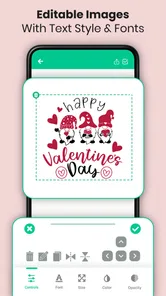
The main limitation is that a library-centered app can make me dependent on what is already available. If I have a very specific visual concept, I may find that browsing gets me close but not exactly where I want to go. A more capable editor would give me greater control over custom shapes, spacing, layering, and detailed modifications.
There is also a practical gap between seeing a design and producing it successfully. The app can help with selection, but it cannot make a delicate design automatically easy to cut, weed, transfer, or read on every material. Beginners may initially assume that a polished preview guarantees a polished physical result. In practice, material choice and scale remain just as important.
The optional purchase structure is another point to consider. Free access is convenient, but the broad purchase range means I would pay attention before confirming anything. I prefer tools that make it obvious which resources are available for free and which require payment. With this app, the best approach is to treat each purchase as a separate decision and judge it by reuse, project relevance, and technical suitability.
Who will get the most from it
I think the app is a good match for beginners who want more personality than plain text but do not yet feel ready to design every element themselves. It should also appeal to casual crafters making gifts, labels, signs, cards, or personalized items where a distinctive monogram or font can carry much of the visual impact.
It may be particularly useful for someone who already owns a cutting machine but often struggles with the first creative step. The app can act as a prompt: browse, compare, choose a direction, and then continue in the machine’s own software. That is a more realistic benefit than expecting it to manage the entire production workflow.
I would be less likely to recommend it to an experienced designer who needs precise vector editing, advanced typographic controls, or complete ownership of the drawing process. I would also suggest skipping it if you only want a full-featured layout editor or if your projects rarely involve lettering, monograms, or cut-friendly graphics. In those cases, a broader design tool may offer better value even if its learning curve is steeper.
Device and version considerations
The current version is 1.2.21, and it supports devices running Android 7.0 or later. That makes it accessible to people using older Android hardware, although the actual comfort of browsing a large visual collection will still depend on the screen and general performance of the device. I would prefer a larger display when comparing detailed fonts or monograms, because small previews make subtle differences harder to judge.
Since it is an Android app, iPhone and iPad users should not assume the same installation route or workflow applies to them. For Android users who meet the minimum system requirement, the free installation makes testing straightforward. I would still plan the final export and cutting steps around the software supported by my particular machine, rather than assuming the app itself is the complete bridge from idea to finished object.
My buy-or-skip judgement
I would try Design Craft if I wanted a quick source of monograms, graphics, and fonts for personal DIY work. The free starting point lowers the risk, and the focused collection is more relevant to cutting and personalization than a completely blank drawing canvas. Its best quality is not that it magically completes a craft project; it is that it helps me move from a vague idea to a more confident visual choice.
I would not make a large purchase immediately. I would first test the browsing experience, identify whether the available styles match my projects, and check a candidate design with my actual wording and intended size. The optional prices span from $0.99 to $99.99 per item, so careful selection is essential. A small, project-specific purchase may be sensible, while a costly collection is harder to justify for occasional use.
Overall, I see it as a specialized companion for DIY design rather than a complete replacement for professional illustration or cutting-machine software. My recommendation is to install it for free, use it to plan a real project, and pay only when a specific asset has clear repeat value. If that focused role matches what you need, it can make personalization easier and more enjoyable. If you need deep editing, original drawing tools, or an all-in-one production workspace, I would skip the purchase and choose a broader alternative instead.
Design Craft: Cut Files, Fonts Frequently Asked Questions
How much storage space should I expect Design Craft: Cut Files, Fonts to use?
The app is a collection of creative resources, including cut files, graphics, and fonts, so the space it needs can vary with the content you download and keep. If your device is short on storage, check its available space before installing and consider removing saved files you no longer use. This is especially useful if you plan to keep a growing library for several craft projects.
Is Design Craft: Cut Files, Fonts free to download, and are there any extra costs?
Design Craft: Cut Files, Fonts is free to download, though some content may require payment through in-app purchases. Individual purchase prices range from $0.99 to $99.99, so it is worth checking the price shown for an item before confirming a purchase. You can explore the app without assuming every design or font is included at no cost.
What is Design Craft: Cut Files, Fonts used for?
Design Craft: Cut Files, Fonts is a creative design app aimed at users who make personalized projects, crafts, stickers, invitations, shirts, labels, and other printable or cuttable artwork. It provides access to design resources such as cut files, decorative graphics, and fonts that can be adapted to different projects. The app is especially useful for crafters who want ready-made elements instead of creating every design from the beginning. Its collection includes more than 5,000 monograms, graphics, and fonts for cut-machine projects.
Does Design Craft: Cut Files, Fonts work with Cricut, Silhouette, or other cutting machines?
The app is designed with crafting workflows in mind, so its files may be useful for projects made with popular cutting machines such as Cricut and Silhouette. However, compatibility can depend on the file format, the machine software, and the type of project you are preparing. Before downloading or purchasing any design, check the listed format and confirm that it can be imported into your preferred cutting application.
Are all designs and fonts in Design Craft free to use?
Not necessarily. Apps offering cut files, fonts, and graphic resources commonly include a mixture of free content, premium items, subscriptions, or individual purchases. In addition, free access does not always mean unrestricted commercial use. I recommend checking the price, licensing terms, and permitted uses for each resource before using it on products that you plan to sell, especially when creating merchandise for customers.
Pros
- Large library of cut files
- fonts
- and ready-to-use craft designs.
- Useful search and category tools make finding projects quick.
- Supports creative work for cards
- stickers
- shirts
- and home décor.
- New design content can provide fresh inspiration for regular crafters.
- Suitable for beginners who want templates without creating everything manually.
Cons
- Some premium designs and fonts require a subscription or separate purchase.
- File compatibility may vary depending on the cutting machine and software used.
- The large catalog can feel overwhelming without more detailed filtering options.
- Design quality and originality may differ noticeably between individual files.
- An internet connection may be needed to browse or download parts of the library.













