Dairy Queen® Food & Treats
- 14.13K
- 4.1
- Installs
- 10.00M
- Price
- Free

Screenshots

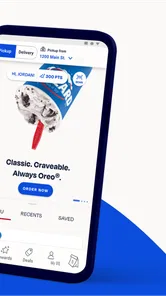
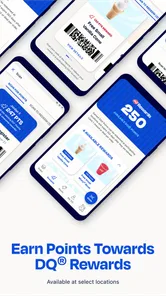
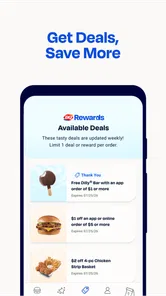
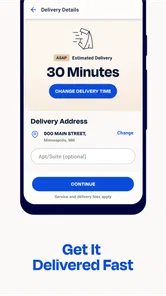
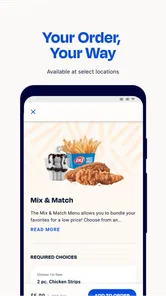
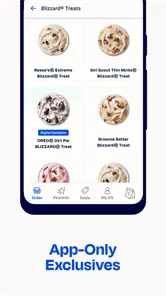
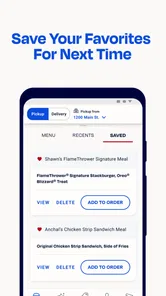
Analysis by Reviewed
I like Dairy Queen® Food & Treats most as a practical companion to a visit, rather than an app that gives me a reason to visit on its own. It puts ordering and offers in one place, which is useful when I already know I want something from Dairy Queen and would rather make the decision before arriving. The app is free, so trying it does not require paying for access; the value comes from whether its ordering and rewards features fit how often you go.
When the app earns its place on your phone
A realistic use is deciding on a treat during a busy afternoon, checking the app before leaving, and placing an order ahead instead of choosing at the counter. That can make the visit feel more organized, especially if you are picking up for other people and want to settle everyone’s choices first. I would still check the selected location and order details before confirming: planning ahead helps, but it is only useful if the pickup plan matches where you are actually going.
It is also worth thinking about how you use rewards. If you already visit Dairy Queen, keeping offers and reward activity in the app may make those trips feel more worthwhile. If you only stop in occasionally, rewards are less likely to affect your routine, so I would treat them as a bonus rather than a reason to buy more than I intended. The app’s free access is clear value; the value of any particular offer depends on whether it suits what you wanted anyway.
Where convenience has limits
Order-ahead tools are most useful when I have a definite destination and a little time to plan. They are less compelling if I am still deciding what to eat, if the nearest restaurant is not convenient, or if I prefer to browse and ask questions in person. Compared with a general food-ordering app, this one is focused on Dairy Queen rather than helping me compare a range of restaurants. That focus is an advantage for a regular customer, but a limitation when I want alternatives.
I would also avoid assuming every visit works the same way just because ordering is available in the app. Check the location and the order information on screen before setting off, particularly when your plans are changing. The app can help reduce uncertainty around making an order, but it cannot make a Dairy Queen stop worthwhile if the restaurant itself is out of your way or its menu does not suit the group.
Who should download it
I’d recommend it to people who already choose Dairy Queen often enough to use its offers, rewards, or advance ordering. It is also a sensible option for someone who likes to decide on a Blizzard® Treat, meal, or snack before reaching the counter. The developer is International Dairy Queen®️, and the app is listed as a free Food & Drink app for everyone. It has a 4.3 average from around 69,000 ratings, with more than 5 million installs, which suggests it has found a sizable audience among customers.
On the other hand, I would skip it if you rarely visit Dairy Queen, do not want another restaurant app, or usually make spontaneous choices in person. Its current version is 4.1.0 and it supports Android 6.0 and up, so device compatibility is worth checking before installing. Those details matter more than the reward pitch if your phone is older or you simply want to keep your home screen uncluttered.
More From Our News Desk

Weather by Xiaomi Review: Clear at a Glance, Less Clear Up Close

X Under Pressure: Can It Recover When Posting Goes Wrong?

Clash of Clans Is Won Between the Battles

Android Auto Makes the Case for Quieter Car Software

MobiOffice: Transforming Mobile Productivity with Seamless Integration

EA SPORTS FC™ Mobile Soccer: Redefining Mobile Sports Gaming
Have you ever found yourself craving a sweet treat or a savory snack, only to realize you have no idea where the nearest Dairy Queen® is? Well, fret no more because the Dairy Queen® Food & Treats app is here to save the day! Trust me, this app is like having a personal ice cream and fast-food concierge right at your fingertips.
Explore the Delicious World of Dairy Queen®
As soon as I downloaded the Dairy Queen® Food & Treats app, I was greeted with a simple and user-friendly interface. It's like stepping into a virtual Dairy Queen® store, with all your favorite treats displayed right on your phone screen. Whether you're in the mood for a classic Blizzard® Treat or a mouth-watering burger, this app has got you covered.
Finding Your Nearest Dairy Queen®
One of the coolest features of this app is the location finder. With just a few taps, I was able to find the nearest Dairy Queen® outlets, complete with their operating hours and directions. No more driving around aimlessly or guessing whether that DQ® you remember is still open. It’s a game-changer for those spontaneous ice cream runs!
Order and Customize with Ease
The app also allows you to place orders directly from your phone, which is perfect for those days when you just can’t wait in line. What I love most is the customization feature. You can tweak your order to suit your taste buds—extra sprinkles, hold the onions, you name it! It’s like having your very own DQ® chef.
Plus, tracking your order is a breeze. You'll know exactly when your food will be ready, so you can time your arrival perfectly. No more cold fries or melted ice cream!
Exclusive Deals and Rewards
Who doesn’t love a good deal? The Dairy Queen® app is packed with exclusive offers and rewards. Every time you order through the app, you earn points that can be redeemed for free treats. It’s like getting a little bonus with every purchase, and who can say no to free ice cream?
The app also keeps you updated on the latest DQ® promotions and seasonal treats, so you’ll never miss out on limited-time goodies again. It’s a sweet deal, literally!
How I’d make an order-ahead visit smoother
For a group pickup, I’d decide what everyone wants before opening the checkout flow, then review each item and its customizations together. That small pause is useful because a treat run often involves different preferences, and it is easy to overlook a change when adding several items quickly. I’d also make sure the chosen restaurant is the one that fits the route, not simply the first location shown. The app helps me organize the order; it does not remove the need to check that the plan works for the people and place involved.
For a single-item stop, ordering ahead may be less important than browsing the menu or seeing what appeals in person. I’d use the app when the choice is already settled or when I want to avoid spending time deciding at the counter. If I am unsure, walking in can be the better approach: it keeps the decision flexible and avoids the feeling that I need to commit before I am ready.
What the free download does—and does not—tell me about value
There is no charge to install the app, which makes trying its ordering and rewards tools a low-commitment choice. That is different from saying every purchase becomes cheaper. I would judge the offers one by one, against what I was already planning to order, rather than treating points or promotions as automatic savings. A deal only has practical value for me if it suits my appetite, timing, and visit; buying an extra item just to make an offer feel worthwhile defeats the point.
The app is most convincing as a convenient route into a Dairy Queen purchase I already want. It does not replace comparing meal prices across different restaurants, and it is not a general-purpose food delivery marketplace. If keeping costs predictable is my priority, I would check the final order details before confirming and compare them with the option of ordering in person. Free access is a genuine plus, but the value of food and offers still depends on the choices I make.
How it differs from other ways to order
Against ordering at the counter, the app’s advantage is preparation: I can settle on items earlier and use advance ordering when that suits the visit. In person, I can change my mind more easily and ask questions directly, so the counter remains the more natural option for an unfamiliar menu choice or an unplanned stop. Neither route is universally faster; the better one depends on whether I value preparation or flexibility more that day.
Compared with a broad restaurant-ordering app, Dairy Queen’s app keeps the experience centered on one chain, which is useful when I already know where I want to eat. It is a poor substitute when I want to compare nearby restaurants, cuisines, or ordering options in one place. I would keep it for repeat visits and use a general service—or simply search for other local choices—when the restaurant itself is still undecided.
Small checks that prevent avoidable hassle
Before confirming an order, I would look at the location, the selected items, and any changes made to them. Then I would keep the pickup plan in mind rather than assuming the app’s convenience means I can arrive at any time without checking what the order screen says. This is especially sensible when plans shift or someone else is collecting. A few seconds of review can prevent the wrong restaurant or an unnoticed customization from spoiling a straightforward treat run.
I would also keep expectations modest around rewards. Their usefulness depends on whether I return often enough and whether the available offers match what I actually like. Someone who visits rarely may find it simpler to order in person and skip tracking another account or app. For a regular customer, however, having offers and ordering tools together can make it easier to remember what is available before paying, without turning every visit into a hunt for a promotion.
When another approach is better
If I am choosing between several places, need broad restaurant comparisons, or do not know whether Dairy Queen is on the route, I would start with a general map or food-ordering service instead. If I have questions that are easier to resolve face to face, I would go to the counter. And if I rarely visit, the modest convenience may not justify keeping a dedicated chain app on my phone, even though the download itself is free.
That distinction matters for families and groups too. The app can help collect choices before a pickup, but it cannot decide whether Dairy Queen suits everyone’s preferences or solve a last-minute change after an order is placed. I would use it as a planning aid, not as a guarantee that the whole outing will be effortless. It is at its best when the destination, the order, and the pickup plan are already reasonably clear.
My bottom line
For me, the strongest reason to keep the app is the combination of store discovery, order-ahead convenience, and access to Dairy Queen offers in a single place. I would not install it expecting every trip to be faster or every reward to change what I spend; I’d use it when I already plan to visit and want to make that visit easier. If Dairy Queen is part of your regular routine, it is an easy free download to try. If it is not, the occasional in-person stop may be all you need.
Dairy Queen® Food & Treats Frequently Asked Questions
What does the Dairy Queen® Food & Treats app let me do?
The app brings Dairy Queen® food deals, rewards, fast reordering, and order-ahead options together on your phone. It is designed for customers who want a convenient way to engage with the brand, whether they are checking offers or getting ready to order. Its Food & Drink focus makes it a practical choice for people who visit Dairy Queen® and want these features in one place.
Can I use the app to find a nearby Dairy Queen® restaurant?
Finding a restaurant can be an important part of planning an order, especially when you are away from home. The Dairy Queen® Food & Treats app is intended to support customers using the brand’s restaurant services, alongside its offers and ordering options. You can explore the app to see how its available features fit your plans and help you decide where to order.
What devices can run the Dairy Queen® Food & Treats app?
The app is available for Android and iOS, so you can use it on a compatible phone or tablet. On Android, it requires version 6.0 or later. It is listed as suitable for everyone, and the app is free to download. Its Food & Drink focus makes it a handy option if you want to browse Dairy Queen® offers and use ordering features from your device.
What is the Dairy Queen® Food & Treats app?
The Dairy Queen® Food & Treats app is a mobile application designed for both Android and iOS platforms. It allows users to browse the menu, order food and treats, locate nearby Dairy Queen® restaurants, and access exclusive deals and promotions. The app aims to enhance the customer experience by providing a convenient and user-friendly interface for all your Dairy Queen® needs.
How do I place an order through the Dairy Queen® app?
To place an order through the Dairy Queen® Food & Treats app, first, download and install the app on your device. Create an account or log in if you already have one. Browse through the menu, select your desired items, and add them to your cart. Once you’ve reviewed your order, proceed to checkout, and choose your pickup method. You can pay directly through the app using various payment options available.
Pros
- User-friendly interface for easy navigation.
- Wide variety of menu options available.
- Fast and efficient delivery service.
- Nutritional information available for health-conscious users.
- Loyalty rewards program for frequent customers.
Cons
- Limited customization for orders.
- Occasional app crashes reported.
- Requires stable internet connection.
- No option to schedule orders in advance.
- Limited availability in certain regions.











