Daily Weather Alarm - Radar
- 20.00
- 3.7
- Installs
- 10.00K
- Price
- Free
Screenshots
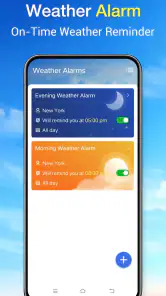
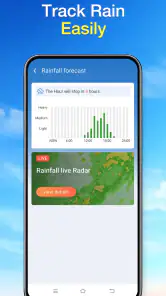
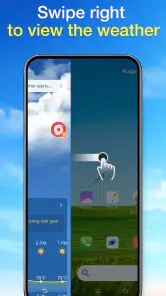
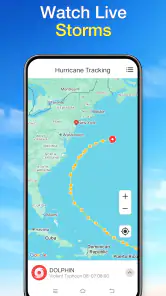
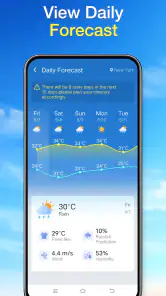
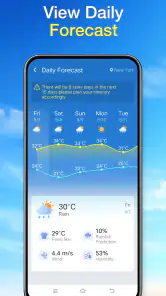
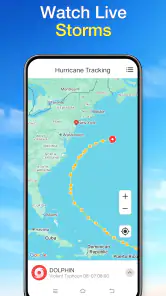
Analysis by Reviewed
I know the small morning dilemma well: I’m about to leave, the sky looks harmless, and I’m not sure whether I should carry a coat or plan around rain. A weather app can help, but only if checking it becomes easier than guessing. Daily Weather Alarm - Radar is positioned around that everyday decision, pairing a weather focus with an alarm-oriented identity. My main question is whether it can reduce the little bits of morning friction without becoming another screen I have to manage.
When a forecast needs to save time
The familiar problem is not a lack of weather information; it is having to make a small decision while getting ready, packing a bag, and trying to leave on time. I don’t want to open several screens just to decide whether to take a light layer. A daily weather routine is useful when it helps me answer that question quickly, then lets me get on with the morning.
That also shapes how I would judge this app. I would not measure it by how long I can browse or by how many details I can inspect, but by whether checking it removes a step from an ordinary routine. If I still need to search elsewhere for the same basic answer, the convenience has disappeared. If a quick check helps me decide and move on, even a narrow tool can earn its place.
Less guessing before you leave
Weather is a practical category, but many apps encourage more checking than a typical day requires. Forecast maps, hourly charts and severe-weather layers can be useful; they can also turn a simple “What should I wear?” into a browsing session. The appeal of this app is the possibility of making weather part of a daily routine rather than a separate task. Its short description, “Daily Weather Alarm,” signals that routine-minded approach, while its broader store summary presents it as an everyday assistant.
I’d treat it as a lightweight decision aid, not as a substitute for careful planning. The useful test is whether a quick check helps me choose a jacket, decide when to walk, or avoid being caught out on the way to work. If that is all I need, a focused tool can save time. If I’m planning a long drive, a hike or an outdoor event, I would still want to compare detailed forecasts and local alerts rather than rely on a glance.
The app is free, is rated for Everyone, and is made by X5 Network Area. It has an average rating of 3.7 from around 80 ratings, with over 10,000 installs. That gives a prospective user some context, but it is not a guarantee that the app will suit every phone or local routine. I’d approach it as a practical option to try, then judge it by whether its daily workflow earns a place on my home screen.
Make the first check serve a real routine
The most useful way to begin is to tie the app to a decision you already make at roughly the same time each day. For example, check it while getting dressed, before packing a bag, or just before heading out. That is a better test than opening it repeatedly without a question in mind. A weather tool becomes genuinely helpful when it shortens a decision, not when it adds another habit of refreshing a screen.
More From Our News Desk

Clash of Clans Is Won Between the Battles

Android Auto Makes the Case for Quieter Car Software

MobiOffice: Transforming Mobile Productivity with Seamless Integration

EA SPORTS FC™ Mobile Soccer: Redefining Mobile Sports Gaming

How Microsoft OneDrive Became a Mobile Productivity Giant

How Google Translate Breaks Language Barriers Effortlessly
The alarm angle suggests a natural routine, but I would not assume that the app replaces a dependable wake-up alarm. Keep your usual alarm in place until you have confirmed how the app behaves on your device and whether its weather-related routine fits your needs. This is a simple but worthwhile distinction: a weather prompt can support a morning plan, while the alarm you rely on to get up should remain something you trust independently.
For a first week, I’d use one repeatable question: “Will the weather change what I take or when I go?” Check at a consistent point, make the choice, and move on. If the app makes that check quicker than switching between a general weather app and your own assumptions, it has a clear job. If it leaves you needing several extra checks, a broader forecast app may be a better fit.
Small daily decisions where it can help
Consider a weekday commute. You have a short walk to transit, a bag that is already full, and no interest in carrying an umbrella unless it is likely to matter. A quick weather check can help you decide whether to pack one before you leave. The practical benefit is not predicting every change perfectly; it is making a better-informed choice while there is still time to act.
It can also be useful for people whose mornings are divided between getting ready and preparing someone else. A parent might check conditions before choosing a child’s outer layer, while someone heading to an early appointment might decide whether walking is comfortable or whether to leave extra time. In both cases, the value comes from fitting the check into an existing moment rather than asking the user to study a forecast in detail.
There is a less obvious use for people who tend to over-check weather. Set a personal rule to consult the app once before leaving, then only check again if plans change or conditions look unusual. That can reduce needless phone time and make a routine more predictable. It is not a special feature claim; it is a way to use a daily-focused weather tool without turning weather into a constant distraction.
Another useful workflow is to check at the point when a decision is still reversible. If you are deciding whether to take a lunch break outdoors, check before you leave the building rather than after you have walked halfway there. If you are planning an evening errand, a later check is more relevant than relying on what you saw early in the morning. The app’s daily framing is best treated as a prompt for timely decisions, not as a reason to assume one early forecast answers everything.
A practical way to judge the routine
To see whether the app genuinely saves effort, I’d compare it with what I already do rather than judge it in isolation. For several ordinary mornings, notice whether one check gives you enough confidence to choose what to wear or pack. If you normally open a general weather service, inspect a chart, then check again, a faster routine could be useful. If your current app already answers the question at a glance, adding another weather tool may only duplicate the work.
One helpful trade-off is to separate routine days from unusual ones. On a normal commute, a quick check may be enough; for a day with an outdoor commitment, I would deliberately switch to a more detailed forecast and revisit it closer to the event. This keeps a simple daily habit from being asked to do a specialist job. It also makes it easier to tell whether the app’s main role—supporting everyday decisions—actually suits you.
Where it may reduce friction—and where it won’t
A dedicated routine can be quicker than opening a large weather service full of sections I rarely use. That simplicity matters most when my need is basic: a fast read before leaving home. A more feature-heavy alternative is likely better when I want to compare hourly changes, inspect radar closely, plan several stops, or monitor conditions for an outdoor activity. The right choice depends on whether speed or depth matters more on that particular day.
The word “Radar” in the app’s name may lead some people to expect a sophisticated radar experience. I would be careful not to choose it on that assumption alone. A name is not a substitute for checking the actual screens and tools available on your device. If radar detail is the main reason you want a weather app, compare what you see here with the dedicated map and alert features of the services you already trust before making it your primary source.
Likewise, an alarm-oriented identity is not automatically a complete scheduling system. Anyone who needs multiple dependable alarms, a carefully customized wake-up routine, or a robust set of notification controls should keep using a purpose-built clock app unless Daily Weather Alarm proves it meets those needs. I see the strongest case for it as a weather check attached to a morning habit, rather than as an all-in-one replacement for other tools.
Forecast confidence is another practical limit. Weather can shift between the time you check and the time you arrive, especially when plans involve several hours outdoors or a location away from home. For consequential choices, I’d use a second source and look again closer to departure. That extra step is sensible even with a familiar weather app; no quick daily check should be treated as certainty.
Who should try it, and who should choose another tool
I’d suggest giving it a try if you want a free, straightforward way to bring weather into your morning decision-making and do not need to explore a long list of specialist tools each time. It may suit commuters, people who walk regularly, and anyone who often wonders whether a change in clothing or timing is worthwhile. The app supports Android 8.0 and later, so device compatibility is something to check before installing on an older phone.
I would skip it as my only weather source if I regularly plan hikes, road trips or outdoor work where detailed conditions and timely alerts matter. In those situations, I’d choose a service whose forecast views and warning tools I have already checked for the locations I care about. I’d also keep a separate clock app if missing a wake-up call would cause a serious problem. These are not criticisms of a daily utility so much as sensible boundaries for relying on any focused app.
The current version is 1.3.0. With a 3.7 average from around 80 ratings, I’d regard its reception as mixed enough to make personal testing more useful than relying on a score alone. Try it during ordinary mornings, notice whether it saves a step, and uninstall it if it creates extra checking or does not fit your routine. That is a better measure of value than installing it simply because the idea sounds convenient.
A practical verdict on the daily habit
What I like about the concept is its narrow purpose: make weather easier to factor into the start of the day. The best outcome is modest but meaningful—less second-guessing about an umbrella, a jacket or the timing of a short walk. The best way to get that benefit is to connect the app to one repeatable decision, check it when the answer can still change your plan, and avoid treating a quick forecast as a promise.
Daily Weather Alarm - Radar is worth considering if you want a low-cost, routine-friendly weather option and your needs are mostly everyday ones. It is less compelling if your first priority is deep radar analysis, extensive trip planning or a highly dependable alarm system. I’d test it against your usual morning routine rather than expect it to replace every weather and clock app you use. If it helps you leave with one less unresolved question, it has done its job; if it adds another step, a familiar general-purpose weather app may serve you better.
Daily Weather Alarm - Radar Frequently Asked Questions
What is Daily Weather Alarm - Radar, and what does it do?
Daily Weather Alarm - Radar combines weather forecasts with alarm and radar features, helping you check conditions while planning your day. Depending on the version available in your region, it may show current weather, upcoming forecasts, radar imagery, and weather-related alerts alongside alarm tools. Review the app’s store listing before installing, since features and availability can vary by device, location, and app version.
Does Daily Weather Alarm - Radar provide accurate forecasts and live radar?
Forecast accuracy depends on the weather data provider, your location settings, and how frequently the app updates its information. Radar imagery can help you follow precipitation, but it should not be treated as a guarantee of exact conditions at your address or minute by minute. Check the displayed update time and compare important warnings with official local weather services, especially during severe weather.
Does the app need location access to show local weather?
Location permission can let Daily Weather Alarm - Radar display forecasts and radar information for where you are, rather than relying on a manually selected city. If you prefer not to share your device’s location, check whether the app lets you enter a city or postal code instead. Permission choices may affect automatic local updates, and you can review or change access in your device settings.
Can I use Daily Weather Alarm - Radar as my everyday alarm clock?
The app’s name suggests that alarm tools are part of its offering, but the available options—such as recurring alarms, snooze controls, sound choices, and weather-based information—can differ by release. Before relying on it for an important wake-up, set a test alarm and confirm that notifications and any required background permissions are enabled. Keeping a backup alarm is sensible until you know it works reliably on your device.
Is Daily Weather Alarm - Radar free, and what should I know about privacy?
Check the current Google Play or Apple App Store listing for the latest pricing, advertising, and in-app purchase details, as these can change over time and differ by platform. Also review the developer’s privacy disclosures before installing. A weather app may request location access and other permissions for particular features; grant only what you need, and use device settings to manage permissions afterward.
Pros
- Combines local weather forecasts with a practical alarm feature.
- Radar view can help you check approaching precipitation at a glance.
- Weather details may help you plan outdoor activities before heading out.
- Alarm scheduling is useful for keeping a consistent morning routine.
- A focused layout makes the main forecast and alarm tools easy to find.
Cons
- Forecast accuracy can vary by location and weather provider.
- Radar updates may lag behind rapidly changing conditions.
- Weather and location access may be needed for relevant local alerts.
- Battery use may increase if the app frequently refreshes data in the background.
- Some features or a cleaner experience may depend on ads or in-app purchases.
- Category
- Weather
- Version
- 1.3.0












