Cricket Visual Voicemail
- 10.93K
- 3.9
- Installs
- 10.00M
- Price
- Free

Screenshots



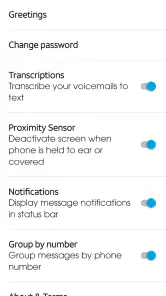
Analysis by Reviewed
I find Cricket Visual Voicemail most useful when I treat voicemail as something to manage rather than something to endure. Instead of forcing me to listen to messages in the order they arrived, it gives me a clearer way to choose which one matters first and respond by call or text. That simple change makes it a practical communication app for Cricket customers who regularly receive work calls, family updates, delivery notices, or other messages they cannot answer immediately.
My overall view is straightforward: this is a focused utility, not a complete replacement for every phone communication tool. It does one job well enough to become part of a daily routine, but its value depends heavily on whether you use Cricket service and whether you prefer visual control over the traditional voicemail call-in system. The app is free, aimed at Everyone, and developed by Cricket Wireless LLC, so it makes the most sense as a companion to a Cricket mobile line rather than as a general voicemail choice for anyone.
Why the visual approach is genuinely useful
The strongest part of the experience is the shift from a sequential voicemail inbox to a message list. With ordinary carrier voicemail, I often have to call in, wait through prompts, listen to messages one after another, and remember which ones deserve a response. Cricket Visual Voicemail lets me look at the available messages and decide where to start. That is a small interface improvement, but it changes the amount of attention the task requires.
Articles Related to Cricket Visual Voicemail
Clash of Clans Is Won Between the Battles
Its raids are quick; its community is a long-term project of coordination, teaching, rivalry, and shared responsibility—with all the friction that entails.
Android Auto Makes the Case for Quieter Car Software
The car interface is no longer judged by how much it can do, but by how quietly it helps. Android Auto shows what drivers now expect—and what still gets in the way.
MobiOffice: Transforming Mobile Productivity with Seamless Integration
MobiOffice: Word, Sheets, PDF is redefining mobile productivity with a surprising blend of functionality and innovation.
EA SPORTS FC™ Mobile Soccer: Redefining Mobile Sports Gaming
Dive into EA SPORTS FC™ Mobile Soccer, where immersive gameplay and strategic depth transform mobile sports gaming.
Imagine finishing a meeting and seeing several missed calls. One may be from a family member, another from a business, and a third from an unknown number. Rather than listening to every message in arrival order, I can open the voicemail list and begin with the contact that matters most. If the message is routine, I can leave it for later; if it needs an answer, I can reply through a call or text. This is particularly helpful when I am in a place where making a long voicemail call is inconvenient.
The option to play messages in any order is more than a convenience for busy people. It also makes voicemail easier to use when I am dealing with interruptions. I can listen to one message, pause the task, and return to another later without treating the inbox like a single uninterrupted session. For someone who receives occasional voicemails rather than dozens every day, this may be the difference between checking messages promptly and avoiding them altogether.
The real strength is control over attention. The app does not need to turn voicemail into a complicated productivity system. It simply puts the messages in a form that is easier to scan and prioritize. That is why I would recommend it to people who frequently miss calls but still need to respond quickly.
Useful in everyday communication
I can see the app fitting naturally into a busy morning. Suppose I miss a call while helping children get ready, then receive another while commuting and a third during work. When I have a quiet moment, I can review the voicemail list in a deliberate order instead of calling a voicemail number and working through everything from the beginning. A short message can be handled quickly, while a longer or more important one can wait until I have enough time to think.
You May Like

How Microsoft OneDrive Became a Mobile Productivity Giant

How Google Translate Breaks Language Barriers Effortlessly

Why Google Sheets Is the Ultimate Mobile Productivity Tool

Unveiling the Dynamic World of My Talking Tom Friends

Free Fire MAX: Dominating the Battle Royale Arena

Free Fire: Winterlands – The Ultimate Winter Gaming Adventure
The call and text response options also reduce a common bit of friction: deciding what to do after hearing a message. If a caller needs a conversation, calling back is the obvious route. If the answer is brief, a text may be more appropriate. Keeping those response paths close to the message makes the process feel more direct than switching between a voicemail prompt, the phone app, and the messaging app manually.
Another practical use is screening the urgency of messages without rushing into a callback. I might be unable to speak but still able to listen and send a short text. That distinction matters for people who work in shared spaces, travel often, or need to keep their phone quiet during appointments. The app supports a more flexible response pattern: listen when convenient, then choose the communication method that fits the situation.
It is also a sensible tool for people who dislike phone menus. Traditional voicemail systems usually require remembering which number to press for replay, deletion, saving, or moving through messages. A visual list is easier to understand at a glance. I would not call that a dramatic innovation, but it removes the kind of small annoyance that makes people postpone checking voicemail.
What the app is, and what it is not
Cricket Visual Voicemail belongs in the communication category, but I would not confuse it with a full messaging platform. It is built around voicemail access and responses, not group conversations, social messaging, video calls, or a broad unified inbox. That narrow purpose is part of its appeal, because there are fewer distractions, but it also means users looking for a single app to manage every kind of conversation will need other tools.
The store summary emphasizes viewing messages, playing them in any order, and replying through a call or text. In my view, that is the correct way to judge it. I would not install it expecting a general-purpose organizer or a replacement for the phone and messaging apps already on the device. Its job is to make carrier voicemail easier to navigate, and the experience should be evaluated on that basis.
The app has been available since December 11, 2012, which gives it a long presence in the mobile communication space. Its current version is 3.19.0.101277 and it requires Android 10 or later. Those details matter when deciding whether an older phone can use it. A person with a handset running an earlier Android release should check compatibility before planning around the app, because the minimum operating system is not optional.
Its broad adoption also suggests that this is not an obscure experiment. The app has passed 10 million installs and carries a 3.9 average from roughly 33 thousand ratings, alongside about 11 thousand written reviews. I read that combination as evidence of a familiar but imperfect utility: many people find the core idea worthwhile, while the rating leaves room for differences in device behavior, expectations, or individual setup.
The friction I would want users to understand
The biggest limitation is that visual voicemail is only valuable when it fits the carrier and phone environment around it. Because this app comes from Cricket Wireless LLC, it is not the kind of independent voicemail client I would expect to work as a universal solution across every network. Someone using another carrier, or someone looking for a carrier-neutral voicemail manager, should consider a different option instead of assuming that any visual voicemail app will work with any number.
There is also a difference between visual access and advanced message management. The app makes it easier to select and play messages, but the basic concept does not automatically solve every voicemail problem. If I need sophisticated transcription, extensive search, cross-device organization, or a unified inbox combining several services, I would look beyond this focused tool. A dedicated communication suite may be a better fit for that workflow, even if it introduces more complexity.
Another trade-off is that the app can encourage a more deliberate voicemail habit without eliminating the need to listen. Seeing a message in a list is helpful, but I still need to play it to understand the caller’s request. That means the app improves navigation and prioritization rather than magically converting every missed call into a quick summary. Users who mainly want written transcripts may find its approach less satisfying than a service designed around transcription.
I also think expectations matter when responding by text. A text reply is useful when the answer is short and appropriate for messaging, but it is not always a suitable substitute for returning a call. A voicemail from a doctor’s office, employer, school, or service provider may require a proper conversation. The app makes the choice available; it does not decide which response is socially or practically correct. I would use the text option as a convenience, not as a reason to avoid necessary calls.
The 3.9 average rating reinforces my cautious recommendation. I would not interpret it as a warning to avoid the app, but neither would I describe the experience as universally smooth. Carrier utilities can feel excellent when they match the intended phone setup and less useful when a user expects features outside their scope. That is why I would install it for a clear voicemail need, not simply because it appears in a communication category.
Small workflow changes that make it more worthwhile
My first tip is to check the voicemail list at a consistent time instead of reacting to every missed-call notification. This works especially well for people who cannot answer during work or school. Reviewing messages together lets me sort urgent conversations from low-priority ones and choose whether each deserves a call, a text, or a later response.
My second tip is to listen with the next action in mind. Before playing a message, I ask whether the likely result will be a callback, a short text, or no response. That keeps the app from becoming a passive archive. Once the message ends, I can act while the context is still fresh rather than reopening it later and trying to remember what the caller wanted.
A third useful habit is to avoid treating the arrival order as an importance ranking. The newest voicemail is not necessarily the most urgent one. A message from a known contact or a service I am expecting may deserve attention before a newer but less relevant call. The visual list makes that judgment easier because it gives me a broader view of the inbox before I start playing messages.
For people who share a phone with a demanding schedule, I would also separate “cannot answer now” from “cannot answer today.” If I am temporarily unavailable, listening and sending a brief text may be enough. If the message involves details that are easy to misunderstand, I would wait and call back when I can focus. The app supports both choices, but good judgment still matters more than speed.
Finally, I would keep the app’s role narrow. I would not use it as a replacement for my normal text history or contact management. Instead, I would let it handle the point where a missed call becomes a voicemail, then move the conversation into a call or text when appropriate. That division keeps the workflow simple and avoids expecting one carrier utility to organize every form of communication.
Who will appreciate it most
I think the best audience is an Android user on Cricket who receives enough voicemail to find the traditional call-in system tedious. That includes people with irregular schedules, workers who cannot answer calls immediately, parents coordinating several responsibilities, and anyone who wants to decide which message to hear first. The app is also a good fit for users who prefer visible controls over remembering voicemail keypad commands.
It may be especially useful for people who receive a mixture of personal and practical calls. A delivery issue, appointment reminder, family message, and workplace request do not deserve identical treatment. Being able to review them as separate entries makes it easier to choose the right response and avoid spending time on messages that can wait.
I would be less enthusiastic for someone who rarely receives voicemail. If nearly every missed call is followed by a text or never needs a response, installing a dedicated visual voicemail app may add little to the daily routine. Likewise, users who are committed to a transcription-first workflow may prefer a service centered on converting audio into searchable text.
It is also not my first recommendation for someone seeking carrier independence. If changing networks is part of the plan, a carrier-specific tool may not be the most future-proof choice. In that situation, the phone’s standard voicemail tools or a broader communication service may be more convenient, even if they lack the clean focus of Cricket’s approach.
How it compares with ordinary voicemail and broader alternatives
Compared with calling a voicemail number, Cricket Visual Voicemail is easier to scan and prioritize. The traditional method remains familiar and may be perfectly adequate for occasional users, but it makes the order of messages feel imposed. The app gives me a better sense of what is waiting before I commit time to listening.
Compared with a full messaging app, it is more limited but also more focused. A messaging platform may offer richer conversations, attachments, group features, and a longer history, while this app concentrates on messages left after unanswered calls. I would not choose between them as direct substitutes. I would use the visual voicemail tool to process missed calls and the messaging app for conversations that already belong in text.
Compared with a transcription-based voicemail service, the trade-off is clarity of purpose versus written convenience. Listening to the original message preserves the caller’s tone and exact phrasing, but reading a transcript can be faster when I am in a quiet-but-busy situation. Users who need searchable text should investigate other options; users who mainly need message order and simple responses may find this app less cumbersome.
That comparison leads to my central judgment: the app succeeds by improving a routine step, not by trying to replace the entire communication stack. Its best qualities appear when the problem is “I have several voicemails and need to handle them efficiently.” Its weaknesses become more visible when the problem is “I need one advanced system for every message, transcript, contact, and device.”
My final recommendation
After looking at the way it fits into everyday call handling, I see Cricket Visual Voicemail as a sensible free utility for the right Cricket customer. It makes voicemail less linear, gives me a practical choice about which message to hear, and keeps call and text responses close to the message that prompted them. Those improvements are modest, but they address a real annoyance that many phone users simply tolerate.
I would recommend trying it if you use Cricket, run into voicemail regularly, and want a clearer way to decide what deserves attention. I would skip it if you need carrier independence, advanced transcription, or a complete communication hub. The app is not trying to be those things, and judging it as though it were would be unfair.
With a 3.9 average and more than 10 million installs, it has clearly found a practical place on many phones, while the less-than-perfect rating is a useful reminder to keep expectations realistic. It is free, rated for Everyone, and available for Android 10 or newer, so the main decision is not financial; it is whether visual control over Cricket voicemail would improve your routine.
My verdict is positive but specific: Cricket Visual Voicemail is worth using when your main frustration is managing missed-call messages efficiently. It will not transform communication, and it cannot replace tools built for transcription or broader messaging. But for a Cricket user who wants to listen in a chosen order and respond without wrestling with a voicemail menu, I would recommend giving it a place in the phone’s communication toolkit.
Cricket Visual Voicemail Frequently Asked Questions
What can I do with Cricket Visual Voicemail before setting it up?
Cricket Visual Voicemail is a communication app for managing voicemail from your phone. Its main convenience is seeing messages in a list and choosing which one to play, instead of calling voicemail and listening in sequence. You can also follow up on a message with a call or text. The app is most useful when your phone and Cricket service support its visual voicemail features.
Can I download Cricket Visual Voicemail on a phone that is not running Android 10 or newer?
The app’s minimum operating-system requirement is Android 10, so a phone running an older version may not be able to install or use it properly. If your device can update, check its system settings before downloading. Meeting the software requirement does not guarantee that every phone is compatible, since Cricket service and device support also matter.
Is Cricket Visual Voicemail intended for Cricket Wireless customers?
Yes. Cricket Visual Voicemail is provided by Cricket Wireless LLC and is designed around Cricket Wireless service. The app is not a general voicemail replacement for every carrier, so having a compatible phone alone may not be enough to use its features. If you are switching networks or using a phone from another carrier, check that Cricket service and visual voicemail are available on your line.
Can I use Cricket Visual Voicemail on an iPhone?
Cricket Visual Voicemail is designed primarily for supported Android smartphones using Cricket Wireless service. If you use an iPhone, check Cricket’s voicemail options for your device rather than assuming this app will provide the same features. Compatibility is tied to the phone and carrier service, so choosing the right voicemail option for your specific device can help avoid setup frustration.
Is Cricket Visual Voicemail free to download?
Cricket Visual Voicemail is a free communication app from Cricket Wireless LLC. Downloading it does not, by itself, guarantee that every voicemail feature will be available on your line, since service eligibility and device compatibility can affect setup. You may also use mobile data or Wi-Fi to retrieve messages, so keep your usual connection and data considerations in mind.
Pros
- Transcribes messages so you can read them without listening to audio.
- Displays caller details and voicemail timestamps in one organized inbox.
- Lets you call back or text callers directly from voicemail entries.
- Supports quick deletion of unwanted messages to keep storage manageable.
- Useful for screening calls when you cannot answer the phone.
Cons
- Availability may depend on your carrier
- region
- and supported phone model.
- Transcription accuracy can drop with accents
- background noise
- or poor audio.
- Some features may require mobile data or an active internet connection.
- Voicemail notifications can be delayed by network or carrier issues.
- The interface may offer fewer controls than your carrier’s standard voicemail service.

- Category
- Communication
- Version
- 3.19.0.101277











