Cleaner Elite
- 1.50K
- 4.5
- Installs
- 1.00M
- Price
- Free

Screenshots
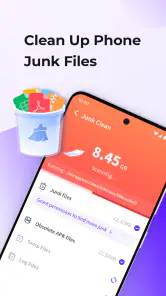
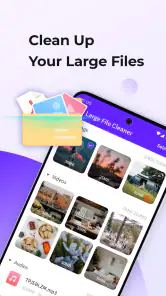
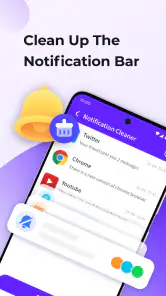
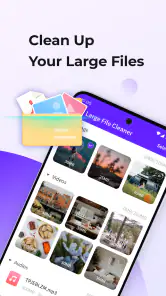
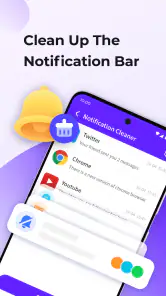
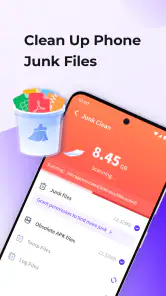

Analysis by Reviewed
When a phone starts warning me about storage, the immediate temptation is to install another utility and tap every cleanup button. I’ve learned that the useful part is not a dramatic speed boost; it’s finding files I can safely remove without spending half an hour searching through folders. Cleaner Elite is a free Android tools app from Carlina Team, and its appeal is a straightforward cleanup flow rather than a complicated dashboard. It has a 4.5 average from around 27,000 ratings, and more than a million installs, so it has clearly found an audience among people looking for a simple way to tidy a phone.
When storage pressure becomes a chore
The recurring problem this app addresses is less about keeping a phone pristine and more about reducing the little decisions that pile up when space runs low. I may know that old downloads and forgotten files are taking room, but finding them one by one can be tedious. A cleaner is useful when it turns that search into a reviewable set of suggestions. The important word is reviewable: saving time should not mean giving up control over what disappears.
That distinction matters most on phones used for several things at once. A document saved for work, an attachment from a family chat, and a video kept for a commute can all look like expendable clutter when I am rushing. I would rather spend a short moment checking a proposed cleanup than discover later that I removed something I needed. Cleaner Elite makes most sense as a practical prompt to inspect storage, not as a promise that every suggested removal is automatically safe.
What I’d check before the first cleanup
The app is marked for everyone and runs on Android 6.0 or later. It was released on July 2, 2024, and version 1.1.9 is the current version. Before using any cleaner, I recommend opening the scan results and reviewing the categories and individual items rather than treating a suggested cleanup as automatic permission to erase everything. That small pause is especially worthwhile if you keep downloaded documents, chat attachments, or offline media on your phone.
A practical first pass is to scan when you have a few minutes, remove only items you recognize, then check your phone’s storage settings afterward. That lets you see whether the freed space matters for your own situation. If you’re clearing room for a large download, for example, it’s better to confirm the result before starting the download than to assume a cleanup has solved the problem.
I’d also make the first scan a learning pass rather than a race to clear as much as possible. Notice which kinds of items appear and whether they are things you routinely use. That gives you a personal reference for later scans: if a category tends to contain files you still need, slow down there; if it consistently surfaces disposable leftovers, reviewing that part may become quicker. The app can make the inspection more convenient, but your own habits are the best guide to what is genuinely unnecessary.
Getting Started with Cleaner Elite
Installing Cleaner Elite was a breeze. A quick visit to the app store, a few taps, and voila! The app was ready to roll. The interface? Oh, it's as user-friendly as it gets. You know those apps where you have to dig through layers of menus? Not this one. Everything you need is right there on the home screen, ready to be tapped.
More From Our News Desk

Weather by Xiaomi Review: Clear at a Glance, Less Clear Up Close

X Under Pressure: Can It Recover When Posting Goes Wrong?

Clash of Clans Is Won Between the Battles

Android Auto Makes the Case for Quieter Car Software

MobiOffice: Transforming Mobile Productivity with Seamless Integration

EA SPORTS FC™ Mobile Soccer: Redefining Mobile Sports Gaming
For me, an uncluttered starting point is valuable when I open a utility only because a warning has appeared. I do not want to spend that moment learning a complex set of controls. Still, an easy home screen is only the beginning of a careful routine: before confirming an action, I’d read the labels and inspect what the app proposes. A clean layout can reduce navigation friction, but it should not replace a deliberate decision about personal files.
Performance and Features
Once I got it running, the app did its magic. It scanned my phone quicker than I expected. I was staring at the screen thinking, "Is this it?" But the results were impressive! It highlighted all those sneaky files I didn't even know existed. And the best part? It lets you choose what to delete. So, no more accidental deletions of those precious vacation photos!
One cool feature is the battery saver option. My phone's battery life has improved since I started using it. It's like giving your phone a mini spa day. You hit a button, and it takes care of the rest. The app also offers a CPU cooler feature. Now, I don't know about you, but having a phone that doesn’t overheat is a big plus in my book.
I treat those extra options as occasional aids rather than a routine that needs to run on a schedule. If I notice unusual battery drain, I first think about what I have been doing: streaming, navigation, a long call, or leaving a demanding app open. That context helps me decide whether a saver tool is relevant or whether I should simply change my usage for a while. The same goes for a warm phone. A cooler button is not a substitute for understanding what is keeping the device busy.
Small routines that make cleanup safer
A useful workflow is to scan before a predictable storage pinch, not only after the phone is already refusing a download. For example, before leaving home for a day when I expect to save maps, tickets, or work files, I can review clutter while I still have time to check each item. This is more useful than starting a cleanup in a hurry at a station or airport, when an unfamiliar file name can be hard to judge and a mistaken deletion is especially frustrating.
Another practical tip is to keep cleanup and backup as separate tasks. If a photo or document matters, I would first make sure I have a copy somewhere I trust, then decide whether the phone copy can go. A cleaner’s convenience can make deletion feel routine, but it cannot tell me how important a file is to my plans. For anything irreplaceable, the extra backup step is a better safeguard than relying on a scan result.
I would also avoid judging a cleaner by how large a number it reports. The meaningful result is whether the space it helps me reclaim solves the immediate problem without removing useful material. If I need room for one download, freeing enough space for that file is a success; a bigger cleanup is not automatically better. Checking Android’s storage screen afterward gives me a useful reality check and helps identify whether an app or a large media folder, rather than small leftovers, is the real source of pressure.
Where a one-tap tool helps—and where it doesn’t
For an everyday example, I’d use it after a week of saving clips and documents for a trip, when the phone’s storage warning appears just as I need to download a map or another file. The useful habit is to scan, inspect the suggested items, and remove only what I no longer need. That is a more dependable workflow than repeatedly tapping a broad “clean” control and hoping it leaves important downloads alone.
Compared with the storage screen built into Android, a cleaner can make a quick scan feel more approachable, while the system settings are often the better place to understand which apps or media are actually taking up space. I’d use both: Cleaner Elite for a convenient review of removable items, and Android’s own storage controls when I need to decide whether a large app, video folder, or download is the real culprit. If you already manage files comfortably, a dedicated cleaner may add little to your routine.
The battery saver and CPU cooler options are best treated as handy tools to try, not guarantees of longer battery life or lower temperatures in every situation. If a phone is warm because a demanding app is running, the more useful response may be to close or adjust that app and give the device a moment. I also wouldn’t use a cleaner as a substitute for backing up photos or documents; deleting something you later want is still possible when you approve a cleanup yourself.
Who will get the most from it
I see the strongest fit for someone who wants a simple cleanup starting point, does not enjoy navigating file folders, and is comfortable reviewing suggestions before acting. It can also suit a person who only thinks about storage when a warning interrupts a task: having one obvious place to begin may be enough to turn a stressful scramble into a short check-and-decide routine. The app is free, which makes trying that workflow low-commitment for someone curious about a dedicated cleaner.
On the other hand, I would skip it if I expected a utility to diagnose every cause of a slow phone or reliably fix battery and temperature problems with one tap. Those issues can depend on what is running or on the device’s broader storage situation, and cleanup alone may not address them. A user who already knows how to inspect folders and Android storage settings may also prefer those built-in controls, which can make a separate scan unnecessary.
There is a useful middle ground for people who are unsure: keep the app for occasional checks, but do not turn every scan into a full cleanup. If a result is unclear, leave it alone and investigate through the file manager or system settings. That cautious approach may mean freeing less space in one session, yet it lowers the chance of deleting something simply because the app surfaced it.
Is Cleaner Elite Worth It?
Alright, here's the real deal. Is Cleaner Elite worth your time? For me, it's a yes. It's like having a personal assistant for your phone. It keeps things tidy and running smoothly. Plus, it's great for those moments when you need to free up space in a jiffy. The app does have ads, but they're not too intrusive, which is always a win.
I’d recommend it most to someone who wants a simple place to review cleanup suggestions and is willing to make the final deletion choices themselves. It’s less suited to people who expect a cleaner to fix persistent lag, solve heat issues automatically, or recover space without checking what will be removed. If your phone is routinely full, the longer-term answer may be to move or delete large files and reconsider what you keep offline, rather than relying on repeated scans.
If I were deciding whether to keep it, I would ask one practical question after a few uses: does its scan help me find items I can confidently remove faster than I could with my normal tools? If yes, it is earning a place in my routine. If I repeatedly need to leave the results and hunt through system settings anyway, then the built-in tools may be enough. That is a better test than expecting a cleaner to make an older or heavily loaded phone feel new.
The app has a 4.5 average across around 27,000 ratings, with roughly 1,500 written reviews, which offers some reassurance that people are using it, though popularity alone does not determine whether its workflow suits me. Its simple focus is the point: it is not a replacement for Android’s storage controls or a careful backup habit. It is a convenient companion for reviewing clutter when I want a quick starting place.
In a nutshell, if your phone's been feeling a little sluggish or if you're just in need of some extra space, give Cleaner Elite a shot. It's simple, effective, and does exactly what it promises. Just like a good friend, it’s got your back, ensuring your phone stays in tip-top shape. So go ahead, give your phone the treat it deserves!
Cleaner Elite Frequently Asked Questions
Is Cleaner Elite suitable for beginners?
Cleaner Elite is presented as a cleaning app, and its short description is simply “Cleaner Elite.” If you are new to this kind of tool, consider whether its purpose matches what you want before installing it. The app is in the Tools category, so it is intended as a utility rather than a game or entertainment app. After installing, review each option before using it.
Who develops Cleaner Elite?
Cleaner Elite is developed by Carlina Team. Checking the developer name when choosing the app can help you distinguish it from other apps with similar cleaning-related names. The app is listed in the Tools category and is free to download. As with any download, use the app page for the platform you intend to install it on and make sure the title and developer match.
Which devices can install Cleaner Elite?
Cleaner Elite is described as an app for Android and iOS devices, so check that your device runs a compatible system before downloading. For Android, the listed minimum requirement is version 6.0. The app is free, and its age rating is Everyone. Making sure your operating system meets the requirement can help you avoid installation problems.
What should I check before downloading Cleaner Elite?
Before downloading, confirm that you are choosing Cleaner Elite by Carlina Team and that the app suits what you want from a cleaning tool. It is listed in the Tools category, with the short description “Cleaner Elite” and the summary “A clean app.” It is free and rated Everyone, so you can review those details alongside your device’s compatibility before installing.
What is Cleaner Elite and what does it do?
Cleaner Elite is a comprehensive optimization app designed for Android and iOS devices. It effectively clears cache, junk files, and unnecessary data to boost your device's performance. Users often find their devices running faster and more efficiently after using Cleaner Elite, thanks to its advanced cleaning algorithms and user-friendly interface.
Pros
- Improves device speed effectively.
- User-friendly and intuitive interface.
- Efficient junk file removal.
- Enhances battery performance.
- Frequency of updates keeps app fresh.
Cons
- Contains in-app advertisements.
- Limited free features.
- May over-clean essential files.
- Requires regular manual activation.
- Occasional false positive alerts.
- Category
- Tools
- Version
- 1.1.9








