Cleaner Antivirus VPN Cleaner
- 26.50K
- 4.9
- Installs
- 10.00M
- Price
- Free

Screenshots
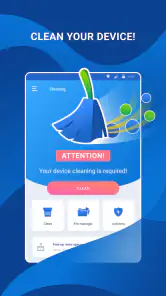
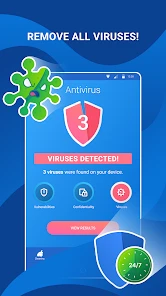
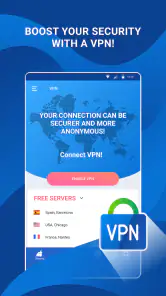
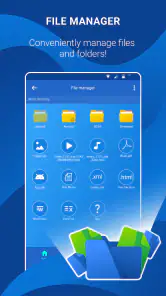

Analysis by Reviewed
I tend to notice phone maintenance most when I’m trying to do something else: open a map, check a message, or get a page to load before I lose a connection. Cleaner Antivirus VPN Cleaner brings cleaning, antivirus tools, and a VPN together in one place. That combination can be convenient if you prefer one app for several maintenance tasks, though it also means the experience includes network-dependent tools as well as local cleanup.
It’s a free tools app from Cleaner + Antivirus + VPN company, with optional in-app purchases ranging from $0.99 to $12.99 per item. It has an Everyone age rating, and its current version is 3.0.9. The app’s 4.9 average from around 579,000 ratings and more than 10 million installs suggest broad adoption, but I’d still judge it by whether its tools suit the way you use your phone.
Using the cleaner, scanner, and VPN in everyday situations
I find it easiest to judge this toolkit by looking at how its three jobs fit together: cleaning addresses storage, scanning is a security check, and the VPN changes how browsing traffic is routed. In this section, I’ll focus on the moments when those tools are useful—and when treating them as interchangeable can send you in the wrong direction. That distinction also sets up a closer look at how connectivity shapes everyday use.
When the network changes the experience
The VPN is the part of this toolkit most directly shaped by connectivity. I’d consider it when browsing on public Wi-Fi, but I wouldn’t treat a VPN as a guarantee that every site, account, or transaction is safe. It changes how your connection is routed; careful browsing and strong account security still matter. If you only want to clear space, you can focus on the cleaning tools instead of turning the VPN on for every session.
That separation is useful in practice: a slow page on a crowded network is not necessarily a storage problem, and deleting files won’t fix weak reception. I’d first check whether other apps are struggling too, then decide whether the issue is network-related or whether the phone is short on space. Keeping those causes distinct helps avoid running a cleaner simply because a connection is lagging.
Making it fit a mobile routine
For a realistic day-to-day example, imagine you’re about to leave for an appointment and notice that your phone is nearly full while connected to café Wi-Fi. I’d use the cleaner to review what can be removed, rather than automatically clearing everything, then use the VPN only if I have a reason to browse through that public connection. Before heading out, I’d check that the apps and files I need are still available. The helpful habit is to make deliberate choices while you have time, not to start a broad cleanup when you’re already in a rush.
The app could suit someone who likes having maintenance tools gathered together and is comfortable deciding when to use each one. It may be less appealing if you already rely on your phone’s built-in storage controls and prefer a dedicated security product for protection. Those alternatives can be simpler: built-in settings keep cleanup close to the operating system, while a standalone security app avoids bundling a VPN and cleaner into the same interface.
More From Our News Desk

Weather by Xiaomi Review: Clear at a Glance, Less Clear Up Close

X Under Pressure: Can It Recover When Posting Goes Wrong?

Clash of Clans Is Won Between the Battles

Android Auto Makes the Case for Quieter Car Software

MobiOffice: Transforming Mobile Productivity with Seamless Integration

EA SPORTS FC™ Mobile Soccer: Redefining Mobile Sports Gaming
What to do when a tool doesn’t solve the problem
A useful troubleshooting rule is to change one thing at a time. If a scan or cleanup doesn’t make the phone feel better, check available storage and test the connection separately before repeating the same action. If browsing becomes inconvenient after enabling the VPN, switch it off and compare the connection; some services or networks may behave differently when traffic is routed through a VPN. That doesn’t mean the tool is broken, but it does mean the extra privacy layer can involve a trade-off.
I’d also avoid treating a cleaner’s result as a reason to delete anything I recognize without checking it first. Clearing temporary clutter can help with space, but removing files that an app needs or that you want to keep can create hassle. A quick review before confirming a cleanup is a small step that can prevent a much bigger one.
Keeping an eye on data and convenience
Network use is worth considering if your mobile plan is limited. A VPN routes browsing traffic through an additional service, so I’d reserve it for situations where I value that extra layer rather than leaving it on by habit. For large downloads or video, I’d compare how the connection behaves with the VPN enabled and disabled, and use a trusted Wi-Fi connection when appropriate. The app’s bundled approach saves switching between separate tools, but it doesn’t remove the need to choose settings thoughtfully.
The same practical caution applies to purchases. The app is free to start, while optional items are available in the stated price range; I’d explore the basic experience first and only pay if a specific extra is useful to me. That makes it easier to decide whether the all-in-one convenience is worth more than using built-in controls or separate apps.
Getting Started with Cleaner Antivirus VPN Cleaner
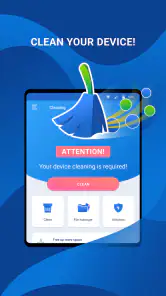
First things first, downloading and installing the Cleaner Antivirus VPN Cleaner is a breeze. Available on both Android and iOS, it’s just a quick tap away in your app store. Once installed, you're greeted with a sleek, user-friendly interface that even my grandma could navigate without breaking a sweat. The app is designed to make cleaning your device feel less like a chore and more like a satisfying spring clean.
Features That Stand Out
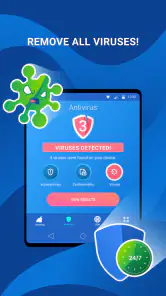
Now, let’s talk features. This app is packed with a bunch of handy tools that go beyond just cleaning. It offers a robust antivirus system that keeps your device safe from malicious threats, which is a must-have these days. The VPN feature is another gem, providing a secure browsing experience by masking your IP address. This is particularly useful if you’re often connecting to public Wi-Fi networks.
What caught my attention was the junk file cleaner, which effectively clears out cache and unnecessary files that hog your device’s memory. I ran this feature, and it freed up a surprising amount of space, giving my phone a noticeable boost in speed. It's like giving your phone a fresh start.
Performance and Usability
In terms of performance, the app runs smoothly without any hiccups. It doesn’t consume much battery life, which is always a plus in my book. The real-time protection works seamlessly in the background, ensuring your device is always shielded from threats without you having to lift a finger.
Using the app is as easy as pie. With intuitive navigation and clear instructions, you can easily switch between cleaning, virus scanning, and activating the VPN. Plus, the app provides regular updates to keep up with the latest threats and technology, which is reassuring.
Deciding which tools deserve a place in your routine
The bundled design is most useful when you actually expect to move between cleanup, scanning, and protected browsing. If your main concern is storage, I’d treat the cleaner as an occasional check rather than a daily ritual. Repeatedly clearing temporary files can be counterproductive if apps simply rebuild them, and the space recovered may not change how the phone feels for long. I’d start with the largest, least important items I can identify and use cleanup only when storage pressure is real.
For someone sharing a device with family, the simplest useful habit is to make cleanup a shared decision: review the proposed items together and leave anything uncertain untouched. The Everyone age rating makes the app suitable for a general audience, but that doesn’t mean every cleanup choice is automatically appropriate for every person using the phone. A cautious review matters more than tapping the most aggressive-looking option.
The antivirus tool also calls for sensible expectations. I see a scanner as one layer of caution, not permission to install unfamiliar files or ignore browser warnings. If you already have security software you trust, running multiple protection tools may add clutter rather than confidence. I’d choose one approach, understand what it covers, and avoid keeping overlapping apps just because they promise similar benefits.
Practical trade-offs while connected
Connectivity changes more than whether a VPN can be used: it can affect how comfortable the whole routine feels. A cleanup task is usually about local storage, whereas browsing protection depends on the network path. If a page is slow, I’d test another site and another app before blaming the VPN or the cleaner. That quick comparison helps distinguish a weak connection, a service problem, and a phone that genuinely needs attention.
When moving between home Wi-Fi, workplace networks, and mobile data, I’d decide in advance where the VPN is worth the extra routing. That is more practical than leaving it enabled by reflex, particularly if a banking, streaming, or work service behaves differently. If an app refuses to connect, I’d first switch the VPN off briefly and retry; if that fixes it, I’d use the affected service without the VPN and turn protection back on afterward when appropriate.
There is also a convenience-versus-control trade-off. A single dashboard can save the effort of opening several apps, but separate tools often make their purpose clearer and may suit people who want finer control over one specific job. Cleaner Antivirus VPN Cleaner makes more sense to me as a handy maintenance hub than as a reason to replace every built-in setting or specialist service on a phone.
Who is likely to appreciate it?
I’d recommend trying it if you regularly run low on storage, want a place to start a scan, and sometimes use a VPN on public networks. The appeal is especially clear for someone who doesn’t want to hunt through several menus for basic maintenance tasks. The app’s Android minimum is version 7.0, so users on older Android releases should check compatibility before planning around it.
I’d skip it if your phone’s storage is comfortably managed, you never need the bundled network tool, or you prefer not to install an all-in-one utility. It is also not my first pick for someone whose top priority is a dedicated VPN experience or specialist security controls. In those cases, a focused alternative—or the operating system’s own storage tools—may make the job easier and keep the setup leaner.
Final Thoughts
So, is it worth downloading? Absolutely. It’s an all-in-one solution that keeps your smartphone running like a well-oiled machine. Whether you're looking to enhance your phone’s performance, secure your browsing, or protect against viruses, this app has got you covered. Plus, it’s free to use, with the option to upgrade for additional features.
In a nutshell, if you’re tired of your phone lagging behind or worried about online threats, give this app a shot. It’s like having a digital Swiss Army knife right in your pocket, ready to tackle any issue that comes your way.
My overall view is positive, with one important qualification: the three tool types address different problems, so I wouldn’t expect a VPN to speed up storage or a cleanup to solve a weak signal. This is most useful for someone who wants a single place to check these areas and is willing to review actions rather than tap through them blindly. If you’d rather keep phone maintenance minimal, or want a specialist VPN as your main priority, a built-in tool or dedicated app may be a better fit.
Cleaner Antivirus VPN Cleaner Frequently Asked Questions
Is Cleaner Antivirus VPN Cleaner suitable for someone who only wants a phone-cleaning tool?
The app brings together phone-cleaning tools, antivirus protection, and a VPN under one name. Its store summary describes it as a tool to clean a phone, with antivirus and virus-cleaning features, while its short description is “Cleaner Antivirus.” If you are mainly looking for cleaning, consider whether the additional security and privacy functions fit what you want before downloading.
What age group is Cleaner Antivirus VPN Cleaner intended for?
Cleaner Antivirus VPN Cleaner has an Everyone content rating, so it is presented as suitable for a broad audience. That rating can help families decide whether the app is appropriate to consider, but it does not replace checking the app’s functions and purchase options yourself. The app is a Tools app, and its features are focused on phone cleaning, antivirus, and VPN use.
Is Cleaner Antivirus VPN Cleaner free to download, and are there optional purchases?
Cleaner Antivirus VPN Cleaner is free to download, so you can try the app without paying upfront. It also offers in-app purchases ranging from $0.99 to $12.99 per item. Before confirming a purchase, review the price and what it includes in the app, especially if you only want to use its free features.
What devices can install Cleaner Antivirus VPN Cleaner?
Cleaner Antivirus VPN Cleaner is an Android app in the Tools category, and it requires Android 7.0 or later. Check your phone’s Android version before downloading to make sure it meets that requirement. The app is listed for everyone, so its content rating is suitable for a broad audience, though individual device compatibility can still depend on the device and operating system.
What features does Cleaner Antivirus VPN Cleaner offer for device protection?
Cleaner Antivirus VPN Cleaner provides a comprehensive suite of features designed to protect your device from malware and online threats. It includes real-time antivirus scanning, privacy protection tools, and an integrated VPN to encrypt your internet connection. These features work together to ensure your device is secure from viruses and hackers, making it a reliable choice for users seeking all-around protection.
Pros
- Lightweight and easy to use interface.
- Efficient antivirus with real-time protection.
- VPN feature enhances online privacy.
- Boosts device performance significantly.
- Multi-language support for accessibility.
Cons
- Limited free features
- requires subscription.
- VPN speed may vary with server load.
- Occasional ads in free version.
- May drain battery with prolonged use.
- Not available on older OS versions.
- Category
- Tools
- Version
- 3.0.9








