CleanBoost - Junk Cleaner
- 263.00
- 3.4
- Installs
- 10.00M
- Price
- Free

Screenshots


Analysis by Reviewed
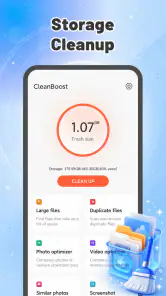
I judge a cleaner less by how satisfying it feels on the first tap than by whether it still earns a place on my phone weeks later. CleanBoost is a free Android tools app from Fadilo Studio, built around a narrow, familiar job: helping clear unwanted files and make storage space available. That focus can be useful when a phone is getting cramped, but a cleaner only helps if its recommendations are easy to understand and its routine does not become another chore.
My first impression is that this is meant for people who want a straightforward storage tidy-up rather than a full device-management suite. It has an Everyone age rating, and the current version is 1.0.4. The app’s modest scope is part of its appeal: if your immediate problem is limited room for photos, downloads, or an update, a focused tool can feel less daunting than digging through several Android settings screens.
From the first cleanup to a lasting habit
Why the first week can feel useful
The appeal of a junk cleaner is easiest to understand at a frustrating moment: you want to take a photo, save a file, or install something, and the phone warns that space is tight. A tool focused on clearing clutter gives you a place to start. Rather than opening folders at random, you can use it as a prompt to review what is taking up room and decide what you no longer need.
That distinction matters. I would treat CleanBoost as a storage-maintenance aid, not a magic speed switch. Clearing files that are genuinely disposable may free room, but it does not automatically make every app run faster or extend a phone’s life. The practical win is having enough space for the things you actually want to keep using.
In the first week, the best approach is a deliberate one-off pass. Look at what the app proposes before cleaning, and pause over anything you do not recognize. If you recently downloaded documents, saved images from a chat, or kept offline material for travel, those files may be clutter to one person and important to another. I would never approve a cleanup solely because a screen labels something as junk.
A realistic example is a phone that has accumulated downloads after a busy month. I might open CleanBoost before a trip, review old files, remove only items I can identify as no longer useful, and then check available storage in Android. That short workflow makes the app a helpful starting point without handing over decisions I should make myself.
Make the cleanup fit a real need
A small change in timing can make the app more useful: I would open it when I have a reason to free space, not whenever I have a spare minute. Before installing a large app or saving a batch of travel photos, I can first review what is already on the phone. This turns cleanup into a decision tied to a practical goal, and it gives me a natural stopping point once I have enough room.
You May Like

Clash of Clans Is Won Between the Battles

Android Auto Makes the Case for Quieter Car Software

MobiOffice: Transforming Mobile Productivity with Seamless Integration

EA SPORTS FC™ Mobile Soccer: Redefining Mobile Sports Gaming

How Microsoft OneDrive Became a Mobile Productivity Giant

How Google Translate Breaks Language Barriers Effortlessly
For someone who shares a phone with family or uses it for work, the review step matters even more. Downloads can include forms, receipts, school files, or images that look disposable until they are needed again. I would avoid cleaning in a hurry, especially before leaving home or starting a trip, when an offline map or saved document might be inconvenient to replace. A focused cleaner can help locate a cleanup opportunity, but it cannot know which personal file has future value to me.
What changes after the novelty wears off
Once the immediate space problem is solved, the question becomes whether there is a reason to return. Cleaners can feel rewarding at first because visible cleanup seems productive. Over time, though, a routine that repeatedly scans and removes little of value becomes busywork. I would use CleanBoost when there is a clear need—low storage, a planned tidy-up, or a quick review of accumulated files—rather than opening it on a fixed schedule just to watch a number change.
This is where its narrow purpose can work in its favor. It is not trying to replace every setting on an Android phone. The app’s simple positioning makes sense for someone who wants a dedicated place to begin sorting storage, especially if navigating file managers feels awkward. On the other hand, people comfortable with Android’s built-in storage controls may prefer to go directly there and review files in context.
The key long-term habit is not “clean everything often.” It is “notice what is accumulating, then make informed choices.” For example, after a cleanup, I would check whether the space problem returns because of a particular type of content I save. If it does, changing that habit—such as periodically reviewing downloaded files—can matter more than repeatedly running a cleaner. That is a more sustainable use of the app than treating it as a permanent cure.
Keep the maintenance light and cautious
My preferred workflow is to open the app only when storage pressure gives me a reason, inspect its suggestions, remove items I can confidently identify, and then stop. This avoids turning maintenance into a daily ritual. It also reduces the chance of deleting something I later need simply because I wanted a cleaner-looking screen.
A useful rule is to separate disposable clutter from personal files. Anything that may be a document, image, recording, or download worth keeping deserves a closer look before removal. If I am unsure, I would leave it in place and use Android’s own file tools to inspect it more carefully. A little caution is a better trade-off than recovering something important from memory after it is gone.
It also helps to decide what “done” means before starting. If my goal is enough room for a specific download or update, I can stop once that need is met rather than continuing to chase a spotless storage view. I would check the phone’s available space afterward, then leave anything ambiguous untouched. That simple boundary makes cleanup less stressful and avoids treating every file the cleaner identifies as a task that must be completed.
CleanBoost is best understood as an optional helper, not a required layer of phone care. A phone that has plenty of free space and an owner who already keeps downloads under control may not need a cleaner at all. In that situation, installing one can add a step without solving a real problem. The app becomes more worthwhile when it helps someone who otherwise would not know where to begin.
Where cleaner fatigue can set in
The category has a built-in limitation: storage cleanup is not an endlessly renewable benefit. Once obvious unwanted files are gone, future cleanups may have less to offer. If an app encourages frequent check-ins without a meaningful reason, the user can start to feel that they are maintaining the cleaner rather than maintaining the phone. I would resist that cycle and judge the app by whether it helps with a real storage decision.
There is also a trust trade-off. A cleanup recommendation is only useful when I understand what I am removing. Broadly treating unfamiliar files as disposable is risky, especially when a phone holds work material, saved media, or items that are difficult to replace. My advice is to favor careful selection over speed. If a proposed deletion is unclear, skip it and investigate using the file manager or Android’s storage settings.
Another source of fatigue is expecting one tool to solve every phone problem. A cleaner focused on storage is not the same as a file organizer, a backup method, or a repair for a slow connection or an aging device. I would separate those jobs rather than repeatedly cleaning in the hope that the phone’s overall behavior changes. When the issue is finding a particular document, a file manager is a better fit; when the concern is preserving memories, a deliberate backup routine matters more than deleting clutter.
The wider alternative is to rely on the phone’s built-in tools. Those can be a better choice when I want to see files within their original folders or prefer not to install a separate cleaner. A dedicated app may be more approachable for someone who wants a single, focused starting point, but convenience should not be confused with deeper control. For detailed file organization, a file manager is often the more suitable tool.
CleanBoost has an average rating of 3.4 from around 26,000 ratings, alongside 263 written reviews, and it has passed 10 million installs. Those figures show that many people have tried it, but they do not tell me whether its cleanup suggestions will fit an individual phone or personal habits. I would weigh my own comfort with the app’s recommendations more heavily than popularity, particularly when deleting files.
Who is likely to keep it installed?
I can see CleanBoost being useful for someone who regularly runs short on storage, finds Android’s settings difficult to navigate, or wants a simple reminder to review accumulated clutter. Its free price removes the cost of trying it, and the Android compatibility floor is version 8.0. For those users, it may remain handy as an occasional tool rather than an app they open every day.
I would skip it if storage is rarely a problem, if I already have a comfortable file-cleanup routine, or if I want a comprehensive file organizer rather than a focused cleaner. I would also be cautious about adopting any cleaner as an automatic fix for a slow phone. A full storage space and a sluggish device are not always the same problem, so removing files may not address the cause.
It is also a less natural choice for anyone who wants a highly structured way to sort years of photos, documents, and folders. In that situation, the phone’s own file tools or a dedicated file manager give more context for organizing items, while a cleaner is better treated as a prompt to review storage. The right choice depends less on the size of the app’s promise than on the task I actually need to finish.
CleanBoost’s strongest case is practical and modest: it offers a dedicated route into storage cleanup for people who want help getting started. Its weakness is the same narrowness; after the obvious clutter is handled, it may not provide a compelling reason for frequent use. I would give it a place on my phone only if it made occasional reviews easier and left me in control of what gets deleted.
For lasting value, I would judge it by one question: does it help me make better cleanup decisions without creating a new maintenance habit? If the answer is yes, keeping it available for the next storage squeeze is reasonable. If I find myself opening it out of routine, or approving suggestions I do not understand, Android’s built-in storage tools—or a careful manual review—are the better choice. That is the fairest way to approach CleanBoost: useful when there is a clear job for it, but not something every phone needs running as part of everyday life.
CleanBoost - Junk Cleaner Frequently Asked Questions
What does CleanBoost - Junk Cleaner do?
CleanBoost - Junk Cleaner is designed to help you identify files that may be taking up unnecessary space, such as temporary data, cached files, or other clutter. Its exact tools can vary by app version and device, so review the on-screen descriptions before running a cleanup. Cleaning is not the same as removing viruses, and it may not improve performance on every phone.
Is CleanBoost - Junk Cleaner safe to use, and could it delete important files?
Any cleaner can affect files or app data if you approve a removal, so check the items selected for cleanup before confirming. Avoid deleting anything you do not recognize, particularly downloads, photos, documents, or data from apps you rely on. Read the app’s permissions and privacy information as well, and keep a backup of important files before using cleanup features.
Does CleanBoost - Junk Cleaner really make a phone faster or extend battery life?
A cleanup may free storage, which can be useful when your device is nearly full, but it cannot guarantee faster performance or longer battery life. Modern Android and iOS systems already manage many background tasks and cached files. Results depend on your device, available storage, and what the app finds; be cautious of dramatic performance claims that are not explained or measured.
Is CleanBoost - Junk Cleaner free, or does it include subscriptions and ads?
Pricing and access can differ by platform, region, and app version. Before installing or starting a trial, check the store listing for in-app purchases, subscription terms, advertising, and which features require payment. If you activate a subscription, note its renewal date and cancellation process. Do not assume that a free download means every cleanup tool is available without charge.
What permissions and device compatibility should I check before installing CleanBoost - Junk Cleaner?
Check the official Google Play or Apple App Store listing for supported operating-system versions, recent update details, developer information, and required permissions. A cleaner may request access to storage or files to scan for items, but permissions should make sense for the feature you use. If a request seems unrelated, decline it and review the app’s privacy disclosures before continuing.
Pros
- Quickly scans for cache and other unnecessary files.
- Simple layout makes core cleaning tools easy to find.
- Can help free up storage when your device is running low.
- Includes tools for reviewing large or unused files.
- Provides a convenient way to check storage usage in one place.
Cons
- Cleaning recommendations may need a manual review before files are removed.
- Some features may be limited to the free version.
- Ads can interrupt the experience
- depending on the version.
- Results depend on what your device allows the app to access.
- A cleaner cannot replace uninstalling apps or managing personal files.

- Category
- Tools
- Version
- 1.0.4











