Clean Sweep Plus
- 2.07K
- 4.3
- Installs
- 1.00M
- Price
- Free

Screenshots
Analysis by Reviewed
I approached Clean Sweep Plus as a practical phone-maintenance tool rather than something to open every day for entertainment. Developed by StarOnline, this free Android app sits in the tools category and presents itself as a tidy assistant for people who want a less cluttered device. That sounds simple, but the useful question is whether it makes cleanup easier than using the phone’s own storage screen.
My answer is fairly positive, with an important qualification: this is most appealing when you want a focused cleanup experience and do not want to pay for a utility. It is less convincing if your phone already has excellent built-in storage controls or if you prefer to inspect every file manually. The app is rated for Everyone, runs on Android 6.0 and later, and its current version is 1.1.1, so compatibility is broad enough for many older devices as well as newer phones.
How I would decide whether Clean Sweep Plus is right for me
The first decision is not about the app itself; it is about the kind of clutter causing trouble. If the problem is a crowded gallery, repeated downloads, forgotten installation files, or a general feeling that the phone has become difficult to navigate, a dedicated cleaner can be convenient. If the real issue is a small internal drive, a large game, or a handful of videos you deliberately want to keep, no tidy interface can replace a careful storage review.
I would also consider how much control I want. A cleanup assistant is valuable when it groups information in a way that helps me make decisions quickly. It becomes frustrating when it encourages indiscriminate deletion or makes me feel that I have to trust a recommendation without checking the details. With any tool of this kind, my personal rule is simple: I review anything important before removing it, especially photos, work documents, downloaded tickets, and files stored in messaging folders.
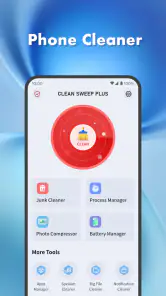
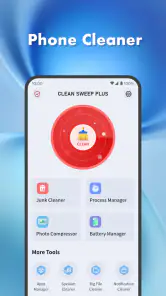
Clean Sweep Plus makes the most sense for someone who wants a straightforward starting point. The store summary describes it as a phone tidy assistant, and that is the right expectation. I would not install it expecting a complete privacy suite, a file-management replacement, or a repair tool for every Android performance problem. Its role is narrower and more useful when treated as a regular housekeeping aid.
The app is free, which removes the biggest barrier to trying it. That matters for an occasional user who only wants to organize a device before a trip, clear space before recording a long video, or help a family member whose phone has become difficult to manage. It also means I can judge the workflow directly instead of committing money before knowing whether the presentation suits me.
There is already some evidence that the app has reached a substantial audience: it has more than a million installs, around twenty-four thousand ratings, and a 4.3 average. I do not treat those figures as proof that it will behave perfectly on every phone, but they do make it easier to view the app as an established option rather than an unknown experiment.
The first cleanup should be treated as an audit
My strongest practical suggestion is to use the first session as an audit, not a deletion marathon. Open the app when you have time to pause, examine its categories, and note which locations or file types are taking space. This gives you a picture of your habits: perhaps the real culprit is a download folder, image duplicates, or media saved repeatedly by a chat app.
That approach has a hidden benefit. Once I know what is filling the phone, I can change the source of the problem instead of repeating the same cleanup every few days. For example, if saved media is the issue, I may adjust how I handle downloads or review conversations that automatically accumulate images. A cleaner is more useful when it reveals a routine than when it merely provides a temporary empty-space feeling.
I would begin with low-risk items and leave personal media until the end. Temporary leftovers and obvious duplicates are easier to evaluate than photographs with similar names or documents whose meaning is not clear from a filename. This is one of the places where a focused app can save time, but only if I keep the final decision in my hands.
Where the focused workflow is most useful
The clearest strength of Clean Sweep Plus is its appeal as a single-purpose destination. Instead of moving through several Android settings pages, I can open a tool designed around tidiness and begin with that goal in mind. For a less technical user, this can be more approachable than a system storage panel filled with categories that require explanation.
I find this especially useful before a predictable pressure point. Imagine I am leaving for a weekend away and want enough room for offline maps, photographs, and a few recordings. I can run a cleanup session first, inspect what can safely go, and avoid discovering the storage problem after I have already started the journey. The same workflow helps before a family event, a software update, or a long day of recording video.
Another good use is helping someone else without taking over their whole phone. A relative may not know where Android stores downloads or how to distinguish an application from a leftover file. A dedicated cleaner gives us a shared place to begin the conversation. I can explain each suggested item while the owner makes the decision, rather than silently deleting things on their behalf.
The best habit is “review, then remove,” not “scan, then approve everything.” That distinction sounds obvious, but it is the difference between a useful maintenance routine and an avoidable data-loss mistake. I would also keep important files backed up independently before doing a large cleanup, because no interface can know the personal value of every file.
Small details that make a cleanup routine safer
One non-obvious trade-off is that convenience can hide context. A filename may look disposable while the file itself is needed later. I therefore prefer to work in short passes: first obvious clutter, then items that need a preview, and finally anything connected to work, school, travel, or family records. This makes the process slower than a single tap, but much safer.
A second useful workflow is to separate urgent space recovery from long-term organization. If I need room immediately, I focus only on clearly unnecessary material. On another day, I can sort photographs or documents properly. Mixing those two jobs often leads to rushed decisions, and a cleaner should not become an excuse to reorganize my entire digital life under pressure.
A third insight is that repeated cleanup can be a diagnostic signal. If I run the app frequently and recover little usable space, the problem may not be ordinary clutter. It could be a large application, offline content, or media I intentionally keep. In that situation, Android’s own storage controls or a full file manager may be better because they help me understand the largest individual consumers rather than simply tidy the surface.
I would also avoid judging the phone’s health solely by how much space is freed. A tidier file list can make navigation feel better, but it does not automatically transform an older device into a faster one. If the phone is slow because of aging hardware, a demanding application, or a system issue, Clean Sweep Plus should be viewed as a housekeeping tool, not a universal performance cure.
How it compares with the usual alternatives
The most obvious alternative is Android’s built-in storage management. That option is often the better choice for users who want system-level context and already feel comfortable navigating settings. It may require more searching and interpretation, but it keeps the process close to the operating system and can be preferable when I want to understand which installed applications or storage areas are responsible for the problem.
A traditional file manager is another alternative. I would choose one when I need precise folder control, manual renaming, moving files between locations, or a clear view of documents. That approach takes more effort, but it is better for people who dislike automated suggestions or who maintain a carefully organized folder structure.
Cloud storage can solve a different problem altogether. If the phone is full because I want to preserve a large photo library, uploading or transferring files may be more appropriate than deleting them. Clean Sweep Plus can help me identify clutter, but it is not a substitute for an archive. I would not use a cleanup pass as my only plan for preserving memories.
Paid maintenance suites may appeal to people who want several phone utilities in one place. However, I would be cautious about choosing a larger bundle merely because it has more buttons. If my actual need is occasional tidying, the free price of this app is a strong reason to start here. If I need backup, security, device diagnostics, and file synchronization together, I should compare those needs separately rather than assume a cleaner covers them.
That comparison also clarifies who should skip it. Experienced Android users who already know exactly where their files live may find the extra layer unnecessary. People with sensitive professional documents may prefer a manual process that gives them maximum visibility. And anyone seeking a dramatic speed boost should look beyond a cleanup app and investigate the actual cause of the slowdown.
What switching to it really costs
The financial cost is easy to understand because the app is free. The more important cost is attention. I still have to inspect suggestions, learn the way the app groups items, and decide whether its approach matches my habits. Installing a cleaner does not remove the responsibility of knowing what I am deleting.
There is also a small adjustment cost when moving away from the built-in Android tools. I may initially open both options to compare what each one shows. That is not wasted effort: the comparison helps me see whether Clean Sweep Plus gives me a clearer route or simply duplicates controls I already use. After that trial, I can keep the app if it makes routine cleanup less intimidating, or remove it if the system tools are already enough.
For an older Android phone, compatibility is a practical advantage. The minimum requirement of Android 6.0 means the app is not limited to recent devices, which could make it useful for phones that are still functional but have modest storage. At the same time, older hardware may make any scan feel less immediate than it would on a newer model, so I would run it when I do not need the phone for something urgent.
I would also establish a personal stopping point. Once the phone has enough free room for normal use, there is little value in chasing every last removable item. The goal is reliable daily space and a manageable file collection, not an empty storage meter. That mindset prevents the app from turning maintenance into an endless task.
My recommendation after weighing the trade-offs
Clean Sweep Plus is a sensible recommendation for Android users who want a free, approachable way to begin tidying their phones. StarOnline has positioned it in the tools category, and the current 1.1.1 release is easy to place in that role: a practical assistant for people who want cleanup gathered into one focused experience. Its Everyone rating also makes it suitable for a broad household audience, provided the person using it understands that deletion decisions still deserve care.
I would recommend it most strongly to casual users, owners of older phones, and anyone preparing for a storage-heavy day. The app is particularly helpful when the alternative is ignoring clutter because Android’s settings feel confusing. Its value is not just the scan itself; it is the nudge to inspect what has accumulated and create a repeatable routine.
I would choose a built-in storage screen instead when I need system-level detail, and a full file manager when I need exact folder control. I would choose backup or cloud storage when preservation matters more than deletion. Those are not failures of Clean Sweep Plus; they are signs that different storage problems require different tools.
My final advice is to install it with a modest goal. Use the first session to understand the phone, remove only items you recognize as safe, and keep important files protected elsewhere. If that process feels clearer than the usual Android route, the app has earned a permanent place in your maintenance routine. If it does not, the free trial has still helped you make an informed comparison without a financial commitment.
Overall, I see Clean Sweep Plus as a useful convenience rather than a magic fix. It wins through accessibility, a focused purpose, broad Android compatibility, and a no-cost entry point. Its limitations are equally clear: it cannot replace judgment, backup, manual file organization, or deeper diagnosis of performance problems. For the right user, that balance is exactly why I would recommend giving it a careful try.
Pros
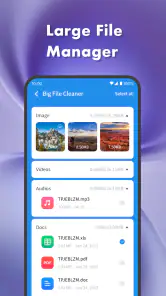
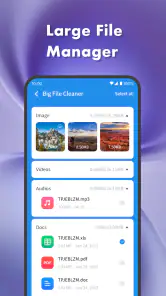
- Quickly identifies large files and unused content.
- Simple interface makes cleanup easy for beginners.
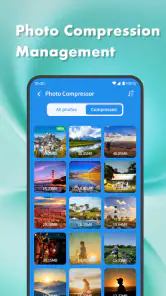
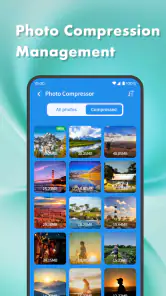
- Helps organize photos
- videos
- and documents.
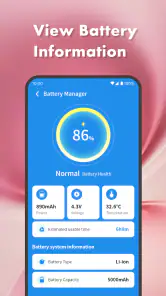
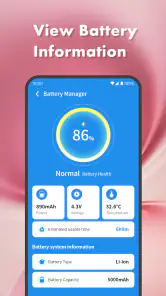
- Useful storage overview shows what consumes space.
- Can improve device performance by freeing storage.
Cons
- Some cleanup suggestions may require manual checking.
- Advanced tools may be limited behind in-app purchases.
- Scanning can take time on devices with extensive storage.
- Results may include files you prefer to keep.
- Ads can interrupt the cleanup experience on the free version.

- Category
- Tools
- Version
- 1.1.1











