Clean Buddy - Antivirus
- 23.00
- 3.8
- Installs
- 500.00K
- Price
- Free

Screenshots
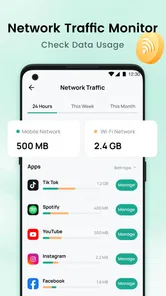
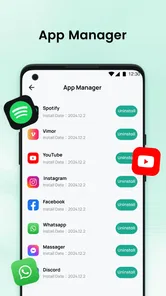

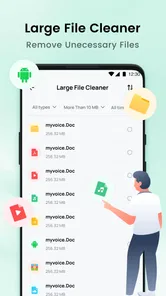
Analysis by Reviewed
Ever felt like your phone's performance is slowing down, or you’re worried about pesky malware lurking in the shadows? I’ve been there too, and that’s why I decided to give Clean Buddy - Antivirus a whirl. This app promises to be your phone’s new best friend, protecting it from viruses and optimizing its performance. Let’s dive into my experience with it.
Simplifying Mobile Security
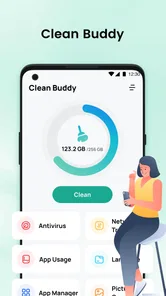
Right off the bat, Clean Buddy - Antivirus impresses with its simple and clean interface. When you first open the app, you’re greeted with a dashboard that’s easy to navigate. No more getting lost in a sea of options. The main screen presents all the essential tools with just a tap away. Whether it’s scanning for viruses, clearing cache, or boosting RAM, everything is a breeze.
Performance Boost
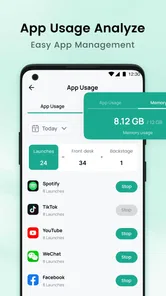
One of the standout features for me was the performance booster. My phone was starting to feel sluggish, and the app's one-tap boost feature worked wonders. It clears unnecessary background apps and frees up RAM, giving my phone a noticeable speed boost. I was genuinely surprised at how much smoother everything ran afterward.
Comprehensive Virus Protection
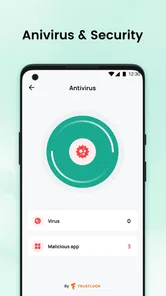
Of course, the main reason I was drawn to this app was its antivirus capabilities. In today’s world, phone security is a big deal. Clean Buddy - Antivirus runs a thorough scan of your device, checking for any hidden threats. I was impressed by how quickly it identified and neutralized potential risks. It’s like having a vigilant watchdog keeping an eye on your digital safety.
Extra Features
Beyond just antivirus and performance boosting, the app offers additional tools like a battery saver and CPU cooler. These features are handy for prolonging your device's life and ensuring it doesn’t overheat during intensive tasks. It’s these extra touches that make the app feel like a comprehensive phone management suite.
Moreover, the app doesn’t bombard you with aggressive ads or pushy notifications, which is a rare find in such apps. It respects your space and lets you focus on what matters, which, honestly, is a relief.
In conclusion, if you’re looking for a reliable app to keep your phone secure and running smoothly, Clean Buddy - Antivirus is worth checking out. It combines a user-friendly interface with effective tools, making it a must-have for anyone serious about their phone’s health. Give it a try, and you might just find your phone’s new best buddy in it.
More From Our News Desk

 Lark Player:Music Player & MP3
Switching to Lark Player: A Better Fit for Music Stored on Your Phone?
Lark Player makes sense if your music already lives on your phone. Here is what changes, what does not transfer by assumption, and how to test the switch without regret.

 Tile Master® - Matching Game
Tile Master Finds Its Place in the Gaps of a Noisy Phone
OS changes rarely transform a tile puzzle, but they reshape the small rituals around it. Tile Master’s appeal lies in how well its brief, tactile rounds fit the modern phone.

 Google Docs
 Shows What Mobile Writing Still Gets Wrong
Google Docs still makes a strong case for the shared document, but its real significance is how it exposes the gap between cloud convenience and genuinely capable mobile work.

 YouTube Studio
 Is Becoming a Creator’s Daily Control Room
As publishing turns into a daily, data-led habit, YouTube Studio is becoming the control room creators reach for between uploads—not another tool for making videos.

 Tiles Hop Music & Ball Game
Tiles Hop Review: When the Beat Is Clear, Every Miss Counts
Tiles Hop turns a simple bouncing-ball premise into a sharp test of timing. Its best design is immediate and readable; its weakest moments come when recovery feels less clear than the beat.

 Piano - Music Keyboard & Tiles
: Inviting Rhythm, Unproven Recovery
A tile-tapping piano game lives or dies by timing. This resilience-focused review separates what its format promises from what players still need to verify.
Latest News



Clean Buddy - Antivirus Frequently Asked Questions
What features does Clean Buddy - Antivirus offer?
Clean Buddy - Antivirus is equipped with a range of features designed to protect and optimize your device. It includes real-time virus scanning, malware removal, and system cleanup tools to enhance performance. Additionally, the app offers privacy protection and a secure browsing experience, ensuring your personal data remains safe while using your device.
Is Clean Buddy - Antivirus effective against all types of viruses and malware?
Clean Buddy - Antivirus is designed to offer comprehensive protection against a wide array of viruses and malware. However, no antivirus can guarantee 100% protection against all threats as new malware variants are constantly emerging. Regular updates and vigilant usage are recommended to maintain optimal security and performance.
How does Clean Buddy - Antivirus impact device performance?
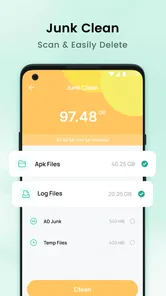
Clean Buddy - Antivirus is optimized to run efficiently without significantly impacting your device's performance. It operates in the background with minimal resource consumption, ensuring that your device remains fast and responsive while providing continuous protection. The app also includes features to clean junk files, further enhancing system efficiency.
Is Clean Buddy - Antivirus free to use, or does it require a subscription?
Clean Buddy - Antivirus offers a free version with essential features, allowing users to perform basic scans and cleanups. For advanced protection and additional features, users can opt for a subscription plan, which provides premium tools and enhanced security capabilities. It's advisable to review the pricing details and benefits of each plan before subscribing.
Can Clean Buddy - Antivirus protect my personal data and privacy?
Yes, Clean Buddy - Antivirus includes features specifically designed to safeguard your personal data and privacy. The app offers secure browsing, anti-phishing tools, and privacy protection mechanisms to prevent unauthorized access to your data. These features collectively work to ensure that your sensitive information remains confidential and protected from cyber threats.
Pros
- Efficient virus scanning
- User-friendly interface
- Quick system optimization
- Regular updates
- Low impact on device performance
Cons
- Contains ads
- Limited features in free version
- Occasional false positives
- Requires internet for full protection
- Subscription can be expensive