

ClawDance: AI Video Generator
- 28.00
- 4.7
- Installs
- 10.00K
- Price
- Free
Screenshots
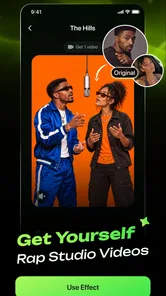
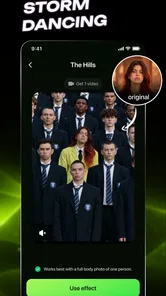
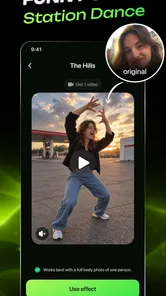
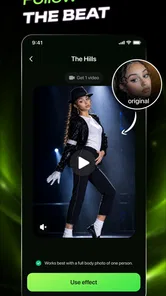
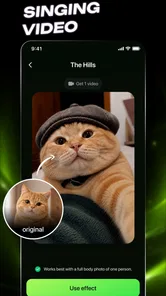
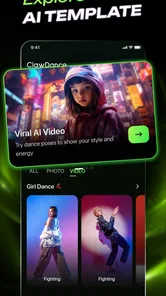
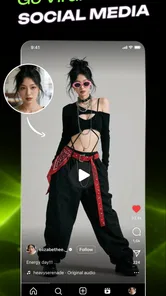
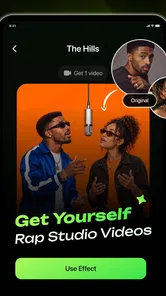
Analysis by Reviewed
Making a short video that feels lively usually takes more work than it appears to. Even a simple social post can involve choosing an image, finding a motion idea, trimming the result, and deciding whether it is ready to share. ClawDance: AI Video Generator approaches that process from the creative side, giving me a way to turn still visual material into a more animated result without starting with a full desktop editor. I found it most interesting as a quick photography companion: it is aimed at people who already have an image or concept and want to push it toward a short, attention-grabbing video.
The app comes from iKame Applications - Begamob Global and belongs to the photography category, although its output is clearly closer to short-form video creation than traditional photo correction. It is free to install, rated for Everyone, and currently listed as version 1.3.1 for devices running Android 7.0 or later. Its average rating is 4.7 from around 1.6 thousand ratings, with over 10 thousand installs, so it has attracted a modest but positive early audience.
From a still image to a usable creative idea
My first impression is that ClawDance works best when I treat it as an idea accelerator rather than a complete production studio. The starting point is not an empty timeline where I have to build every moment manually. Instead, the appeal is the possibility of beginning with visual material I already have and letting the app help turn that material into something with movement and a more social-friendly presentation.
That distinction matters. If I want to retouch a portrait, correct lighting, remove distractions, or manage a large photo library, a conventional photography editor is still the better fit. If I want precise cuts, multiple audio tracks, captions, transitions, and detailed timing, a dedicated mobile video editor gives me more control. ClawDance makes more sense in the middle: I have a photo, a playful concept, or a visual prompt, and I want to see whether it can become a short video without building the result frame by frame.
The app’s short store label, “ClawDance,” suggests a playful identity, while its broader purpose is presented as an AI video generator with simple animation and editing. I would not approach it expecting the same workflow as a professional non-linear editor. Its value is speed and experimentation. The more open I am to trying a visual idea and judging the result, the more useful it becomes.
A realistic everyday example would be preparing a post for a small shop or personal account. I might have a clean product photo, a picture of a handmade item, or a still image from a weekend trip. Rather than uploading the unchanged image, I can use the app as a quick creative pass: animate the visual, inspect the result, and decide whether it has enough energy to publish. That saves me from spending time on a complicated edit when the post only needs a short piece of motion.
Another useful starting point is repurposing material that would otherwise stay in the camera roll. A favorite portrait can become a more expressive clip, and a travel photo can be given a stronger sense of presentation. I like this because it changes the question from “What video should I shoot?” to “What can I do with this image?” For users who regularly collect photos but rarely make videos, that is a practical shift.
More From Our News Desk

 Gmail
GmailGmail in a Busy Inbox: Who Benefits Most?
From first account to crowded workday, Gmail earns its place through dependable search and flexible sorting—but its best fit depends on how much inbox maintenance you can tolerate.

 Prime Video
Switching to Prime Video: What Changes in Your Viewing Routine
Prime Video can make a compelling second home for streaming, but switching means learning a different catalog, rental layer, and route from browsing to playback.

 Universal TV Remote Control
Universal TV Remote Control Works Best as a Reliable Backup
A phone remote earns its place through quick setup and reliable habits. Here is how to get more from Universal TV Remote Control—and where its limits show.

 Weather - By Xiaomi
Weather by Xiaomi Review: Clear at a Glance, Less Clear Up Close
Xiaomi’s weather app makes everyday forecasts quick to scan, but its calm surface can leave useful details and recovery paths harder to find than they should be.

 X
XX Under Pressure: Can It Recover When Posting Goes Wrong?
A resilience-focused review of X, examining setup, mistaken posts, interruptions, weak connections, and the gaps that matter when recovery needs to be dependable.

 Clash of Clans
Clash of Clans Is Won Between the Battles
Its raids are quick; its community is a long-term project of coordination, teaching, rivalry, and shared responsibility—with all the friction that entails.
Latest News



Choosing the right source material
The quality of the starting image matters more than a store summary might suggest. I would begin with a clear subject and a simple composition rather than a crowded scene full of tiny details. A strong face, a single object, or an obvious foreground subject gives the animation concept a better chance of looking intentional. Busy backgrounds can make a generated result feel less controlled, especially when the visual idea depends on separating the main subject from its surroundings.
I also recommend preparing several source images instead of committing to the first one. This is one of the app’s more useful creative lessons: the best result may come from the image with the clearest silhouette, not necessarily the image with the highest artistic quality. A beautifully composed photograph can still be a poor animation starting point if the subject blends into the background.
For social publishing, I would also think about the first moment before generating anything. A video that takes too long to communicate its subject may lose attention, even if the later animation is attractive. ClawDance is therefore more useful when I already have a basic purpose in mind, such as introducing an object, giving a portrait a playful treatment, or turning a still memory into a short visual greeting.
The making process feels more like direction than editing
The central experience is the act of asking a still visual to behave like video. That makes the app approachable for people who do not want to learn a timeline interface first. I can focus on the intended mood and the relationship between the subject and the motion instead of immediately worrying about layers, keyframes, or detailed cuts.
That simplicity is also the main trade-off. A lightweight process can help me reach a first result quickly, but it may not give me the same control I would have in a manual editor. If a generated movement is close to what I want but not quite right, I cannot assume that every tiny part of it will be adjustable with professional precision. I see the app as a tool for generating a direction, then deciding whether that direction is good enough for the final post.
When I use an AI-assisted creative tool, I try not to judge the first output too harshly. The first attempt often tells me whether the source image and the idea are compatible. If the motion feels awkward, I would change the image before spending time trying to rescue it. That workflow is more efficient than repeatedly applying the same treatment to a weak source.
A practical tip is to keep the original photo untouched and work from a copy. This is not because the app is difficult to use, but because creative experiments are easier when I know I can return to the clean source. I would also compare the generated result with the original at normal viewing size, not only while zoomed into details. A small imperfection may be acceptable in a fast social clip, while a distracting distortion in the main subject is a reason to start over.
The editing side is best understood as a finishing stage rather than a replacement for every other editing app. If the result already has the movement and mood I need, a simple adjustment may be enough. If I need a carefully timed story with several scenes, I would move the output into a more established video editor for the final assembly. That handoff keeps ClawDance in the role where it is most useful instead of forcing it to handle a job it was not designed to replace.
Iteration is where the app earns its place
The strongest reason to keep an AI video tool on a phone is not that it eliminates creative decisions. It is that it makes trying several directions less intimidating. I can test whether a portrait works better with a subtle treatment or a more playful one, whether a product image benefits from movement, and whether a still photograph has enough visual clarity to carry a short clip.
I would use a small decision loop: choose a source, make one version, watch it without pausing, and identify one specific weakness. That weakness might be a distracting background, a motion style that does not match the subject, or an opening that takes too long to understand. Then I would change only one major input at a time. This makes the comparison meaningful and prevents a series of random attempts from becoming frustrating.
One non-obvious advantage of this approach is that it can help me discover which photographs are actually useful for motion. In a normal photo library, I may select images based on sharpness or sentimental value. After experimenting with animation, I start noticing separation, gesture, negative space, and recognizable shapes. The app can therefore influence how I choose future photos, even when I am not using it.
There is a cost to iteration, though. AI-assisted creation can encourage endless retries because each new version feels quick to make. If a result is not improving, I would stop and change the concept or use a different tool. The app is most productive when I set a clear stopping point, such as choosing the version that communicates the idea best rather than chasing a perfect result that may not be achievable from the original image.
Another trade-off is consistency. A creator managing a series of branded posts may need every clip to follow exactly the same visual rules. In that situation, a manual template in a conventional editor can be more dependable. ClawDance is better suited to individual experiments, occasional posts, and creative variations where a little unpredictability is acceptable.
Preparing the result for sharing and handoff
Before publishing, I would watch the completed clip from beginning to end with the sound muted and ask whether the visual idea still makes sense. This catches a common problem with short videos: the effect may look impressive in isolation but fail to communicate what the viewer is seeing. If the subject becomes unclear, I would return to the source image rather than adding more decoration.
The app is also useful as an intermediate step. I can imagine creating the animated base in ClawDance, then using a familiar editor for captions, a logo, a longer sequence, or platform-specific formatting. This two-stage workflow is more realistic than expecting one mobile app to cover ideation, generation, detailed editing, and publishing equally well. ClawDance handles the creative transformation; another tool can handle the final packaging when the project demands it.
For a casual creator, that extra handoff may not be necessary. A short result that looks good on its own can be shared directly through the normal phone workflow. For a small business, freelancer, or social media manager, the handoff is more valuable because it leaves room for a final review. I would check the subject, text, framing, and overall tone before sending the clip to a client or posting it publicly.
Storage and organization are worth considering in a practical workflow. I would name or group the source image and finished version together, especially when testing several variations. That sounds minor, but creative apps can quickly produce a confusing camera roll. Keeping the selected version separate from experiments makes later publishing much easier.
The free entry point makes it reasonable to test the workflow before committing to it. At the same time, in-app purchases range from $9.99 to $89.99 per item, so I would pay attention to any purchase decision and consider how often I expect to use the app. Someone making one occasional animated greeting may not value paid options in the same way as a creator producing visual content regularly.
Who will enjoy it, and who should choose something else?
I think ClawDance is a good match for people who have photos but want more movement, beginners who find traditional video timelines intimidating, and creators who enjoy testing unusual visual ideas. It can also suit a person preparing quick social content from existing images, particularly when the goal is a short, playful result rather than a polished commercial film.
It is less suitable for anyone who needs exact control over every frame, reliable brand consistency across a large campaign, or a complete professional editing environment in one place. A photographer seeking detailed retouching should use a dedicated photo editor. A video creator building interviews, tutorials, music edits, or multi-scene stories should start with a full video editor. The app’s appeal depends on valuing fast experimentation over exhaustive manual control.
I would also be cautious about using it as the only tool for important client work until I had tested the workflow with the exact kind of images I plan to deliver. AI-assisted results can be visually interesting without being perfectly predictable. For personal posts, that uncertainty can feel creative. For a paid project with strict expectations, it can become an extra review step.
The Everyone age rating makes the app approachable for a broad audience, but that does not change the need for sensible publishing choices. I would still review any image before sharing it, especially when it includes other people, private surroundings, or material intended for a limited audience. The app may make creation easier, but the responsibility for selecting and publishing the source remains with me.
My verdict after using it as a creative tool
ClawDance: AI Video Generator is most convincing when I use it to bridge the gap between photography and short-form video. It gives a still image a chance to become something more dynamic, and its approachable concept lowers the barrier for people who do not want to learn complex editing before making their first clip.
I would recommend trying it if your camera roll is full of images that could use a new presentation, or if you want to explore animated social content without building everything manually. The most effective workflow is to choose a clean source, make a focused attempt, compare variations thoughtfully, and hand the selected result to another editor only when the project needs more precise finishing.
My recommendation is more reserved for professional editors and creators who need repeatable, frame-level control. They will probably be happier with a traditional video application as their main workspace. For everyone else, the free starting point makes experimentation accessible, while the optional purchases mean I would evaluate the cost against my actual publishing routine rather than assuming every feature is necessary.
Overall, I see this photography app as a quick creative companion rather than a universal production suite. Its best contribution is helping me ask better questions of my existing images: can this picture move, can it tell a tiny visual story, and is a short animated treatment more engaging than the original still? When the answer is yes, ClawDance can turn that idea into a practical first draft with much less friction than starting from a blank video timeline.
ClawDance: AI Video Generator Frequently Asked Questions
Who develops ClawDance: AI Video Generator, and what should I know before installing it?
ClawDance: AI Video Generator is developed by iKame Applications - Begamob Global and belongs to the Photography category. Its content rating is Everyone, and it has a 4.7 average from around 1.6 thousand ratings, with over 10 thousand installs. These details can help you get a quick sense of the app, but your own experience will depend on the features and results you want from an AI video tool.
What is ClawDance: AI Video Generator and what can it do?
ClawDance: AI Video Generator is an AI-powered creative app designed to turn written prompts, images, or other user-provided ideas into short videos. It can be useful for creating social media clips, animated concepts, music-style visuals, and experimental scenes without traditional editing skills. Results depend heavily on the clarity of your prompt, the quality of uploaded images, and the generation options available in the current version.
Is ClawDance: AI Video Generator free to use?
ClawDance is free to download, but it also offers in-app purchases ranging from $9.99 to $89.99 per item. Before generating several clips or choosing a purchase, check the pricing page and purchase screen carefully. Pay attention to renewal terms, credit expiration, export restrictions, and whether higher-quality or watermark-free videos require a paid option, so you can decide whether the available features suit your budget.
What kind of phone or device is required to use ClawDance?
ClawDance requires Android 7.0 or later. The app generally needs a stable internet connection, because AI video processing is usually performed online rather than entirely on the phone. A newer device can provide a smoother experience when selecting media, previewing results, and saving exports. Allow enough free storage for generated videos, and keep the app updated to its current version, 1.3.1.
Can users create videos from their own photos, prompts, or characters?
ClawDance is intended for creative generation using text instructions and, depending on the available tools, reference images or user-selected media. For better results, describe the subject, movement, setting, camera style, lighting, and desired mood in a clear prompt. Avoid uploading private, sensitive, or copyrighted material unless you have permission. AI output can vary between attempts, so several generations may be needed to achieve a satisfactory result.
Pros
- Creates short AI videos from simple text prompts
- Offers creative effects for social media content
- Easy interface suitable for beginners
- Generates ideas quickly without advanced editing skills
- Convenient for experimenting with different visual styles
Cons
- Output quality can vary between prompts
- Some features may require credits or a subscription
- Rendering may take longer for complex videos
- AI results may include visual glitches or odd details
- Limited control compared with professional video editors











