ClaimWise: Class Actions
- 875.00
- 4.3
- Installs
- 100.00K
- Price
- Free

Screenshots



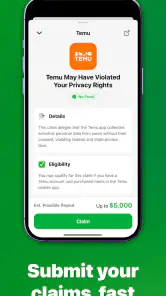
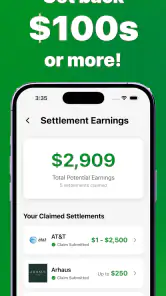



Analysis by Reviewed
I found ClaimWise: Class Actions most useful when I treated it as a household money-checking tool rather than something to open casually and forget. Its purpose is straightforward: it helps people look for class-action settlements that may apply to them and pursue a possible payment. That can be especially handy when several people in a home use the same brands, services, or products but keep their purchases and accounts separate.
The app is free to install, and its Everyone age rating makes it approachable for a broad audience. Still, the subject is financial and legal in a practical sense, so I would not hand a shared phone to a child and assume the process is self-explanatory. The useful question is not simply whether ClaimWise can find a claim. It is whether the person using it can carefully decide which notices apply, provide accurate information, and keep track of what was submitted.
How ClaimWise fits into a shared household
A realistic example is a family or group of roommates sharing a tablet or an Android phone. One person may remember buying a product, another may have used a subscription, and a third may have received an email about a settlement but never followed up. Instead of relying on everyone’s memory, one adult can use ClaimWise as a central place to review possible opportunities and then ask each person for the details needed to judge eligibility.
I like this approach because class-action claims are easy to overlook. They often require attention at the right time, and household members may not know that a notice concerns them. The app’s central idea is therefore more practical than it first sounds: it turns a vague “I think I saw something about that” into a prompt to investigate.
That does not mean every result will apply to everyone in the home. A shared device is not the same as a shared identity. If one roommate bought an item, that does not automatically make the others eligible. If a family member used a separate account, their dates, receipts, emails, or other supporting details may be different. I found that the best workflow was to use the app for discovery first, then verify each person’s circumstances separately before submitting anything.
This distinction matters because the app is not a substitute for personal records. I would keep order confirmations, subscription emails, receipts, account statements, or other relevant documents nearby while reviewing a claim. Even when a form appears simple, guessing can create more trouble than skipping a claim that cannot be supported.
Keeping identities separate on one device
ClaimWise is easier to use responsibly when the household agrees on a simple boundary: one person reviews, but nobody submits information for another person without that person’s permission. This is particularly important on a phone that stays logged in, because a later user may see a partially completed process or mistake someone else’s information for their own.
I recommend deciding at the beginning whose information is being checked. If the device is passed around, write down the person’s name or initials outside the app, not inside a form unless the form specifically asks for them. Then finish or abandon that review before moving to the next household member. This small habit reduces the risk of mixing purchase dates, email addresses, and eligibility details.
The same rule applies to roommates. A shared internet connection or shared address does not prove that everyone had the same experience. It is better to treat each person as an independent claimant, even when the app is being used from the same screen.
For privacy, I would avoid leaving the app open while the phone is unattended. I would also avoid saving screenshots that contain personal information in a shared photo library. These are not special ClaimWise features; they are sensible precautions whenever a tool deals with contact details, purchase history, or claim forms.
What the first review should look like
My first pass would be deliberately cautious. I would browse the available opportunities, read the description closely, and note what kind of event or purchase each one concerns. Then I would compare those requirements with the household member’s own records. The goal is to build a short list of plausible matches, not to submit to everything that sounds familiar.
A useful trick is to separate three questions: did this person use the relevant service or product, did they do so during the stated period, and can they provide the requested information honestly? A “yes” to only the first question is not enough. This three-step check is one of the most valuable ways to avoid treating the app like a sweepstakes browser.
I would also read the final review screen slowly. Names, addresses, email accounts, and purchase details are easy to mistype on a phone. If several people are using one device, the final check is even more important because autofill or recently used information can make an old detail look correct when it belongs to someone else.
Coordinating claims without creating confusion
ClaimWise works best in a household when it supports coordination rather than replacing it. I would create a simple private note with the opportunity name, the person checking it, the date of review, and whether more documentation is needed. I would not copy sensitive information into a group chat just to keep everyone updated.
This process helps with a common problem: two people may independently submit what they think is the same claim. That can happen when a partner sees a notice on the shared phone, then another household member sees it later and starts again. Before taking action, ask whether someone has already reviewed it and whether the claim belongs to one person or several people under the official instructions.
Another useful habit is to set a household review time once a month or whenever someone receives a relevant notice. I would not check constantly. Class-action opportunities are usually more useful when reviewed calmly, with records in front of you, rather than rushed during a busy commute. A short scheduled check also makes it easier to stop once the information becomes unclear.
The app can be helpful for a couple who divides household tasks. One person may be better at locating old emails, while the other is more comfortable reading forms. That division can work, but the person whose information is being used should still make the final decision. Coordination should reduce effort, not transfer responsibility to whoever happens to hold the phone.
Age, trust, and sensible supervision
Although the app is rated for Everyone, I would interpret that as broad accessibility, not as a recommendation that children manage claims independently. The subject involves personal details and decisions about eligibility. A parent or guardian can explain what the app is for, but should review the relevant information before a young user enters anything.
For older teenagers, ClaimWise could be a useful lesson in checking records and reading conditions carefully. I would use it as a guided exercise: identify a possible match, compare it with a receipt or account email, and discuss why an uncertain answer should remain uncertain. That teaches a more valuable habit than simply chasing a possible payment.
Trust also matters between adults. If a partner uses the app on behalf of another person, the arrangement should be explicit. The person providing the information should know what is being entered and where any payment or correspondence may go. A shared device can make this feel informal, but the consequences are still personal.
I would be especially careful with elderly relatives who may be targeted by confusing messages about settlements. ClaimWise can be a starting point for checking whether an opportunity appears relevant, but I would not treat an unexpected message, urgent request, or unfamiliar payment instruction as trustworthy merely because the topic resembles something shown in the app. When money or identity details are involved, slow verification is the safer choice.
What stands out in everyday use
The strongest part of ClaimWise is its focus. It is not trying to be a full budgeting app, receipt manager, or general financial dashboard. Its value comes from bringing potential class-action claims into one place so a user can decide whether to investigate them. For someone who regularly ignores settlement emails or never knows where to start, that focus can make the process less intimidating.
I also appreciated the difference between discovery and decision-making. The app may help surface an opportunity, but the user still has to read the conditions and decide whether the facts fit. That division of labor is healthy. It keeps the tool useful without pretending that a match in a list automatically guarantees eligibility or payment.
The developer is ST Advanced, and the app currently carries a 4.3 average from around 1.9 thousand ratings, with more than 800 written reviews. That level of public response suggests that many people find the basic idea worthwhile, although a rating cannot tell me whether a particular claim will apply to my household. I would treat the feedback as a reason to explore the app, not as proof of a result.
It has passed the 100 thousand install mark, which also makes it feel less like an obscure experiment and more like a tool that has attracted a real user base. Even so, popularity does not remove the need to check the details of every opportunity. The practical benefit remains dependent on the accuracy of the information supplied by the user.
Where the experience needs patience
The main friction is that the app cannot do the most important part for you: it cannot turn uncertain personal history into reliable evidence. If you do not remember when a purchase happened, which account was used, or whether a service was active during the relevant period, you may still need to search your inbox and statements. ClaimWise can organize the starting point, but it does not eliminate that detective work.
That makes it less suitable for someone expecting instant money. A possible claim is not the same as an approved claim, and an approved claim is not necessarily a quick payment. I would skip the app if my only goal were immediate cash or if I was unwilling to read eligibility language carefully. The process rewards patience more than speed.
There is also a household-specific limitation: a single shared device can make organization harder if people do not establish boundaries. Without a clear routine, one person may leave a form unfinished, another may enter details in the wrong place, and a third may assume the matter is complete. The app itself cannot solve poor coordination.
People who already maintain a careful personal system for tracking settlement notices may not gain much from adding another tool. A spreadsheet, email folder, or calendar reminder can be enough for someone who is disciplined and prefers complete control. ClaimWise is more appealing to users who want a dedicated starting point rather than those who already have a reliable workflow.
Version, cost, and practical expectations
The current version is 1.0.62, and it supports Android 7.0 or later. That makes it accessible on many older Android phones, which is helpful for a shared household device that is not replaced frequently. I would still keep the operating system updated where possible, especially when the phone is used for personal information.
There is no upfront charge to install the app. However, in-app purchases range from $5.99 to $89.99 per item. That means I would pay attention to any screen that presents an optional purchase and make sure every household member understands that “free to install” does not necessarily mean every possible action inside the app is free.
This is particularly important on a shared phone connected to a family payment method. I would require the account holder’s approval before any purchase and avoid letting a child or guest tap through a payment screen. The safest approach is to treat the free installation and optional in-app purchases as two separate decisions.
If you are evaluating the app for a relative, explain that a payment prompt is not automatically required to investigate a possible claim. Read what the screen offers, decide whether it adds genuine value, and never assume that paying guarantees eligibility or a larger result. That expectation-setting can prevent the app from being misunderstood as a guaranteed payout service.
How it compares with familiar alternatives
Compared with searching the web manually, ClaimWise offers a more focused path. Web searches can produce outdated pages, duplicate explanations, advertisements, and confusing discussions. A dedicated app is easier for a first review because it gives the task a clear home. The trade-off is that a focused app may not replace independent checking, especially when you want to confirm official instructions or investigate a claim in depth.
Compared with email alerts, the app is more useful when several household members need to review opportunities together. Email is excellent for preserving a notice from a company or administrator, but messages get buried, forwarded, or mistaken for spam. ClaimWise can serve as the place where the family discusses what needs attention, while the original email remains an important reference.
Compared with a spreadsheet, the app is less flexible but easier to approach for someone who does not want to design a tracking system. A spreadsheet can record dates, documents, and follow-up reminders in detail. ClaimWise is better for starting the search; a spreadsheet may be better for a household managing many people or many records.
Compared with a general finance app, it is narrower and therefore potentially clearer. Budgeting tools focus on spending, saving, and accounts, while this app focuses on possible settlements. I would not install it expecting budgeting features. If my main problem were controlling monthly expenses, a finance app would be the better choice. If my problem were missing claim opportunities, ClaimWise would be the more relevant tool.
Who should use it, and who should pass
I would recommend ClaimWise to adults who frequently overlook settlement notices, couples who want to review household possibilities together, and people who are comfortable checking their own records before submitting information. It is also a reasonable option for someone helping a relative, provided the relative remains involved and understands what is being done.
I would be more cautious about recommending it to anyone who expects guaranteed payments, dislikes reading conditions, or tends to submit forms impulsively. I would also suggest skipping it if the only available device is shared by many people and nobody is willing to establish account and privacy boundaries. In that situation, a personal email folder or a private browser session may be easier to manage.
People who need formal legal advice should look elsewhere for that specific need. ClaimWise can help identify a possible opportunity, but it should not be treated as a lawyer, a personal financial adviser, or a replacement for reading official settlement instructions. That distinction is important when eligibility depends on details that are difficult to interpret.
My household verdict
After using ClaimWise as a shared household tool, I see its best role as a calm first checkpoint. It helps turn scattered memories and ignored notices into a reviewable list, but it works only when users keep identities separate, check records, and resist rushing toward a payment screen.
The smartest way to use ClaimWise is to treat every possible claim as a lead to verify, not as money already earned. That mindset makes the app more useful and reduces the risk of submitting inaccurate information. For a family or group of roommates, a simple routine—one person at a time, clear permission, private details, and a final review—does most of the work.
ST Advanced has made a focused tools app for a very specific problem, and the free installation lowers the barrier to trying it. The optional purchase range means I would monitor shared-device payments carefully, while the Everyone rating makes it approachable when an adult provides sensible guidance. With its 4.3 average and more than 100 thousand installs, it has enough presence to deserve consideration, but my recommendation still depends on how carefully you use it.
In my view, ClaimWise is worth trying if your household regularly loses track of settlement notices and you are willing to verify each detail. It is not the right choice for instant cash, legal advice, or completely hands-off claims. Used with realistic expectations and clear account boundaries, it can be a convenient way to find opportunities that might otherwise remain buried in an inbox.
Pros
- Helps users discover class actions they may otherwise miss.
- Provides a centralized view of potential settlement opportunities.
- Can simplify eligibility checks and claim submission steps.
- Useful alerts may help users track deadlines and case updates.
- Free access makes it easy to browse available claims.
Cons
- Eligibility varies by location and purchase history.
- Claim payouts are uncertain and can be relatively small.
- Some cases may require supporting documents or proof of purchase.
- Deadlines can be easy to miss if notifications are disabled.
- Personal information may be required to submit certain claims.

- Category
- Tools
- Version
- 1.0.62











