Cinehut
- 9.72K
- 4.6
- Installs
- 5.00M
- Price
- Free

Screenshots
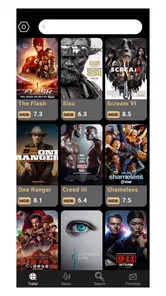
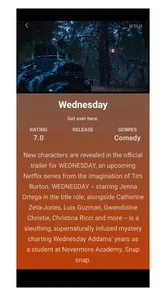

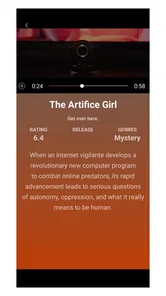

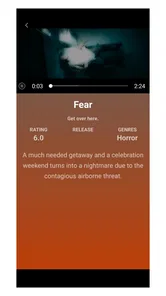

Analysis by Reviewed
I’d treat Cinehut as a movie-discovery tool first, rather than assuming it works like a full streaming subscription. The app is listed in the Tools category, and its focus on trailers and a player makes it most relevant when I want to preview a film or find something to watch. That distinction matters: if you’re looking for a particular show to stream, check that the app suits that purpose before building your evening around it.
When a trailer helps you choose
For me, the most useful role for Cinehut is the decision-making stretch before watching: the moment when a title sounds familiar, but I’m not sure it suits my mood. A trailer gives me a quick sense of tone and pacing, which can be more useful than reading a short synopsis. I’d use it to compare a few possibilities, then make the actual viewing plan elsewhere if needed.
That workflow is especially handy when another person is choosing too. Rather than taking turns describing films, I can pull up a preview and let everyone react to the same sample. I’d still keep the shortlist small. Watching trailer after trailer can turn a quick decision into its own browsing session, so I find it helps to start with a genre, a mood, or one actor everyone agrees on.
A quick check before movie night
In everyday use, I’d open Cinehut while deciding what to watch, browse a few trailers, and use those previews to narrow down the options. That’s a more practical way to approach it than expecting every title to be available to play in full. Trailers can help a group settle on a choice faster, especially when everyone has a different idea of what sounds good.
One useful habit is to treat a trailer as a short sample, not a guarantee that the film itself is available in the app. If you find something appealing, check your usual viewing services before inviting friends over or setting aside time. This small extra step prevents a promising preview from turning into a frustrating search later.
A realistic example: I might be on the sofa with a friend who wants something light while I’m leaning toward a thriller. We can preview one or two candidates, agree on the mood, and then check where the selected film is available. Cinehut is most useful in that first part of the evening, not as a promise that the whole viewing journey will happen in one place.
Speed, stability, and what to expect
I would judge the experience by how quickly the app gets me to a trailer or player, rather than by expecting the same depth as a major subscription service. A focused app can be handy when I want a fast preview, but browsing still depends on having a suitable connection and a device that can handle video playback comfortably. I wouldn’t use it as my only plan for a long trip unless I had already checked what would work offline.
More From Our News Desk

 Lark Player:Music Player & MP3
Switching to Lark Player: A Better Fit for Music Stored on Your Phone?
Lark Player makes sense if your music already lives on your phone. Here is what changes, what does not transfer by assumption, and how to test the switch without regret.

 Tile Master® - Matching Game
Tile Master Finds Its Place in the Gaps of a Noisy Phone
OS changes rarely transform a tile puzzle, but they reshape the small rituals around it. Tile Master’s appeal lies in how well its brief, tactile rounds fit the modern phone.

 Google Docs
 Shows What Mobile Writing Still Gets Wrong
Google Docs still makes a strong case for the shared document, but its real significance is how it exposes the gap between cloud convenience and genuinely capable mobile work.

 YouTube Studio
 Is Becoming a Creator’s Daily Control Room
As publishing turns into a daily, data-led habit, YouTube Studio is becoming the control room creators reach for between uploads—not another tool for making videos.

 Tiles Hop Music & Ball Game
Tiles Hop Review: When the Beat Is Clear, Every Miss Counts
Tiles Hop turns a simple bouncing-ball premise into a sharp test of timing. Its best design is immediate and readable; its weakest moments come when recovery feels less clear than the beat.

 Piano - Music Keyboard & Tiles
: Inviting Rhythm, Unproven Recovery
A tile-tapping piano game lives or dies by timing. This resilience-focused review separates what its format promises from what players still need to verify.
Latest News



For heavier use, such as moving through several trailers in a row, I’d keep an eye on the phone’s battery and data use just as I would with other video apps. On a limited mobile plan, Wi-Fi is the sensible choice for extended browsing. If playback stalls, I’d first check the connection and try again rather than assume the app itself has failed; that is a simple recovery step that often helps with video on a phone.
My practical speed test would be modest: open it when I have a stable connection, try a short preview, and see whether the player behaves well on my device before relying on it for a group decision. A single smooth clip is encouraging, but it doesn’t guarantee that every session or network condition will feel the same. If it hesitates, I’d avoid repeatedly tapping play; I’d pause, check connectivity, and retry once the connection is steadier.
Reliability during a longer browsing session
Reliability matters most when I’m comparing several trailers, because that is when small interruptions become noticeable. I wouldn’t call any video app dependable in every setting: weak Wi-Fi, a busy mobile connection, or a phone juggling many active tasks can all affect playback. My best approach is to use Cinehut as a discovery aid when I have enough signal and time to recover from a brief pause, rather than making it the only option for a tightly scheduled screening.
If I’m using it to help a group choose, I’d decide on a backup early. That doesn’t mean expecting trouble; it simply avoids making everyone wait while I troubleshoot. I can keep the title in mind, then switch to a streaming service or film guide if the player is slow or the preview isn’t useful. The important distinction is between an interruption in playback and a problem with the movie choice itself.
For a calmer experience, I’d browse before guests arrive rather than making the first launch part of the evening’s entertainment. That gives me time to see whether the app is comfortable on my phone and whether the trailers I want to preview are accessible. It’s a small bit of preparation, but it makes a discovery tool feel more dependable without assuming that every connection will behave perfectly.
Device limits and sensible habits
Cinehut is free to download, and it was released on January 19, 2020. Its current version is 1.8.2, and it supports Android 6.0 and newer. That minimum makes it a possible option for some older Android phones, but an operating-system match alone doesn’t tell me how smoothly video will run. I’d judge the experience on the actual device, especially if it has limited free space, an older battery, or other apps running in the background.
When I expect to browse for more than a few minutes, I’d start with a reasonable battery charge and Wi-Fi if it’s available. Those are ordinary precautions for video, not special setup requirements. If the phone becomes warm or playback turns choppy, I’d close apps I don’t need and take a break rather than keep pushing through. That gives me a better sense of whether the issue is temporary device strain or simply a poor connection.
There’s also a useful boundary to keep in mind: a trailer-focused app is not automatically a travel-ready video library. I would not count on it for entertainment during a flight or a commute without checking the available playback options in advance. If offline viewing is essential, a service built around downloads is a safer fit; if I only need a quick preview while planning at home, that requirement matters much less.
Who it suits—and who may prefer another option
Cinehut is worth considering for someone who likes previewing films before choosing where to watch them, or who wants a lightweight way to explore cinema-related video. It may be less suitable if you need a dependable catalogue of full-length films, offline access for travel, or one place to manage subscriptions. In those cases, a familiar streaming platform or a dedicated film guide may fit better, depending on whether watching or researching is your priority.
Compared with opening several streaming apps just to sample what’s on offer, a trailer-focused tool can make the first step feel simpler. The trade-off is that a preview doesn’t settle availability, playback rights, or where the full film can be watched. I’d use Cinehut to spark ideas, then move to the service that actually carries the title I choose.
I’d also suggest skipping it if your main goal is a carefully organized watchlist, detailed film research, or a single paid service with a predictable catalogue. Those needs call for tools designed around cataloguing or full-length viewing. Cinehut makes more sense as a quick stop in the discovery process: useful when I want a visual impression, less useful when I need a complete answer about where and how to watch.
What the audience and pricing suggest
YoungTunes is the developer, and the app has a 4.6 average from around 50,000 ratings, with roughly 9,700 written reviews. It has passed 5 million installs, which suggests it has reached a substantial audience, though popularity alone doesn’t tell me whether it will suit my particular phone or viewing habits. I’d treat those figures as background, then decide based on whether trailer browsing solves a real problem for me.
The app is free, with optional in-app purchases ranging from $1.99 to $49.99 per item. I’d look carefully at any purchase prompt before proceeding and consider whether I need the option being offered. If my goal is simply to preview a film, I would not assume that paying is necessary; if a purchase is presented, checking its terms first is the sensible move.
Its Teen content rating is another practical detail for households. If younger family members use the phone, I’d make the decision about access with them in mind rather than treating a general movie-discovery app as automatically suitable for every age. The right choice depends on the household’s own rules and on what content appears during use.
Ah, the world of streaming apps! It's like we're living in the golden age of binge-watching, and I've just stumbled upon a cool new app that might just enhance your movie night experience. Enter Cinehut, an app that promises to bring the magic of cinema right to your fingertips. Let's dive in and see what this app has to offer, shall we?
First Impressions
The first thing you'll notice about Cinehut is its sleek and user-friendly interface. It's like the app is inviting you to explore its vast library of movies and shows. Navigating through the app is a breeze, with intuitive menus that make finding your favorite flicks a walk in the park. Whether you're a tech guru or not, you'll find the experience quite seamless.
Features Galore
Now, let's talk about features. Cinehut boasts an impressive collection of movies and TV shows across various genres. From action-packed blockbusters to indie films, there's something for everyone. The app also offers personalized recommendations based on your viewing history, which is a nifty feature if you're ever stuck in the classic "What should I watch next?" dilemma.
Another standout feature is the offline viewing option. You can download your favorite movies and shows to watch later, which is perfect for those long flights or when you're stuck in a Wi-Fi dead zone. The streaming quality is top-notch, offering crisp visuals and clear audio that make for an immersive viewing experience.
What Sets It Apart?
One of the things that caught my eye was Cinehut's community feature. You can connect with fellow movie buffs, share reviews, and even join discussions about your favorite films. It adds a social dimension to the app, making it more than just a streaming service. It's like having a virtual movie club at your fingertips!
Moreover, the app supports multiple languages, catering to a global audience. Whether you're in the mood for a French classic or a Bollywood hit, Cinehut's got you covered. It's this inclusivity that makes it a standout choice for movie lovers around the world.
Final Thoughts
In a world saturated with streaming apps, Cinehut manages to carve out its own niche by offering a diverse selection of content, stellar features, and a user-friendly interface. Whether you're a casual viewer or a hardcore cinephile, this app has something to offer. So, if you're looking to spice up your streaming game, give Cinehut a whirl. Who knows, it might just become your new go-to for movie nights!
Cinehut Frequently Asked Questions
Can I use Cinehut to watch full movies and TV shows?
Cinehut’s store summary highlights trailers and a player, which makes it relevant to browsing and playing video-related content. It should not be assumed to provide a complete library of full-length movies or television episodes like a dedicated streaming service. Before downloading, consider whether you want a tool for exploring trailers and video content or a service specifically intended to stream complete titles.
What should I check before installing Cinehut on my device?
Before installing Cinehut, consider your device’s operating system and whether the app’s purpose suits what you want to do. Cinehut is an app in the Tools category, with a focus described as trailers and a player. Android users should also make sure their device meets the stated minimum system requirement. Thinking through these basics can help you decide whether it is a practical fit.
Does Cinehut require an account, and what personal information does it collect?
If you are considering Cinehut, it is sensible to review the permissions and privacy details shown during installation and in the app store before sharing personal information. Those details can help you understand what access the app requests and how account-related features work. You can also assess whether the app’s trailer and player focus matches your needs without assuming that every feature requires registration.
Can I use Cinehut without making in-app purchases?
Cinehut is free to download, and you can consider trying its available features without making a purchase. The app also lists optional in-app purchases, so review the price and terms shown for any offer before confirming it. If you do not want to spend money, be mindful of purchase prompts and use your device’s purchase controls to help prevent unintended transactions.
What should I know about Cinehut’s age rating before downloading it?
Cinehut is rated Teen, so it may be more suitable for older children and adults than for young viewers. Consider the rating alongside your household’s preferences and the way you plan to use the app. Checking an app’s age guidance before installing it can help you decide whether it fits your needs or those of someone using your device.
Pros
- User-friendly interface for easy navigation.
- High-quality streaming with minimal buffering.
- Extensive library of movies and TV shows.
- Frequent updates with the latest content.
- Option to download for offline viewing.
Cons
- Limited availability in certain regions.
- Contains ads that can interrupt viewing.
- Requires a stable internet connection.
- Some content may not have subtitles.
- Occasional app crashes on some devices.