Chipotle
- 67.55K
- 4.7
- Installs
- 10.00M
- Price
- Free

Screenshots
Analysis by Reviewed
When I’m hungry and deciding whether to install a restaurant app, I want to know one thing first: will it make getting the meal I want easier, or give me another screen to manage? Chipotle is most useful when I’ve already chosen Chipotle and want to customize a burrito, bowl, or tacos before arranging pickup or delivery. If you’re new to it, start with one familiar meal, choose a nearby option, and review the order before placing it. That simple first run shows what the app does well without making lunch a project.
What to Expect from a Restaurant-Specific App
This is an ordering app for Chipotle Mexican Grill, not a general restaurant browser. That distinction is worth knowing before you install it: you can focus on Chipotle’s menu and shape a meal to your preferences, but you won’t get the broad restaurant comparisons offered by a multi-restaurant delivery app. I’d choose this app when I know what kind of food I want and want to make decisions at my own pace. If I’m still deciding between cuisines, a broader service is the more useful starting point.
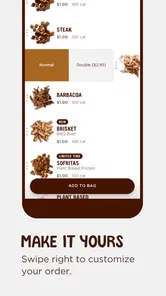
The core appeal is control over the order. Rather than trying to remember every ingredient while talking through a counter line, I can make choices in sequence and look over the meal before checkout. That can make a familiar lunch feel more straightforward, especially when I have a specific combination in mind. It does not remove the need to choose carefully, though: customization gives you options, not an automatic guarantee that every meal will match your expectations.
Chipotle is free to download, has an Everyone age rating, and is published by Chipotle Mexican Grill. It has a 4.7 average from around 470,000 ratings and over 10 million installs. Those figures give a sense of its reach, but I wouldn’t treat popularity as a promise about a particular restaurant, pickup, delivery, or order. My practical test is whether the menu and ordering flow fit the way I actually get lunch.
Ordering Made Easy
The first thing I noticed about the Chipotle app is how user-friendly it is. I mean, sometimes apps can be overwhelming with their complex interfaces, but this one keeps it simple. With just a few taps, you can order your favorite burrito, bowl, or taco, customized exactly how you like it. The app layout is intuitive, making the whole ordering process a breeze. Plus, you can save your favorite orders for next time, which is a neat little feature if you’re a regular Chipotle fan like me.
Starting with a Low-Stress Setup
For a first-time user, I’d avoid trying to learn every part of the app before ordering. Open it when you have a little time, decide whether pickup or delivery suits the occasion, and then build a single meal you already understand. That approach makes it easier to tell whether a choice is about the food, the location, or the way you want to receive the order. If you’re ordering while rushed, it’s easy to tap through choices without noticing what you selected.
Before settling on a location, think about where you’ll be when the food is ready. A nearby restaurant is not necessarily convenient if you’ll be across town by pickup time, while delivery may make more sense when you can’t make the trip. I treat that decision as part of planning the meal, not a last-minute button to press. It helps set realistic expectations and avoids building an order around an option that doesn’t fit the day.
More From Our News Desk

Weather by Xiaomi Review: Clear at a Glance, Less Clear Up Close

X Under Pressure: Can It Recover When Posting Goes Wrong?

Clash of Clans Is Won Between the Battles

Android Auto Makes the Case for Quieter Car Software

MobiOffice: Transforming Mobile Productivity with Seamless Integration

EA SPORTS FC™ Mobile Soccer: Redefining Mobile Sports Gaming
Customization at Your Fingertips
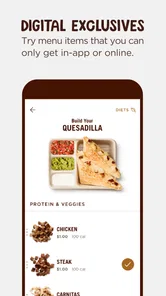
One of the standout features of this app is the level of customization it offers. Whether you're a fan of extra guac, or you want to skip the sour cream, the app allows you to tailor your meal to your exact preference. I found this particularly useful because, let's face it, we all have our unique taste buds. And for those of us with dietary restrictions, this level of customization is a lifesaver.
My useful tip is to make the meal in a deliberate order: choose the main format and ingredients first, then check any additions or omissions one by one. If I change my mind halfway through, I pause to make sure the final selection still reflects what I want, rather than assuming the earlier choices stayed as intended. This matters most when one small ingredient changes the character of a meal or when I’m placing an order for someone else.
For dietary needs, I’d use customization as a way to communicate my preferences, not as a substitute for checking the finished selection. Take time to inspect the ingredients on each meal, especially in a group order where different people have different requirements. If a need is serious or depends on handling beyond ingredient selection, I would not assume that an app screen alone answers every safety question. In that situation, checking directly with the restaurant is the more sensible choice.
Getting to the First Successful Order
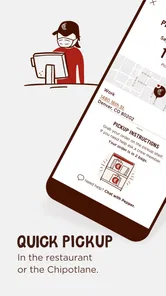
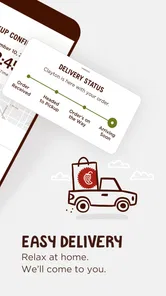
Speed is of the essence, especially when you're hungry and on the go. The app ensures your order is prepared in a timely manner, and you can choose between pick-up and delivery options. I tried both and was impressed with how efficient the service was. The pick-up option is perfect if you're nearby and want to grab your meal quickly. On the other hand, the delivery service is a godsend on lazy days when stepping out seems like a chore.
For a first order, I’d treat customization as a short checklist rather than a creative free-for-all. Decide on the base and main ingredients first, then add or skip extras one choice at a time. Before paying, pause to scan the full order; that small check is useful when you have a particular preference or are ordering for someone else. The app makes choices convenient, but the meal still depends on selecting the ingredients you want.
A realistic first success might be a weekday lunch between errands. I can choose a familiar bowl, select pickup if I’ll pass a restaurant anyway, and review the ingredients before placing the order instead of trying to remember everything at the counter. If my plans change and I’m no longer nearby, that original pickup choice may no longer be practical; I’d reconsider the fulfillment option before completing the order rather than assuming the app can solve the change automatically.
When I’m ordering for a friend or family member, I keep each meal distinct and check it separately. It’s tempting to build several meals quickly and trust memory, but that’s exactly when two people’s preferences can blur together. A quick review of each customized meal is a small investment that makes a group order less stressful. It is especially helpful if one person wants a simple order and another wants several ingredients adjusted.
Pickup, Delivery, and the Trade-Off
Pickup and delivery serve different routines, so I wouldn’t call one universally better. Pickup makes sense when I’m already close to a restaurant or can fit the stop into a trip. Delivery is appealing when leaving home or work is inconvenient, but it depends on having a suitable delivery option where I am. I decide based on the day’s route and the effort involved, rather than choosing delivery by default just because it appears convenient.
Compared with ordering in person, the app gives me more time to consider ingredient choices and review the meal without holding up a line. In person, though, I can speak directly with staff while ordering. Compared with a general delivery app, Chipotle’s own app keeps the experience focused on its menu, while a broader service is better when I want to compare restaurants. The right option depends on whether I value menu focus, direct conversation, or variety that day.
There is also a practical limit to ordering ahead: the app can organize the request, but it cannot make a distant pickup point convenient or ensure that my schedule stays unchanged. I try to place an order when I have a reasonable idea of where I’ll be and how I’ll get the food. If my plans are uncertain, waiting until they settle can be better than placing an order early and then having to rethink the logistics.
Saved Meals and Rewards in Everyday Use
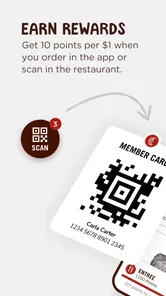
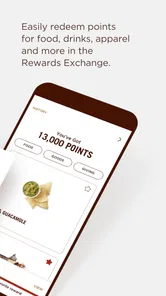
Who doesn’t love a good reward system? The app includes a loyalty program that lets you earn points with every purchase, which you can redeem for free food. As someone who's always on the lookout for a good deal, this feature definitely caught my attention. It’s like getting a little bonus just for enjoying your favorite meals.
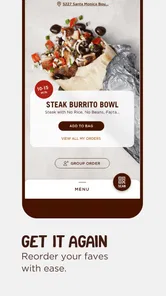
Saving a go-to order is most useful when your tastes are settled: it can make a routine lunch quicker, while a new visit is still a chance to adjust ingredients. I wouldn’t choose a meal just to chase points, though. Rewards are a pleasant extra, not a reason to order more often than you otherwise would. For an occasional customer, the main value remains being able to place a customized order without starting from scratch at the counter.
There’s a useful middle ground between saving every order and rebuilding everything from memory. I’d save only a combination I genuinely expect to want again, then treat it as a starting point rather than assuming it will suit every visit. If I’m ordering for someone else or trying a different meal, I review those choices on their own. That keeps the convenience of a repeat order from turning into an accidental repeat of ingredients I meant to change.
Where the App Fits—and Where It Doesn’t
This is a good fit if Chipotle is already one of your regular choices, or if you want to decide on ingredients at your own pace before pickup. It is less compelling if you’re comparing many restaurants, since a restaurant-specific app naturally focuses on that one menu rather than showing a broad range of local cuisines. In that situation, a general delivery app may be more useful for browsing alternatives; if you already know you want Chipotle, ordering directly here keeps the experience centered on its menu.
I’d also skip it if what I need is a wide-ranging meal planner or a way to coordinate choices across several unrelated restaurants. Its strength is making a Chipotle order easier to shape, not helping me decide what cuisine everyone should eat. Likewise, if I strongly prefer to ask questions face to face while choosing ingredients, ordering at the restaurant may feel more comfortable than doing the whole process on a phone.
Customization is helpful, but it also puts the responsibility for checking the meal on you. I’d slow down when ordering for someone with dietary needs and review every ingredient selection rather than assuming a customized order automatically resolves every concern. Likewise, pickup is not a shortcut if the chosen restaurant is inconvenient to reach. Delivery can spare a trip, while pickup makes more sense when you’ll already be nearby; the practical choice depends on your plans, not just the app.
One point that can surprise a first-time user is that a smooth ordering flow doesn’t make every decision obvious. The app helps you assemble a meal, but you still need to know what you want and read back your choices. If you’re unsure about an ingredient, don’t rush through the screen just to get to checkout. Taking a moment to decide—or choosing a simpler familiar meal for the first try—makes the experience easier to judge.
What to Know Before You Keep Using It
The app is free and comes from Chipotle Mexican Grill, so there’s no separate app price to weigh against trying it. It has an Everyone age rating, a 4.7 average from around 470,000 ratings, and over 10 million installs. Those figures suggest it is widely used, but they can’t promise that every individual order or location will feel equally smooth. I’d judge it by whether the ordering flow works for your routine and whether the pickup or delivery option suits where you are.
It’s a Food & Drink app, released in 2013, and version 11.11.0 is listed for devices running Android 9 or later. For a first-time user, the useful question is less about the version number and more about whether the app can make your usual order easier. If it does, save that meal for next time; if you only want Chipotle occasionally, you can still use it for a one-off order without making it part of your daily routine.
As a next step, I’d place one straightforward order and pay attention to the parts that matter to me: whether I can build the meal without confusion, whether the chosen way of receiving it fits my plans, and whether reviewing the order catches any changes I made along the way. If that first experience saves effort, keeping the app for repeat lunches makes sense. If I find that I prefer browsing several restaurants or talking through every choice in person, I know to use a different route next time.
My Take After Trying It
To wrap it up, the Chipotle - Fresh Food Fast app combines convenience with the deliciousness of Chipotle meals. It’s perfect for anyone who loves customizing their meals and getting them fast. The app is straightforward, reliable, and includes some cool perks like loyalty rewards. So, if you haven’t tried it yet, I'd say give it a whirl. Your taste buds will thank you!
My recommendation is strongest for someone who already likes Chipotle and wants to make a familiar order with less back-and-forth. Start with one meal, check every choice, and choose pickup or delivery according to your actual route. That gives you a fair first impression without expecting the app to do more than it is designed for. If you’re still deciding where to eat, or need a conversation to resolve a detailed food question, another option may serve you better.
Chipotle Frequently Asked Questions
Does the Chipotle app let me order food for pickup or delivery?
Yes. The Chipotle app is designed for Mexican food pickup and delivery, letting you place an order from your phone instead of starting in person. It can be useful when you want to arrange a meal ahead of time or choose delivery. Available choices may depend on the location and ordering options shown in the app.
Who develops the Chipotle app, and how can I find the official one?
The app is developed by Chipotle Mexican Grill. When searching for it in an app store, check the developer name so you can distinguish the company’s app from unrelated results. Its short description is simply “Chipotle,” and it is the company’s own Food & Drink app for accessing its Mexican food pickup and delivery service.
Is the Chipotle app free to download, and what devices can run it?
The Chipotle app is free to download and is made by Chipotle Mexican Grill. It is available for Android and iOS, with a minimum operating-system requirement of version 9. The app is listed for Everyone, so its age rating is suitable for a general audience. Check your device’s operating-system version before downloading to make sure it meets that requirement.
What can I use the Chipotle app for?
Chipotle is a Food & Drink app centered on Mexican food pickup and delivery. It gives customers a digital way to place and manage food orders, making it useful when you want to arrange a meal through your phone rather than begin in person. The app is developed by Chipotle Mexican Grill, so it is the company’s own ordering app.
What features does the Chipotle app offer?
The Chipotle app provides a seamless and convenient experience for ordering your favorite Mexican dishes on the go. Users can customize their orders, choose from a variety of fresh ingredients, and save their favorite meals for quick reordering. The app also offers delivery and pick-up options, nutrition information, and exclusive rewards and deals for frequent users.
Pros
- User-friendly interface with easy navigation.
- Customizable meal options to suit preferences.
- Fast and efficient online ordering process.
- Real-time order tracking to stay updated.
- Exclusive offers and discounts for app users.
Cons
- Limited delivery areas may restrict access.
- Occasional app crashes disrupt experience.
- Inconsistent order preparation times.
- Lack of diverse payment options.
- Some features require stable internet.











