CBS Sports App: Scores & News
- 36.65K
- 4.6
- Installs
- 10.00M
- Price
- Free

Screenshots
Analysis by Reviewed
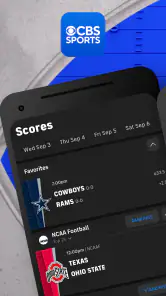
Hey there, sports enthusiasts! My first-week impression of CBS Sports App: Scores & News is that it gives a sports fan several reasons to check in: scores, news, video and analysis sit together instead of making me bounce between separate sources. That breadth is useful when I follow more than one sport, but the real test is whether the app remains helpful after the novelty of setting it up wears off.
What I would test in the first week
I’d use the first few days to see whether the app fits the way I actually follow sports, not to turn on every option at once. A good test is to choose one team I follow closely and one sport I only check occasionally. Then I can tell whether the personalized feed helps me find the important updates quickly or whether it simply gives me another stream to scroll through.
I’d also pay attention to what happens on a day when there is no major game I care about. Scores are an obvious reason to open a sports app, but the news and video are what can make it worth keeping between match days. If I still find something useful to read or watch in a quieter stretch, that is a stronger sign of lasting value than a busy weekend full of games.
From quick checks to a lasting routine
As a free sports app from CBS Interactive, Inc., it has an easy case for an initial download: I can try it without paying upfront, and it’s rated for Everyone. The app has an average rating of 4.6 from around 242,000 ratings, with over 10 million installs. Those figures suggest broad appeal, but they don’t tell me whether its mix of coverage suits my habits. I’d treat it as a convenient starting point, then decide whether its alerts and coverage earn a permanent spot on my home screen.
All-in-One Sports Hub
Okay, let’s get straight to the point. The CBS Sports App is a comprehensive platform that keeps you updated on all things sports. From live scores to the latest sports news, this app has it all. Whether you're a die-hard fan of football, basketball, baseball, or even niche sports, this app ensures you’re always in the loop. I love how it covers a wide range of sports, making it a one-stop-shop for sports enthusiasts.
Personalization at Its Best
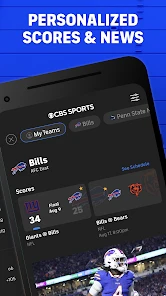
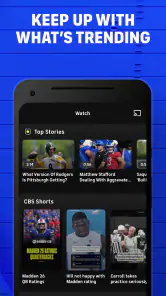
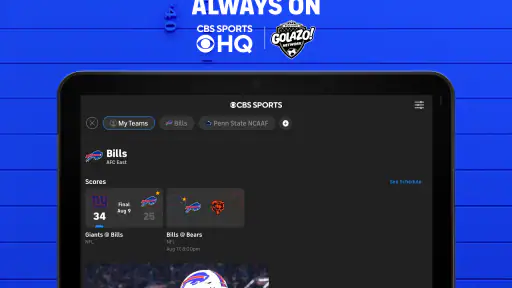
One of the coolest features is the app’s ability to personalize your feed. You can choose your favorite teams and leagues, and the app curates content tailored just for you. I found this particularly handy because, let’s be honest, who has time to sift through irrelevant sports updates? This feature ensures you get the information you care about most, right at your fingertips.
That setup choice matters more over time than it first appears. I’d begin with the teams and leagues I genuinely follow, not every club I’m vaguely curious about. A focused feed makes quick checks more useful and gives notifications a better chance of feeling relevant. If I’m following a tournament casually, I can look it up when I want rather than letting every update compete for attention.
More From Our News Desk

Weather by Xiaomi Review: Clear at a Glance, Less Clear Up Close

X Under Pressure: Can It Recover When Posting Goes Wrong?

Clash of Clans Is Won Between the Battles

Android Auto Makes the Case for Quieter Car Software

MobiOffice: Transforming Mobile Productivity with Seamless Integration

EA SPORTS FC™ Mobile Soccer: Redefining Mobile Sports Gaming
Building a routine without turning it into a chore
For someone who follows several sports, I’d make the app a short daily checkpoint rather than a place to linger. I might scan scores in the morning, return only when a team I care about has a game, and use a recap later if I missed the action. This creates a clear job for the app: help me catch up efficiently. If I find myself opening it out of habit and then scrolling without learning anything, I’d narrow the teams I follow or reduce how often I check.
It can also work for a household or group of friends with different interests, as long as each person is comfortable with one broad sports source. One person may care about a team’s result while another wants general headlines; a shared conversation can start from the same app without everyone needing the same level of commitment. For a fan who wants deep coverage of a single competition, though, that breadth is less important than specialist detail.
Real-Time Notifications
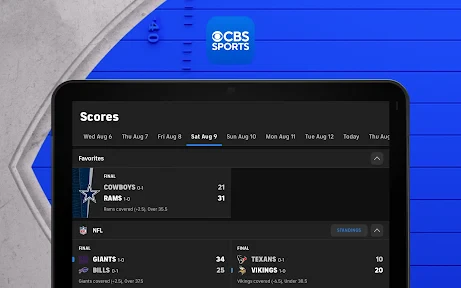
Never miss a beat with the app’s real-time notifications. Whether it’s a score update, a player injury, or trade news, you’ll be the first to know. I’ve been using this feature extensively, and it’s like having a personal sports announcer in your pocket. Just remember to manage your notification settings, so your phone doesn’t become a non-stop buzzer during game days!
For everyday use, I’d separate the moments when I want an interruption from the moments when I only want to catch up. If I’m following a close game while commuting, score alerts can save me from repeatedly opening the app; during a busy workday, too many updates can become noise. Starting conservatively and changing the settings after a few days is a practical way to keep the app useful without letting it dictate when I check sports.
Practical trade-offs for scores and alerts
Alerts are most valuable when I have a specific reason to receive them. I’d choose a small set of teams or competitions first, then notice which notifications I actually act on. If an alert routinely leads me to open the app and find nothing I need, that is a cue to adjust rather than accept the interruption as part of being a fan. A quick glance at the feed can serve casual interest; a notification should be reserved for news I would otherwise be disappointed to miss.
For live tracking, a score-focused app may suit someone who wants the leanest possible screen and little else. The advantage here is having news and video nearby when a score prompts a question, such as what happened before a result changed or why a story is circulating. The trade-off is that a broader app can feel busier than a single-purpose scoreboard. I’d choose based on whether I value context enough to tolerate extra material around the numbers.
Video Highlights and Expert Analysis
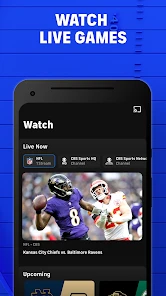
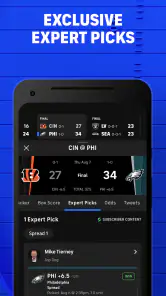
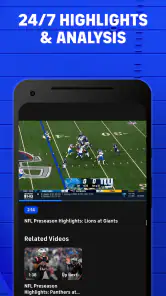
The app doesn’t just stop at scores and news. It’s packed with video highlights and expert analysis, which is perfect for those times you miss a game. The video quality is top-notch, and the expert commentary adds depth to the highlights, giving you insights you might not have considered. I’ve spent countless hours watching game recaps and enjoying the detailed analysis from seasoned sports analysts.
This is where I’d use the app differently from a dedicated live-streaming service or a league-specific companion. Its value is in keeping the surrounding context close to the score: a quick recap, a news item, then analysis, rather than making it my only destination for watching an entire event. If I mainly want full live coverage, I’d check whether a dedicated broadcaster better fits that need. If I want a compact catch-up between errands, this broader mix is more convenient.
What a useful catch-up looks like
Say I miss a game because I’m out for the evening. I’d start with the score, then look for a recap or related analysis to understand the result without reading a long run of updates. That sequence is more efficient than opening several sites, but it also depends on the app having the kind of follow-up material I want for that event. I’d treat the clips and commentary as a way to regain context, not as a guarantee that a short highlight can replace watching the whole contest.
That distinction matters if I’m deciding whether to keep a separate streaming subscription or app. A news-and-scores hub can complement a viewing service by helping me follow other games and catch up afterward, but it is not automatically a substitute for watching live. If full broadcasts are the main thing I need, I’d compare services built around viewing first and use this app only if its news and score coverage adds something distinct.
User-Friendly Interface
Now, let’s talk usability. The app boasts a sleek, user-friendly interface that’s easy to navigate. Even if you’re not tech-savvy, you’ll find it a breeze to use. The design is clean, with intuitive navigation that allows you to switch between different sports, scores, and news without any hassle.
A realistic routine might be checking the day’s scores over breakfast, opening a team story during a lunch break, and watching a short highlight after missing a game. That is the kind of repeat value I look for: several small reasons to return, without needing to spend an evening browsing. For a fan whose interests shift by season, the broad sports coverage can also make one app more practical than installing a separate scores app for every league.
Keeping the app useful as interests change
Sports habits are not fixed. During one stretch, I may follow a particular team closely; later, my attention might move to a different sport or to a major event. A personalized feed is helpful only if I revisit those choices when my interests change. I’d make a quick cleanup part of the routine: remove teams I no longer track closely and add the ones that matter now. That small bit of maintenance can prevent yesterday’s priorities from crowding out today’s.
The same principle applies to the difference between a serious follow and a casual one. I’d keep immediate alerts for the former and rely on a manual check for the latter. It is a simple way to keep the app’s broad coverage without giving every interest equal space in my day. The goal is not to make the feed perfectly exhaustive; it is to make the first screen useful enough that I can decide quickly whether to stay or move on.
When another sports app makes more sense
I wouldn’t recommend making this the only sports source for everyone. A fan who follows one league obsessively may prefer that league’s own app for a narrower, more specialized experience; someone focused on full-event viewing should compare streaming options rather than assume a scores-and-news app will replace them. And if frequent alerts frustrate you, the app’s best-known convenience can turn into a reason to ignore it. I’d keep notifications selective and use it for the mix of updates and catch-up that I actually want.
There is also a small ongoing cost consideration even though the app is free to download: in-app purchases range from about five dollars to about a hundred dollars per item. I’d check what an optional purchase covers before confirming anything and treat the free experience as the sensible first step. The app is currently at version 10.67.1 and has been around since 2011, so it is an established product rather than a brand-new experiment; still, I’d update it through the usual app store when updates are available. It requires Android 9 or later.
Who is likely to keep it installed?
I think it is a good fit for someone who wants one place to check a mix of sports, especially if scores, reporting and short-form catch-up all matter. It is also practical for people who follow a team closely but have limited time to watch every game. The combination can help them stay aware without making every update a separate search.
I’d be less likely to recommend it to someone who wants only a bare score ticker, dislikes news feeds, or already gets everything they need from a league-specific app. The same goes for anyone whose main goal is watching complete live events: a dedicated viewing option is the more direct choice. In those cases, the app’s breadth may mean extra material rather than extra value.
For someone unsure, I’d try it as a free download and decide after a normal week, not after one exciting game day. Follow only the teams that matter, keep alerts restrained, and see whether the news or highlights bring me back when there is no live score to check. That gives a more honest sense of the recurring value than simply counting how often I open the app.
To sum it up, the CBS Sports App: Scores & News is a must-have for any sports fan looking to stay informed and engaged with their favorite sports. It’s a powerful tool that transforms your smartphone into a portable sports broadcasting station. So, if you're eager to enhance your sports-watching experience, give this app a try. Trust me, you won’t regret it!
Does it earn a place month after month?
For me, it can, provided I use it as a flexible sports desk rather than expecting it to do everything. I’d keep it if its personalized feed saves time, its score checks fit naturally into the day, and I return to its recaps when I miss a game. If I only follow one competition or already have a trusted league app that covers my needs, the extra breadth may not justify another app to maintain. My long-term verdict is positive for multi-sport fans who want scores, stories and highlights in one familiar place; the habit lasts when I tune it to my interests and leave the rest alone.
CBS Sports App: Scores & News Frequently Asked Questions
Does the CBS Sports App show scores and news without opening each team’s page?
The app is designed as a central place to keep up with sports scores, news, videos, and more. Choosing favorite teams and leagues helps bring relevant updates into your feed, so you can check on the sports you follow without relying only on separate team pages. It is a practical option for fans who want a quick overview as well as focused coverage.
Can I use the CBS Sports App mainly for videos and highlights?
Yes. Video content is part of the app’s sports coverage, alongside scores and news. The app also offers highlights and analysis, giving fans more ways to catch up on sports stories and action. If you mainly want video, you can still use the app as a broader sports destination and personalize your feed around the teams and leagues that interest you.
Is the CBS Sports App free to download, and are there optional purchases?
Yes, the CBS Sports App is free to download and use. It offers a wide range of features without any cost, but it does contain ads. In-app purchases are available, with prices ranging from $4.99 to $99.99 per item. The basic app is therefore accessible without payment, while optional purchases may suit users looking for additional offerings.
What sports can I follow in the CBS Sports App: Scores & News?
The CBS Sports App is a sports app for keeping up with scores, news, videos, and more. It covers major leagues and competitions, giving fans a central place to follow the sports they care about. You can also customize your feed by choosing favorite teams and leagues, so the updates you see are more relevant to your interests.
Who develops the CBS Sports App, and is it suitable for all ages?
The app is developed by CBS Interactive, Inc. Its content rating is Everyone, making it suitable for a broad audience. It is designed for sports fans who want access to news, scores, videos, and other sports coverage in one app, whether they follow a particular team closely or simply want a convenient way to check on the wider sports world.
Pros
- Comprehensive sports coverage
- Real-time score updates
- User-friendly interface
- Customizable notifications
- Broad range of sports
Cons
- Contains ads
- Requires internet connection
- Limited offline features
- Occasional streaming lag
- In-app purchases needed
- Category
- Sports
- Version
- 10.67.1





