CareCam Pro
- 1.03K
- 4.4
- Installs
- 1.00M
- Price
- Free

Screenshots
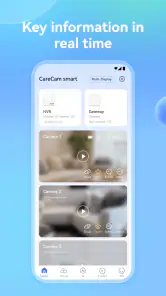
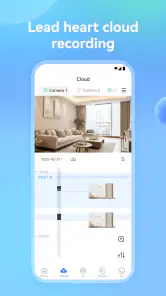
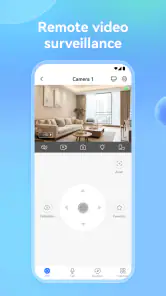
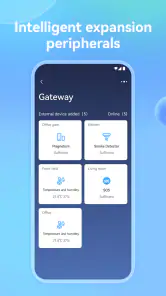
Analysis by Reviewed
CareCam Pro is the kind of home-security tool I would consider when I want to check on a room, an entrance, or a family member without turning a phone into a complicated control center. I found it more approachable than many security platforms that try to combine cameras, alarms, automation, subscriptions, and a long list of technical settings in one place. Its focus is narrower: helping a compatible Care Home camera become something I can monitor from a mobile device.
That simplicity is also the most important part of the experience for people with different abilities and different daily routines. A security app is not useful only when everything is calm and the user has plenty of time. It has to remain understandable when someone is tired, anxious, distracted, using one hand, dealing with poor lighting, or relying on a larger display. In my experience, CareCam Pro is easiest to appreciate when I treat it as a practical viewing and monitoring companion rather than as a complete replacement for every other safety measure in the home.
How CareCam Pro feels to read and navigate
The app belongs to the Tools category and comes from Care Home. Its public store summary presents it as a home-security system, while the short description simply identifies it as CareCam Pro. That restrained presentation matches my first impression: this is an app I would expect to open for a specific security task, not browse for entertainment or explore casually.
For a new user, the most important advantage is the direct purpose. When I open a security app, I want to know quickly where to look for the camera view and how to return to it. A focused layout can reduce the mental effort involved in remembering several unrelated sections. That matters for older users, people who are not comfortable with smartphones, and anyone who may need to check a camera while handling another task.
At the same time, simple does not automatically mean effortless. Security apps often depend on the user understanding the difference between a live view, a saved event, a notification, and a device setting. I would take a few minutes to explore each visible control during a quiet moment, rather than waiting until an unfamiliar sound or unexpected visitor creates pressure. This is one of the most useful habits with CareCam Pro: learn the route to the camera before you actually need it.
Readability is also affected by the phone itself. A larger screen can make camera controls and status information easier to distinguish, while a crowded or older display may make small interface elements harder to use. I would increase the phone’s system text size if needed and check whether the app remains comfortable at that setting. The practical test is not whether the opening screen looks neat; it is whether I can identify the right control quickly without guessing.
People with limited vision may benefit from keeping the phone at a comfortable distance and using the operating system’s magnification or display adjustments where appropriate. Those tools belong to Android or iOS rather than to CareCam Pro itself, but they can change the experience considerably. I would also avoid placing the phone in a position where glare makes the live image difficult to interpret. A camera feed can be technically visible yet still tiring to read if reflections, low contrast, or a dim room get in the way.
For users who find multi-step navigation difficult, a consistent routine helps. I would place the app somewhere easy to reach, decide which camera matters most, and practice opening that view without exploring every menu. This turns the app into a familiar daily action instead of a small puzzle. It is a modest adjustment, but it is more valuable than downloading a security app and assuming the interface will explain itself during an emergency.
One detail I would not overlook is the difference between checking a live scene and interpreting what is happening in it. A person with color-vision differences, reduced contrast sensitivity, or visual fatigue may find a dark hallway or a backlit doorway difficult to read. The app can display the camera feed, but the quality of the result still depends heavily on camera placement, room lighting, and the phone screen. I would test the exact view at daytime and at night, from the same place where I normally expect to use the phone.
Motor control and sensory comfort
CareCam Pro is best suited to users who can perform ordinary touch gestures, but the real question is how much precision the interface demands. In a home-security situation, repeated tapping or tiny controls can become frustrating for someone with tremors, reduced dexterity, arthritis, or temporary hand strain. I would use the largest comfortable phone, keep the device supported on a table when possible, and avoid trying to operate it while walking or carrying something.
A useful workflow for limited hand mobility is to separate viewing from control. If I only need to see whether a room is occupied, I can focus on opening the camera feed and leave secondary actions alone. If I need to change a setting, I would do that while seated and with both hands available. This reduces accidental taps and gives me time to confirm what the app is showing rather than treating every screen as an urgent command panel.
Voice control may help some users reach the app or perform basic phone actions, but I would not assume that every CareCam Pro function can be completed by voice. The app’s usefulness should therefore be judged by the touch interaction it actually provides on the person’s device. Someone who depends entirely on hands-free operation should test the full routine before relying on it for independent monitoring.
Sensory load is another consideration. Home-security software can create worry simply because its purpose is to watch for something wrong. I prefer an arrangement that lets me check deliberately instead of encouraging constant attention. If notifications or repeated alerts are available through the phone and camera setup, I would tune them carefully so that important events do not disappear among unhelpful interruptions. Too many alerts can be as damaging to confidence as too few, especially for someone who becomes overwhelmed by sounds or visual pop-ups.
For users sensitive to flashing, abrupt sounds, or busy screens, I would examine the phone’s notification behavior in a calm setting. The safest approach is to understand what an alert looks and sounds like before handing the responsibility to someone who may react strongly to sudden changes. I would also keep a non-digital backup plan, such as a trusted person who knows how to check the home, because an app should support a safety routine rather than become the only part of it.
CareCam Pro can be useful for a person who wants visual reassurance, but it should not be treated as a substitute for direct communication. A camera may show that someone is present without explaining whether they need help. For a family supporting an older relative, I would pair camera checks with an agreed call or check-in routine. That combination is more inclusive because it recognizes that seeing a room and understanding a person are different tasks.
Using it in real situations
A realistic everyday scenario is checking the front area while preparing dinner. My hands may be occupied, the room may be noisy, and I may only have a few seconds to look at the phone. In that situation, CareCam Pro is most helpful when the camera view is already familiar and the phone is easy to reach. I would not want to search through a long list of features while a delivery is waiting or a family member is asking a question.
Another use is supporting someone who has difficulty moving around the home. A relative can check a camera before calling, reducing unnecessary trips or interruptions. However, privacy and dignity matter just as much as convenience. I would agree on where cameras are appropriate, who can access them, and when monitoring should stop. The app may make viewing easier, but it cannot make those decisions for a household.
For a caregiver, the value is often in reducing uncertainty between planned visits. A quick view can answer a narrow question such as whether a common area is occupied or whether an entrance appears clear. I would avoid using it to make assumptions about health, safety, or wellbeing from a single image. If the person is not visible, that does not automatically mean something is wrong; it may simply mean the camera does not cover the relevant space.
Situational access also depends on connectivity, battery, and the physical camera setup. A phone with a nearly empty battery is a poor security tool, and a camera pointed toward a window may produce a washed-out image at certain times of day. I would test the system from the places where I expect to use it: the bedroom, the garden, the street outside, or another building if that is part of the routine. A setup that works beside the camera may feel very different when used from a weak-signal corner of the home.
Travel is another case where expectations should stay realistic. If I am away from home, I might value the ability to check in remotely, but I would still want a trusted person nearby who can respond physically if something appears wrong. Remote viewing gives information; it does not provide a local response. That distinction is especially important for users who live alone, have mobility limitations, or may need assistance that a camera cannot deliver.
CareCam Pro is free to download, which lowers the barrier to trying it with a compatible setup. The app also lists in-app purchases ranging from under a dollar to several hundred dollars per item, so I would pay attention to any purchase screen and confirm what a charge relates to before continuing. I would not assume that the free download means every possible camera or service arrangement costs nothing. A careful user should understand the specific setup and avoid buying anything simply because a security message creates urgency.
The app is marked for Everyone, and it supports devices running Android 7.0 or later. That makes it approachable for people who do not own a recent phone, although an older device may still affect speed, display clarity, battery life, or multitasking. I would judge compatibility by the complete experience: can the user open the app, read the feed, respond to an alert, and return to the home screen without frustration?
Where the usual alternatives may be better
Compared with a general smart-home platform, CareCam Pro may feel less distracting because its purpose is tied closely to camera monitoring. That can help someone who finds large connected-home dashboards confusing. On the other hand, a broader platform may be preferable for a household that wants cameras alongside lighting, locks, speakers, and routines in one place.
Compared with a basic camera viewer, CareCam Pro may appeal to people who want a more dedicated home-security experience rather than a generic network-camera screen. The trade-off is that a simpler viewer can sometimes be easier for a single technical task, especially if the user only needs a direct feed and has no interest in wider security functions. I would choose the app that matches the person’s actual routine, not the one with the longest feature list.
Compared with relying on phone calls or a neighbor, an app offers a quick visual check without asking another person to respond every time. But a trusted human remains better when the situation needs judgment, conversation, physical help, or reassurance. For users with hearing loss, visual monitoring can be valuable; for users with low vision, an audio call may be more informative. The best arrangement may combine both rather than forcing one tool to serve every ability.
The app has a 4.4 average from around thirty-three thousand ratings, with more than a thousand written reviews, and it has passed the million-install mark. Those figures suggest that it is not an obscure experiment, but popularity does not settle the accessibility question for a particular household. I would treat the experience of the actual user, phone, camera position, and network as more important than the public score.
The current release is version 2.9.36. I would keep the app and the phone’s operating system maintained where possible, especially for a security-related tool. Updates can change layouts, notification behavior, or compatibility, so a person who depends on a familiar routine should revisit the basic workflow after an update rather than assuming every control remains in exactly the same place.
Remaining barriers and sensible precautions
The biggest barrier is that visual monitoring remains visual. A user with significant sight loss may need another person or a separate accessibility arrangement to interpret the feed. Someone with hearing loss may miss an audible alert unless the phone also provides a visible or vibrating signal. Someone with cognitive difficulties may need a simplified written routine beside the phone. I would not describe any of these as failures of the user; they are reminders that a camera app cannot automatically meet every communication need.
There is also a risk of false confidence. A clear image can make me feel that the home is being fully watched even when the camera covers only one angle. Before relying on it, I would identify blind spots, check what happens when the room is dark, and decide what action follows an unexpected scene. This is one of the less obvious but most important trade-offs: better access to information is useful only when the household has a sensible response plan.
Privacy can become a barrier if people in the home feel watched rather than supported. I would place cameras carefully, discuss their use with everyone affected, and avoid treating constant viewing as a replacement for trust. For a person who is anxious about surveillance, a scheduled check-in may be more acceptable than open-ended monitoring. Inclusive technology has to respect control and consent as well as physical access.
Users should also think about account responsibility. A shared family arrangement can make support easier, but it can become confusing if nobody knows who is expected to respond to an alert. I would establish one primary contact and one backup, then make sure both understand the basic viewing routine. This is a practical improvement that does not require a new feature; it simply prevents the app from becoming an unattended notification source.
I would skip CareCam Pro if the household needs a fully hands-free experience, extensive integration with unrelated smart-home equipment, or a security plan built around professional emergency response. I would also look elsewhere if the person using it cannot comfortably interpret a camera feed and has no reliable support. In those cases, a different device, a broader accessibility setup, or direct human assistance may be more appropriate.
For users who can operate a phone and want a focused way to check a Care Home camera, the app remains a reasonable option. Its free entry point makes experimentation easier, while the presence of paid in-app items means I would review every purchase carefully. The age rating of Everyone also makes it easier to consider in a family setting, although adults should still decide how children interact with cameras and notifications.
My inclusive verdict is that CareCam Pro works best as a clear, familiar visual checkpoint, not as an all-purpose answer to home safety or accessibility. I like it for quick checks, caregiver routines, and households that prefer a dedicated tool over a sprawling smart-home dashboard. I would recommend setting it up during a calm period, adjusting the phone for comfortable reading, testing the camera in difficult lighting, and creating a human backup plan. Used that way, it can make everyday monitoring less demanding without pretending that one app can remove every barrier.
Pros
- Remote live viewing with smooth video on compatible networks.
- Motion alerts help you react quickly to activity at home.
- Two-way audio enables conversations through supported cameras.
- Multiple camera support makes monitoring several areas convenient.
- Night vision provides useful visibility in dark environments.
Cons
- Cloud recording features may require a paid subscription.
- Video quality and playback depend heavily on network strength.
- Some cameras may need frequent firmware updates for stability.
- Privacy concerns arise when cameras are placed in sensitive areas.
- Compatibility can vary between camera models and mobile devices.

- Category
- Tools
- Version
- 2.9.36











