Cardly AI: Sports Card Scanner
- 885.00
- 4.7
- Installs
- 100.00K
- Price
- Free

Screenshots


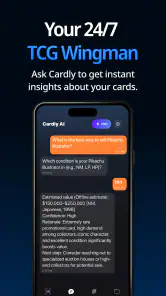

Analysis by Reviewed
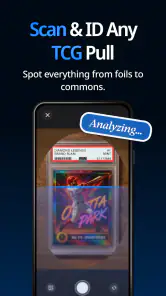
I approached Cardly AI: Sports Card Scanner as a practical tool rather than a collector’s novelty. It is built for people who want to grade, organize, and estimate the value of sports cards without turning every card into a long research session. In my experience, that focus makes it more useful than a simple camera app, but it also means the quality of the result depends heavily on how clearly the card is presented and how carefully I treat the app’s suggestions.
Developed by Scate, this free tools app is aimed at collectors who need a quick first pass over a growing card collection. Its store summary points directly to grading, collecting, and valuing cards, while the short description identifies it as Cardly AI. That combination tells me what the app is trying to solve: the awkward gap between having a box of cards and knowing what is actually worth closer attention.
The app has a 4.7 average from around 16 thousand ratings, with more than 100 thousand installs. Those figures suggest that it has found a clear audience, but they should not be mistaken for a guarantee that every scan will be accurate. A card scanner can save time, yet condition, edition, player, year, and market context still matter. I see this app as a useful assistant for sorting and prioritizing, not a replacement for a specialist appraisal.
How Cardly AI fits into a real collecting routine
The most convincing use case is a collection that has outgrown memory. Imagine opening a storage box after moving house and finding cards mixed together from different teams, seasons, and purchases. Normally, I would photograph each card, search for identifying details, compare listings, and write down notes. That process becomes tiring very quickly. A scanning workflow gives me a faster way to decide which cards deserve deeper research.
I would begin with the cards that are easiest to handle: clean surfaces, readable text, and enough light to avoid glare. After scanning, I would separate the results into three groups. The first group would contain cards that look ordinary and can be stored without further work. The second would contain cards whose identity or value deserves checking. The third would contain cards with condition concerns, unusual details, or a potentially meaningful estimate. This three-stage approach is more reliable than treating every displayed result as final.
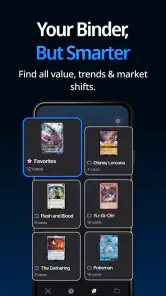
That sorting habit is one of the app’s less obvious strengths. The value is not only in identifying a card; it is in reducing the number of cards that demand manual attention. A collector with a modest personal collection can use the app as a triage tool, while a more serious collector can use it to decide where to spend time on sales history and condition review.
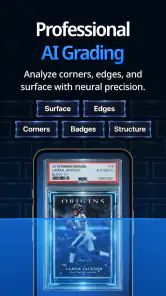
I also find the grading angle useful when it is treated as a conversation starter. A scan can encourage me to inspect centering, corners, edges, and surface more carefully. It can point out why a card might deserve attention, but I would not rely on an automated impression to determine a professional grade. A tiny crease, print line, soft corner, or surface mark may be difficult to judge from a quick image, especially when lighting is uneven.
Scanning works best when the setup is deliberate
The quickest way to get a disappointing result is to rush the camera stage. I would place the card on a flat, uncluttered surface and avoid holding it at an angle. Reflections from sleeves and rigid holders can hide important details, while harsh overhead light can create bright patches across the player’s name or statistics. Moving the light slightly to one side is often more helpful than simply making the room brighter.
Another practical tip is to clean the phone lens before scanning a batch. It sounds minor, but a hazy lens can make text look less distinct and reduce confidence in the result. I would also keep the card inside the frame without cropping its borders. Those borders can help with identification and are especially relevant when the app is being used to think about condition.
For a large collection, I would not scan randomly. I would work in small batches based on sport, team, era, or storage box, then record where each batch came from. Even if the app helps identify a card, a useful collection workflow still needs physical organization. A scan is much more valuable when I can find the card again later instead of having a promising result with no clear location.
What the app can and cannot tell me about value
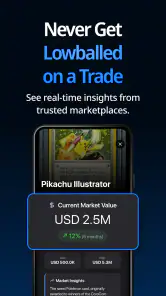
Value is the area where users should be most cautious. A displayed estimate can help identify cards worth investigating, but it is not the same as a completed sale. Asking prices, recent transactions, card condition, scarcity, grading status, and buyer demand can all move the real-world price in different directions. I would use the app’s valuation as a filter for research, not as a promise of what I will receive.
This distinction matters most when a card appears unusually valuable. In that situation, I would rescan it under better lighting, confirm the identifying details manually, inspect the physical card, and compare it with relevant marketplace evidence. If the card is genuinely important, a specialist opinion may be more appropriate than relying on any automated tool. The app can help me notice a possibility; it should not be the only basis for selling or insuring a valuable item.
For everyday collecting, the estimate is still useful even when it is not exact. It can help me decide whether to use a sleeve, a top loader, a binder page, or a separate storage box. It can also make it easier to choose which cards to take to a show or discuss with another collector. That practical decision-making role is more realistic than expecting one scan to settle every question about market price.
What feels mature in the current version
The current version is 1.7.2, and that is worth noting because the app is not being presented as an untouched first release. It was released on October 1, 2025, so the product is still relatively young, but the version number suggests that Scate has already moved beyond the earliest build. I would expect the app to keep developing, particularly around recognition quality, collection organization, and the handling of unusual cards.
For an existing user, the important effect of that evolution is not simply seeing a newer version number. It is having a tool that can become part of a repeatable routine instead of remaining a one-time experiment. If I scan cards regularly, even small improvements in recognition or workflow can reduce friction across an entire collection. The benefit compounds because the same process can be reused whenever I buy a new lot, inherit cards, or reorganize storage.
At the same time, I would keep my expectations grounded. A version update does not automatically make automated grading equivalent to expert inspection, and it does not remove the need to verify unusual results. The app’s development is most valuable when it improves the first pass while leaving the final judgment with the collector.
The minimum operating requirement is Android 7.0, which makes the app accessible to people using older Android phones rather than limiting it to recent hardware. That can be helpful for collectors who keep an older device dedicated to scanning. However, an older operating system and an older camera may produce a less comfortable experience than a newer phone, especially when photographing glossy cards or small printed details.
The age rating is Everyone, which fits the straightforward nature of the tool. I would be comfortable recommending it for a family collection or for a younger collector learning how to catalog cards, provided an adult explains that estimated values are not guaranteed prices. The app can encourage good habits such as careful storage and record keeping, but it should not turn collecting into an assumption that every card has significant monetary value.
Where it beats the usual alternatives
The usual alternative is a manual combination of a phone camera, a notes app, search results, and marketplace browsing. That approach offers more control, but it is slow and inconsistent. I may record one card carefully, then become less precise after the first large stack. Cardly AI is more appealing when speed and a consistent first pass matter more than building a detailed research file for every item.
A spreadsheet remains better for collectors who need custom fields such as purchase source, storage location, trade status, cost basis, or insurance notes. A dedicated marketplace may be better when the main goal is listing cards for sale rather than identifying and sorting them. A professional grading service is better when condition has serious financial consequences. In my view, this app sits between those options: faster than manual research, but less authoritative than specialist evaluation.
That middle position is also its main trade-off. I gain convenience, but I give up some transparency compared with checking every detail myself. When the result looks obvious and the card is common, that trade is sensible. When the card is rare, damaged, misprinted, or difficult to identify, I would switch from convenience mode to verification mode.
Small workflows that make it more useful
One effective workflow is to scan before buying a mixed lot. If I am considering a box from a local seller, I would not assume that the most visible cards represent the whole collection. A quick sample can help me understand whether the lot contains cards worth researching or mostly cards that are valuable for personal interest rather than resale. I would still inspect the physical cards, but the app can make the first decision less vague.
A second workflow is an annual storage review. I would scan a section of the collection, check whether the cards are still organized sensibly, and move anything that deserves extra protection. This is more useful than scanning everything once and never looking at the results again. Collections change as cards are traded, gifted, sold, or moved between boxes, so a repeatable review keeps the information connected to the physical cards.
A third is preparing for a trade. Instead of bringing an entire box, I could scan likely trade candidates, verify the most interesting ones, and create a short group to discuss. That reduces the chance of overlooking a card because it was buried at the bottom of a storage case. It also encourages a fairer conversation: I can separate personal attachment from the question of market interest.
I would also avoid scanning through a sleeve whenever possible if the sleeve creates glare. For preservation, the card should remain protected during storage, but identification and condition review may require a clearer view. The safest approach is to handle the card over a clean surface, touch the edges rather than the face, and return it to protection immediately. The app cannot compensate for careless handling.
Where the experience still needs caution
The biggest remaining gap is the difference between a convenient estimate and a dependable appraisal. That gap is not unique to this app, but it is especially important because the subject is collectible value. A collector may see a high number and mistake it for a guaranteed sale price, or see a low number and overlook a card whose importance is sentimental, historical, or condition-dependent.
Recognition can also be difficult with cards that share similar designs. Variations in year, parallel, insert, print run, language, or player details may not be obvious in a quick scan. A card with a visually similar base version can be confused with a more specialized release if the image does not reveal the relevant distinction. I would manually compare the result with the card itself before making a buying, selling, or trading decision.
Condition creates another source of friction. A flat photograph may show obvious damage, but it cannot always communicate how a card looks under changing light or from several angles. A collector should be especially careful with surface scratches, indentation, edge wear, and centering. If the app encourages me to inspect those details, it is doing its job; if I treat its impression as a final grade, I am asking too much from it.
The free price makes experimentation easy, but the app also includes in-app purchases ranging from $0.99 to $49.99 per item. I would check what a purchase unlocks before committing, particularly if I only need occasional scans. For a casual collector, the free experience may be enough to decide whether the workflow fits. For someone cataloging a large collection, the cost should be weighed against the time saved and the importance of the results.
This is also a reason not to recommend it automatically to every collector. If I already maintain a detailed spreadsheet and enjoy researching each card manually, the app may feel like an extra step rather than a solution. If my collection is mostly memorabilia where emotional value matters more than market estimates, the valuation focus may not add much. And if I need formal documentation for insurance, tax, or a high-value sale, I would choose a more authoritative process.
Questions I would answer before installing
Would I use it for a small collection? Yes, especially if I am curious about cards inherited from a relative or collected years ago. The app can provide a manageable starting point without requiring me to learn every cataloging convention first. I would still verify anything that appears rare or unexpectedly valuable.
Would it replace a spreadsheet? Not for me. I would use the scanner to gather quick identification and value clues, then keep important personal details in a separate record. A spreadsheet is still better for tracking where a card is stored, what I paid, whether it is available for trade, and what I decided after manual verification.
Can beginners use it? The Everyone rating and focused purpose make it approachable, but beginners should learn one important rule immediately: an estimate is a prompt to investigate, not a final answer. That single habit prevents most disappointment and makes the app much more useful.
Is it suitable for serious collectors? It can be, as a fast screening layer. Serious collectors are likely to benefit most when they use it to narrow a large workload, then apply their own knowledge and external checks to important cards. It is less suitable as the only system for a collection where precise provenance, condition records, and transaction history are essential.
Should I pay for extra functionality? I would start free, scan a representative group, and judge whether the results fit my collection. Because individual in-app purchases range from $0.99 to $49.99, the right choice depends on how often I scan and whether the added workflow genuinely replaces manual effort. I would not buy simply because a promising card appears on screen.
What I would watch as Scate continues developing it
For future updates, I would pay attention to how the app handles difficult cards rather than only easy, clearly labeled examples. Better treatment of variants, parallel releases, damaged cards, and cards photographed in protective holders would make the tool more valuable to experienced collectors. I would also welcome improvements that make it easier to connect a scan with a physical storage location, because identification without retrieval can become frustrating in a large collection.
I would also watch how clearly the app communicates uncertainty. A useful scanner should help me understand when a result is strong, when it is an educated estimate, and when I need to verify details manually. Clear confidence cues and practical prompts for checking condition would be more valuable than simply displaying a precise-looking number.
For current users, the sensible approach is to keep using the app as a first-pass assistant while preserving independent records for cards that matter. Rescanning after reorganizing a collection can be worthwhile, but I would not erase older notes without comparing the results. Keeping a small history of decisions helps me understand whether a change reflects the card, the photograph, or a revised estimate.
My overall view is positive, with a clear boundary. Cardly AI: Sports Card Scanner is strongest when it turns a messy pile of cards into an organized research queue. It saves the most effort at the beginning of the process, helping me decide what deserves attention. It is not the right final authority for grading or high-stakes valuation, and users who expect guaranteed prices may be disappointed.
I would recommend it to casual collectors, families sorting inherited cards, and enthusiasts who want a quicker way to review new purchases. I would pair it with a spreadsheet or specialist research for serious cataloging, and I would use professional evaluation for genuinely valuable cards. As a free tools app from Scate with a current version of 1.7.2, it is easy to try, and its best results come from treating its intelligence as support for careful collecting rather than a substitute for it.
Pros
- Quickly scans sports cards using your phone’s camera.
- AI recognition can identify cards without manual data entry.
- Useful for organizing a growing personal card collection.
- Helps estimate card values and spot potentially valuable finds.
- Simple interface makes it approachable for new collectors.
Cons
- Recognition may struggle with damaged
- rare
- or poorly lit cards.
- Estimated values can differ from current market sale prices.
- Some features may require a paid subscription or in-app purchase.
- Scanning large collections can still take considerable time.
- Coverage may vary across sports
- sets
- and international releases.

- Category
- Tools
- Version
- 1.7.2











