Camtro
- 1.66K
- 4.5
- Installs
- 500.00K
- Price
- Free

Screenshots
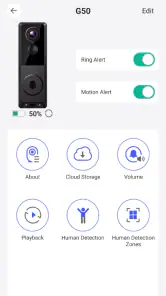
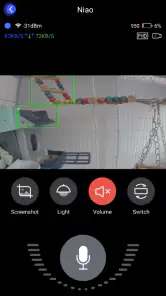
Analysis by Reviewed
When I first opened Camtro, I understood its appeal immediately: it is built around the simple idea of speaking with a visitor through a smartphone while also seeing who is at the door. That makes it more focused than a general messaging app, and potentially more useful than relying on a voice-only intercom. My review is less about treating it as a complete home-security system and more about examining whether its visitor-contact purpose feels practical, understandable, and comfortable to use.
This is a free Tools app from DigitalConverge Intellect Limited, with an Everyone content rating. It has reached over 500 thousand installs and holds a 4.5 average from around 18 thousand ratings, which suggests that many people find the basic concept worthwhile. It was released on May 29, 2025, and the current version is 2.0.3. The app supports Android 6.0 and later, so compatibility should be broad on reasonably maintained phones.
What Camtro is really useful for
The best way to think about Camtro is as a visitor-conversation tool rather than a replacement for every device in a connected home. Its store summary focuses on talking to visitors by smartphone and being able to see them. In everyday terms, that could mean checking who is outside before deciding whether to open the door, answering when you are in another room, or communicating with someone when reaching the entrance immediately is inconvenient.
I particularly like the separation between seeing and responding. A traditional doorbell may alert you, but it does not necessarily give you a convenient way to continue the interaction. A voice-only intercom lets you speak, but removes useful visual context. Camtro’s value comes from bringing those two actions together on a phone, provided the surrounding setup works as intended.
That last point matters. An app like this is only helpful when the phone, visitor-side equipment, network connection, and account arrangement are all ready at the same time. It is not the sort of tool I would install casually and expect to solve visitor communication without preparation. The first useful test is not a dramatic security scenario; it is a normal arrival at home, with one person outside and another person inside trying to answer without confusion.
For a household, the practical question is who should receive the interaction. If only one person uses the app, the workflow may feel straightforward. If several people need access, the household should agree in advance about who answers, who can speak, and what happens when the primary user is unavailable. Those are not glamorous details, but they determine whether the app feels dependable or becomes another source of missed calls and uncertainty.
In my experience, visitor tools are most valuable when they reduce a small but repeated inconvenience. A delivery arrives while I am preparing food, working in a back room, or helping someone else. Being able to identify the visitor and communicate without immediately leaving what I am doing can be genuinely useful. It is a modest benefit, but one that can recur throughout the week.
How it compares with familiar alternatives
The usual alternative is a basic doorbell, a voice intercom, or a dedicated smart-home product. A basic doorbell is simpler and may involve fewer account decisions, but it cannot offer the same phone-centered conversation experience. A voice intercom can be quick, yet it gives less visual information. A larger smart-home system may offer more connected functions, but it can also be more expensive, more complicated, and tied to a broader ecosystem than someone actually needs.
Camtro sits in the middle. It is more purposeful than a generic chat app because the visitor context is central, but it should not automatically be judged against an entire security platform. If your priority is visitor communication from a smartphone, its narrow focus makes sense. If you need recording, alarms, multiple cameras, automation, or a detailed household security dashboard, I would look at a dedicated system instead of assuming this app covers those jobs.
The free entry point is helpful for trying the workflow before committing. At the same time, the app includes in-app purchases priced from $18.99 to $99.99 per item. That makes it important to understand which parts of the experience are available without payment and which may require a purchase. I would not buy immediately. I would first confirm that the basic visitor interaction works reliably in the place where I intend to use it, then decide whether any paid option solves a real need.
Trust begins with what the app can access
Because Camtro deals with visitors and visual communication, trust is not an optional extra. Before using it regularly, I would inspect the permission prompts carefully and grant only what is necessary for the action I am trying to perform. Camera and microphone access deserve particular attention because they can expose people and conversations in a private space. I would avoid approving a request automatically just because the app cannot proceed until it receives it.
The most useful habit is to test permissions one at a time where the operating system allows it. If the app asks for camera access, I would consider whether I am currently trying to view a visitor. If it asks for microphone access, I would connect that request to speaking with the visitor. If another request appears that does not make sense for the immediate task, I would pause and inspect the phone’s permission settings rather than treating every prompt as routine.
I also recommend checking the app’s permissions again after an update. The current version is 2.0.3, and updates can change how an app requests or uses access even when the main purpose remains the same. This is not a reason to avoid updating; it is a reason to make permission review part of normal maintenance. On a shared household phone, that small check can prevent an old configuration from being forgotten.
The safest setup is the one where every person understands when the camera and microphone are being used. That includes people inside the home as well as visitors outside. I would tell household members that the app is installed, explain its purpose, and avoid treating the phone as an invisible monitoring device. Clear expectations are especially important when children, guests, maintenance workers, or neighbors may appear at the entrance.
Data-sensitive moments deserve deliberate choices
The sensitive moments with Camtro are easy to identify. A visitor may be visible on screen, a conversation may include personal information, and the phone itself may be used in a room where other private activity is taking place. I would avoid discussing passwords, access codes, travel plans, or other confidential details through a visitor conversation unless there is no safer option. The convenience of answering remotely should not turn the entrance into a place for sharing information that could be overheard.
I would also be careful about using the app in public or semi-public spaces. If I answer while sitting in a café, on public transport, or in a busy office, the visitor’s image and conversation could be exposed to people nearby. A phone screen is not automatically private simply because the app is personal. Lowering the volume, using headphones where appropriate, and checking who can see the display are sensible choices.
Another practical consideration is the phone’s lock screen. Notifications can reveal that someone is at the entrance, and depending on the phone’s notification settings, they may appear where other people can read them. I would review notification previews and decide whether the convenience of visible alerts is worth the privacy trade-off. On a shared or frequently borrowed phone, hiding message details may be the better choice.
I would take the same care with account access. A visitor-contact app should not be treated like a disposable utility if it is connected to a home routine. Use a strong, unique password for the account, keep the phone protected with its normal screen lock, and remove access from devices that no longer belong to the household. If another person needs to use the service, I would prefer a clearly understood account arrangement instead of passing around one login without discussing who can see or answer visitors.
Control is more than pressing “allow”
User agency starts before the first conversation. I want to know why the app needs a permission, when access is active, and how easily I can turn it off. Android’s system controls are useful here: permissions can be reviewed, notifications can be adjusted, and access can be revoked when the app is not needed. These controls do not replace reading the app’s own explanations, but they give me a practical way to limit exposure.
I would create a short household routine around the app. First, decide who is expected to answer. Second, agree on a simple response when the visitor is unfamiliar. Third, decide whether the door is ever opened based only on what appears on the screen. The visual feed can help identify someone, but seeing a person does not prove that the situation is safe. I would still use normal judgment and avoid sharing details that make the household easier to target.
A useful, less obvious tip is to test the app at different times rather than only during installation. Try it when the main user is near the router, then from the room where they are most likely to be. Test with the phone locked, with notifications silenced, and with another household member handling the interaction. This reveals workflow problems that a one-minute setup test can miss, especially when the app is meant to help during ordinary interruptions.
I would also establish a fallback. If the phone is unavailable, the battery is empty, or the user is busy, the household should know what to do instead. A normal doorbell, a spoken response, or a previously agreed instruction may be enough. Camtro can support a visitor routine, but relying on any single phone-based method for every arrival is unnecessarily fragile.
For people who are especially privacy-conscious, the right question is not simply whether the app is free. It is whether the visual and conversational convenience justifies the permissions, account handling, and household exposure that come with the use case. I would read the app’s privacy information and account controls directly before making it part of a sensitive environment. That is a reasonable step for any app that may handle images and live conversations.
Where the experience may feel less comfortable
The focused purpose is also a limitation. Camtro is not automatically the best choice for someone who wants a broad home-security setup. If your main goal is continuous monitoring, event history, alarm integration, or a large collection of smart-home controls, a specialized platform will probably be a better fit. Choosing a narrower tool can be smart, but only when its narrow purpose matches the problem you actually have.
The purchase range may also create hesitation. Since the app is free to install but offers paid items, I would want the payment path to be clear before spending anything. A price that feels reasonable for one household may not make sense for someone who only occasionally needs remote visitor communication. I would compare the total cost with a simple intercom or an existing device already owned, not just with the price of other apps.
There is also a human limitation that software cannot remove: people may answer inconsistently. One person may respond quickly while another ignores the alert. Someone may speak too quietly, hold the phone at an awkward angle, or assume that viewing a visitor is the same as verifying them. The app can make the conversation possible, but the household still needs a sensible routine and a cautious approach to unfamiliar visitors.
For older relatives or people who dislike account-based tools, the setup may be more effort than it is worth. A physical intercom with obvious buttons can be easier for some users, even if it offers fewer capabilities. Likewise, anyone who does not want a camera or microphone involved in visitor communication should skip this type of solution rather than trying to force it into a privacy preference that it does not suit.
Who I would recommend it to
I would recommend Camtro to someone who specifically wants to communicate with visitors from a smartphone and values being able to see them while doing so. It makes the most sense for a household that can agree on account responsibility, permission choices, and a fallback plan. The broad Android compatibility and free starting point make it practical to evaluate without committing immediately.
I would be more cautious about recommending it to a person who expects a complete security product. The app’s central function is visitor conversation with visual contact, and that is the standard I would use to judge it. If you need a wider set of security functions, choose a product designed around those functions. If you only need an occasional way to answer the entrance remotely, Camtro may be closer to the right level of complexity.
Before installing, I would ask myself four practical questions: Will the intended phone usually be available? Is the home network dependable in the rooms where I need to answer? Does everyone who may appear on camera understand the arrangement? And am I comfortable reviewing permissions, notifications, account access, and any paid options myself? A “no” answer does not make the app bad, but it may indicate that a simpler alternative is a better fit.
My cautious verdict
Camtro has a clear, useful idea: bring visitor conversation and visual confirmation to the smartphone instead of leaving them tied to a fixed intercom. In my view, that focus is its strongest quality. It can make ordinary arrivals easier, especially when I am away from the entrance but still want to decide whether to respond.
My recommendation comes with boundaries. I would treat it as a visitor-contact tool, not as proof that a home is secure. I would review every permission, adjust notification visibility, protect the account, explain the setup to household members, and test a fallback before depending on it. I would also try the free experience first and consider in-app purchases only after identifying a specific benefit.
With those expectations, Camtro is worth considering for people who want a phone-based way to see and speak with visitors. Its 4.5 average and substantial install base make it easy to understand why the concept attracts attention, but the final decision should come from your own comfort with camera access, microphone access, account control, and the app’s place in your daily routine. For me, it is a sensible focused option when visitor communication is the problem; it is not the right answer when the real need is a full security ecosystem or a completely camera-free entrance.
Pros
- Simple interface makes browsing and sharing content easy.
- Supports quick photo and video capture from a mobile device.
- Useful for staying connected with friends and followers.
- Content can be accessed conveniently while traveling.
- Lightweight design should work well on many modern phones.
Cons
- Privacy settings may require careful review before posting content.
- Image quality can depend heavily on the phone’s camera and connection.
- Frequent notifications may become distracting for some users.
- Some features may be limited without an active internet connection.
- The app may use noticeable battery and mobile data during extended use.

- Category
- Tools
- Version
- 2.0.3











