BURGER KING® App
- 103.92K
- 4.4
- Installs
- 10.00M
- Price
- Free

Screenshots


Analysis by Reviewed
When I decide whether a restaurant app is worth keeping, I look for a practical payoff: does it make choosing, ordering, or finding a nearby location easier than doing those things in person? The BURGER KING® App is most useful when Burger King is already somewhere I plan to eat. It is a free Food & Drink app from Burger King, Inc., and its core appeal is having restaurant information, mobile ordering, and offers together rather than needing to search for each separately.
Start with how you actually choose lunch
Before installing a chain-specific app, I ask myself whether I already know where I want to eat. If I am set on Burger King, a focused tool can be more convenient than opening a general restaurant service and filtering through places I will not choose. If I am still deciding between burgers, a local café, or another kind of meal, the dedicated app cannot answer that broader question. Its value depends less on how often I use food apps in general and more on how often BK is already on my shortlist.
I also think about where I will be when I use it. The restaurant finder is useful when I am away from my usual area, but finding a nearby location is only the first part of planning a stop. I would check that the location works with my route and timing before building a lunch break around it. That simple habit matters more on a tight schedule than browsing a long menu: a convenient restaurant is helpful only if it is convenient for the trip I am actually making.
A good fit for a planned BK stop
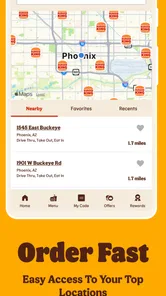
I would reach for it when I know I want a Burger King meal and would like to check the options before arriving. Looking at the menu and available deals first can make it easier to settle on an order instead of deciding while a queue builds behind me. The nearby-restaurant finder is useful in a different way: if I am travelling through an unfamiliar area, I can check whether a BK is a convenient stop before changing my route.
For example, imagine I have a short lunch break and a Burger King is on the way. I can browse before I leave, compare the offers shown in the app with what I actually want, and place a mobile order if that suits the location and my plans. That can reduce the time spent making choices at the counter. I would still check the order carefully before confirming; an app can speed up selection, but it does not remove the need to make sure the chosen meal is right.
Where a chain app beats a general food service
Compared with walking into a restaurant and ordering at the counter, the app lets me explore first and use mobile ordering when it is convenient. Compared with a general food-ordering service, its focus is narrower: it is specifically for Burger King, so it makes the most sense if I already want that restaurant rather than if I am choosing among several places. That focus is the trade-off. I would not install it expecting a broad directory of restaurants or a way to compare unrelated menus.
Deals can also affect the decision, but I would treat them as a chance to save on something I already wanted, not a reason to add food I would otherwise skip. Offers may vary with location, so I would look at what is actually displayed before relying on a particular deal. If I am ordering for a group, it is worth checking each item and the total before sending the order; the convenience of a phone screen can make it easy to overlook a small choice when several people are calling out requests.
More From Our News Desk

Weather by Xiaomi Review: Clear at a Glance, Less Clear Up Close

X Under Pressure: Can It Recover When Posting Goes Wrong?

Clash of Clans Is Won Between the Battles

Android Auto Makes the Case for Quieter Car Software

MobiOffice: Transforming Mobile Productivity with Seamless Integration

EA SPORTS FC™ Mobile Soccer: Redefining Mobile Sports Gaming
Using the app without letting it make the decision for you
First things first, let's talk about what the BURGER KING® App brings to the table. Literally. This app is like having a personal BK concierge right in your pocket. It's designed to make your BK experience as smooth as possible, whether you're grabbing a quick bite or planning a feast.
Easy navigation for a more deliberate order
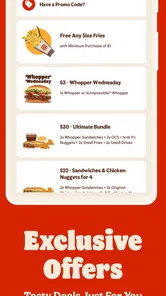
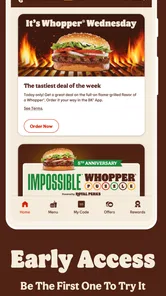
The user-friendly interface is a big plus for me. From the moment you open the app, everything is laid out intuitively. The menu is organized neatly, making it super easy to find what you're craving. And let's not forget the customized offers! Who doesn't love a good deal? The app tailors deals specifically for you based on your location and preferences, so you can always find something that tickles your fancy.
My practical tip is to browse before you are hungry and rushed. Looking through the menu and offers while you have a moment gives you time to decide whether a promotion matches what you actually want. It also makes the final check more useful: instead of tapping through quickly at the counter, you can compare the basket with your plan and catch an unwanted extra or the wrong choice before confirming. I would treat the offer area as a prompt to check, not as proof that a deal will suit every visit.
Mobile ordering and the moments when it helps
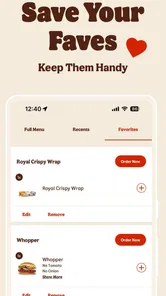
One of the standout features of this app is the ability to order and pay right from your phone. No more waiting in long lines or fiddling with cash. Just browse the menu, pick your favorites, and boom, you're done. Plus, the app remembers your past orders, which is great for those of us who like to stick to their tried-and-true favorites.
That repeat-order convenience is especially handy when I already know what I want and do not need to explore. It is less helpful when I am undecided, ordering for several people, or want to ask a question before choosing. In those situations, I would slow down and review the order item by item, or simply order with staff if a conversation is the easiest way to sort things out. Mobile ordering is an option, not a rule for every visit.
A useful way to avoid a rushed mistake is to separate choosing from submitting. I can decide what I want first, then use the app to place the order only if the location and available choices fit the plan. If something on screen does not match what I expected, I would pause rather than assume the app has interpreted my preference correctly. That small bit of patience is a better trade than having to resolve a mistaken order after arriving.
Offers, loyalty, and sensible expectations
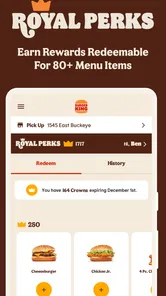
Now, let’s talk perks. The BURGER KING® App has a loyalty program that rewards you for every purchase. Accumulate points and redeem them for free food. It's a win-win situation. I've already scored some free fries and a drink just by using the app. Trust me, those points add up faster than you think!
For me, the important question is whether the program fits purchases I would make anyway. A reward can feel worthwhile if it comes through ordinary visits, but it is not a reason to make extra trips just to chase points. I would check the terms shown in the app and keep my expectations tied to what it actually displays. That makes it easier to judge the benefit honestly instead of assuming every purchase or every location will work in exactly the same way.
Why the location finder matters beyond travel
Another cool feature is the exclusive content available only through the app. Whether it's new menu items or limited-time offers, you're in the loop. It's like being part of a special club where you get the first dibs on all things BK. For a fast-food lover like me, this is pure gold.
The location tool can also help with a less obvious decision: whether to make a BK stop at all. If I am driving somewhere unfamiliar, I can check for a nearby restaurant before choosing a detour or promising to meet someone there. I would still use common sense about the route and timing rather than treating “nearby” as the same as “on the way.” For a regular customer, that makes the finder useful even on days when I do not place an order through the phone.
When another way to order is the better choice
The app is less compelling if Burger King is an occasional, unplanned stop or if you prefer to choose from several restaurants each time you order. In those cases, ordering directly at the counter—or using a broader service when you need restaurant choice—may be simpler. Mobile ordering is also not automatically the best option for every visit: if I want to ask a question or change my mind while ordering, speaking to staff can feel more straightforward.
There is a real trade-off between speed and flexibility. An app is at its best when my choices are settled and the selected restaurant suits my plans. A counter order is often the more natural route when I need a conversation or want to decide as I go. A general delivery or restaurant-discovery service may fit better when comparing multiple businesses is the main task. I would choose among those options based on the decision in front of me, not assume one method is always superior.
Before making it part of my routine, I would check that the nearby location suits my route and review the live offer details rather than assuming every promotion applies everywhere. I would also compare the app’s final order with what I intended to buy, especially when using a deal or ordering for more than one person. Those small checks help avoid turning a quick digital order into an inconvenient pickup.
What to expect from its footprint and compatibility
The app is rated for Everyone, is free to download, and has an average rating of 4.4 from around 306,000 ratings. It has been installed over 10 million times, which suggests it is a familiar option for many BK customers, though popularity alone cannot guarantee a smooth experience at every restaurant. It was released on May 8, 2013, and version 7.63.0 requires Android 7.0 or later.
Those details make it easy to decide whether it is worth trying, but they do not change the main test: will I use it on an actual BK visit? I would not keep a restaurant app simply because it has a large audience. I would keep it if checking a location, reviewing an offer, or placing an order saves me a step often enough to matter. If I only eat at Burger King once in a while, using the counter when I arrive may be just as sensible.
Questions I would settle before relying on it
If you are wondering whether it is useful without ordering every time, I would say yes if you mainly want to browse offers or locate a restaurant; the ordering tools matter most when you expect to buy. Whether you can use a particular offer or complete a pickup as expected depends on the options shown for the location you select, so check those details in the app before setting out. Its 102,000 reviews also show that plenty of people have shared feedback, but I would judge it by how well it fits my own local visits.
Another practical question is whether a deal is worth changing your order for. I would compare it with the meal I had in mind and choose the offer only if it makes that plan better. If it pushes me toward food I did not want, the apparent saving is not useful. For a shared order, I would also confirm everyone’s selections before submitting; that is a small step, but it is more reliable than trying to remember several requests while tapping quickly.
If your phone is older, the stated Android requirement gives you a straightforward compatibility check before downloading. If you use a different mobile platform, the relevant store page for your device is the sensible place to check compatibility. Either way, the app is free to try, so the decision can be based on whether its location and ordering tools help with your routine rather than on a purchase commitment.
My recommendation
For someone who already visits Burger King and likes checking deals before choosing, this is an easy app to try: it costs nothing to download and brings the chain’s ordering and location tools into one place. I would keep it if those features save me effort on real visits, not just because a promotion looks tempting. If you rarely eat at BK, or value comparing lots of restaurants more than a dedicated chain experience, you can comfortably skip it.
Final Thoughts? If you're a fan of BURGER KING®, downloading this app is a no-brainer. It makes ordering a breeze, saves you money with exclusive deals, and rewards you for your loyalty. Plus, who doesn't want to be the first to try new menu items? So go ahead, give it a try. Your taste buds (and your wallet) will thank you!
BURGER KING® App Frequently Asked Questions
Is the BURGER KING® App available in my country?
The BURGER KING® App is intended to connect users with BK® restaurants, deals, and mobile ordering, so its usefulness depends on whether those services are offered where you are. Restaurant locations and promotions can vary by area. Before relying on it for a meal, open the app and check whether it shows a nearby restaurant and offers relevant to your location.
Can I use the BURGER KING® App to order ahead?
Yes, mobile ordering is one of the app’s main features. It lets you browse the available ordering options on your phone and place an order through the app, which can be convenient when you want to plan your visit in advance. Available choices may depend on the restaurant you select, so check the options shown for that location before completing an order.
What devices can run the BURGER KING® App?
The BURGER KING® App is a Food & Drink app for Android and iOS. On Android, it requires version 7.0 or later, so checking your device’s operating system before downloading can help avoid compatibility surprises. The app is free to download, and its content rating is Everyone, making it suitable for a broad audience.
Who makes the BURGER KING® App, and what is it for?
The app is developed by Burger King, Inc. and brings useful restaurant-related tools together in one place. Its focus is on exclusive deals, mobile ordering, and finding a nearby BK® restaurant. If you often visit Burger King, having those options on your phone can make it easier to browse offers and plan an order before heading to a restaurant.
What features does the BURGER KING® App offer?
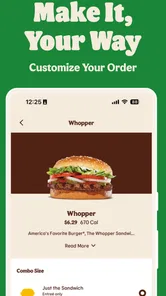
The BURGER KING® App offers a range of features designed to enhance the user experience. These include mobile order and pay, exclusive deals and coupons, a restaurant locator, and nutritional information. Users can customize their orders and choose pickup or delivery options. The app also supports secure payment methods for a seamless transaction process.
Pros
- Easy to navigate user interface.
- Exclusive offers for app users.
- Order customization available.
- Quick access to nutritional info.
- Rewards program for frequent users.
Cons
- Limited payment options.
- App occasionally crashes.
- Longer wait times during peak hours.
- Region-specific availability issues.
- Limited menu updates.











