BP Care - Pressure & Sugar
- 52.00
- 3.6
- Installs
- 1.00M
- Price
- Free
Screenshots
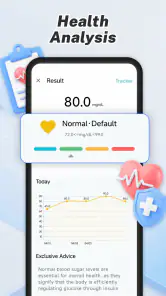
Analysis by Reviewed
I approached BP Care - Pressure & Sugar as a simple health-recording tool rather than a replacement for a blood pressure monitor, glucose meter, doctor, or treatment plan. That distinction matters. Its main job is to give me a convenient place to record blood pressure and blood sugar readings, so the value comes from building a usable personal record over time. If you already take measurements at home and often lose the notes, this app has a clear practical purpose.
Developed by Brainy Lab Studio, this free Tools app is aimed at everyone, and it runs on devices using Android 9 or later. The current release is version 1.5. Its straightforward focus makes it easier to understand than a broad wellness platform filled with exercise plans, meal suggestions, sleep scores, and unrelated dashboards. I see it as a focused logbook for two measurements that many people need to remember accurately.
The app has passed the one-million-install mark and holds an average rating of 3.6 from roughly 1.7 thousand ratings. That places it in an interesting middle ground: it is clearly being used at scale, but the rating also suggests that convenience alone will not make it perfect for every person. My experience is that its usefulness depends less on flashy presentation and more on whether you are willing to enter readings consistently and interpret them responsibly.
Recording two kinds of health readings in one place
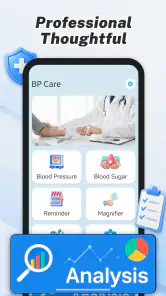
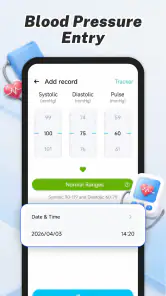
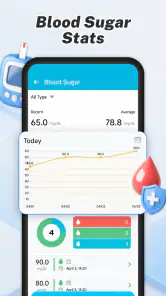
The central capability is the ability to track blood pressure and blood sugar in the same app. That sounds modest, but it solves a familiar everyday problem. Someone may check blood pressure in the morning, measure glucose at a different time, and later try to remember which result belonged to which day. A dedicated record reduces that mental load and creates a single place to review both types of information.
I particularly like the idea of treating the app as a timeline of personal observations instead of expecting it to make medical decisions. A number is more useful when I know when it was taken and what was happening around it. For example, a glucose result before breakfast should not be mentally mixed with one taken after a meal, and a blood pressure reading after rushing up stairs should not be treated as equivalent to one taken after sitting quietly. The app can help preserve the record, but the quality of the record still depends on how carefully I measure and enter it.
This is where the app’s narrow scope becomes a strength. It does not try to compete with a full hospital portal or a complete fitness ecosystem. For a person who wants a lightweight diary for blood pressure and sugar, that focus can feel less distracting. I can open it with a specific task in mind: enter a result, review previous entries, or prepare information before speaking with a healthcare professional.
There is also a useful separation between recording and interpretation. I would not use a stored value as proof that I am safe, unwell, improving, or worsening without considering the measurement method and medical context. A tracking app is most helpful when it supports a conversation with a clinician, not when it encourages someone to diagnose themselves from a single entry.
What the recording habit changes in daily life
The real effect of this capability appears after several entries, not during the first minute of use. A single number is easy to overreact to. A sequence can reveal whether readings are usually taken at a similar time, whether certain situations produce unusual results, and whether I have been skipping measurements. Even when the app does not answer the medical question for me, a consistent history is more useful than scattered paper notes or numbers stored in unrelated phone applications.
One non-obvious advantage is that a combined log can expose gaps between the two routines. I might remember to check blood pressure but forget glucose, or do the opposite. Seeing both records in one place makes that imbalance easier to notice. It also gives me a practical prompt to improve the routine rather than relying on memory. The app becomes less about entering impressive-looking numbers and more about making the record complete enough to discuss.
Another useful approach is to enter readings as soon as possible after measuring them. Delayed entry creates avoidable errors, especially when several results look similar. If I have to keep a temporary note, I would write down the time and measurement context as well as the value, then transfer it promptly. That workflow reduces the chance of assigning a result to the wrong day or confusing a morning reading with an evening one.
How I would use it after a home measurement
In normal use, I would measure with the appropriate device first and then open BP Care to record the result. The app is not the measuring instrument; it is the place where the result is captured. That makes the reliability of the final record depend on both parts of the process. A poor measurement technique cannot be repaired by a tidy app entry.
For blood pressure, I would try to keep the circumstances reasonably consistent: sit down, settle before measuring, and avoid comparing a reading taken immediately after activity with one taken during a calm routine. For blood sugar, I would pay attention to whether the reading is connected to fasting, a meal, or another instruction from my healthcare professional. These details are important because a number without context can lead to an unfair comparison.
After entering a result, I would review the history at regular intervals rather than checking it obsessively after every measurement. The purpose of the record is to make patterns easier to communicate. If something looks persistently unusual, the sensible next step is to contact a qualified professional. I would never change medication or ignore symptoms because an app entry appears reassuring.
A practical tip is to use one routine as an anchor. For instance, if I already have a reliable morning habit, I can connect the recording step to it instead of hoping I will remember later. The app cannot create discipline by itself, but reducing the number of places where information is stored makes the habit easier to maintain. This is especially helpful for people who manage several health tasks at once.
A realistic routine for a busy household
Imagine a person who checks blood pressure before leaving for work and monitors blood sugar according to a schedule discussed with a clinician. In the past, the first result might be written on a scrap of paper while the second is remembered until the evening. With BP Care, the person can enter each result close to the time of measurement and later review the record before an appointment. The benefit is not that the app predicts anything; it is that the appointment starts with a clearer account of what actually happened.
This also helps when a family member assists with health routines. Instead of asking, “What was your number last Tuesday?” and relying on memory, they can use the recorded history as a reference. I would still be careful about who handles the phone and would avoid treating the app as a substitute for direct communication with the patient or clinician. The record is a support tool, not an automatic authority.
For someone who travels between home and work, the app may be more convenient than carrying a notebook. The trade-off is that the phone must be available and the user must remember to enter the readings. A paper log can work without a charged device, while an app offers easier digital organization. The better choice depends on which method the person will actually use every day.
Where the convenience meets its limits
The biggest trade-off is simple: BP Care records information, but it does not turn an ordinary phone into a blood pressure cuff or glucose meter. Anyone expecting automatic measurement from the handset will be disappointed. I would choose this app only if I already have access to a suitable measuring device or receive readings elsewhere and want a convenient record.
There is also a difference between storing data and understanding it. A list of readings can look authoritative even when the entries were taken under inconsistent conditions. If I measure at random times, enter values from different devices, or forget whether a glucose result was before or after eating, the history becomes harder to interpret. The app can support a careful process, but it cannot enforce the medical quality of every entry.
Another limitation is that a focused tracker may feel too basic for users who want a complete health-management system. Someone looking for medication reminders, appointment planning, nutrition analysis, wearable integration, or detailed coaching may prefer a broader health platform. I would not install BP Care expecting it to replace all those tools. Its appeal is strongest when the user wants less clutter, not more features.
The average rating of 3.6 indicates that the experience is not universally satisfying. I would interpret that as a reason to test the workflow personally rather than assuming the app will fit every routine. A person with complex monitoring needs should be especially cautious about relying on a general-purpose log. In that situation, a clinician-recommended system or a device ecosystem designed around the required measurements may be a better choice.
Privacy is another reason to use judgment. Health readings are personal, so I would think carefully before sharing screenshots, handing over an unlocked phone, or allowing someone else to manage the record casually. Even when an app is free, the information stored inside it deserves the same care as a paper medical file. I would also keep an alternative record for important appointments if losing phone access would create a problem.
Who should skip it
I would skip BP Care if I need automatic readings, clinical interpretation, emergency alerts, or a system that actively manages treatment. It is also not the right fit for someone who dislikes manual entry and is unlikely to maintain a routine. A tracker that is opened once and then forgotten cannot provide a meaningful history, regardless of how convenient it looks at first.
I would be cautious if a healthcare professional has asked for a very specific format, such as detailed notes about symptoms, medication timing, or measurement conditions. In that case, I would first confirm that the app’s record is suitable for the requested follow-up. If it is not, a structured paper form or a specialized medical record system may communicate the necessary detail more clearly.
People who are worried about an immediate health problem should also look beyond an app. A stored reading is not an emergency service, and a normal-looking entry should not override serious symptoms. The safest role for this tool is routine documentation alongside appropriate medical advice.
Who gets the most value from it
The strongest audience is someone who already measures blood pressure or blood sugar and wants a free, dedicated place to keep the results. It can also suit a caregiver helping another adult maintain a regular record, provided the information is entered carefully and discussed with the right professional. The Everyone age rating makes the app broadly accessible, but accessibility does not remove the need for responsible health decisions.
I also see value for people moving away from loose notes. The transition works best if they establish a simple rule: measure correctly, record immediately, and review the history before appointments. That three-step workflow is more important than filling the app with a large volume of inconsistent entries. In my view, the app rewards regularity rather than intensity.
Its free price removes an obvious barrier for someone who wants to try a dedicated tracker before committing to a larger health platform. Still, free does not automatically mean complete. I would spend a short trial period checking whether entering both kinds of readings feels natural, whether the history is easy for me to understand, and whether it supports the exact information I need to bring to a clinician.
Brainy Lab Studio has kept the concept focused enough that the decision is fairly clear. If your need is a simple digital log for blood pressure and blood sugar, this app deserves consideration. If your need is measurement, diagnosis, treatment guidance, or advanced medical integration, you should look elsewhere or follow the system recommended by your healthcare team.
My final take on the everyday workflow
After looking at the app through the lens of its main capability, I see BP Care as a practical record keeper with a clearly defined boundary. Its best contribution is helping me turn scattered measurements into an organized history. That can make appointments more productive and personal routines easier to review, but only when I enter readings consistently and preserve their context.
I would recommend it to a friend who says, “I have the numbers, but I never know where I put them.” I would explain that the app will not measure anything for them or tell them what treatment to choose. Its job is smaller and more useful than that: keep the blood pressure and blood sugar record together so the person can use it responsibly.
My strongest recommendation is to treat the app as a memory aid, not a medical authority. Used that way, the free tool can earn a place in a daily routine, especially for users who prefer a focused tracker over a crowded wellness suite. The version 1.5 release and broad adoption make it easy to try, but the deciding factor should remain practical: can you record readings accurately and use the resulting history in a sensible conversation with a healthcare professional?
Pros
- Tracks blood pressure and blood sugar readings in one place.
- Supports notes to add context to each health measurement.
- Simple interface makes routine logging quick and accessible.
- History views can help identify changes over time.
- Useful for preparing organized information for doctor visits.
Cons
- It does not measure blood pressure or glucose without compatible equipment.
- Manual entry can lead to inaccurate records if values are mistyped.
- Health insights should not replace professional medical advice.
- Some features may require permissions or an account to use fully.
- Reminders and tracking may feel limited compared with dedicated health apps.
- Category
- Tools
- Version
- 1.5











