

Blood Sugar Diary for Diabetes
- 144.00
- 4.5
- Installs
- 5.00M
- Price
- Free
Screenshots
Analysis by Reviewed
I judge a health diary by what happens after the first burst of enthusiasm: does it still feel useful once logging becomes routine? Blood Sugar Diary for Diabetes is built around recording glucose readings and reviewing them later, a focused approach that can help turn scattered numbers into a record you can discuss with a clinician. I’d see it as a companion to diabetes care, not a replacement for medical advice or a tool that makes treatment decisions for you.
Where the first week can help
In the first few days, a dedicated place for readings can make the habit feel less haphazard. Instead of relying on memory or notes in different places, you can build a diary that brings measurements together with meals, activity, and insulin doses. That context matters: a reading on its own is just a number, while a note about what was happening around it may give you a more useful question to raise at an appointment.
A practical routine is to record a reading when you already check it, rather than waiting until the end of the day to reconstruct events. If you have a busy morning, a reminder may help establish a repeatable cue; if reminders become annoying, turning them off is better than letting irritation push you away from logging altogether. I’d also keep notes brief and consistent. A small amount of useful context is more sustainable than trying to document every detail of the day.
How the diary holds up over time
The app is a free medical app from Cards, and its focus is narrower than a full diabetes-management platform. That can be an advantage if your main need is a personal glucose record rather than a bundle of connected services. It has a 4.3 average from around 19,000 ratings, with over one million installs, suggesting that many people have tried it; those figures don’t tell me whether its workflow will suit your own routine, so I’d judge it by how easily you can keep using it.
After several weeks, the useful question is whether the history helps you notice patterns without encouraging you to overinterpret them. Trends can support a conversation with your healthcare provider, but a chart cannot explain every change or tell you what adjustment is safe. I would use the diary to prepare specific questions—such as whether a repeated pattern deserves attention—rather than treating a visual rise or dip as a diagnosis.
Maintenance, limits, and alternatives
There is a real maintenance cost to any tracking app: entries need to be timely enough to make the record meaningful, and missed days can leave gaps. Before relying on it for an appointment, I’d review the dates and make sure the notes are understandable to someone who wasn’t there. Exporting the record can make sharing easier, but I’d check the resulting file before sending it so that it contains the period and details I actually want to discuss.
Compared with a paper notebook, a phone diary can make reviewing and sharing a history more convenient; compared with a connected glucose-monitoring system, a manual log asks more of you and may not provide the same automatic flow of readings. That trade-off makes this app a better fit for someone who wants to enter information deliberately than for someone who needs readings captured with as little manual effort as possible. Anyone looking for treatment guidance or a substitute for professional monitoring should choose a clinically appropriate option with their care team instead.
More From Our News Desk

 Gmail
GmailGmail in a Busy Inbox: Who Benefits Most?
From first account to crowded workday, Gmail earns its place through dependable search and flexible sorting—but its best fit depends on how much inbox maintenance you can tolerate.

 Prime Video
Switching to Prime Video: What Changes in Your Viewing Routine
Prime Video can make a compelling second home for streaming, but switching means learning a different catalog, rental layer, and route from browsing to playback.

 Universal TV Remote Control
Universal TV Remote Control Works Best as a Reliable Backup
A phone remote earns its place through quick setup and reliable habits. Here is how to get more from Universal TV Remote Control—and where its limits show.

 Weather - By Xiaomi
Weather by Xiaomi Review: Clear at a Glance, Less Clear Up Close
Xiaomi’s weather app makes everyday forecasts quick to scan, but its calm surface can leave useful details and recovery paths harder to find than they should be.

 X
XX Under Pressure: Can It Recover When Posting Goes Wrong?
A resilience-focused review of X, examining setup, mistaken posts, interruptions, weak connections, and the gaps that matter when recovery needs to be dependable.

 Clash of Clans
Clash of Clans Is Won Between the Battles
Its raids are quick; its community is a long-term project of coordination, teaching, rivalry, and shared responsibility—with all the friction that entails.
Latest News



It is free to install, though it includes in-app purchases ranging from $0.99 to $99.99 per item. It is rated for Everyone, and the current version is 1.2.5, with Android 5.0 as the minimum requirement. I’d consider those practical details before settling into a long-term record, especially if you plan to use the app on an older device or prefer to avoid optional purchases. The best test is a short trial of your real routine: can you enter a reading quickly, make sense of the history, and keep doing both without it becoming another chore?
A routine that fits real days
The kind of day that makes a diary worthwhile is not necessarily an unusual one. Imagine checking your glucose before breakfast, heading into a busy morning, and only later trying to remember whether a meal, a walk, or a dose happened before a particular reading. If you add the reading when you take it and make only a short note about the relevant context, you avoid turning the evening into a memory exercise. That simple sequence is more likely to produce a record you can trust than a detailed account typed from recollection.
I’d also decide in advance what you want the log to answer. If the goal is to bring a clear history to a planned appointment, focus on entries that help explain that period and use the review time to flag questions. If you are trying to understand how a regular activity relates to readings, keep the notes consistent enough to compare similar days. Changing what you record every few days makes comparisons harder, even if the extra detail feels thorough in the moment.
Who benefits from a manual record
This is most appealing to someone who already checks glucose and wants a dedicated place to organize readings alongside everyday context. It can also suit a person who prefers an intentional routine over relying on automatic data collection, or who wants a record to review with a clinician. Its value comes from the quality and continuity of the entries, not from treating the app as a source of medical conclusions.
I would be cautious about choosing it as the main tool if manual entry is already a point of friction, if you need readings to arrive automatically, or if your care plan depends on a connected monitoring setup. A paper notebook may be a better fit for someone who avoids phones during checks, while a device-linked system may be more practical when minimizing typing matters. The right choice depends on the workflow your care requires and what you can sustain, rather than on which option looks more feature-rich.
What makes the habit last
One useful way to reduce fatigue is to separate recording from interpretation. Enter the information when it is fresh, then choose a predictable time to review it; constantly reopening charts can make normal variation feel more significant than it is. A review before an appointment, for example, gives you a clear purpose and helps you turn observations into questions instead of trying to assess every entry as it appears.
Another trade-off is completeness versus speed. A short, accurate entry is generally more useful than a richly detailed note that you abandon after a few days. I’d treat optional context as a tool for answering a specific question, not as a daily obligation. When life gets busy, returning to a simple record is better than deciding that a gap means the whole diary has failed.
Because the app supports exporting, I’d make that step part of appointment preparation rather than assuming a clinician will be able to inspect the app directly. Check the dates and readability of the file, and make sure the material matches what you intend to share. That small review can catch an incomplete period or a note that made sense to you at the time but is unclear later.
One practical question is whether the app can replace a glucose meter, connected monitor, or clinical advice. I would not treat a diary as any of those: its role is to organize information you record, while measurement and treatment decisions belong within your care plan. Another sensible question is whether the free install means every feature is free; optional in-app purchases are available, so I’d check the purchase details in the app before relying on a paid option or assuming it is necessary.
For someone deciding whether to keep it, I’d use a short, honest test: can you record readings at the point you normally check, add only the context you need, and later find the history without confusion? If yes, the diary may earn its place through steady usefulness. If entering information becomes a recurring source of annoyance, switching to a notebook or a more automatic tool may be the more responsible choice.
If you're like me and constantly on the quest to keep your blood sugar levels in check, you'll want to take a look at the Blood Sugar Diary for Diabetes. This app has been a game-changer for many, offering a simple yet comprehensive solution to tracking and managing diabetes. Let me take you through my experience with this handy tool.
A User-Friendly Interface
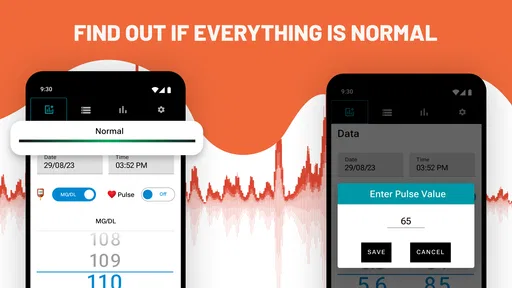
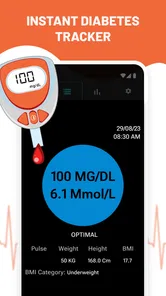
One of the first things I noticed about the Blood Sugar Diary for Diabetes is its user-friendly interface. You don't need to be a tech wizard to navigate through it, which is a relief for someone like me who prefers straightforward apps. The home screen is intuitive, allowing you to quickly log your blood sugar readings and meals. It's like having a personal assistant keeping tabs on your health.
Customizable Features
What I love about this app is the level of customization it offers. You can set reminders for logging your readings, and even customize your target blood sugar range. It's these little things that make a big difference. The app also allows you to log your insulin doses and physical activities, which gives you a holistic view of your health. I found this feature particularly useful, as it helped me identify patterns and adjust my lifestyle accordingly.
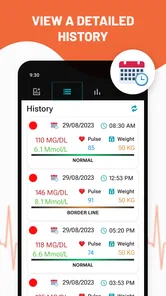
Moreover, the app offers a comprehensive history log. It's like having your own personal diabetes diary. You can easily scroll back to any date to review your readings and activities. This feature is super helpful when discussing your progress with your healthcare provider.
Data Analysis and Insights
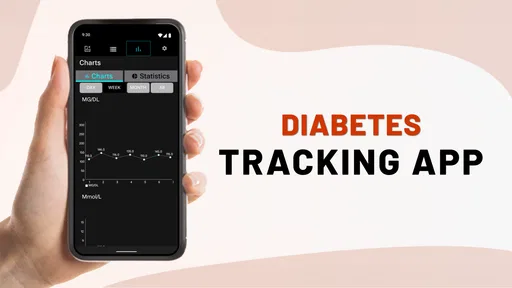
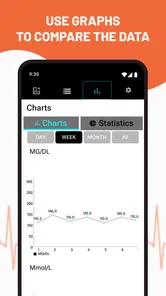
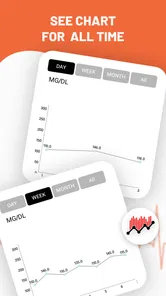
Another strong suit of this app is its data analysis capabilities. The Blood Sugar Diary doesn't just store your data; it analyzes it to provide insights into your blood sugar trends over time. You can view graphs and charts that make it easy to spot any worrying trends or improvements. It's like having a data analyst on your phone, which takes the guesswork out of managing diabetes.
What's more, the app allows you to export your data in various formats. This is a godsend when you need to share your information with your doctor or dietitian. Having all your data organized and easily accessible can make your medical appointments a breeze.
Keeping the habit practical
One small but useful approach is to choose a consistent point in your day to review the log, rather than repeatedly checking charts after every entry. For example, before a regular appointment, I’d look back through the relevant period and note questions about recurring patterns. That makes the app’s history more useful without turning ordinary fluctuations into a source of worry.
It suits people who are comfortable entering readings themselves and want a straightforward record that can include related details. Someone who already relies on a connected device for automatic capture, or who finds phone-based logging burdensome, may be better served by the tools recommended by their care team. The deciding factor is not how many fields you can fill in, but whether the record stays accurate enough to be useful.
Final Thoughts
All in all, the Blood Sugar Diary for Diabetes is a fantastic tool for anyone managing diabetes. It combines ease of use with powerful features that help you keep a close eye on your health. Whether you're newly diagnosed or a seasoned pro at managing your condition, this app has something to offer. So, if you're looking for a reliable way to track your blood sugar levels and more, give this app a try. It might just become your new best friend in managing diabetes.
Blood Sugar Diary for Diabetes Frequently Asked Questions
What should I know about Blood Sugar Diary for Diabetes before downloading it?
Blood Sugar Diary for Diabetes is a medical app from Cards for keeping track of blood sugar readings. It is free to download, rated Everyone, and has an average rating of 4.3 from around 19,000 ratings. Its focus is recording and reviewing readings, so consider whether a digital diary fits the way you currently keep health information before installing it.
How popular is Blood Sugar Diary for Diabetes?
The app has over 1 million installs and has been released since May 29, 2020. It has received 143 reviews, giving prospective users some public feedback to consider alongside its average rating. Ratings and reviews reflect individual experiences, though, so it is worth deciding whether its tracking approach suits your own routine rather than relying on popularity alone.
What is the app’s current version, and what Android version does it require?
Blood Sugar Diary for Diabetes currently runs at version 1.2.5 and requires Android 5.0 or later. Before downloading, check your device’s Android version and available storage, and make sure you install the edition intended for your operating system. Keeping compatibility in mind can help avoid installation problems and ensure the app can run on your device.
Is Blood Sugar Diary for Diabetes free to download, and are there in-app purchases?
Blood Sugar Diary for Diabetes is free to download, so you can try its diary and tracking tools without paying upfront. The app also offers in-app purchases, with items ranging from $0.99 to $99.99. Check the purchase details in the app before confirming anything, particularly if you plan to use it regularly or share a device with someone else.
Which devices can run Blood Sugar Diary for Diabetes?
The app is available for Android devices running Android 5.0 or later. Its current version is 1.2.5, and it is a medical app intended for recording and reviewing blood sugar information. Before downloading, check your device’s Android version and available storage, and make sure you install the edition intended for your operating system.
Pros
- User-friendly interface
- Comprehensive data tracking
- Customizable reminders
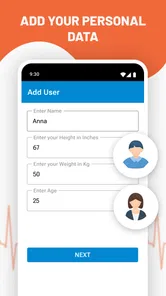
- Supports multiple users
- Offline functionality
Cons
- Limited food database
- Ads in free version
- Basic analytics only
- Requires manual data entry
- No integration with wearables













