Auto Navigator New & Used Cars
- 505.00
- 4.7
- Installs
- 100.00K
- Price
- Free

Screenshots



Analysis by Reviewed
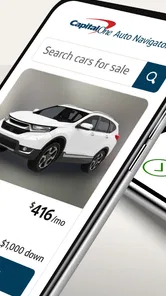
Buying a car usually becomes stressful at the moment when browsing turns into money decisions. You may begin by comparing body styles and end up wondering which vehicles fit your budget, whether financing is realistic, and how much time you can spend visiting dealerships. Auto Navigator New & Used Cars, developed by Capital One Services, LLC, focuses on that transition. Its central appeal is the ability to shop for new and used cars while viewing financing information in the same experience.
I found that focus more useful than a simple vehicle-search app because it changes how I look at listings. Instead of treating the car and the loan as completely separate tasks, I can consider them together from the start. That does not remove the need to inspect a vehicle, compare offers, or read the final paperwork carefully, but it gives the shopping process a more practical frame. The strongest part of Auto Navigator is not merely finding a car; it is connecting the car I am considering with the financing question that determines whether it makes sense.
Why the financing-centered approach matters
Most car shoppers already know how to search for vehicles. Manufacturer sites are useful for new models, dealership pages show local inventory, and general marketplaces offer a broad selection of used cars. The difficulty comes later: deciding which option remains sensible after financing enters the picture. A vehicle that looks affordable in a listing can feel very different once the loan term, down payment, taxes, fees, and trade-in situation are considered.
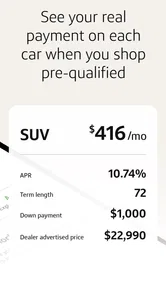
Auto Navigator is built around that exact point of friction. Its store summary describes shopping for cars and seeing financing, and in daily use that pairing gives the app a clearer purpose than a general automotive catalog. I would not install it simply to read model news or learn every specification of a vehicle. I would use it when I am actively narrowing down a purchase and want the financial side visible while comparing candidates.
The app is available as a free Auto & Vehicles app for Everyone, which makes it approachable for a broad audience. It has a 4.7 average from around 6,100 ratings and more than 100,000 installs, so it has attracted meaningful interest without being presented as a niche enthusiast tool. Those figures do not decide whether it suits me, but they do fit the impression of a practical shopping utility rather than a specialist diagnostic or ownership app.
One important distinction is that financing visibility should not be confused with a complete ownership budget. The app can help me think about the purchase and financing together, but I still need to account for insurance, fuel or charging, maintenance, registration, parking, and unexpected repairs. A monthly payment is only one part of what a car costs me. Auto Navigator is most valuable when I use it to improve my shortlist, not when I treat it as the only financial advice I need.
Turning a broad search into a realistic shortlist
When I begin with an open-ended search, it is easy to collect attractive vehicles without asking whether they belong in the same financial conversation. A newer compact SUV, an older luxury sedan, and a lightly used pickup may all look appealing, but their financing and ownership implications can be very different. The financing-oriented design encourages me to compare vehicles through a more grounded question: does this specific choice fit the purchase plan I am considering?
More From Our News Desk

Weather by Xiaomi Review: Clear at a Glance, Less Clear Up Close

X Under Pressure: Can It Recover When Posting Goes Wrong?

Clash of Clans Is Won Between the Battles

Android Auto Makes the Case for Quieter Car Software

MobiOffice: Transforming Mobile Productivity with Seamless Integration

EA SPORTS FC™ Mobile Soccer: Redefining Mobile Sports Gaming
That is a subtle but useful change in behavior. Rather than saving every interesting listing, I can focus on vehicles that meet my practical needs and remain plausible once financing is considered. This is especially helpful for shoppers who have a firm monthly comfort level but are unsure how that translates into vehicle price. It also helps prevent the common mistake of choosing a model first and confronting affordability only after becoming emotionally attached to it.
I still recommend keeping a separate note with the details that matter to me: expected down payment, acceptable loan length, insurance estimate, and a reserve for repairs. Auto Navigator works best as the active shopping surface, while that note acts as a reality check. The two together are more useful than either one alone.
How I would use Auto Navigator during a real purchase
Imagine I need a dependable used car for commuting. I start by deciding what the vehicle must do rather than choosing a badge. It needs enough space for my routine, a reasonable age and mileage range, and a payment that will not make the rest of my budget uncomfortable. I then use Auto Navigator to browse suitable new and used cars while keeping financing in view.
At this stage, I would resist the temptation to judge a listing only by its displayed price. I would compare several vehicles that serve the same purpose and observe how the financing picture changes between them. A slightly cheaper car may not automatically be the better decision if its age or condition creates more uncertainty. Conversely, paying more for a newer vehicle is not automatically wise if the higher commitment leaves no room for insurance and maintenance.
The practical workflow is therefore a loop rather than a straight line. I search, narrow the vehicles, review the financing context, and then revise my search if the results are not comfortable. That loop is the app’s real contribution. It gives me a reason to adjust the car I want before I waste time arranging a viewing for something that does not fit my plan.
For a used vehicle, I would treat the app as the beginning of due diligence, not the conclusion. I would still ask for the vehicle history, inspect the car in person, arrange an independent inspection when appropriate, and verify the final numbers with the seller. The app can help me decide which cars deserve that effort, but it cannot replace physical condition checks or careful paperwork.
A useful workflow for comparing several cars
My preferred approach would be to create a small shortlist rather than browsing endlessly. I would choose a few vehicles that meet the same basic need, then compare their financing situations and practical compromises. One may offer newer equipment, another may have a lower purchase price, and another may provide more room. Looking at them side by side in the context of financing makes the trade-offs easier to discuss with another person.
A particularly useful habit is to revisit the shortlist after deciding on a maximum comfortable payment. If every candidate feels too expensive, I would change one variable at a time: vehicle age, body style, equipment, or purchase price. That makes the compromise visible. Dropping several requirements at once can produce a car that technically fits the budget but no longer suits the original need.
I would also avoid treating the first attractive result as a recommendation. Search tools can show possibilities, but the right choice depends on information outside the listing, including condition, seller reputation, location, and the exact terms presented at purchase. Auto Navigator helps organize the search; judgment still belongs to me.
The situation where the app makes the biggest difference
The best scenario is a shopper who is serious enough to consider financing but early enough to change direction. Someone replacing an aging commuter car, for example, may have a rough budget and a few vehicle types in mind without knowing what is realistic. Auto Navigator can shorten the distance between “I like this model” and “this is a sensible candidate for my situation.”
It is also useful when two people are shopping together. One person may care about cargo space, while the other focuses on the monthly commitment. A financing-centered search gives both concerns a place in the same conversation. Instead of arguing over a vehicle based only on appearance or features, we can ask whether the car satisfies the need without creating an uncomfortable financial stretch.
First-time buyers may benefit from the same structure. The car market can feel confusing when every listing presents a different age, mileage, condition, and price. Seeing vehicles through a financing lens encourages a beginner to think in terms of a complete purchase decision rather than a headline number. I would still encourage a first-time buyer to have someone experienced review the final agreement, but the app can make the early research less scattered.
Another strong use case is replacing a planned vehicle with a comparable alternative. If the exact model I wanted is too expensive, I can use the financing context as a signal to broaden the search instead of abandoning the purchase or accepting an uncomfortable payment. That is where the app feels more helpful than a manufacturer configurator, which is usually excellent for exploring one brand but less useful for comparing the financial reality of several different paths.
Where it differs from ordinary car-shopping alternatives
Manufacturer apps and websites are often better when I have already chosen a new model and want detailed trim, color, or equipment information. General vehicle marketplaces may be stronger when my priority is the widest possible range of sellers and listings. A dealership site can be more convenient when I am ready to contact one store directly. Auto Navigator occupies a different position: it is most useful while I am connecting vehicle discovery with financing decisions.
That focus is both its advantage and its boundary. I would not expect it to replace an independent vehicle-history service, a mechanic’s inspection, an insurance quote, or a spreadsheet that includes every ownership expense. Nor would I use it as my only source for technical research. Its value appears earlier in the process, when I need to decide which vehicles deserve deeper investigation.
This makes the app a better companion to other tools than a universal replacement for them. I might use Auto Navigator to build a financially sensible shortlist, a manufacturer site to verify equipment, a history report to investigate a used vehicle, and an insurer’s tool to estimate coverage. That may sound like extra work, but it reflects how significant a car purchase is. The app reduces one important source of confusion without pretending to solve every part of the decision.
Trade-offs I noticed before relying on it
The main limitation is that financing information can create a feeling of precision before the entire deal is known. A displayed financing view may help me compare options, but the final purchase can depend on factors such as credit profile, down payment, taxes, fees, trade-in value, vehicle condition, and seller terms. I would therefore use the figures as planning guidance and ask for a complete written breakdown before committing.
There is also a psychological trade-off. When a vehicle is presented alongside a manageable-looking payment, I may focus on the payment and overlook the total amount paid over time. I have to deliberately consider both. A lower monthly figure achieved through a longer term may not be the best value, especially if it keeps me paying on an aging vehicle for too long. The app can support a careful decision, but it cannot make that decision for me.
Used-car shoppers face another limitation: financing suitability does not tell me whether a particular vehicle is mechanically sound. Two cars with similar prices can have very different repair risks. Mileage, service records, accident history, tire condition, and upcoming maintenance may matter more than a small difference in the payment. I would never skip an inspection because a listing looks financially attractive.
There is some friction in any search that asks me to move between browsing and verification. I may find a promising car, then need to confirm its details with the seller and check information elsewhere. That is normal for this category, but it means the app rewards organized users. If I want a single screen containing every ownership cost, independent assessment, and final contract term, this will not be enough on its own.
The current app version is 2026.08.21 and requires iOS or Android 11 or later. That requirement is reasonable for many recent phones, but it matters if I am using an older device. Before planning a purchase around the app, I would make sure my phone can run it smoothly. The free price removes one barrier, though it does not remove the financial responsibility of the transaction itself.
Questions I would settle before making an offer
I would first ask whether the displayed financing information reflects the exact vehicle I am considering or only an initial planning view. I would then request the complete purchase breakdown, including the vehicle price, taxes, fees, down payment, trade-in treatment, and total financing cost. These questions are essential because a convenient monthly figure can hide changes elsewhere in the agreement.
I would also confirm the vehicle’s actual availability before traveling. Online inventory can change, and a car that fits my search may no longer be ready when I arrive. For a used car, I would ask for service records and arrange an inspection. For a new car, I would verify the exact trim and included equipment rather than assuming every vehicle with the same model name is configured identically.
Finally, I would compare the financing option with alternatives. A bank or credit union may offer a different rate or term, and my own cash-flow plan may favor a larger down payment or a less expensive vehicle. Auto Navigator can be the starting point for that comparison, but I would not assume that the first financing path I see is automatically the best one.
Who gets the most value from this app
Auto Navigator is a strong fit for people who are actively shopping for a new or used car and want financing to influence the search from the beginning. It is particularly useful for buyers with a defined budget, several acceptable vehicle types, and a willingness to compare rather than chase one favorite model. The app can help those shoppers spend their research time on realistic candidates.
It is also a good fit for anyone who finds traditional car shopping fragmented. If I dislike jumping between vehicle listings, financing calculators, and dealership pages just to understand whether an option is plausible, this integrated approach can make the early stage feel more coherent. The benefit is not that every decision happens automatically; it is that the key question appears earlier in the process.
I would be more cautious recommending it to someone who has already chosen a specific vehicle and only needs detailed technical information. That person may get more from the manufacturer’s resources, an owner community, or an independent review. I would also tell a cash buyer that the financing-centered advantage may matter less, although the vehicle-shopping side can still be useful for finding candidates.
Likewise, shoppers who need a full ownership-cost analysis should pair the app with other research. Someone deciding between an electric car and a gasoline model, for example, needs to consider charging access, energy costs, insurance, maintenance, and local conditions in addition to the purchase financing. Auto Navigator can inform the purchase stage, but it should not be mistaken for a complete long-term cost calculator.
My overall view is positive because the app concentrates on a real weakness in ordinary car shopping: people often choose a vehicle before understanding how the financing changes the decision. By bringing those two parts closer together, Auto Navigator helps me build a more realistic shortlist and avoid spending time on cars that are attractive only in isolation. Use it as a financing-aware shopping companion, then verify the vehicle and the final contract independently.
That recommendation also explains where I would place it in my own workflow. I would open it early, use it to compare new and used possibilities, and let the financing context challenge my first assumptions. After that, I would move to inspections, history checks, insurance estimates, and competing finance offers. For that specific stage of buying a car, the free app from Capital One Services, LLC is focused, practical, and more useful than a basic listing browser, provided I remember that a helpful starting point is not the same thing as a complete purchase decision.
Auto Navigator New & Used Cars Frequently Asked Questions
What devices can I use Auto Navigator New & Used Cars on?
Auto Navigator is available for compatible Android devices running version 11 or later. Before downloading, check your device’s operating system so you know it can install and run the app. It is a mobile car-shopping tool from Capital One Services, LLC, designed to bring vehicle browsing and financing exploration together in one place.
Who is Auto Navigator designed for, and is it suitable for all ages?
The app is aimed at people exploring a vehicle purchase, whether they are beginning to compare cars or looking into financing as part of their shopping. Its content rating is Everyone, so the app is not restricted to adults by its store age classification. However, buying a car and entering into financing agreements involve decisions that should be made with appropriate guidance and careful review.
What is Auto Navigator New & Used Cars?
Auto Navigator is a car-shopping app designed to help users search for new and used vehicles, compare listings, and explore financing options in one place. You can browse cars by make, model, price, mileage, features, and location. It is intended to simplify the early stages of buying a vehicle, although final prices, availability, and financing terms may vary by dealer and individual circumstances.
Can I find both new and used cars through the app?
Yes, Auto Navigator lets users explore both new and pre-owned vehicles, depending on the listings available in their selected area. Search filters can usually help narrow results by vehicle type, brand, model year, mileage, price range, and other preferences. Used-car condition, warranty coverage, and history can differ considerably, so it is important to review the listing details and confirm all information with the seller before making a purchase.
Does Auto Navigator offer financing or prequalification?
The app may provide tools for exploring financing and, where available, checking potential eligibility or prequalification through participating financial services. Prequalification is not the same as final loan approval, and the estimated payment, interest rate, down payment, and terms can change after a complete application and credit review. Users should read the applicable disclosures carefully and compare the offer with other financing options before signing any agreement.
Pros
- Searches new and used cars from multiple dealerships in one place.
- Detailed listings include photos
- pricing
- mileage
- and vehicle specifications.
- Useful filters help narrow results by make
- model
- price
- and location.
- Dealer contact options make it easy to request information or schedule a visit.
- Can help compare nearby inventory before committing to a dealership.]
Cons
- Listing availability and prices may change before you contact the dealer.
- Some vehicles may have limited photos or incomplete listing information.
- Search results can vary depending on your location and local dealer coverage.
- The app may redirect you to dealers for financing and purchase details.
- Used-car condition cannot be fully judged from listings alone.













