

Capital One Travel
- 352.00
- 4.6
- Installs
- 100.00K
- Price
- Free

Screenshots

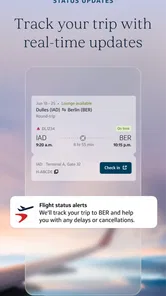

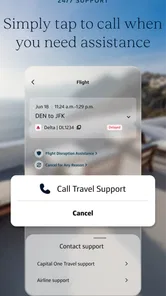

Analysis by Reviewed
I approached Capital One Travel as a trip-planning companion rather than as a replacement for every travel service on my phone. That distinction matters. The app comes from Capital One Services, LLC and sits in the Travel & Local category, with a clear focus on bringing travel-related planning into one place. It is free to use, rated for Everyone, and its current version is 1.19.0-17 for devices running Android 11 or later.
My first impression was that its value depends less on opening it once and more on building a repeatable routine around it. If I am comparing a few possible trips, checking what has already been arranged, or trying to keep travel research from being scattered across browser tabs, the app makes sense. If I already have a favorite airline, hotel chain, and booking method and rarely compare alternatives, its role is smaller.
How I use it as a practical travel baseline
I would begin with one simple habit: open the app before making a booking decision, not after. That gives me a dedicated place to organize the travel search instead of jumping between general search engines, airline apps, hotel websites, email, and notes. The benefit is not that every traveler suddenly needs another app; it is that Capital One Travel gives the planning stage a defined home.
For a normal weekend away, my workflow would be deliberately simple. I would decide the destination and approximate dates, explore the available travel choices, compare the options that fit my schedule, and then return to the app when I am ready to review the trip. Keeping those steps together reduces the chance of losing the option I liked while browsing somewhere else.
The app is particularly useful when I am still deciding what to book. That is the stage where small differences matter: a departure time that avoids a rushed morning, a return option that leaves enough room for delays, or a hotel location that saves time once I arrive. A general search engine can find possibilities, but a travel-focused app is more comfortable for narrowing them down and returning to the same journey later.
I also found that the best results come from treating the app as a comparison workspace rather than a magic recommendation engine. I would still check the final details carefully before committing. Dates, airports, room arrangements, baggage needs, cancellation conditions, and the total cost all deserve attention. The app can make the search more orderly, but it does not remove the responsibility of checking whether an option genuinely suits my trip.
A realistic example would be planning a short visit for a family event. I might first look for transport options that avoid an inconvenient connection, then compare hotels close enough to reduce local travel. After that, I would revisit the promising choices later instead of starting from zero. That repeatable pattern is where the app becomes more useful than a one-time search: the research remains connected to the trip I am actually trying to arrange.
More From Our News Desk

 Weather - By Xiaomi
Weather by Xiaomi Review: Clear at a Glance, Less Clear Up Close
Xiaomi’s weather app makes everyday forecasts quick to scan, but its calm surface can leave useful details and recovery paths harder to find than they should be.

 X
XX Under Pressure: Can It Recover When Posting Goes Wrong?
A resilience-focused review of X, examining setup, mistaken posts, interruptions, weak connections, and the gaps that matter when recovery needs to be dependable.

 Clash of Clans
Clash of Clans Is Won Between the Battles
Its raids are quick; its community is a long-term project of coordination, teaching, rivalry, and shared responsibility—with all the friction that entails.

 Android Auto
Android Auto Makes the Case for Quieter Car Software
The car interface is no longer judged by how much it can do, but by how quietly it helps. Android Auto shows what drivers now expect—and what still gets in the way.

 MobiOffice: Word, Sheets, PDF
MobiOffice: Transforming Mobile Productivity with Seamless Integration
MobiOffice: Word, Sheets, PDF is redefining mobile productivity with a surprising blend of functionality and innovation.

 EA SPORTS FC Soccer Mobile 26
EA SPORTS FC™ Mobile Soccer: Redefining Mobile Sports Gaming
Dive into EA SPORTS FC™ Mobile Soccer, where immersive gameplay and strategic depth transform mobile sports gaming.
Latest News



The strongest audience is therefore not just frequent flyers. It includes people who make several comparisons before booking, travelers who dislike scattered confirmations, and anyone who wants a single travel-oriented starting point. The app can also help less experienced travelers feel more organized because the planning process has a clear sequence instead of a collection of unrelated tabs.
At the same time, I would not use it as my only source of information for complicated travel. A multi-city itinerary, unusual accessibility requirement, strict loyalty preference, or special booking condition may still require checking the provider directly. For those cases, the app is better as an initial planning layer than as the sole authority for every detail.
Settings and preparation that make the routine smoother
Before relying on any travel app, I like to check the basics on my phone. Capital One Travel requires Android 11 or newer, so I would confirm the device is compatible before planning around it. I would also keep the app updated to version 1.19.0-17 when available, since travel information and booking experiences benefit from using the current release rather than an old installation.
Notifications are worth reviewing instead of accepting every prompt automatically. Travel-related alerts can be useful when I am actively monitoring a trip, but unnecessary notifications become noise quickly. My preference would be to allow the messages that help me act while reducing anything that interrupts ordinary days. The exact balance depends on how often I travel and how closely I want to follow a booking.
I would also check the phone’s location and battery settings before a travel day. I do not want to assume that an app needs constant access, and I would avoid making permissions broader than necessary. At the same time, I would make sure the phone is not aggressively restricting the app if I expect to open it during a busy journey. This is less about a special Capital One Travel feature and more about preventing ordinary phone settings from undermining a useful travel workflow.
Another practical preparation step is deciding where the app fits alongside the services I already use. I would not delete airline or hotel apps simply because I installed this one. Provider apps can remain important for check-in, loyalty details, or operational updates, while Capital One Travel can serve as the place where I compare and organize the initial plan. The most reliable setup is complementary, not all-or-nothing.
I would keep my trip details consistent across the apps I use. A common source of confusion is changing dates or destinations in one place but forgetting that another service still reflects the original plan. When I make a change, I would quickly review the whole itinerary rather than assuming every connected service has adjusted automatically. That habit is especially valuable when a trip includes several separate reservations.
Privacy and account comfort also deserve a quick personal check. Since this is a travel service from Capital One Services, LLC, I would use the account and information-sharing choices I am comfortable with, and I would avoid signing in on a public device. Travel plans contain dates and locations that I would rather keep protected. No convenience is worth careless account handling.
Shortcuts that reduce repeated searching
The fastest way to use the app is to search with a decision already in mind. Instead of browsing endlessly, I would define the one factor that matters most for the current trip: schedule, location, simplicity, or overall value. Then I would use the available travel choices to create a manageable shortlist. This prevents the familiar problem of spending a long time looking without becoming closer to a decision.
I would also separate research sessions by purpose. One session can be for discovering possibilities, another for comparing the finalists, and a final review for checking the booking details. Mixing all three stages together encourages impulsive choices because the first acceptable result starts to feel like the only result. A staged routine makes it easier to notice trade-offs.
For repeat travelers, the useful shortcut is consistency. I would search in the same order each time, review the same practical details, and keep a short personal checklist outside the app if necessary. My checklist might include travel times, airport or station convenience, accommodation location, baggage expectations, and the final amount shown before booking. The app handles the travel search; the checklist protects me from forgetting a personal priority.
Another efficient pattern is to compare like with like. If I am reviewing several transport choices, I would first keep the departure and arrival requirements similar. If I am comparing hotels, I would avoid judging one option by its headline price while judging another by its full conditions. Consistent comparisons make the app more valuable because I am using it to evaluate meaningful alternatives rather than collecting random possibilities.
I would revisit the app at a calm moment instead of making every decision while rushing through an airport. Travel planning is easier when I can read dates and conditions carefully. A few quiet minutes can prevent a much larger problem later, especially when the cheapest-looking choice has an inconvenient schedule or does not fit the rest of the journey.
For a group trip, I would use the app to create a common shortlist before asking everyone to decide. That is more efficient than sending a stream of unrelated screenshots. I can present a few options with clear reasons for keeping them, then let the group discuss the trade-offs. The app does not solve group disagreement, but it can make the choices easier to compare.
One less obvious benefit is reducing mental switching. When travel research lives across different websites, I have to remember where each option came from and which version was current. A focused travel app gives me a more stable starting point for returning to the plan. I still verify important details, but I spend less energy reconstructing my own research.
Where an experienced user should keep expectations realistic
Capital One Travel is not automatically the best route for every booking. A traveler with a strong preference for one provider may find it faster to go directly to that provider. Direct services can be more familiar for managing an existing reservation, handling specialized requests, or accessing account-specific tools. In that situation, this app may add an extra step rather than remove one.
I would also be cautious with complex itineraries. When several cities, separate tickets, unusual connections, or special arrangements are involved, a single planning interface may not show the whole risk clearly. I would break the journey into logical parts and verify each part with the relevant provider. The convenience of a central search should not encourage me to overlook the weak link in a complicated plan.
Another limitation is that comparison can create the illusion of certainty. Seeing options together feels reassuring, but travel conditions can change and the final terms are what matter. I would review the exact dates, passenger details, accommodation information, and conditions before confirming anything. If a choice is important because of a tight connection or a nonrefundable commitment, I would take extra time rather than relying on a quick visual comparison.
People who want extensive offline travel guidance may also need another tool. I would not expect a booking-focused travel app to replace maps, destination guides, translation tools, or local transport apps. My travel setup would probably contain several specialized tools, with Capital One Travel handling the planning and comparison role. That division is more realistic than expecting one app to cover every moment from inspiration to arrival.
There is also a personal trade-off between convenience and control. A centralized workflow is easier to manage, but some travelers prefer to inspect every provider independently. I understand that preference, especially for expensive trips or bookings with unusual rules. My approach would be to use the app for discovery and organization, then move to direct verification whenever the decision carries a higher financial or logistical risk.
The app’s public reception is encouraging without being a reason to stop evaluating it for myself. It holds an average rating of 4.6 from around 3K ratings, and it has passed 100K installs. Those figures suggest that many people find the experience worthwhile, but they do not guarantee that its workflow will match every traveler’s habits. I would treat them as a useful signal, not a substitute for checking whether the app fits my needs.
The Everyone content rating makes it approachable for a broad audience, including households where different people may help with planning. Still, an age rating says little about whether a particular travel decision is suitable. Adults remain responsible for checking costs, terms, timing, and the practical needs of everyone on the trip.
My verdict after building a repeatable travel habit
Capital One Travel works best when I give it a defined job: compare travel possibilities, keep the planning process focused, and return to the same trip without rebuilding the search each time. Its free price removes the usual barrier to trying that workflow, and the app is straightforward to recommend to someone who wants a more organized starting point than a general web search.
I would recommend it to travelers who compare before booking, people arranging short or ordinary trips, and users who want travel research separated from unrelated browsing. It is also a sensible companion for someone who already uses provider apps but wants a central place to begin. The strongest results come from combining the app with a personal checklist and a final verification habit.
I would skip it, or at least make it secondary, if I always book directly with one provider, need highly specialized travel support, or prefer to manage every reservation independently. In those cases, the extra comparison layer may not justify itself. I would also avoid treating it as a complete travel toolkit; maps, check-in, local information, and provider-specific management may still belong elsewhere.
My practical recommendation is to test it on a normal upcoming trip rather than a high-stakes itinerary. Search with a clear priority, narrow the choices, review the details later with a fresh eye, and compare the final option with the direct provider when the booking matters. That experiment will quickly show whether the app saves time or simply adds another place to look.
Overall, I see Capital One Travel as a useful planning center rather than a universal travel solution. Its real strength is the repeatable habit it encourages: search deliberately, compare consistently, revisit the same journey, and verify before committing. For me, that makes it a worthwhile free app in the Travel & Local space, provided I use it with realistic expectations and keep specialized travel tools available when the trip demands them.
Capital One Travel Frequently Asked Questions
Is Capital One Travel free to download, and what devices can run it?
Capital One Travel is free to download and is listed for everyone. It is a travel app from Capital One Services, LLC, designed for searching and managing travel in one place. Before installing, check that your device runs iOS or Android 11 or later, as the app requires that minimum operating-system version.
What is Capital One Travel, and who can use it?
Capital One Travel is an online travel booking platform connected to eligible Capital One credit cards. It lets users search and reserve flights, hotels, and rental cars, while offering card-specific rewards, price tools, and travel benefits. Availability depends on your Capital One account, card type, country, and the services currently supported in your region.
Can I earn or redeem Capital One miles when booking through Capital One Travel?
Eligible cardholders may be able to earn miles on qualifying purchases made through Capital One Travel and redeem existing miles toward travel reservations. The exact earning rate, redemption value, eligible cards, and available options can vary. Before confirming a booking, review the displayed price, miles requirement, taxes, and any restrictions carefully.
Does Capital One Travel offer price protection or price-drop benefits?
Capital One Travel may provide price-related tools for selected flights, including price predictions, tracking, and possible price-drop assistance depending on the itinerary and your card benefits. These features are not guaranteed for every booking and may include limits, deadlines, or maximum reimbursement amounts. Always read the terms shown before purchasing.
Can I cancel or change a reservation made through Capital One Travel?
Cancellation and change policies are determined by the airline, hotel, rental company, and fare or rate selected. Some bookings may be flexible, while others are nonrefundable or charge modification fees. Capital One Travel can help manage eligible reservations, but it cannot always override the supplier’s rules, so check the policy before completing payment.
Pros
- Price-drop protection can provide credits when eligible fares fall.
- Price matching helps reduce the risk of overpaying for select bookings.
- Premium cardholders may unlock extra benefits and travel credits.
- Search tools make it easy to compare flights
- hotels
- and rental cars.
- Bookings can be managed alongside eligible Capital One card rewards.
Cons
- Many benefits depend on having an eligible Capital One credit card.
- Travel options and prices may differ from those shown directly by providers.
- Price-drop and price-match rules include restrictions and claim deadlines.
- Changing or canceling reservations may involve provider-specific fees.
- Rewards redemption values and availability can vary by booking and destination.













