aTranslator - Text & Voice
- 6.07K
- 4.6
- Installs
- 1.00M
- Price
- Free
Screenshots
Analysis by Reviewed
aTranslator - Text & Voice is most useful when you need a quick way to understand or express something across a language barrier. I like the idea of having text, speech, and camera translation together, especially for travel, but I’d treat it as a handy aid rather than a substitute for careful human communication. It’s a free tools app from NewRiverApp, and its appeal is practical: open it when a phrase, spoken exchange, or printed sign gets in the way.
Where the three translation modes help
Each mode suits a different moment. Text translation is the sensible choice for a message or a longer sentence you can inspect before using. Voice translation is quicker when you need to ask a short question aloud. Camera translation can help with a menu, notice, or label when typing unfamiliar characters would be slow. That variety makes the app easier to reach for than a tool limited to one kind of input.
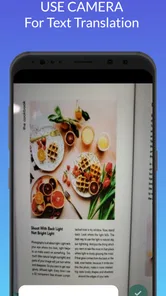
For example, imagine arriving at a station and needing to check a sign before choosing a platform. A camera translation can give you a quick starting point; if the result is unclear, you can type a key phrase or try speaking it instead. I’d use that sequence to orient myself, then confirm important details with staff rather than assume a translated sign has captured every nuance.
Good for quick help, not high-stakes wording
Translation is sensitive to context. A short phrase may have several possible meanings, and a machine-rendered sentence can sound more certain or polite than intended. For ordering food, asking directions, or understanding a basic notice, speed may matter more than perfect phrasing. For medical instructions, legal documents, or a delicate conversation, I would seek a qualified person or a trusted specialist tool instead of relying on an instant result.
One useful habit is to keep input simple: use one idea at a time, avoid slang, and check whether the translated wording still matches what you mean. With voice input, speak clearly and pause between thoughts. With a camera, frame only the relevant text and make sure it is readable. These small steps can make a translation easier to judge, though they cannot remove the risk of ambiguity.
What is aTranslator - Text & Voice?
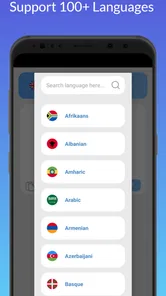
Picture this: you’re navigating the bustling streets of Tokyo, and everything around you is in Japanese. Panic? Nah! You whip out your phone, open aTranslator - Text & Voice, and bam, you’re back on track. This nifty app is your all-in-one solution for translating text, voice, and even images in real time. It supports over a hundred languages, making it a versatile tool for globetrotters and language enthusiasts alike.
Features That Make It Shine
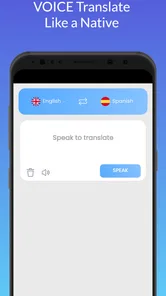
One of the standout features of aTranslator is its voice translation capability. Ever tried ordering food in a French restaurant when your accent is more "bonjour" than "bon appétit"? Just speak into the app, and it’ll translate your request into flawless French, making you sound like a local. It’s like having a personal translator in your pocket.
More From Our News Desk

 Lark Player:Music Player & MP3
Switching to Lark Player: A Better Fit for Music Stored on Your Phone?
Lark Player makes sense if your music already lives on your phone. Here is what changes, what does not transfer by assumption, and how to test the switch without regret.

 Tile Master® - Matching Game
Tile Master Finds Its Place in the Gaps of a Noisy Phone
OS changes rarely transform a tile puzzle, but they reshape the small rituals around it. Tile Master’s appeal lies in how well its brief, tactile rounds fit the modern phone.

 Google Docs
 Shows What Mobile Writing Still Gets Wrong
Google Docs still makes a strong case for the shared document, but its real significance is how it exposes the gap between cloud convenience and genuinely capable mobile work.

 YouTube Studio
 Is Becoming a Creator’s Daily Control Room
As publishing turns into a daily, data-led habit, YouTube Studio is becoming the control room creators reach for between uploads—not another tool for making videos.

 Tiles Hop Music & Ball Game
Tiles Hop Review: When the Beat Is Clear, Every Miss Counts
Tiles Hop turns a simple bouncing-ball premise into a sharp test of timing. Its best design is immediate and readable; its weakest moments come when recovery feels less clear than the beat.

 Piano - Music Keyboard & Tiles
: Inviting Rhythm, Unproven Recovery
A tile-tapping piano game lives or dies by timing. This resilience-focused review separates what its format promises from what players still need to verify.
Latest News



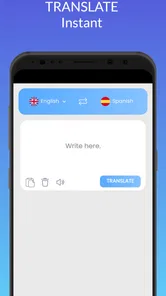
Another cool feature is the text translation. Whether it’s a text message from an international friend or a piece of content online, just copy the text into the app, and it translates it in an instant. Plus, the image translation feature is a lifesaver. Simply snap a picture of any text, and watch it transform into your language of choice. Handy, right?
User Experience and Interface
The interface is intuitive and user-friendly, perfect for anyone who might not be tech-savvy. The app is designed to be straightforward, with large buttons and clear instructions, so you won’t feel like you’re deciphering a puzzle just to use it. Even if you’re new to translation apps, you’ll find this one easy to navigate and use.
Another thing I love about this app is its reliability. It works seamlessly even with a weak internet connection, which is a huge plus when you’re out and about. And let’s not forget the offline translation feature. Once you download the necessary language packs, you can translate without needing Wi-Fi or data. Now, that’s a travel essential!
Getting better results in everyday situations
I find it helps to decide what I need before choosing a mode. If I’m reading a short notice, I start with the camera; if the wording is awkward, I type just the phrase that matters instead of copying a whole paragraph. That smaller second pass gives me something easier to compare with the original and can reveal whether one word is driving a confusing result.
For a spoken exchange, I’d prepare a short sentence rather than improvise a long explanation while someone waits. A question such as asking where a particular stop is will usually be easier to check than a detailed story with several directions and conditions. If the other person replies quickly, I would pause and translate the response separately. The trade-off is a slower conversation, but it reduces the chance of losing an important detail inside a long exchange.
Camera use has its own practical limits. A menu with distinct item names is a better candidate than a page where text is tiny, decorative, or arranged in several columns. I’d move closer, avoid casting a shadow over the words, and check the result against the original layout before ordering. If an item could involve an allergy or dietary restriction, I would not treat a camera result as confirmation; I’d ask the restaurant directly and make the concern clear.
Choosing it over familiar alternatives
Compared with keeping a separate dictionary or switching between a camera tool and a speech translator, having these input styles in one place can reduce friction when you’re on the move. I’d choose aTranslator for quick, varied travel questions and casual exchanges. If I needed careful wording for work, a language-learning explanation, or a translation I could confidently publish, I’d use a specialist service or ask a fluent speaker to review it. A translator is best as a bridge to understanding, not an authority on tone.
It also helps to think about the setting before opening the camera or voice mode. A sign or menu is usually a straightforward target; a crowded scene, glare, small print, or background conversation can make input harder to interpret. If a result seems odd, switch modes rather than repeating the same attempt: type the most important words, or show the translated text to someone who can clarify. That gives you a practical fallback without assuming every first result is right.
Compared with a dedicated dictionary, the advantage here is speed across different kinds of input; the trade-off is that a quick translation may not explain why a phrase is expressed a certain way. A dictionary or language-learning app is better when I want to study a word, compare meanings, or understand grammar. A specialist translation workflow is also the safer option when a document must be polished or consistent. I see this app as the tool I reach for before those options, not a replacement for them.
A realistic travel workflow
Imagine I’m checking into a small guesthouse and need to ask whether breakfast is included. I would type a short, direct question, inspect the translated version, and show it to the host rather than trusting a complicated spoken exchange. If the reply comes back in a language I don’t understand, voice translation may help me get the gist. I’d then repeat the key point in a simpler form, especially if it affects a time or arrangement. This kind of back-and-forth is where having text and voice available together feels useful.
For a traveler, that workflow is more valuable than treating the app as a magic interpreter. It lets me start a conversation, check a sign, or understand the broad point of a reply without pretending every nuance is settled. I’d still keep essential addresses, booking details, and emergency phrases somewhere I can read directly, rather than relying on a live translation at the moment I need them.
Who will get the most from it
I’d recommend it to travelers who want a quick pocket tool, people exchanging everyday messages across languages, and curious learners who need a rough sense of what a phrase means. Its 4.6 average from around 19,000 ratings and more than a million installs suggest that many users find it useful, while the Everyone age rating makes it accessible to a broad audience. It is currently version 1.4, requires Android 8.0 or later, and is free to try.
It may be the wrong choice if you need dependable interpretation for a high-consequence decision, or if you want structured lessons that explain grammar and usage rather than provide a translation. I’d also avoid depending on any translation app as your only plan in a situation where a misunderstanding could cause harm. For routine travel, though, it can make the first step in a conversation less awkward.
It is also a reasonable fit for someone who translates occasional messages and wants one place to try text, speech, or a camera rather than deciding in advance which specialized tool to open. I would not pick it as my main study companion if my goal were to build vocabulary systematically: a translation can help me understand a sentence, but it does not by itself provide the practice and explanation that learning requires.
Before leaving home, I’d check that the phone meets the Android 8.0 minimum and try the mode I expect to use while I still have time to get comfortable with it. The app is free, which makes that a low-pressure trial, but I’d still test the camera on a clear printed label and voice input in a quiet place. A quick practice run makes it easier to tell whether I can handle the controls before I’m standing in a busy station or shop.
Final Thoughts
In a world where communication is key, having a reliable translation app is a game changer. Whether you’re traveling, learning a new language, or just trying to bridge a communication gap, aTranslator - Text & Voice is an app that can make your life significantly easier. It's not just about translating words; it’s about connecting with people, understanding cultures, and making the world a little bit smaller.
So, next time you’re packing your bags for an adventure, don’t forget to download aTranslator. Trust me, you’ll wonder how you ever traveled without it!
My recommendation comes with a clear boundary: use it to get unstuck, not to hand over judgment. If a phrase matters, compare the translation with the original, simplify what you enter, and ask a person when the stakes are real. That approach makes its combination of text, voice, and camera most useful while keeping the limits of machine translation in view.
aTranslator - Text & Voice Frequently Asked Questions
Can aTranslator - Text & Voice help me when I am learning or practicing another language?
It can be useful for everyday language practice because aTranslator - Text & Voice provides text and voice translation, letting you compare phrases or hear spoken input translated. It is best treated as a handy reference rather than a complete language course: translation can help with understanding and communication, while learning grammar and vocabulary still takes practice. The app also offers instant camera translation for written text.
Can I use aTranslator - Text & Voice while traveling?
The app’s text, voice, and instant camera translation tools can be useful in common travel situations, such as asking a question, understanding spoken words, or reading a sign. You can choose the input method that suits the moment. For trips where connectivity may be limited, keep in mind that offline translation is available for some languages, while the full range of features and language support requires an internet connection.
Can I use aTranslator - Text & Voice to translate words seen through my camera?
Yes. aTranslator - Text & Voice includes instant camera translation, which can help when you need to understand written text around you, such as signs or printed material. It also offers text and voice translation, so you can choose the method that suits the situation. The app is free and is rated for everyone.
What is aTranslator - Text & Voice and how does it work?
aTranslator - Text & Voice is a versatile app designed to facilitate communication by translating text and voice in real-time. It supports a wide range of languages, making it ideal for travel, business, and learning new languages. Users can either type the text they want translated or use the voice feature for instant translation, ensuring seamless communication across language barriers.
Is aTranslator - Text & Voice available for both Android and iOS devices?
Yes, aTranslator - Text & Voice is available for both Android and iOS devices. Users can download the app from the Google Play Store for Android devices or the Apple App Store for iOS devices. The app ensures a consistent experience across different platforms, allowing users to enjoy its features on their preferred device.
Pros
- User-friendly interface
- Supports multiple languages
- Offline mode available
- High translation accuracy
- Fast translation processing
Cons
- Limited free version features
- Requires internet for voice translation
- Occasional ads
- No text-to-speech for all languages
- Battery consumption can be high