

Archo – AI Interior Design
- 62.00
- 4.1
- Installs
- 1.00M
- Price
- Free

Screenshots
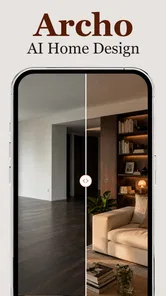
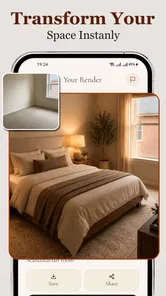
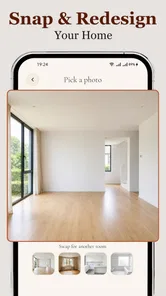



Analysis by Reviewed
I would use Archo when I want to explore a room idea before committing to paint, flooring, or a furniture layout. It is an AI interior-design app from ATQ - AI Lab, built around turning a photo of a space into a visual starting point for changes. That makes it more useful for weighing possibilities than for producing a final renovation plan: the appealing part is seeing an idea quickly, while the important part is judging whether it fits the real room.
A useful check before you start experimenting
I find it helps to choose a room with a decision already in mind, rather than treating the app as a source of endless inspiration. A renter deciding whether a small living room would feel calmer with lighter walls, for instance, can use a visual concept to clarify a preference without confusing that first impression with permission to make a permanent change. If I were renting, I would use the result to plan a reversible refresh or to explain an idea to a landlord, not as evidence that a renovation is approved.
The same approach works when two people share a space but picture it differently. Each person can react to a concrete direction—more open, warmer, simpler—before anyone buys paint or rearranges heavy furniture. The trade-off is that a generated image may help settle the style question while leaving practical disagreements untouched, such as storage needs or where everyday items belong. I would use it to start that conversation, then check the room’s actual routines together.
Quick concepts, with the real room still in mind
In my experience, the best way to approach Archo is as a brainstorming companion. A room can feel hard to imagine in a different colour or style, and a visual mock-up helps make the choice less abstract. I would try it when I have a few plausible directions but cannot decide which one is worth pursuing—not when I need precise measurements, a contractor-ready drawing, or proof that a particular finish will look exactly as shown.
The app sits in the home design corner of the House & Home category. Its focus on changing walls, floors, and layouts gives it a more visual role than a conventional home-improvement checklist or shopping app. Instead of beginning with a long planning document, I can begin with the room itself and use the result to clarify what I like. That shift from imagining to comparing is its clearest practical strength.
Speed matters here because experimentation works best when it feels low-effort. Archo is intended for trying room ideas without building each one by hand, so I would expect the process to feel most rewarding when I can make a quick pass, inspect the result, and decide what to try next. I would not treat “instant” as a guarantee that every image will appear immediately or that every complex room will be processed equally smoothly. Photo quality, visual clutter, and the amount of detail in a space can all affect how useful an AI-generated concept feels.
Make the first image easier to interpret
A useful workflow is to start with a clear view of one room rather than a collage or a photo packed with objects close to the camera. Before taking the picture, I would step back enough to show the walls and floor, move small clutter out of the foreground, and avoid strong visual obstructions. This is not about making a room look staged; it is about giving the design process a more legible base. If a result seems odd, I would first check the photo and the angle before deciding the app itself has failed.
More From Our News Desk

 Gmail
GmailGmail in a Busy Inbox: Who Benefits Most?
From first account to crowded workday, Gmail earns its place through dependable search and flexible sorting—but its best fit depends on how much inbox maintenance you can tolerate.

 Prime Video
Switching to Prime Video: What Changes in Your Viewing Routine
Prime Video can make a compelling second home for streaming, but switching means learning a different catalog, rental layer, and route from browsing to playback.

 Universal TV Remote Control
Universal TV Remote Control Works Best as a Reliable Backup
A phone remote earns its place through quick setup and reliable habits. Here is how to get more from Universal TV Remote Control—and where its limits show.

 Weather - By Xiaomi
Weather by Xiaomi Review: Clear at a Glance, Less Clear Up Close
Xiaomi’s weather app makes everyday forecasts quick to scan, but its calm surface can leave useful details and recovery paths harder to find than they should be.

 X
XX Under Pressure: Can It Recover When Posting Goes Wrong?
A resilience-focused review of X, examining setup, mistaken posts, interruptions, weak connections, and the gaps that matter when recovery needs to be dependable.

 Clash of Clans
Clash of Clans Is Won Between the Battles
Its raids are quick; its community is a long-term project of coordination, teaching, rivalry, and shared responsibility—with all the friction that entails.
Latest News



I would also change one broad design decision at a time. For example, I might first compare wall treatments, then consider a floor direction, and only afterward revisit the overall arrangement. When several elements change together, it becomes difficult to tell what caused a version to feel better or worse. A small sequence of focused experiments turns the output into a decision aid rather than a stream of attractive but hard-to-compare images.
Where repeated experiments can feel demanding
The busiest moment is likely to be a session where I am cycling through multiple ideas for the same room, especially if I keep revising the source image or trying to evaluate several visual directions in one sitting. That is when I would pay attention to whether each result is clear enough to guide the next attempt. If the differences are subtle, taking a pause and comparing a few preferred outcomes side by side can be more useful than generating more variations without a specific question in mind.
There is a practical trade-off between speed and control. AI visualization can help me reach an appealing concept faster than manually assembling a room in a detailed design tool, but it does not replace the deliberate control those tools can offer. If I need exact spacing, accurate product dimensions, or a reliable representation of how materials behave under a particular light, I would verify those decisions with measurements, physical samples, and a more technical planning method. Archo is strongest earlier in the process, when I am deciding what direction is worth investigating.
A realistic use case is repainting a bedroom. I might take a photo before shopping, test a few broad colour moods, and use the most convincing result to narrow the shortlist. I would then look at real paint samples in the room, because a digital preview is not a guarantee of the final shade under changing daylight or artificial lighting. The app can help me avoid choosing from imagination alone, but it should not make the purchase decision on my behalf.
Reliability means judging the result, not just the wait
For a tool like this, reliability is more than whether the app opens. The output has to preserve enough of the room’s identity for me to recognize what I am evaluating. I would look for the main structure—the room’s proportions, major openings, and the surfaces I meant to reconsider—to remain understandable. If a generated concept changes details in ways that make the space feel unlike the original, I would treat it as inspiration rather than a faithful preview.
That distinction matters most when an idea is expensive or difficult to undo. A dramatic new floor or a changed layout may look convincing in an image while raising questions that a visual concept cannot settle: whether furniture will fit, whether a doorway remains clear, or whether the chosen material suits everyday wear. My advice is to use the image to form questions for the next step, not to treat it as evidence that the project will work exactly as pictured.
I would also keep a simple record of the versions I genuinely like, such as saving the images or noting what I changed between attempts if the app’s available workflow allows it. That habit prevents a common design-session problem: remembering a look vaguely but forgetting which specific choice made it appealing. It is a useful safeguard whenever several concepts begin to blur together, and it keeps experimentation connected to a real decision.
Device fit and sensible expectations
Archo is listed for devices running Android 7.0 or later, which gives it a broad baseline of OS compatibility. That does not mean every older phone will feel equally comfortable for image-based work. A small screen can make it harder to inspect details, and a device under pressure from other apps may make an image-heavy session less pleasant. I would close unnecessary apps if the phone feels sluggish and judge the experience on the actual device I plan to use, rather than assuming the minimum OS requirement promises identical performance everywhere.
Because the central activity is visual, screen size is a more important practical consideration than it would be for a text-only home planner. A tablet or a larger phone screen can make comparing finishes easier, while a compact display is still convenient for quick idea checks. I would not buy a new device just for this app; I would simply avoid making fine design judgments from a tiny preview if the details matter to the decision.
For anyone concerned about whether it is worth trying, the basic app is free, rated for Everyone, and has an average rating of 4.1 from around 9,300 ratings. It has passed one million installs, which suggests that room visualization has broad appeal, though popularity alone cannot tell me whether a particular output will suit my home. The current version is 1.3.2. The useful takeaway is to try it on a room you know well and see whether its concepts help you think more clearly before relying on it for a larger project.
Cost and alternatives depend on how far you need to go
Archo is free to start, with in-app purchases ranging from $7.99 to $39.99 per item. I would consider the paid options only after establishing that the app fits my workflow and checking what an offered purchase covers at the time I use it. For a one-off colour brainstorm, a free route may be enough. If I expect to explore many rooms or return repeatedly, I would weigh the value against how much time the visual experiments save me, rather than paying simply because a polished render looks persuasive.
Compared with a traditional interior-design planner, Archo appears better suited to quick visual exploration than exact, hands-on specification. A manual room planner is usually the better choice when dimensions, furniture footprints, and circulation paths are central. A mood-board app or a folder of reference photos can be better when the task is collecting real examples and materials. Archo has a different advantage: it can help me picture a direction in the context of my own space, which generic inspiration images cannot do as directly.
It is not the right fit for someone who needs a dependable technical plan, wants every object placed with precise control, or is already certain about the design and simply needs measurements and purchasing details. It may also disappoint a user who expects every generated image to preserve every feature of the photographed room. In those situations, I would choose a measured floor-plan tool, consult a designer, or use physical samples instead. The app is most helpful when uncertainty is about the look, not the construction.
Who I would recommend it to
I would recommend Archo to renters imagining a reversible refresh, homeowners comparing a few wall or floor directions, and anyone who struggles to picture a change from words alone. It can also be handy before a conversation with a partner or decorator: a visual concept gives everyone something concrete to react to, even if the final plan changes. The most useful outcome may not be a perfect design but a clearer answer to “more like this, or less like this?”
My main tip is to decide the question before opening the app. If I am choosing between warm and cool finishes, I will focus on that distinction. If I am unsure about the room’s arrangement, I will pay attention to whether the proposed layout makes practical sense rather than being distracted by colour. This keeps the session focused and makes each generated idea easier to evaluate. It also reduces the temptation to mistake visual novelty for a genuinely workable improvement.
My verdict: Archo is a useful early-stage design tool when I want to test a room idea quickly and see it in a familiar setting. Its strongest role is helping me compare directions and decide what deserves real-world checking. I would approach it with sensible expectations about image fidelity, avoid using it as a substitute for measurements, and take care before paying for extras. If that balance sounds right, it is an approachable way to make home-design decisions feel less abstract; if precision is the priority, a more technical planner will serve better.
ATQ - AI Lab released Archo on March 18, 2026, and the app’s appeal is straightforward: it helps turn a vague room idea into something I can react to. I would keep it in the early part of a decorating project, where speed and visual exploration matter more than exact specifications. Used that way, it can make the next decision easier without pretending to make every decision for me.
A practical stopping point for a design session
I would end a session once I had a short list of distinct directions, not keep generating alternatives just because the next experiment is easy to request. For example, after deciding that a bedroom should feel brighter, I would select the strongest concept, then check whether the real room’s lighting and existing furniture support it. This is a useful boundary: the app is good for reducing uncertainty about a look, but repeated visual tweaking can create false confidence if I stop asking what the room needs to do day to day.
For a bigger change, I would use the concept as a handoff rather than a plan: show it to a decorator, compare it with material samples, or use it to guide measurements in a separate tool. That keeps the visual idea useful while letting more reliable methods answer questions about fit, cost, durability, and installation. For a quick refresh or an early discussion, that division of labour feels sensible; for a construction decision, I would move on to tools built for precision.
Archo – AI Interior Design Frequently Asked Questions
What is Archo – AI Interior Design, and what can it do?
Archo is an AI-powered interior design app that helps you explore new looks for a room using photos and design prompts. Depending on the features available in your version, you can choose a room type or style and generate visual concepts to use as inspiration. Treat the results as design ideas rather than construction plans: an AI image may not accurately represent room dimensions, materials, or how furniture will fit.
How do I use Archo to redesign a room?
A typical workflow is to select or upload a clear photo of the room, identify the space or design style, and let the app generate a transformed image. For more useful results, photograph the room in good lighting, keep the view unobstructed, and describe the look you want as specifically as the available controls allow. App features and steps can vary by version, so check the current interface before starting.
Is Archo – AI Interior Design free to use?
Pricing and access may depend on the app version, platform, region, and current offer. Some AI design apps provide limited free generations or previews, while additional designs, tools, or faster processing may require a subscription or in-app purchase. Review the app’s store listing and the purchase screen carefully before confirming payment, including the trial length, renewal price, billing frequency, and cancellation terms.
Does Archo create accurate designs that I can use to buy furniture or renovate?
Archo can help you visualize possible styles, colors, and layouts, but generated images should not be treated as precise measurements or guaranteed product recommendations. AI may alter architectural details, furniture proportions, windows, or lighting, and a pictured item may not correspond to a product you can purchase. Before buying furniture or beginning renovation work, measure the room and verify materials, dimensions, and plans independently.
What happens to the room photos I upload to Archo?
To generate a design, the app may need to process photos you provide, and its handling of those images depends on its privacy policy and the services it uses. Before uploading, review the policy and app permissions to understand whether images are stored, shared with service providers, or used to improve features. Avoid including people, personal documents, or other sensitive details in room photos.
Pros
- Quickly visualizes room ideas from photos
- making it easy to explore new looks.
- AI-generated concepts can provide inspiration when you're unsure where to start.
- Useful for comparing different styles without rearranging furniture first.
- A convenient option for experimenting with interiors on a mobile device.
- Can help communicate a design direction before making larger decor changes.
Cons
- AI results may misrepresent room dimensions
- layouts
- or existing furniture.
- Generated images are concepts
- not precise renovation or shopping plans.
- Some features or generations may require payment or in-app credits.
- Results can vary in quality depending on the photo and prompt provided.
- You may need to upload interior photos
- so review the app's privacy terms first.









