AniDraw: 2D Draw Animation
- 44.00
- 3.9
- Installs
- 1.00M
- Price
- Free

Screenshots
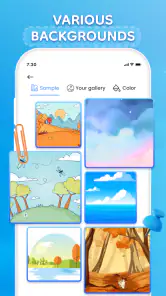
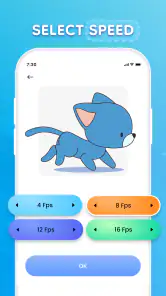
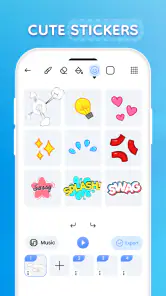
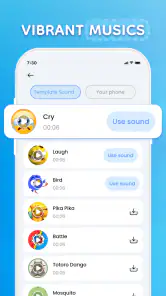
Analysis by Reviewed
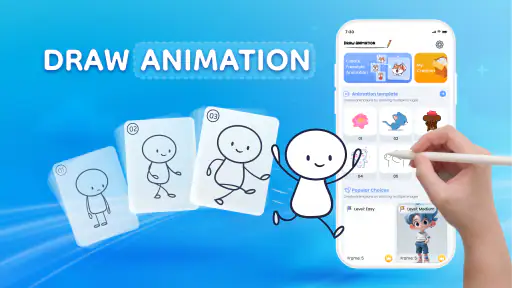
Ever wondered how those snazzy 2D animations you see on social media are made? Well, let me introduce you to AniDraw: 2D Draw Animation. This app is your new best friend if you're into doodling or aspiring to create your own animations from scratch. I got the chance to dive into this app, and let me tell you, it’s like finding a hidden door to a world of creativity.
Getting Started with AniDraw
At first glance, AniDraw might seem a bit overwhelming, especially if you’re new to animation. But fear not! The app comes with a nifty tutorial that guides you through the basics. It’s almost like having a friend who’s a pro animator, showing you the ropes. You’ll find yourself drawing and animating simple characters within minutes. The interface is sleek and intuitive, so you won't find yourself lost in a sea of buttons.
Features that Stand Out
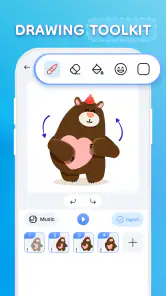
What sets AniDraw apart is the sheer variety of tools it offers. Whether it’s brushes, layers, or color palettes, the app gives you everything you need to bring your imagination to life. Layer management is a breeze, allowing you to create complex animations without losing track of your work. The onion skinning feature is a godsend, letting you see previous frames while drawing the next one, ensuring a smooth flow in your animations.
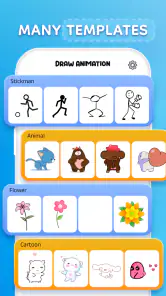
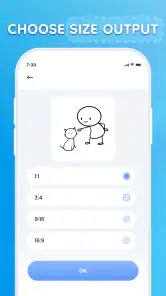
Another fun aspect is the library of pre-made assets. If you're in a rush, or just feeling a bit lazy, you can use these assets to whip up an animation in no time. Plus, the app supports various formats, so sharing your masterpiece on different platforms is as easy as pie.
Why You’ll Love It
If you’re someone who loves to experiment, AniDraw will be your playground. The app encourages creativity and experimentation. The community feature is fantastic, allowing you to share your work and get feedback from other users. It’s like being part of a global artist hub, where inspiration flows freely.
Moreover, the app is constantly updated with new features and improvements, so you’ll always have something new to look forward to. Whether you’re a beginner or a seasoned artist, there’s always something to learn and explore.
Final Thoughts
Overall, AniDraw: 2D Draw Animation is a fantastic tool for anyone interested in animation. It’s user-friendly yet packed with powerful features that can turn your ideas into reality. The app is a perfect blend of fun and functionality, making it a must-have for budding animators and professionals alike. So, go ahead, download AniDraw, and let your creativity run wild!
More From Our News Desk

Clash of Clans Is Won Between the Battles

Android Auto Makes the Case for Quieter Car Software

MobiOffice: Transforming Mobile Productivity with Seamless Integration

EA SPORTS FC™ Mobile Soccer: Redefining Mobile Sports Gaming

How Microsoft OneDrive Became a Mobile Productivity Giant

How Google Translate Breaks Language Barriers Effortlessly
AniDraw: 2D Draw Animation Frequently Asked Questions
What is AniDraw: 2D Draw Animation and what can I do with it?
AniDraw: 2D Draw Animation is a creative app designed for both amateur and professional artists who are interested in creating 2D animations. With this app, users can draw, animate, and bring their illustrations to life using a variety of tools and features. The app provides a platform for sketching frame-by-frame animations, adding layers, and utilizing onion skinning to see multiple frames at once. It's ideal for those looking to explore animation and improve their drawing skills.
Is AniDraw suitable for beginners or is it more for experienced animators?
AniDraw is designed to cater to both beginners and experienced animators. It offers user-friendly interfaces and tutorials for newcomers, making it easy to start creating animations without prior experience. At the same time, it provides advanced tools and features that experienced users will find beneficial for more complex projects. This makes AniDraw a versatile app for a wide range of users.
What are the system requirements to run AniDraw: 2D Draw Animation?
To run AniDraw: 2D Draw Animation smoothly, users need a device running Android 5.0 or iOS 11.0 and above. The app requires a minimum of 2GB RAM for optimal performance, especially when working on larger animation projects. It's recommended to have ample storage space available as animation files can be large. Users should ensure their device is updated to avoid any compatibility issues.
Does AniDraw offer any in-app purchases or subscription plans?
Yes, AniDraw offers several in-app purchases and subscription plans that provide additional features and tools. While the basic version of the app is free, users can purchase premium tools, additional brushes, and effects to enhance their animation projects. The subscription plans offer more comprehensive packages, including cloud storage, advanced export options, and regular updates with new features.
Can I export and share my animations created in AniDraw on other platforms?
Absolutely! AniDraw allows users to export their animations in various formats, such as GIFs, MP4s, and image sequences, making it easy to share on social media platforms like Instagram, Facebook, and YouTube. The app ensures high-quality exports so that your animations maintain their visual fidelity. Users can also save their projects to the cloud or their device storage for easy access and sharing.
Pros
- User-friendly interface for beginners.
- Wide range of drawing tools available.
- Supports frame-by-frame animation.
- Export animations in multiple formats.
- Regular updates with new features.
Cons
- Limited advanced features for professionals.
- Occasional app crashes reported.
- Requires internet for full functionality.
- Ads can be intrusive at times.
- Slow performance on older devices.

- Category
- Art & Design
- Version
- 1.2.8













