Emoji Battery - Battery Icon
- 209.00
- 4.1
- Installs
- 1.00M
- Price
- Free
Screenshots
Analysis by Reviewed
Ever felt like your phone’s battery life just doesn’t express enough? Well, let me introduce you to Emoji Battery - Battery Icon, the app that brings a playful twist to your battery indicator. Whether you’re all about emojis or just want a fun way to check your battery, this app might just be the quirky addition you never knew you needed.
Transform Your Battery Experience
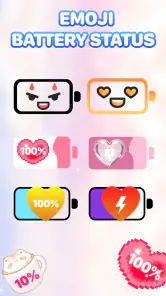
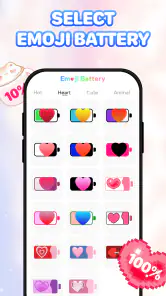
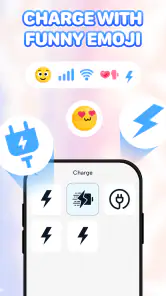
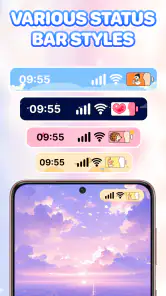
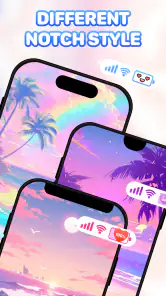
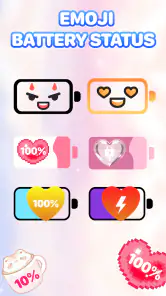
The moment I installed Emoji Battery - Battery Icon, I could tell it wasn’t just another battery tracker. The app allows you to replace the mundane battery icon with a variety of emojis, bringing a smile to your face every time you glance at your phone. From smiley faces to animals, the choices are diverse, ensuring there’s something for everyone.
Personalizing Your Emoji
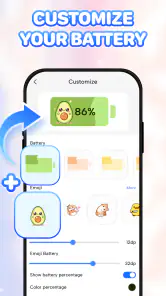
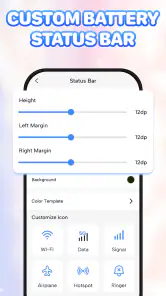
This app doesn’t just stop at providing a bunch of emojis; you can actually personalize the experience. Selecting an emoji that reflects your mood or the day’s vibe is as easy as pie. And trust me, it’s quite the conversation starter! Imagine your friends’ reactions when they see a cat or a pizza slice representing your battery life.
Easy to Use
One of the things I absolutely loved about this app is how user-friendly it is. Navigating through the app is a breeze, even for those who might not be the most tech-savvy. You simply choose your emoji, set it, and voila! Your battery indicator is now a fun little image on your screen.
Why You’ll Love It
Now, you might wonder why you’d even care about what your battery icon looks like. But here’s the thing: it’s all about adding a bit of joy to the mundane parts of life. Emoji Battery - Battery Icon does exactly that. It’s a small change that can bring a surprising amount of joy every time you peek at your phone.
So, if you’re looking for a unique way to spice up your phone’s interface, give this app a spin. You’ll find that it’s not just about tracking your battery; it’s about infusing a bit of personality into every glance at your screen. Who knew battery life could be so entertaining?
In conclusion, Emoji Battery - Battery Icon isn’t just an app; it’s a delightful way to express yourself, one emoji at a time. Whether you’re an emoji enthusiast or just someone who loves a bit of fun, this app is sure to bring a chuckle every time you check your battery status. So go ahead, and let your battery life express itself like never before!
More From Our News Desk

Clash of Clans Is Won Between the Battles

Android Auto Makes the Case for Quieter Car Software

MobiOffice: Transforming Mobile Productivity with Seamless Integration

EA SPORTS FC™ Mobile Soccer: Redefining Mobile Sports Gaming

How Microsoft OneDrive Became a Mobile Productivity Giant

How Google Translate Breaks Language Barriers Effortlessly
Emoji Battery - Battery Icon Frequently Asked Questions
What is Emoji Battery - Battery Icon and how does it work?
Emoji Battery - Battery Icon is a fun and visually engaging app that allows users to customize their battery icons with emojis, offering a unique way to monitor battery life. Instead of the standard battery icon, users can select from a variety of emojis to display, which change in appearance as the battery level decreases or increases. This adds a personalized touch to your device and helps make battery management more visually appealing.
Is Emoji Battery - Battery Icon available for both Android and iOS devices?
As of the latest update, Emoji Battery - Battery Icon is available exclusively for Android devices. It can be downloaded from the Google Play Store. iOS users currently do not have access to this app due to platform restrictions regarding customization of system icons. However, developers are exploring possibilities for a future iOS version.
Does using Emoji Battery - Battery Icon affect battery performance?
Using Emoji Battery - Battery Icon does not significantly impact your device’s battery performance. The app is designed to operate efficiently in the background, consuming minimal resources. It simply replaces the default battery icon with a customized emoji without altering the core functionalities of the device’s battery management system.
How can I customize my battery icon using emojis?
To customize your battery icon with emojis using Emoji Battery - Battery Icon, first download and install the app from the Google Play Store. Once installed, open the app and browse through the available emojis. Select your preferred emoji, and it will automatically replace the default battery icon. You can change the emoji anytime through the app's settings menu.
Is Emoji Battery - Battery Icon safe to use on my device?
Yes, Emoji Battery - Battery Icon is safe to use. It has been thoroughly tested for security and does not require any unnecessary permissions that could compromise your privacy. The app solely focuses on customizing the battery icon and does not access your personal data. Always ensure you download the app from the official Google Play Store to avoid any security risks.
Pros
- Visually appealing battery icon themes.
- Easy to use interface.
- Customizable battery level alerts.
- Low battery consumption.
- Frequent updates with new designs.
Cons
- Limited free theme options.
- Some icons may appear small.
- Occasional ads in free version.
- Requires access to device settings.
- Limited support for older devices.
- Category
- Personalization
- Version
- 1.1.3













