Skizz - Lockscreen Drawing
- 153.00
- 3.3
- Installs
- 10.00M
- Price
- Free
Screenshots
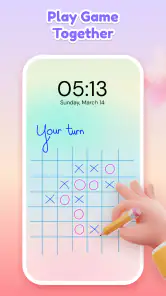
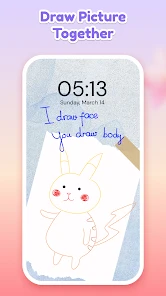
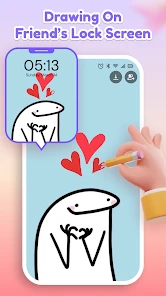
Analysis by Reviewed
Ever found yourself staring at your phone thinking, "I wish my lock screen was more exciting"? Enter Skizz - Lockscreen Drawing, an app that adds a dash of creativity and personalization to your otherwise mundane lock screen. I’ve been tinkering with this app for a while now, and let me tell you, it's as fun as it sounds!
Unleash Your Inner Artist
The first thing that struck me about Skizz - Lockscreen Drawing is how easy it is to use. You don’t need to be Picasso to get started here. The app offers a variety of brushes and colors, which means you can create anything from a simple doodle to a masterpiece worthy of a gallery wall. Trust me, the user-friendly interface is a breeze to navigate, making it suitable even for those who might not consider themselves tech-savvy.
Features to Love
One of the standout features of this app is the customizable lock screen. You can literally draw your unlock pattern, which adds an extra layer of security and creativity to your device. No more boring PIN codes or predictable patterns. Instead, you get to decide what your unlock sequence looks like. It’s like having a secret handshake with your phone!
Another cool feature is the ability to save your drawings. This means you can switch them up depending on your mood or the season. Feeling festive? Draw some snowflakes for the holidays. In the mood for summer? How about a sun-kissed beach scene?
What’s the Catch?
Now, no app is without its quirks, and Skizz is no exception. Occasionally, I experienced some lag while drawing more complex patterns, but nothing too disruptive. Also, while the app is free, there are in-app purchases for additional brushes and color palettes. It’s not a deal-breaker, but something to keep in mind if you’re planning to go all-in with your lock screen artistry.
Overall, Skizz - Lockscreen Drawing is a delightful app that injects a bit of fun into your everyday routine. Whether you’re looking to express your creativity or simply want a unique way to unlock your phone, this app is definitely worth a try. So go ahead, let your imagination run wild, and transform your lock screen into a canvas!
More From Our News Desk

Clash of Clans Is Won Between the Battles

Android Auto Makes the Case for Quieter Car Software

MobiOffice: Transforming Mobile Productivity with Seamless Integration

EA SPORTS FC™ Mobile Soccer: Redefining Mobile Sports Gaming

How Microsoft OneDrive Became a Mobile Productivity Giant

How Google Translate Breaks Language Barriers Effortlessly
Skizz - Lockscreen Drawing Frequently Asked Questions
What is Skizz - Lockscreen Drawing and how does it work?
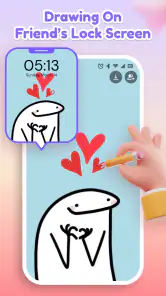
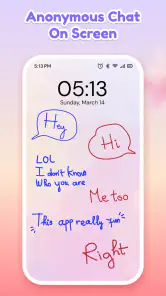
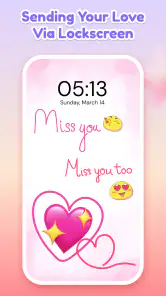
Skizz - Lockscreen Drawing is an innovative app that allows users to unleash their creativity right from their lockscreen. By simply accessing the app, users can draw, sketch, and doodle directly on their lockscreen without needing to unlock their device. The app includes various tools and colors, making it easy for users to express their artistic ideas spontaneously and share them with friends or save them for later.
Is Skizz - Lockscreen Drawing available for both Android and iOS devices?
Yes, Skizz - Lockscreen Drawing is available for both Android and iOS platforms. Users can download the app from the Google Play Store or Apple App Store, respectively. The app is designed to function seamlessly across different devices, ensuring a smooth user experience regardless of the operating system. Whether you're using an Android phone or an iPhone, you can enjoy the creative features of Skizz.
Does Skizz - Lockscreen Drawing require an internet connection to function?
No, Skizz - Lockscreen Drawing does not require an internet connection to function. Users can enjoy drawing and sketching on their lockscreen without needing to be connected to Wi-Fi or data. This offline capability ensures that users can express their creativity anytime and anywhere, making it a convenient tool for artists and casual doodlers alike.
What are some key features of Skizz - Lockscreen Drawing?
Skizz - Lockscreen Drawing offers a range of features designed to enhance the drawing experience. These include a variety of brush sizes and colors, an intuitive and user-friendly interface, and the ability to save or share creations directly from the lockscreen. Additionally, the app supports multiple layers, allowing users to create more complex and detailed artworks. These features make Skizz a versatile tool for anyone looking to draw on the go.
Is Skizz - Lockscreen Drawing free to download and use?
Skizz - Lockscreen Drawing is free to download and use, offering basic features at no cost. However, the app also provides optional in-app purchases for users who wish to unlock additional tools and features. These may include advanced brush settings, exclusive color palettes, and other premium content. Users can choose to enjoy the app's free features or enhance their experience with these optional upgrades.
Pros
- Intuitive interface for quick drawing
- Variety of colors and brush options
- Lightweight with minimal battery usage
- Smooth performance without lag
- User-friendly with easy navigation
Cons
- Limited advanced features for artists
- Ads can be intrusive at times
- No cloud backup for drawings
- Lacks collaboration tools
- Occasional crashes on older devices

- Category
- Personalization
- Version
- 1.8.0













